
A Content Delivery Network, often referred to by the acronym "CDN", is literally a "content distribution system". It relies on the use of servers installed in datacenters strategically located around the world. These are connected to each other via high-speed fiber optic private connections, allowing web content to be accessed more quickly by users.
The concept of a CDN is therefore intimately linked to page loading speed. However, its use does not address all web performance issues, and is not a systematic solution to webperf problems. In this article, we will explore together what activating a CDN can bring in terms of performance and security, but also the side effects it can cause.
What is a CDN?
A CDN, or Content Delivery Network, is a network of servers distributed worldwide that store a copy of your site's files and serve them from the closest point to each visitor. It reduces the distance between the visitor and the content, thus reducing latency, and offloads your origin server from the majority of requests.
The principle works in three steps. The CDN receives the request instead of your server; if it already has the requested file, it serves it immediately; otherwise, it retrieves it from the origin, stores it, and serves it to subsequent visitors. A popular resource is requested only once from your hosting, regardless of traffic.
A CDN does not only serve static files. Connection termination occurs at the edge, so that even a dynamic, non-cacheable page benefits: the visitor negotiates their connection within tens of kilometers, and the CDN network then communicates with your server over established links.
How does a CDN work?
A CDN sits between the visitor and your server via DNS: the domain name no longer points to your hosting but to the network, which routes each request to its nearest point of presence. The visitor never knows an intermediary exists, and the site's address does not change.
Each point of presence keeps a copy of already requested files. If the resource is cached and still fresh, it's served immediately; otherwise, the node retrieves it from the origin, stores it, and then serves it. The Cache-Control header sets this duration, and specifically the s-maxage directive, which is specific to shared caches.
The hit rate measures the effectiveness of the system: it's the proportion of requests served from the cache without querying the origin. On Cloudflare, the cf-cache-status header indicates this request by request, with the values HIT, MISS, and BYPASS. A flood of MISSes on static files signals a faulty configuration.
The subject of caching goes far beyond the CDN, which is just one layer among six. We have dedicated a complete guide to web caching to this stack, from the browser to the database. Each layer protects the one below it, and the CDN is configured in consistency with the others, never in isolation.
What can be served from a CDN?
Everything, but not in the same way. Static files, images, stylesheets, scripts, and fonts can be cached for a long time and without risk since a change is accompanied by a URL change. Dynamic HTML requires a short duration, expressed in seconds, and exclusions for personalized pages.
The most misunderstood nuance concerns pages that cannot be cached. A shopping cart, a customer account, or an order funnel should never be served from a shared cache, but they still benefit from the network: the connection ends at the edge, and the journey to the origin uses already established links.
This leaves URL parameters, a classic source of poor hit rates. Version suffixes added by themes and extensions create a separate cache entry for each variation, even though the file is identical. Configuring the cache key to ignore them directs all these variations to a single entry.
What are the benefits of a CDN?
A CDN offers six distinct benefits: recent network protocols enabled by default, accelerated DNS resolution, reduced latency regardless of visitor location, on-the-fly optimized static resources, a reduced hosting bill, and protection against attacks. The first three directly relate to performance.
Cutting-edge network technologies
Since CDNs are designed by network experts like Akamai, Cloudflare, Amazon CloudFront, or Fastly, they benefit from cutting-edge, highly available infrastructures. They are better equipped than 90% of traditional web hosts. This allows for the use of technologies that are still not widely deployed, such as the HTTP/3 protocol, Brotli compression, or Early Hints.
It is possible to take advantage of these technologies on a traditional server, but at generally much higher costs: this notably requires having a high-performance virtual private server (VPS) or dedicated server. And entrusting its management to an experienced system administrator, which also has a cost.
Faster DNS resolutions
CDNs function like a proxy, meaning they interface between the origin server (your hosting) and the end-user (your visitor). To do this, they are entrusted with DNS management, usually handled by the registrar. However, CDNs have extremely high-performance DNS infrastructures, which translates into lower response times (Time To First Byte, TTFB metric).
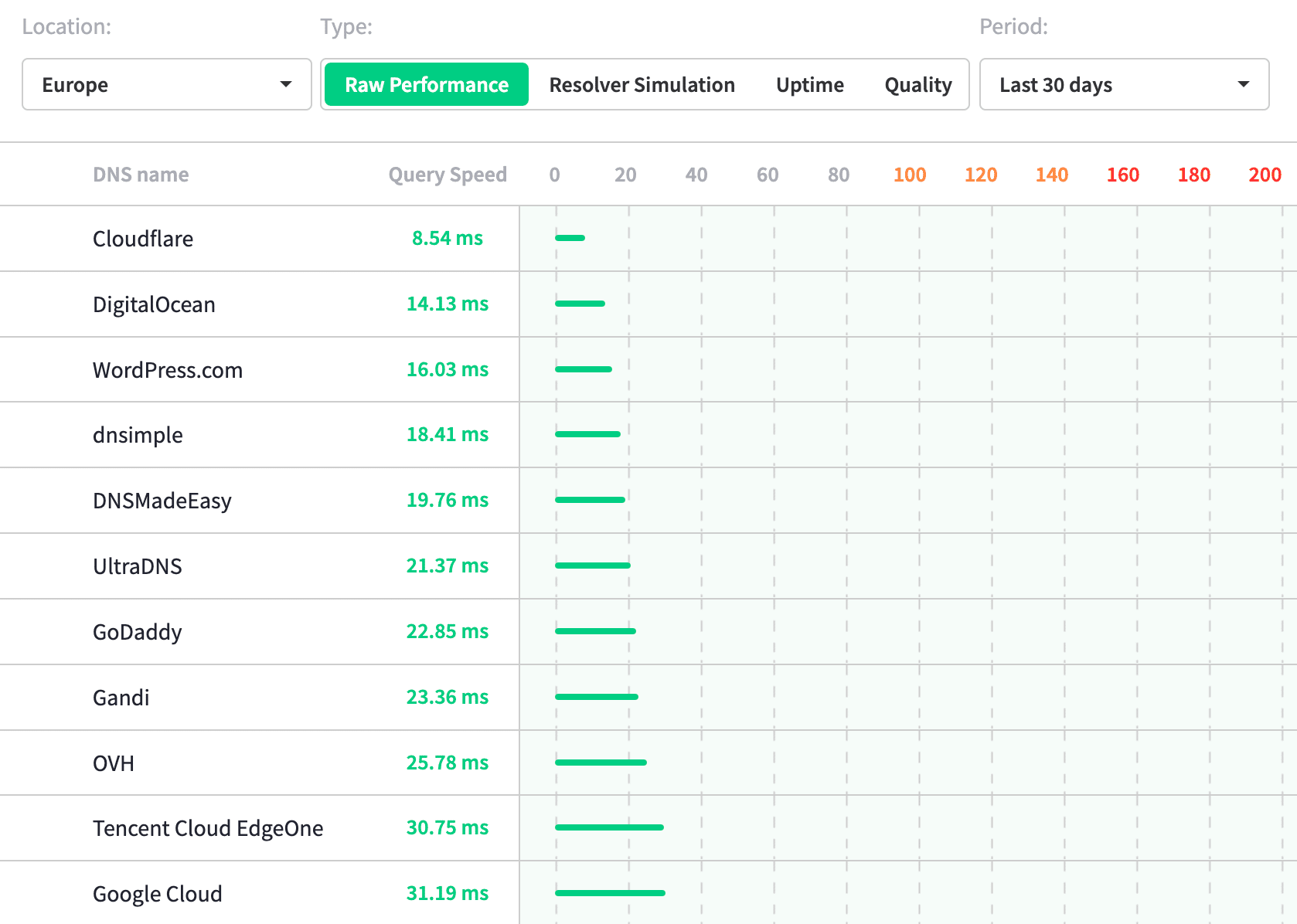
Cloudflare, which is exemplary in this regard, thus shows DNS resolution times 3 times faster than OVH, the leader in web hosting in France. Note also that it is entirely possible to entrust DNS management to Cloudflare without activating the CDN functionality, and this for free. You will then benefit from the best available at this level, with an interesting impact on TTFB.
Fast pages worldwide
This is the primary use case for a CDN, the only real one it can address! Thanks to the ultra-fast network connections linking all its data centers, a CDN can serve a page to any user in the world in a matter of seconds. If you have hosting in France and a significant portion of your traffic comes from abroad, then the CDN question should be considered.
When choosing your CDN provider, make sure it has data centers in the regions where your visitors are located. Because while Cloudflare, Akamai, and AWS all have perfectly meshed infrastructures, other smaller providers offer only a few dozen locations. Response times will not be as good in this case, as data will have to travel long distances.
Optimized static content
One of the basic mechanisms of a CDN is to copy static files to its own servers: on the first request for an image, video, stylesheet, font, or JavaScript file, the resource is cached on the fly and transparently... When a user accesses a website, the CDN automatically redirects requests to the data center closest to the user, considerably reducing loading times.
Most CDNs, however, offer to go further by applying on-the-fly compression, minification, or even conversion of certain resource formats to lighter ones. The most common example is generating images in Webp or Avif as an alternative to traditional formats like PNG, Jpeg, and Gif. This considerably reduces their size while maintaining equivalent or slightly degraded image quality (as chosen).
This second point can be managed directly by hosting, but with the need to deploy specific and often paid tools. This can also have an impact on disk space requirements: multiplying the volume occupied by images by 2 or 3 may require upgrading to a hosting plan with more storage space.
Lower hosting costs
By absorbing a majority of HTTP requests, a CDN greatly relieves the origin server. The latter is generally only responsible for generating dynamic pages, with everything else being served directly by the data center closest to the visitor. This results in a significant decrease in CPU and RAM consumption.
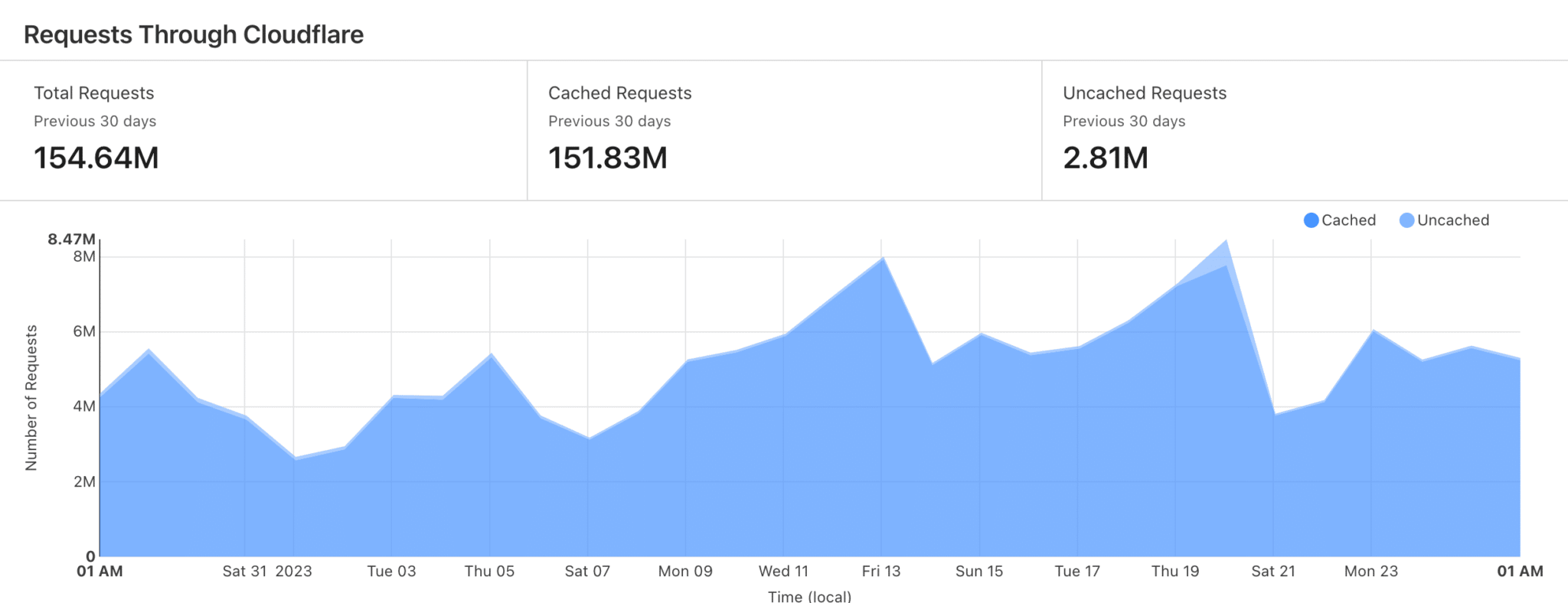
You are free to keep this reserve of available resources, for example, to absorb potential one-off traffic spikes. Or, you can downgrade your hosting by switching to a less powerful, and therefore less expensive, plan. In the latter case, however, be careful not to underestimate the need: if the CDN cache is emptied, all subsequent requests will be directed to your hosting, which must be able to handle them.
Finally, do not forget that CDNs are paid services: to see if the solution allows for savings, you should compare the cost of the initial hosting versus the new hosting + the CDN.
Increased security
Since CDNs function as proxies, they offer significant security benefits. To begin with, your server is no longer directly exposed to end-users: they cannot know its IP address. Hackers cannot attempt intrusions via FTP, SSH, or web without going through the CDN provider's firewall. These providers, once again, are at the forefront of what's possible.
CDNs also integrate advanced protections against denial-of-service attacks (the famous DDoS, for "Distributed Denial of Service"). They can instantly and transparently switch to an intelligent mitigation interface. And, once the crisis has passed, they can return to normal operation without you even realizing the danger that was averted.
Is your site as fast as your visitors expect?

What are the disadvantages of a CDN?
Five reservations are worth considering: real configuration complexity, a risk to crawling if bots are mishandled, usage-based billing that's difficult to predict, an additional point of failure in the chain, and limited benefit for a purely local audience. None are deal-breakers, all are manageable.
High technical complexity for novices
Deploying a CDN can be complex for a website publisher accustomed to the all-in-one services of their web host like OVH, Ionos, or Gandi. This involves changing the DNS servers, a step that is often a deterrent for non-technical users. Subsequently, it's important to verify that the DNS records have been re-entered in the new interface. Then, you must wait for DNS propagation, which sometimes takes time.
Once the DNS is managed by the CDN, the next step is to configure the proposed options effectively. By default, most additional optimizations are disabled. Therefore, it's up to the website publisher to set up the features optimally... which is often not done. This results in losing some of the performance gain potential, which is regrettable.
A potential risk for crawling
Gary Illyes, a well-known analyst at Google, published a message on LinkedIn explaining that one of the most common crawling issues was related to the use of a poorly configured CDN and/or Firewall. The sometimes aggressive security settings of these tools can block search engine indexing bots, preventing Googlebot, among others, from indexing a site's pages.
The recommendation is to systematically check the CDN configuration, and to whitelist the IP address ranges used by known indexing robots. In case of an accidental blacklisting, the effects on SEO visibility can be catastrophic.
An "à la carte" business model that is difficult to anticipate
Most CDN providers offer a basic service, which mainly includes distributing content across different datacenters with a security layer. Depending on the size and traffic of the site, this can already represent a significant cost compared to renting a server from a web host.
Other advanced options such as configuring firewall rules, enabling Brotli compression, or generating Webp and Avif alternatives may incur additional costs. If you are relying on a CDN to optimize your site's performance, be sure to compare what different providers include in their basic offering, and make projections for variable-priced options: they often depend on the volume of bandwidth consumed.
Finally, before making any decisions, don't forget to consider renting a more powerful server configured by an experienced system administrator: the cost will likely be significant here too, but the variability factor will disappear in favor of a fixed cost that is easier to budget.
An additional single point of failure
Although they have highly available infrastructures, CDNs have all the technical characteristics of what is called a Single Point Of Failure (SPOF). More concretely, if your CDN encounters a problem or a technical failure, your site will no longer be accessible or may be significantly slowed down.
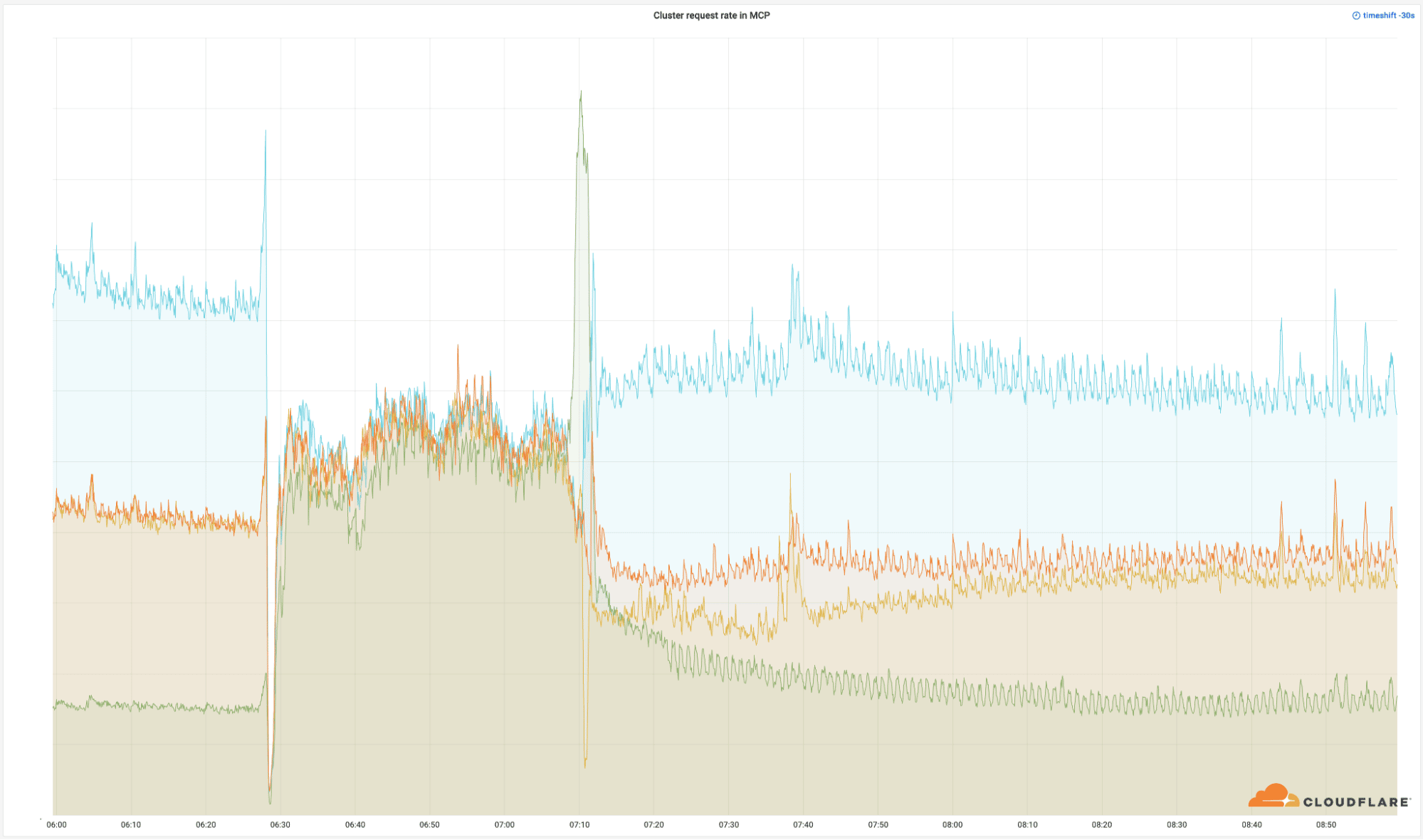
These scenarios are rare but have already affected players like Cloudflare which, on June 21, 2022, for example, faced a major network outage. Several hundred thousand sites were unavailable worldwide for about 2 hours. This was the time it took for network technicians to detect the cause of the outage and fix it.
Adverse effect for reduced geographic targeting
A CDN primarily serves to improve loading times for users who are geographically distant from the origin server. If the majority of your users are in the same geographic region as that server, using a CDN is probably not justified.
Worse still, implementing a CDN will very often have a negative impact on page response times if users are located near the origin server. Unlike static resources, dynamic pages generally cannot be cached by CDNs. With each request, the CDN will fetch the page from its source and then serve it to the visitor.
This additional step can add tens or even hundreds of milliseconds to the TTFB, consequently impacting other performance metrics like First Contentful Paint (FCP) and Largest Contentful Paint (LCP). If you have hosting in France and 95% of your visitors live in mainland France, a CDN is not the magic bullet for your web performance issues.
How to verify that a CDN is properly configured?
Three checks are sufficient. First, check the cache status header on your static resources: the vast majority should be served from the cache. Then, verify that HTML is not mistakenly cached on custom pages. Finally, check the headers actually received, never the declared configuration.
The second check concerns crawlers. A poorly configured CDN may serve them an outdated version, block them with an overly broad security rule, or distort the detection of their country of origin. The Search Console's crawl report reveals these anomalies, through a drop in crawled pages or unusual errors.
The last check is the simplest and most often forgotten: measure from multiple countries. A correctly configured CDN eliminates the latency gap between a visitor close to your server and a visitor on the other side of the world. If this gap persists, the CDN is useless and the problem lies elsewhere.
Should you use a CDN for your site?
Yes, as soon as your audience extends beyond your region, your site serves a significant volume of images, or your hosting struggles during peak hours. No, if your audience is strictly local and your server is already close to them: the latency gain becomes negligible compared to the added complexity.
When making a decision, it's important to be pragmatic. If I had to summarize my opinion on CDNs based on the advantages and disadvantages presented, here it is in a few key points:
- It's an optimal solution for globally frequented sites, but not for highly geolocated sites.
- It's not the magic bullet for performance issues: you can also optimize the site on its existing hosting.
- It offers an undeniable advantage in terms of security.
- It's not necessarily less expensive than high-performance hosting.
Feel free to share a comment to complete, qualify, or question this article.