
Every web page you view is the result of a chain of calculations and transfers: the browser queries a server, the server executes code, the code queries a database, and the whole thing returns as HTML, CSS, JavaScript, and images. Caching is the art of not redoing this work when it has already been done. At each layer of this chain, a memorization mechanism can store the result of a costly operation and serve it again in a fraction of the original time: it is the best performance lever in terms of effort versus gain on the entire web.
However, the word "cache" covers very different realities. The browser cache, that of a CDN, that of a WordPress plugin, that of Redis, or that of MySQL store neither the same things, nor in the same place, nor for the same reasons. Confusing them leads to the two classic pitfalls: pages displaying outdated content, or servers unnecessarily recalculating what a cache layer should have retained. Understanding what caches what, where, and for how long is a prerequisite for any serious performance strategy.
In this guide, we go down the entire stack, in the order a request traverses it: the browser cache and its HTTP headers, the CDN and edge caching, reverse proxies like Varnish, the page cache of WordPress plugins, object caching with Redis, Memcached, and APCu, PHP's OPcache, and finally the buffer pool of MySQL and MariaDB. Throughout, we maintain the distinction that structures everything: static resources and dynamic pages have different caching needs.
What is web caching?
Web caching is the set of mechanisms that store the result of a costly operation to serve it again without recalculating it. It exists at each layer of the chain, from the visitor's browser to the database. Each layer saves a different operation: a network transfer, a distance, a code execution, or a disk read.
The principle is always the same: keep the result of an expensive operation in a faster storage space or closer to the consumer, and serve it again as long as it remains valid. What changes from one layer to another is the nature of the saved operation. Browser cache saves network transfer. CDN saves geographical distance. Page cache saves PHP execution. Object cache saves SQL queries. OPcache saves code compilation. Buffer pool saves disk reads. Put together, these layers form a cascade where each level protects the one below it: the higher a request is intercepted, the less it costs.
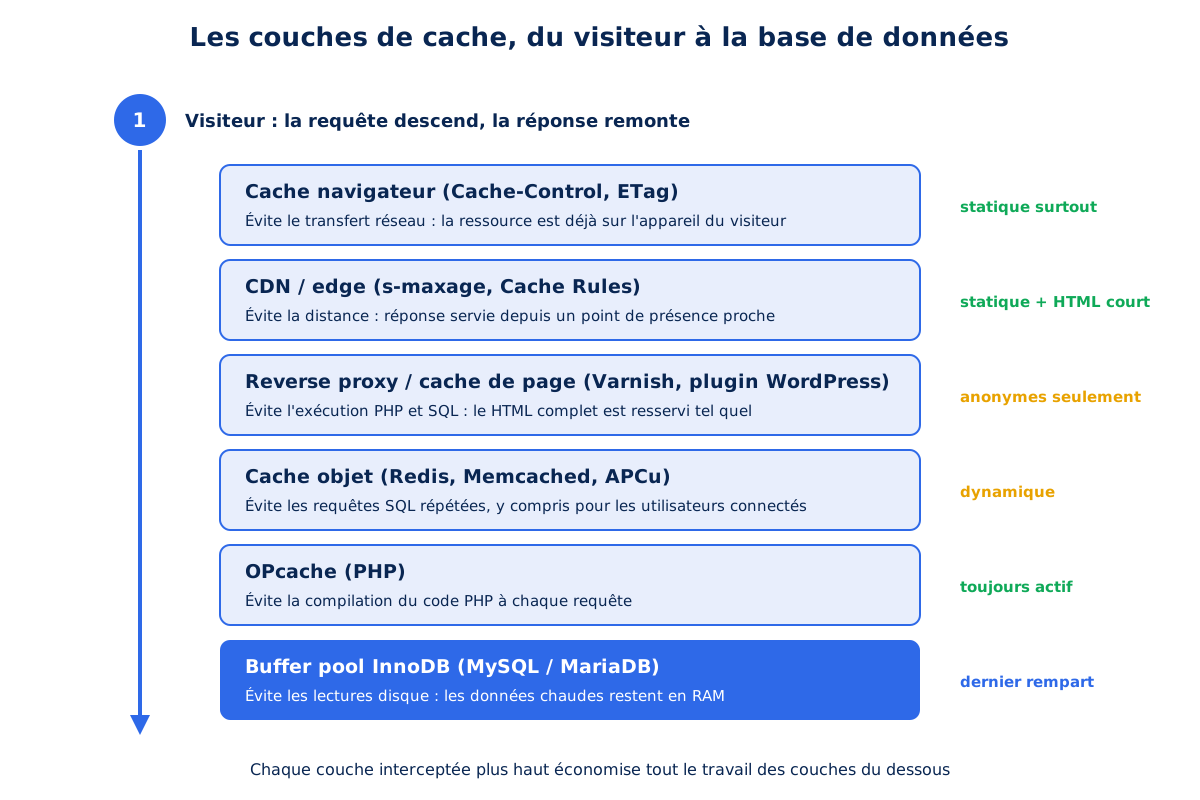
This cascade has a downside: each cache introduces a risk of serving stale data. The entire discipline of caching consists of arbitrating between freshness and savings, and this arbitration depends entirely on the nature of the content. A versioned stylesheet can be kept for a year without risk: if it changes, its URL also changes. A product page with real-time stock, however, can only tolerate a few seconds of delay. That is why the first question to ask about any resource is not "how long to cache it", but "is it static or dynamic, and what makes it stale?".
Static resources (CSS, JavaScript, fonts, images, SVG) are the same for all visitors and change with deployments. Dynamic pages (generated HTML, API responses, feeds) can vary depending on the user, their session, their cookies, and change with content. The former call for long and aggressive cache durations, the latter for short, conditional, or even null durations. Each of the layers we will go through applies this distinction in its own way, starting with the one closest to the visitor: their own browser.
How does browser caching work?
Browser cache stores resources already downloaded on the visitor's device, to reuse them without a new network request. Its lifespan is controlled by the Cache-Control header sent by the server, and its validity is checked by the ETag. It is the most cost-effective cache of all, as it completely eliminates the round trip.
The browser HTTP cache is the most cost-effective of all: a resource served from the visitor's disk or memory costs zero network bytes and zero server milliseconds of latency. It is also the only layer that you control only indirectly, through the headers your server sends. The entire mechanism is specified by RFC 9111, and it essentially boils down to two headers: Cache-Control for lifetime, ETag for revalidation.
Cache-Control, the grammar of freshness
The Cache-Control header combines directives, each answering a specific question: who is allowed to store the response, for how long, and what to do upon expiration. The most important ones can be counted on one hand.
max-age sets the freshness duration in seconds for all caches. s-maxage sets a specific duration for shared caches (CDN, proxies), ignored by the browser. public and private allow or disallow shared cache storage. no-cache allows storage but requires revalidation on each use. no-store prohibits all storage. The distinction between these last two is crucial: no-cache revalidates, no-store prohibits all storage, and confusing them is costly.
# Ressource statique versionnée : cache long et ferme
Cache-Control: public, max-age=31536000, immutable

# HTML : stockable mais revalidé à chaque affichage
Cache-Control: max-age=0, must-revalidate

# Page personnalisée : navigateur seulement, jamais les caches partagés
Cache-Control: private, max-age=0, must-revalidate

# Donnée sensible : aucun stockage nulle part
Cache-Control: no-store| Directive | Effect | Who applies it | Use case |
|---|---|---|---|
max-age=N | Freshness duration in seconds | All caches | Basis of any policy |
s-maxage=N | Duration specific to shared caches | CDN, reverse proxy | Shared HTML for a few seconds |
public / private | Allows or prohibits shared cache | CDN, reverse proxy | Anonymous pages / logged-in pages |
no-cache | Storage allowed, revalidation required | All caches | Content that changes without notice |
no-store | No storage anywhere | All caches | Sensitive data only |
immutable | Never revalidate | Browser | Assets versioned by hash |
stale-while-revalidate=N | Serves stale, refreshes in background | Shared caches | HTML editorial |
Two confusions constantly reappear in the configurations we audit. The first pits no-cache and no-store against each other: the former allows storage by imposing a check, the latter prohibits any storage. Setting no-store on HTML disables the bfcache, and thus navigation via the back and next buttons, for a most often negligible privacy gain.
The second confuses max-age and s-maxage. Serving max-age=600 on HTML imposes ten minutes of cache on the visitor's browser, who will therefore see frozen content even after your publication. The right combination separates the two audiences: systematic revalidation on the browser side, short but shared freshness on the CDN side.
A little-known pitfall deserves to be pointed out: a response served without any cache header is not excluded from the cache for all that. The browser then applies a heuristic cache, inferring a lifespan from the last modification date. The behavior becomes unpredictable and differs from one browser to another: visitors may see an outdated version without anything in your configuration explaining it. The rule is therefore simple: every resource must have an explicit cache policy, even if that policy is "do not cache".
ETag and conditional revalidation
When a resource expires, not all is lost. If the response carried an ETag header (a fingerprint of the content) or Last-Modified, the browser does not re-download the file: it sends a conditional request with If-None-Match or If-Modified-Since. If the content has not changed, the server responds 304 Not Modified, without a body: a few hundred bytes instead of the full file. The combination of a reasonable max-age and an ETag constitutes what we call a strong cache configuration: the retention period is controlled, and expiration results in an almost free check rather than a re-download.
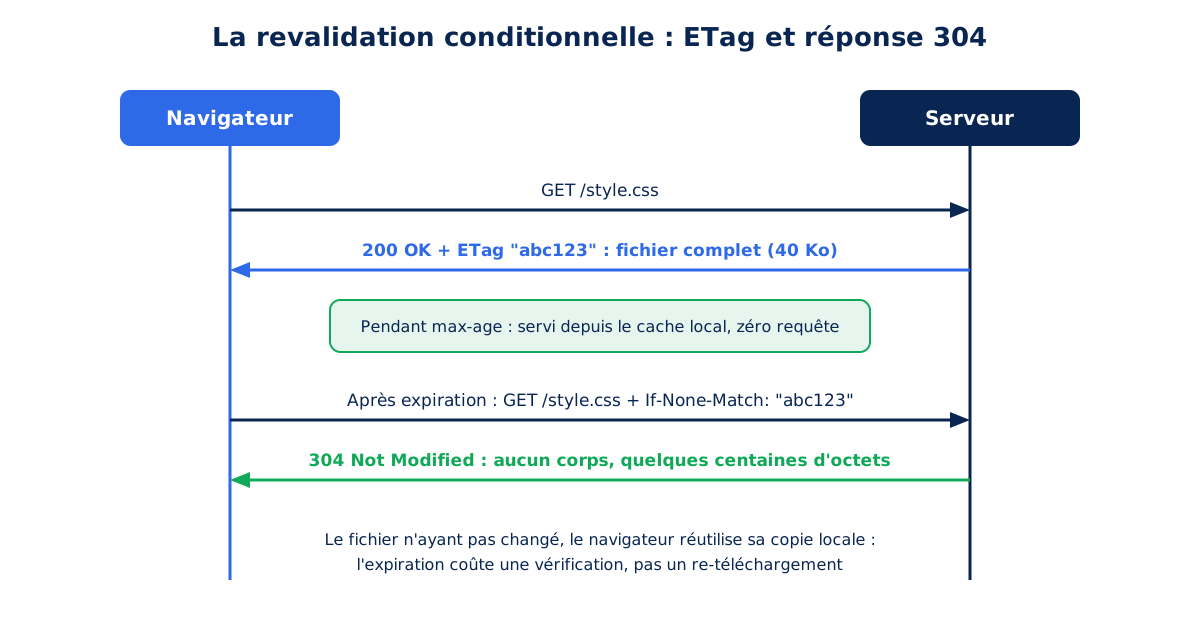
Conversely, weak configurations (no headers at all, a single Expires, or a max-age without a validator) leave room for browser interpretation and cause unnecessary re-downloads. During our audits, we systematically check the headers of the page's heaviest resources: the main CSS, the JavaScript bundle, the LCP image, and the main font. A max-age=0 or a neglected no-store on any of these nullifies all the benefit of the browser cache on repeat visits, precisely where it should shine.
Three policies for three families of resources
The static versus dynamic distinction translates here into three typical policies. For versioned resources (a hash in the filename, like app.4f8d9.js), the cache can be maximal: one year, with the immutable directive which tells browsers that support it, Firefox and Safari according to MDN, to never revalidate as long as the resource is fresh. For unversioned static resources (logo, favicon), an intermediate thirty-day cache with ETag offers a good compromise.
For HTML, finally, the right policy is a short or null cache, but never no-store: this directive disables the browser's back/forward cache, the mechanism that makes navigation with the back and forward buttons instantaneous, as documented by web.dev.
<IfModule mod_headers.c>
    # Assets versionnés : un an, immutable
    <FilesMatch "\.(css|js|woff2|svg)$">
        Header set Cache-Control "public, max-age=31536000, immutable"
    </FilesMatch>

    # Images : un mois, revalidation ensuite
    <FilesMatch "\.(jpg|jpeg|png|webp|avif)$">
        Header set Cache-Control "public, max-age=2592000"
    </FilesMatch>

    # HTML : revalidation systématique, compatible bfcache
    <FilesMatch "\.(html|php)$">
        Header unset Cache-Control
        Header always set Cache-Control "max-age=0, must-revalidate"
    </FilesMatch>
</IfModule>
These headers control the browser behavior of each visitor. They do not yet address the issue of distance: between a server in Paris and a visitor in Montreal, even a perfectly cached resource will have to cross an ocean on the first load. This is the problem the next layer solves.
What is edge caching and what does a CDN do?
Edge caching consists of storing responses on a network of geographically distributed servers, the points of presence of a CDN, to serve them from the node closest to the visitor. The gain is twofold, in latency and server load: latency decreases with distance, and the origin server no longer sees the majority of requests.
A CDN (Content Delivery Network) places a network of globally distributed Points of Presence between your visitors and your server. Each PoP maintains its own cache: when a visitor requests a resource, the CDN serves it from the nearest node if it's there, and only contacts your origin server if it's missing. The benefit is twofold: latency drops as physical distance drops, and your origin server is relieved of the majority of requests. We've detailed the advantages and limitations of CDNs in a dedicated article; let's focus here on their caching aspect.
s-maxage: talk to shared caches without touching the browser
Since the CDN is a shared cache, it follows specific directives. The most useful is s-maxage, which sets the freshness duration on the CDN side independently of the max-age seen by browsers, as specified in the MDN documentation. A Cache-Control: max-age=0, s-maxage=60, must-revalidate, public header produces a subtle and valuable behavior for HTML: each browser revalidates its copy on each display, but the CDN pools the same version for sixty seconds for all visitors. On a high-traffic site, this minute of shared cache is enough to absorb entire peaks without hitting the origin server, while keeping content almost real-time.
Cache Rules: impose a consistent policy at the edge
Modern CDNs allow overriding headers sent by the origin at the edge. With Cloudflare, Cache Rules allow you to separately define an Edge TTL (Time To Live on the Cloudflare network) and a Browser TTL (the Cache-Control rewritten to browsers). This is a valuable fallback when the origin serves faulty headers: a shared CMS that sends TTLs that are too short, or no headers at all, can be corrected with a single rule, without touching the server. A configuration we commonly deploy targets static resources by their file extension:
(http.request.uri.path.extension in {
  "css" "js" "woff" "woff2" "ttf" "svg"
  "jpg" "jpeg" "png" "webp" "avif" "gif" "ico"
  "mp4" "webm" "pdf" "zip"
})
Within this scope, the rule forces cache eligibility, an Edge TTL appropriate to the deployment frequency, and possibly a Custom Cache Key. The latter addresses a very common problem on WordPress: versioning parameters like ?ver=6.4.2, added by themes and plugins, create a distinct cache entry for each URL variation and collapse the CDN's hit rate. Configuring the cache key to ignore these parameters, as allowed by the Cloudflare documentation, consolidates all variations into a single entry.
The check is done in the DevTools Network tab, by observing the cf-cache-status header: HIT means the resource is served from the edge, MISS means it was looked up at the origin, BYPASS means the cache was bypassed. A well-configured site should serve the vast majority of its static resources with a HIT; a stream of MISS or BYPASS on CSS files or images is a sign of a configuration problem to fix as a priority.
stale-while-revalidate: serve quickly, refresh in the background
One last directive deserves its place in the arsenal of shared caches: stale-while-revalidate, specified by RFC 5861. It allows a cache to serve an expired response during a grace period, while revalidating it in the background with the origin. The visitor receives an immediate, slightly outdated response, and the next visitor receives the fresh version: the revalidation latency is moved out of the user's critical path.
A header like Cache-Control: s-maxage=60, stale-while-revalidate=300 thus combines one minute of strict freshness and five minutes of tolerance during which no one ever waits for the origin. For editorial HTML, where a few seconds of delay is invisible, this is one of the settings with the best risk-to-benefit ratio.
What is a reverse proxy and what is it used for?
A reverse proxy is a server placed in front of your application, which receives visitor requests, serves responses it already knows about itself, and only forwards to the application those it cannot handle. It renders the response before PHP starts, which eliminates the entire generation time.
Let's go back down to your infrastructure. Between the network and your application, a cache reverse proxy can be inserted: a server that receives HTTP requests, serves responses it already knows from its memory, and only forwards to the application what it doesn't know how to serve. The best-known representative of this family is Varnish, designed exclusively for this role: it keeps responses in RAM and serves them again without ever waking up PHP or the database. The principle also applies to its integrated equivalents, such as the NGINX cache module or LiteSpeed's server cache: in all cases, the request is served even before your application starts.
Varnish is configured in a dedicated language, VCL (Varnish Configuration Language), documented in the official documentation. Its default behavior perfectly illustrates the static versus dynamic boundary: a request carrying a cookie is not cached, because a cookie signals a potentially personalized response. All configuration work consists of refining this boundary, by removing cookies without application value (analytics, consent) to make anonymous pages cacheable, while preserving actual sessions:
sub vcl_recv {
    # Les ressources statiques se cachent toujours, cookies ignorés
    if (req.url ~ "\.(css|js|woff2|jpg|png|webp|avif|svg)$") {
        unset req.http.Cookie;
        return (hash);
    }
    # Utilisateur WordPress connecté : ne jamais servir depuis le cache
    if (req.http.Cookie ~ "wordpress_logged_in_") {
        return (pass);
    }
    # Visiteur anonyme : retirer les cookies parasites (analytics, consentement)
    unset req.http.Cookie;
}
Varnish also adopts, on the server side, the idea of the grace period: its grace mode, described in the dedicated documentation, allows it to continue serving an expired response while the fresh version is regenerated in the background, and even to hold up in case of origin failure. A site whose backend restarts can thus continue to serve its pages without any visitor noticing: beyond speed, the cache becomes an instrument of resilience, capable of absorbing a traffic spike or an incident that the application alone would not have handled.
The question of invalidation remains: when content changes, cached copies must disappear. Varnish offers targeted purge and URL pattern ban mechanisms for this, described in its user guide, which CMSs control via dedicated extensions. In practice, on managed hosting that integrates Varnish or an equivalent, this plumbing is already connected: publishing an article automatically purges the affected pages. This is one of the criteria that lead us to recommend WordPress hosting designed for performance rather than generic shared hosting where none of these layers exist.
Is your site as fast as your visitors expect?

How does a WordPress cache plugin work?
A WordPress cache plugin saves the final HTML of a page during the first visit, then serves this file to subsequent visitors without re-executing WordPress. The PHP and SQL chain is bypassed. A page that cost hundreds of milliseconds of computation now costs a few.
Not all sites have Varnish in front of their application. This is precisely the gap that WordPress cache plugins fill: WP Rocket, LiteSpeed Cache, W3 Total Cache, or WP Super Cache replicate, within WordPress, the principle of full page caching. On the first visit to a URL, the plugin lets WordPress generate the page normally, then saves the final HTML to a file on disk. On subsequent visits, this file is served directly, and the entire PHP and SQL chain is bypassed: a page that cost hundreds of milliseconds of computation now costs a few.
Technically, these plugins rely on a mechanism provided by WordPress: the WP_CACHE constant, documented in the official administration guide, which loads a advanced-cache.php file deposited by the plugin very early on. It is this file that checks if a cached copy exists and serves it before the WordPress core is loaded.
The most advanced plugins go further by writing rewrite rules directly into the web server configuration, so that the HTML file is served by Apache or NGINX without even starting the PHP interpreter. The choice of plugin depends on the context, and particularly on the server: we shared our criteria in our guide to choosing a WordPress theme, and the logic is the same for the caching ecosystem.
Logged-in users, shopping carts, private areas: the exclusions that save
Page caching has a structural limitation: it can only serve the same copy to everyone if the page is identical for everyone. A logged-in user, an e-commerce shopping cart, or a member area produce personalized pages that should never end up in shared cache. Detection relies on cookies: WordPress sets a wordpress_logged_in_ cookie after authentication, documented in the official cookie guide, and all serious caching plugins exclude requests carrying it by default. The same logic can be applied at the server level, to differentiate cache headers sent to anonymous visitors and logged-in users:
<IfModule mod_headers.c>
    SetEnvIf Cookie "wordpress_logged_in_" wp_logged_in=1
    # Anonymes : cache CDN partagé de 60 s
    Header set Cache-Control "max-age=0, s-maxage=60, must-revalidate, public"
    # Connectés : jamais de cache partagé
    Header set Cache-Control "max-age=0, must-revalidate, private" env=wp_logged_in
</IfModule>
Checking this type of configuration involves two curl -I commands, one without a cookie and the other with a dummy wordpress_logged_in_test cookie: the first should return public with the s-maxage, the second private. Finally, pay attention to a point that trips up many installations: caching plugins can issue their own Cache-Control headers via PHP on the pages they generate, and silently overwrite the server configuration. The only reliable verdict is that of the headers actually received, never that of the configuration file.
Preloading and purging: keeping the cache warm without serving stale content
Page caching operates based on two events: its purging, when content changes, and its filling, when a visitor requests a page that is not yet in the cache. Purging is now well managed by plugins: publishing or modifying an article automatically invalidates the affected URLs (the page itself, the homepage, archives).
The preloading, however, deserves adjustment: without preloading, each purged page becomes slow again for the first visitor who requests it, the one who will pay the full generation cost. Serious plugins therefore offer preloading that crawls the sitemap and regenerates the cache in the background, so that no real visitor ever encounters a cold page.
This convenience comes at a cost that must be managed: preloading too aggressively on a large site amounts to launching a full crawl of itself with each purge, with the accompanying CPU load. The default settings are generally reasonable, but on sites with a high volume of pages, we limit the frequency of preloading and reserve it for high-traffic templates. The logic is the same as for the entire stack: the cache is there to smooth out the load, not to create a new one.
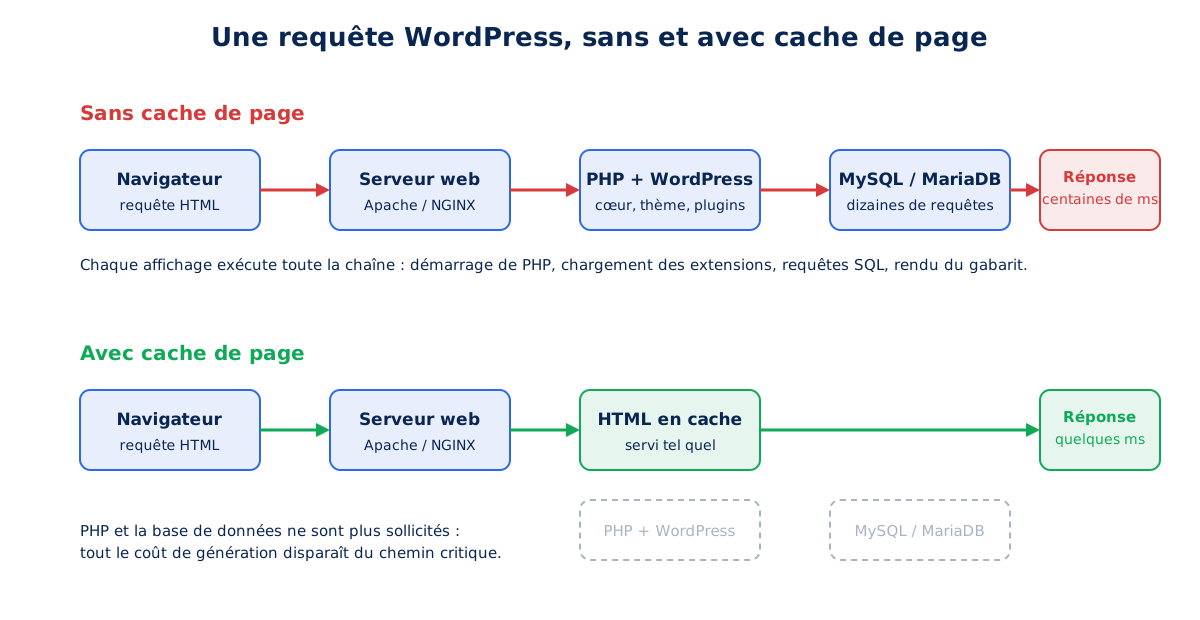
Page caching beautifully handles anonymous visitors, who make up the majority of traffic for an editorial or showcase site. But it leaves entirely unaddressed the case of pages it cannot cache: administration, logged-in users, the checkout process. To speed those up, you need to go down a level and tackle the generation cost itself.
What is an object cache like Redis used for?
An object cache stores the results of database queries in memory to avoid replaying them on each display. On WordPress, it makes persistent an internal mechanism that, without it, dies at the end of each query. It acts where page caching can do nothing: administration, logged-in users, cart.
Generating a WordPress page involves executing dozens of SQL queries: site options, content metadata, taxonomies, plugin settings. Many of these queries return the same results thousands of times a day.
WordPress natively includes an abstraction layer for memorizing them, the WP_Object_Cache class, but with a size limit: by default, this memory only lasts for the duration of a PHP request, and everything is recalculated on the next page. Persistent object caching removes this limit by connecting this abstraction to external storage that survives from one request to another: an SQL query executed once then serves thousands of displays.
The connection is made via an `object-cache.php` drop-in, usually installed by a dedicated plugin like Redis Object Cache, and a few configuration constants:
// wp-config.php
define( 'WP_REDIS_HOST', '127.0.0.1' );
define( 'WP_REDIS_PORT', 6379 );
// Indispensable si plusieurs sites partagent la même instance Redis
define( 'WP_CACHE_KEY_SALT', 'monsite_' );
Three technologies share this role, with distinct profiles. Redis, the most common choice today, offers rich data structures and fine visibility into what is stored. Memcached, older and deliberately minimalist, remains relevant on multi-server architectures where its simplicity is an asset.
APCu, finally, is an internal memory cache module for PHP: no separate service to administer, minimal latency since everything lives within the PHP process, but a cache that cannot be shared between multiple servers. On a single VPS hosting a site, APCu is a sober and efficient alternative to Redis; as soon as the infrastructure becomes distributed, Redis or Memcached become necessary.
The effect of object caching is maximal precisely where page caching can do nothing: WordPress administration, logged-in users, WooCommerce cart pages. It is also what makes transients truly effective: without persistent object caching, these temporary data that plugins readily store end up in the database's options table, as explained in the Transients API documentation, and bloat that table instead of relieving the database.
Since WordPress 6.1, the Site Health tool explicitly flags the absence of persistent object caching on sites that would benefit from it, a signal formalized by the WordPress Hosting Handbook. Verification, once the drop-in is in place, works both ways: the plugin displays its hit rate, and a tool like Query Monitor allows you to observe the drop in the number of SQL queries per page. On the administration pages of a plugin-heavy site, the switch from a volatile object cache to a persistent cache is immediately noticeable, without any other configuration line having changed.
What is OPcache in PHP used for?
OPcache stores already compiled PHP code in shared memory, in the form of opcodes, to avoid rereading and recompiling each file on every request. It is the highest-performing cache in the server stack on a CMS like WordPress, which loads hundreds of PHP files per page.
Before executing a single line of your site, PHP must read each source file, parse it, and compile it into internal instructions, opcodes. Without caching, this work is redone on each request, for each file, even though the code only changes during deployments. The OPcache extension, integrated into PHP, stores the result of this compilation in shared memory: subsequent requests directly execute the opcodes, without disk reads or compilation. On a CMS like WordPress or Prestashop, which loads hundreds of PHP files per request, this is the highest performing cache in the entire server stack, and it is almost always active by default on recent hosting plans.
Active does not mean well-sized. Three directives in php.ini, described in the configuration documentation, deserve systematic attention: the allocated memory, the interned string buffer, and the maximum number of cached files. The default values are designed for small applications; a WordPress loaded with plugins easily exceeds them, and a saturated OPcache silently resumes compilation. Here are the values we deploy on the servers we manage:
; php.ini
opcache.memory_consumption=256
opcache.interned_strings_buffer=32
opcache.max_accelerated_files=20000

; En production stricte, on peut désactiver la revérification
; des fichiers et vider l'OPcache à chaque déploiement
; opcache.validate_timestamps=0
Since PHP 8.0, OPcache includes an additional layer, even closer to the processor core: the JIT (Just In Time) compiler, presented in the PHP 8.0 release notes. Where classic OPcache stores opcodes that the PHP interpreter still needs to execute one by one, JIT translates the most solicited code portions into native machine instructions, executed directly by the CPU without going through the interpreter. This is the final link in the chain: after saving on disk reads and compilation, we save on interpretation itself.
; php.ini : activer le JIT (PHP 8.0+), en complément de l'OPcache
opcache.jit=tracing
opcache.jit_buffer_size=128M
A word of honesty is needed about what JIT brings. The official release notes place its clearest gains on intensive calculation loads; however, a CMS like WordPress spends most of its time waiting for the database and I/O, not calculating. On a classic web page, the JIT gain is therefore real but modest, far behind that of OPcache sizing: it is a complement to activate once the rest is in place, not a substitute for the rest. The tracing mode, recommended by the configuration documentation, automatically targets the code's hot loops.
OPcache, including JIT, requires no application invalidation: it refreshes itself when files change, at the frequency defined by the configuration. Its monitoring is limited to periodically checking that the allocated memory is not full and that the hit rate remains close to 100%. Once the compiled code is served from memory, there is one last possible bottleneck, at the very bottom of the stack: the database itself.
How does the database cache its data?
MySQL and MariaDB keep recently read table and index pages in RAM, within InnoDB's buffer pool. As long as a requested piece of data is found there, the response does not touch the disk. This is the most critical server setting, and is most often left at its default value.
A database spends its time reading table and index pages. InnoDB's buffer pool, the storage engine for MySQL and MariaDB, is the RAM area where these pages are stored after being read: as long as a requested piece of data is found there, the database responds from memory, without touching the disk. The MariaDB documentation describes it as the most important memory area to configure, and indicates that up to 80% of RAM can be allocated to it on a machine dedicated to the database. If undersized, it forces repeated disk reads: each query slows down, WordPress waits for the database, and server response time degrades on all non-cached pages.
The problem is all the more insidious because the default value, often 128 MB, is almost always left as is, even on servers with several gigabytes of RAM. Our sizing rules are simple: 70 to 80% of RAM on a machine dedicated to the database, 40 to 50% on a VPS that also hosts the web server and PHP, never more than the available physical RAM, and no need to exceed the total size of the database. The current value can be read with one query:
-- Taille actuelle du buffer pool, en mégaoctets
SELECT @@innodb_buffer_pool_size/1024/1024;

-- Réglage, dans la section [mysqld] du fichier de configuration
-- MariaDB : /etc/mysql/mariadb.conf.d/50-server.cnf
-- MySQL   : /etc/mysql/mysql.conf.d/mysqld.cnf
-- innodb_buffer_pool_size = 2048M
A word on a false lead that is still very common in tutorials: the query cache, which memorized the textual result of SELECT queries, was removed from MySQL 8.0 and remains disabled by default on MariaDB due to its scaling issues, as the query cache documentation reminds us.
Highlighting it no longer makes sense: query result caching is now handled one level higher, in the application object cache, and the database focuses its memory intelligence on the buffer pool. In shared hosting, this parameter is not accessible anyway: it is one of the trade-offs that structurally separate the offers, and another reason to choose your hosting based on technical criteria rather than price.
Should static and dynamic content be cached differently?
Yes, and that’s the distinction that structures the entire strategy. Static resources, identical for everyone and versioned, are cached for a long time and aggressively. Dynamic pages, which vary by user, are cached for a short time, conditionally, or not at all. Confusing the two results in either stale content or servers that recalculate for nothing.
Let's recap the entire stack from the perspective that structures it: what each layer caches, for whom, and for what type of content. This table summarizes the initial settings we apply, which obviously need to be refined according to the context of each site:
| Layer | What it avoids | Static | Dynamic |
|---|---|---|---|
| Browser | Network transfer | 1 year, immutable | max-age=0, must-revalidate |
| CDN / edge | Distance and origin | Long TTL, clean cache key | s-maxage short (0 to 60s) |
| Varnish / page cache | PHP + SQL execution | Systematic | Anonymous only, purge on publication |
| Object cache (Redis, APCu) | Repeated SQL queries | None | Systematic, including logged-in users |
| OPcache | PHP compilation | Systematic | Systematic |
| InnoDB buffer pool | Disk reads | None | Sized according to RAM |
Reading this table vertically reveals the overall logic. For static resources, everything happens in the upper layers: the browser and CDN do the bulk of the work, and the server layers hardly ever see them. For dynamic pages, it's the opposite: the upper layers remain discreet to preserve freshness, and it's the lower layers, from the page cache to the buffer pool, that absorb the generation cost. A mature caching strategy is therefore not a magic layer, but a coherent stack where each level handles what the previous one lets through.
Where to start to implement caching?
Start by measuring what is actually cached today, by reading the served headers and the hit rate of each layer. Then, activate the layer that is most missing in the chain, as it is the one that protects all the others. Each layer is activated and then verified before moving on to the next.
Faced with this stack, the mistake would be to activate everything at once and hope for the best. Each layer is evaluated through measurement: the headers actually served are read in DevTools or via curl -I, the CDN's hit rate in its analytics, the page cache's effectiveness in server response time, and that of the object cache and buffer pool in the database metrics.
The most profitable starting point depends on the site's profile: an editorial site with anonymous traffic will first benefit from page caching and CDN, a store with logged-in users will first benefit from object caching and the buffer pool. And caching absolves from nothing: a slow-to-generate page will remain slow at each expiration, and a cache only spreads a cost that is always better to reduce at the source.
The question of diagnosis remains: on an existing site, knowing which layer is missing, which is poorly configured, and which is overriding the others requires reading the entire chain, from HTTP headers to database behavior. This is exactly the scope of a web performance audit: mapping the existing caches, measuring what each one actually intercepts, and prioritizing the configurations that will change your visitors' metrics. Because behind every well-configured cache layer, there is a lower TTFB, an LCP that follows, and visitors who stay.