
Customer service asked for a chat. Marketing asked for customer reviews on product pages. Sales asked for an appointment booking module. Quality asked for a satisfaction survey that opens after ten seconds. Each of these widgets was validated separately, each seemed painless, and none were ever measured. Six months later, the site saw its Core Web Vitals drop without a single line of its own code changing.
A customer relationship widget is a piece of interface provided by a third party, injected into your pages by a script, and which lives its own life: it loads its application, its styles, often its fonts, sometimes a permanent connection, and it does this for all your visitors, including the 95% who will never open it. The Web Almanac 2024 notes that customer service is, along with consent and video, one of the three most present third-party categories on the web, and the third-party-web project specifies that these scripts are generally heavier than others.
This article establishes what each family of widgets really costs, from chat to reviews to surveys and appointment booking, why this cost remains invisible in most measurement tools, and how to decide which ones to keep, which ones to load on demand, and which ones to remove. You won't choose between having a chat and not having one. You will choose which one, and how to load it. How much does your widget stack cost you, and which of its bricks weighs the most?
How much does a chat widget really cost?
Much more than its appearance suggests, and very unevenly depending on the provider. In the third-party-web dataset consulted on September 17, 2026, one chat measures an average impact of 33 milliseconds on the main thread while another, with comparable functionality, measures 2,157. Between two equivalent tools, the ratio exceeds a factor of sixty.
The loader is not the widget
The script you paste into the HTML seems light because it’s not the widget itself, but a loader. A few kilobytes whose sole function is to fetch the actual application, with its components, libraries, stylesheets, and translations. The most useful admission comes from a publisher itself: Intercom published in 2019 that its messenger, a React application served as a single file, weighed nearly 600 KB compressed before optimization, reduced to 240 KB after chunking, and claimed a gain of five seconds on a fast 3G connection and eleven on a slow 3G.
The same article describes a stylesheet with over four thousand rules downloaded and parsed on every visit, even when only the small floating button was displayed. The engineer who led this project drew a lesson that applies to all widgets in this family, and which explains why the rest of this article insists so much on on-demand loading.
People who never interact with the Messenger should not have to download superfluous code that could slow down their site experience.
Daniel Husar, an engineer at Intercom, in his article Reducing the Intercom Messenger bundle size by 65%, published on July 8, 2019
Seven years later, the principle remains the exception. Intercom now preloads its application when hovering over the button rather than on page load, but most publishers still load everything, all at once, for everyone. The loader also has a little-seen side effect: as it injects the following files itself, the browser cannot discover them in advance, and the dependency chain lengthens by one round trip at each stage.
What to look at instead of weight
The transferred weight says almost nothing about the actual cost. A JavaScript file must be decompressed, parsed, compiled, and then executed on the single thread that displays the page and responds to clicks, and it is this execution time that freezes the interface. Forty kilobytes of code that traverse the DOM, set up observers, and calculate styles can block the main thread longer than a file three times heavier that just waits. Our guide on the true cost of a third-party script details this mechanism, which applies here without exception.
This is precisely what the third-party-web average impact metric measures: the main thread execution time attributed to each third party by Lighthouse’s startup audit, across about four million mobile pages from the HTTP Archive. It doesn’t capture fonts, the cost of style computation, or persistent connections, and these blind spots will be revisited later. But for comparing what tools make the CPU do, it’s the best publicly available data.
Context, widgets everywhere
The Web Almanac 2024 ranked consent providers, video, and customer service as the three most prevalent third-party categories on the web, with the domain embed.tawk.to being the most frequent representative of customer service. The 2025 edition adds that over 90% of pages embed at least one third party, with a median of 79 third-party requests per mobile page, an increase. The cookie banner and video already have their guides on this blog, for choosing your CMP wisely and integrating video without slowing down your site.
The third pillar was missing, and it’s not handled like the other two: a consent banner is removed once answered, a video only loads on pages that have one, whereas a chat is present on all pages, for all visits. It starts with a misconception to debunk.
Why the iframe protects you from nothing
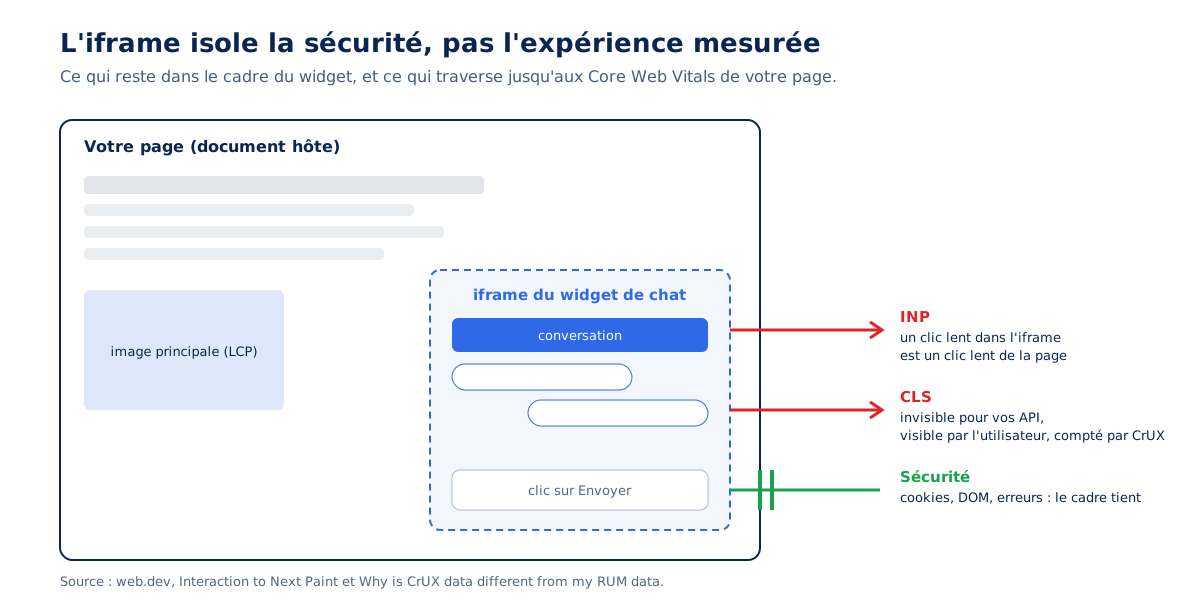
Many chat widgets display in an iframe, and many teams deduce that their cost remains contained within it. This is the most persistent misconception on the subject. An iframe isolates a security context, not a user experience: interactions occurring within it count towards the document’s INP, and the visual shift it causes, invisible to your tools, remains visible to the user and counted by Google.
What we believe an iframe does
The belief deserves to be stated honestly, because it’s half true. An iframe is a separate document, with its own navigation context, its own scripts, and, in Chrome, often its own process. A bug in the widget cannot read your cookies, and a JavaScript error in the chat window doesn’t break your order funnel. All of this is accurate, and it’s a security isolation, not a perceived performance isolation. The visitor, however, sees only one page.
INP counts what happens in iframes
The documentation for Interaction to Next Paint is explicit: interactions occur in the main document or in the iframes it contains, the user doesn’t know what’s in an iframe and what isn’t, and the INP measured in iframes is therefore necessary to reflect the top-level page experience. A sluggish click in the chat window is a slow interaction on your page, just like a click on your add-to-cart button.
The metric's threshold is 200 ms at the 75th percentile, and it’s the worst interaction of the visit that is retained, not the average. A single chat opening at 600 ms is therefore enough to classify the entire page as having poor responsiveness. Our guide on INP and how to optimize it explains why a single bad click is enough to degrade the score.
The CLS of iframes is invisible to your tools, but not to Google
The strongest point of this article is a web.dev page dedicated to the differences between CrUX and RUM. For security reasons, a page does not have access to the content of its iframes, even if they are same-origin. The metrics for this content can only be measured by the iframe itself, never by the APIs of the page hosting it.
The rest is written in black and white: if the iframe contains the LCP element, or content that affects the CLS or INP experienced by the user, your RUM solution will not see it, including Google's web-vitals library. CrUX, measured by the browser itself, does not have this limitation and counts what happens within iframes.
The operational consequence is confusing for those who don’t know it: your RUM dashboard is green, your Search Console is red, and both are correct. They don’t measure the same scope. A chat window unfolding in its iframe and pushing content, a notice banner whose stars arrive after the fact in their frame, produce a delay counted in the Core Web Vitals and absent from your graphs. Our guide on CLS and how to optimize it lays the groundwork; the diagram below summarizes what the iframe lets through.
Isolation itself has a cost
Even when its content is light, the iframe is not neutral. Chromium's Site Isolation documentation indicates that isolating sites in separate processes costs about 10-13% extra memory on desktop, and more importantly, that the layout of the entire page is no longer synchronous, as its frames can be spread across multiple processes. A third-party iframe therefore adds a process, inter-process communication with every resize, and rendering that is no longer coordinated with your page's rendering. On an entry-level mobile, this is not a minor detail.
What also doesn't work
Three false solutions are circulating, and chances are you've already read them elsewhere. The sandbox attribute is a security mechanism that restricts what the embedded document is allowed to do; the widget downloads and executes exactly the same code. The fetchpriority attribute does not exist on <iframe>; it only applies to images, scripts, and preloads. Both attributes are therefore ineffective on the widget's cost.
As for loading="lazy" on an iframe, it's newer than we think: Firefox only supported it in late 2023, in its version 121, on December 19, 2023, and Safari since 16.4 according to caniuse, with this rarely-read caveat from the MDN documentation: deferral is only applied if JavaScript is enabled, as an anti-tracking measure.
This last attribute remains useful for an iframe placed below the fold, such as a booking calendar at the bottom of the page. It's useless for a chat widget, whose iframe is positioned fixedly in the window, therefore always visible, therefore never deferred. This leaves the question everyone asks first: which one to choose.
Which chat widget to choose?
The one with the lowest execution cost, before any consideration of features, because no loading setting can make up for a factor of sixty. The third-party-web dataset from September 17, 2026, ranges from 33 ms for Crisp to 3,089 ms for Freshchat, with a methodological caveat: the observation bases range from 1,577 to 176,551 pages.
The table
The table compares the most popular chat tools based on their average impact, i.e., JavaScript execution time on the main thread per page, as aggregated by third-party-web from mobile Lighthouse audits of the HTTP Archive, along with the number of pages on which each tool was observed. The third column is as important as the second: it tells you how much confidence to place in each line.
| Chat tool | Average impact | Pages observed | Third-party-web category |
|---|---|---|---|
| Crisp | 33 ms | 1,577 | Customer Success |
| Tawk.to | 440 ms | 176,551 | Customer Success |
| Smartsupp | 647 ms | 35,566 | Customer Success |
| LiveChat | 1,116 ms | 62,860 | Customer Success |
| HubSpot | 1,226 ms | 313,527 | Marketing |
| Intercom | 1,433 ms | 58,316 | Customer Success |
| Zendesk | 2,157 ms | 111,484 | Customer Success |
| Freshchat | 3,089 ms | 11,972 | Customer Success |
| Drift | 4,394 ms | 4,339 | Marketing |
Two reading precautions are necessary. First, a tool measured on 1,577 pages and another on over 111,000 cannot be compared with the same confidence: a factor of sixty is still significant, but it should not be read like a sports ranking, and Crisp’s excellent result should never be cited without its page count. Second, HubSpot and Drift are categorized under Marketing because their script does more than just chat: their impact includes forms, tracking, and personalization, which partly explains their position.
What the table means for you
The central message of this article can be summed up in one sentence, and it’s uncomfortable for an optimization agency: for this family of tools, the choice of the provider weighs more than all the micro-optimizations you might do afterward. Deferring a script’s execution by 2,000 ms doesn’t make it less costly; it shifts the cost to the moment the visitor interacts, which is precisely where INP is measured. The most profitable decision is made before signing the contract, not after integration.
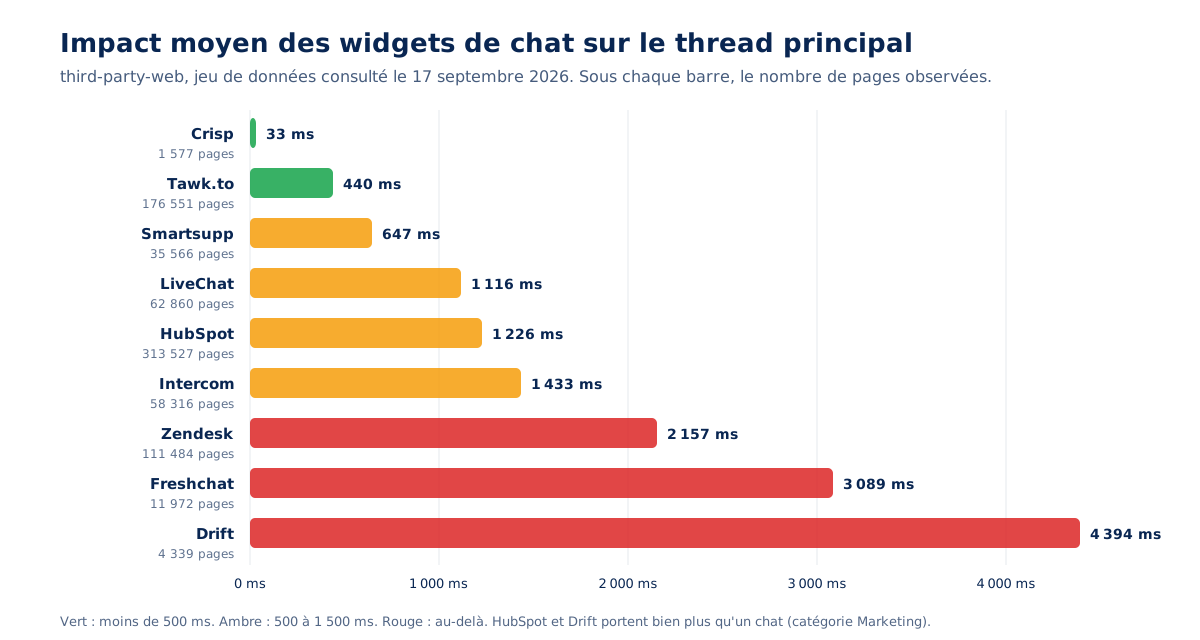
The graph makes the scale difference more readable than the table, and reveals something that raw numbers hide : the most widespread tool on the market, Tawk.to, present on over 176,000 pages, is in the light tier. Adoption volume therefore does not follow cost, and there is no obligation to pay a lot for a common chat. This reading prompts three questions to ask the publisher, which do not appear in any table.
Criteria not included in the table
Can the widget be loaded on demand, meaning does it expose an API to only call its script on the first click of a button you control? Does it offer an iframe-free mode, or conversely an iframe whose dimensions are known in advance? Does it reserve its space on the page before arriving, or does it push the content when it displays? A publisher who answers yes to all three gives you control over the cost; a publisher who answers no imposes theirs.
These three answers are worth obtaining in writing before signing, because they condition everything that can be done afterwards: without a loading API, no facade is possible. Our own measurements, further on, show that public rankings do not tell the whole story, but we still need to look at the other widget families.
Customer reviews, surveys, and appointment booking
Chat is only the most visible part of the stack. Review widgets, questionnaires, exit-intent popups, and appointment modules follow the same mechanics, each with a specific characteristic that makes it either wiser or more dangerous than chat. The dataset from September 17, 2026, shows, for the most widespread review widgets, overall more moderate average impacts, in this order:
- Trustpilot, 295 ms on 74,130 pages;
- Avis Vérifiés, listed under its publisher Net Reviews, 326 ms on 1,984 pages;
- Trusted Shops, 430 ms on 33,129 pages;
- Yotpo, 668 ms on 48,498 pages;
- Judge.me, 1,021 ms on 37,537 pages.
The family is wiser than chat, but it has a specific pitfall. These widgets are placed on the homepage and product pages, therefore exactly where LCP occurs, and their content arrives afterwards, therefore exactly when CLS occurs. A block of stars materializing under the title of a product page shifts the price, the buy button, and the photo, the three elements the visitor looks at. Our guide on LCP and how to optimize it reminds us that anything inserted above the main image delays or displaces its painting.
The surprise, appointment booking
Calendly measures an average impact of 4,305 ms on 13,872 pages in the same dataset, which is more than almost all the chat tools in the previous table. It is the widget that no one suspects, because it is perceived as a simple calendar, and it is often placed by a salesperson in an HTML block without going through the technical team. An embedded calendar is actually a complete application within an iframe, with its time zone management, its availability loaded from an API, and its own framework.
Loading it on a product page for a button that 2% of visitors will use is the most costly error in this family.
Surveys and popups
Does a popup that appears after five seconds count towards CLS? Yes, entirely. The Cumulative Layout Shift documentation only provides for exemptions for shifts occurring within 500 ms following a discrete interaction, a tap, a click, or a keystroke. A trigger by timer, scroll depth, or exit intent does not qualify, as mouse movement and scrolling are not discrete interactions.
There is no shortage of examples. A satisfaction survey that pops up after ten seconds, a newsletter invitation two-thirds of the way down the page, an exit-intent popup that triggers when the cursor leaves the tab, all produce a counted shift without any exemption.
The detail that shows mastery of the subject is even finer. Even a widget opened by a click causes a counted shift if its content takes more than 500 ms to arrive, as the exemption expires. A button that opens an empty window, which then fills up a second later, pushing surrounding content, is an unexpected shift in terms of the metric. The workaround is to reserve the space immediately, within 500 ms, even if it means displaying a skeleton, and then let the content arrive without moving anything.
A trivial case that illustrates everything
Social sharing buttons are the miniature version of all of the above. In the dataset of September 17, 2026, AddToAny measures an average impact of 141 ms and ShareThis 360 ms, for a function that three HTML links fulfill at zero cost, without scripts, without cookies, and without third-party connections. The block below is the most immediately copyable in the article: each network provides an official sharing URL, you just need to construct it.
<!-- Partage sans script : trois liens, zero tiers, zero cookie -->
<ul class="partage">
<li><a href="https://www.linkedin.com/sharing/share-offsite/?url=https%3A%2F%2Fwww.exemple.fr%2Farticle%2F"
rel="noopener" target="_blank">Partager sur LinkedIn</a></li>
<li><a href="https://x.com/intent/post?url=https%3A%2F%2Fwww.exemple.fr%2Farticle%2F&text=Titre%20de%20l%27article"
rel="noopener" target="_blank">Partager sur X</a></li>
<li><a href="mailto:?subject=Titre%20de%20l%27article&body=https%3A%2F%2Fwww.exemple.fr%2Farticle%2F">Envoyer par e-mail</a></li>
</ul>
<!-- Sur mobile, l'API native fait mieux que n'importe quel widget -->
<script>
if (navigator.share) {
document.querySelector('.partage').insertAdjacentHTML('beforeend',
'<li><button type="button" id="share-native">Partager</button></li>');
document.getElementById('share-native').addEventListener('click', function () {
navigator.share({ title: document.title, url: location.href });
});
}
</script>This case is trivial, and that's why it's instructive: no one would defend 360ms of main thread for three links. The same reasoning, applied to a chat or an reviews widget, runs into a single obstacle: the lack of measurement. This is what our audits bring to the public ranking, and they only partially confirm it.
Is your site as fast as your visitors expect?

What our reports add to the ranking
The following observations come from our audits and optimization interventions, on sites from various sectors, anonymized by typology. They do not replace the previous table; they complete it on what it doesn't measure: fonts, rendering cost, persistent connections, and everything a widget loads for a window that no one opens. Each can be reproduced on your site with the steps provided later.
The average impact measures neither fonts nor rendering cost
A chat tool that ranks among the lightest in the public ranking was found during an audit, on a personal services site, to be nearly 250KB of resources, including four Noto Sans font files loaded with high priority, and over a thousand CSS selectors injected into the page, responsible for excessive style calculation time with every interaction. On another site, the same tool exceeded 125KB and kept a WebSocket connection open permanently.
The public indicator measures JavaScript execution time: it ignores fonts, styles, and connections, and a tool can be exemplary on one and costly on the other three.
The consequence deserves to be written in black and white, because it is rare in an article that has just published a table: the table is a starting point, not a verdict. It identifies tools to discard immediately, those whose execution alone exceeds one second. It is not enough to differentiate between light tools, and this is where measurement on your own site becomes essential.
The widget that loads its own fonts
The observation is transversal to this family of tools and almost never addressed. A voice of the customer tool was found to have 166KB of JavaScript spread across sixteen files, plus 74KB of fonts in two TTF files, loaded on all pages of a furniture e-commerce site. Another chat loaded the same 27.7KB font twice, served from two different data centers on the same distribution network, because two of its components declared it separately.
The TTF format, uncompressed for the web where WOFF2 divides the weight by two or three, deserves to be noted in passing: a widget that embeds TTF has not been audited by its own editor.
The in-house recommendation is simple and almost always accepted by publishers when asked: have the widget inherit the site’s font, either through a configuration option or a CSS rule on its container, rather than letting it load its own. The benefit is twofold: tens of kilobytes saved and one less request on the critical path, plus visual consistency that marketing demanded anyway. Our article on fonts and performance details the cost of each additional font file.
The paradox of review widget timing
On a cosmetics e-commerce site, a review aggregator’s widget weighed over 100 KB to download and 360 KB once unzipped, and it arrived both too early and too late. Too early for blocks at the bottom of the page, outside the initial viewport, which it loaded and rendered unnecessarily on load.
Too late for the stars displayed under the product page title, which appeared after the fact and caused a shift in the most viewed element on the page. The same script was both early and late because it treated all its placements the same way.
The applied fix involved two steps, and it’s repeated in the space reservation block further down: asynchronous script loading, and height reservation using min-height on the original container and the final container. The two are distinct because the widget replaces its anchor point with an element it creates itself. Reserving one without the other leaves a shift during substitution, which is the most common error with these widgets.
The reassurance widget that some visitors never see
A widely used review widget relies on a third-party script served from a domain that ad-blocking lists know well, causing it to be blocked by ad blockers. On a personal services site, the audit found that this script did not load for a significant portion of equipped visitors. Thus, we pay for third-party connection latency and execution costs for a reassurance element that part of the audience will not see, precisely the more suspicious part, the one the reassurance was aimed at.
A tasty corollary noted in the same audit: profile pictures served from a URL containing the segment /adverts/ were blocked for the same reason, due to a simple directory name.
The in-house recommendation shifts the debate from performance to efficiency: replace the widget with an SVG or PNG image of the rating and number of reviews, regenerated periodically server-side from the publisher's API, with a link to the full reviews page. Zero scripts, zero third-party connections, visible to everyone, and an image of a few kilobytes that doesn't shift anything since its dimensions are known.
Synchronous appointment booking
On a B2B technical solutions website, the appointment booking module was integrated via a synchronous stylesheet and script on the product pages, exactly as provided by the publisher's snippet. The result was a bottleneck that blocked page rendering until the third-party domain responded. Simply switching the two resources to asynchronous resulted in a net gain in LCP, without touching the widget itself.
Relating to the Calendly figure above: it's the widget nobody suspects, and it's often the worst integrated.
What we load for a window that nobody opens
Three brief observations, which any reader can verify on their site in ten minutes in the Network tab. The flags for a language change window, downloaded while the window is hidden. The avatar for a chatbot window, loaded while the window is closed by default. A second anti-bot service loaded on all pages for a login form, when it could have been conditioned to the opening of the registration window, so as not to penalize 100% of users for a feature that only concerns a fraction of them.
In all three cases, the cost is paid by everyone for the usage of a few, and this is the most common reason in this entire category.
The measurement gap that nobody sees
Let's pick up the thread from the second part, because it explains a situation that many teams experience without understanding it. A slow widget in an iframe degrades the INP and CLS measured by CrUX, therefore the Core Web Vitals, therefore what Search Console sees. It never appears in an in-house RUM built on browser APIs, since these APIs do not have access to iframe content. Both measurements are accurate, they do not cover the same scope, and only Google's counts for SEO.
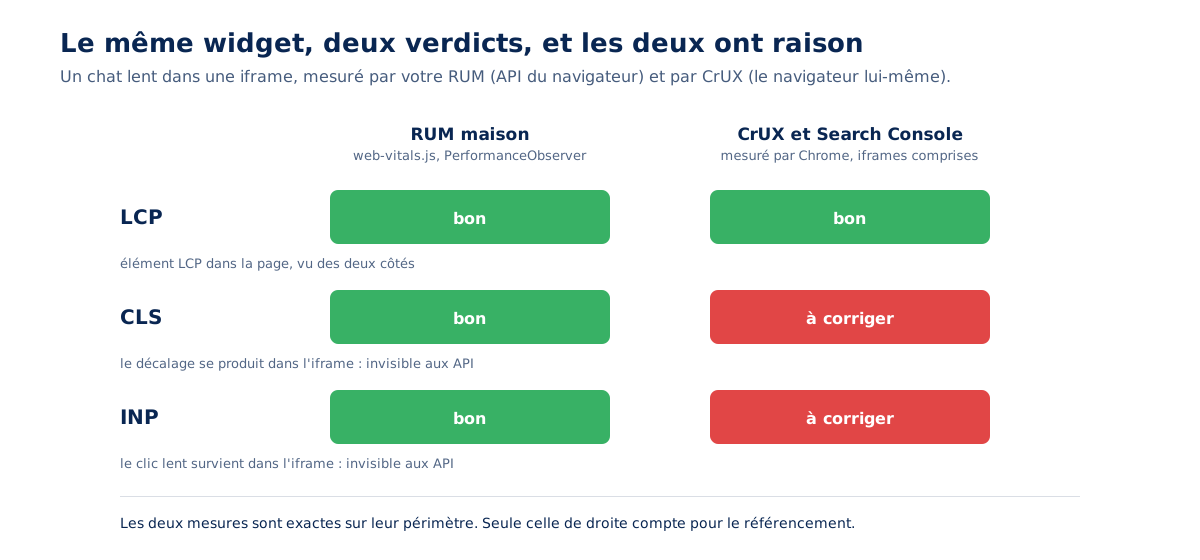
The symmetrical warning is necessary for honesty. This doesn’t mean RUM lies, nor that it should be abandoned: it sees all browsers where CrUX only sees Chrome, it segments by page and by journey where CrUX aggregates over 28 days, and it attributes a slow interaction to a specific element. You simply need to know which of the two sources answers which question.
Our comparison of PageSpeed Insights vs. Lighthouse and our article on how web performance is measured set this framework; for widgets in iframes, the question of CLS and INP falls to CrUX, and to it alone.
A practical consequence arises from this for widget publishers themselves. The INP documentation indicates that sub-frames can report their measurement entries to the parent document. A publisher concerned about their customers would therefore expose their iframe's metrics via postMessage, so that RUM can integrate them. To our knowledge, almost none do, and this is a question to ask when choosing.
How to integrate these widgets without slowing down your site?
By measuring each widget separately, by only loading what is immediately useful on arrival, and by reserving space for everything that comes later. The facade technique, a static button that loads the actual widget on the first click, remains the most effective, but Lighthouse removed the audit that recommended it on October 10, 2025, and no publisher offers it natively.
Measure first, one widget at a time
The method takes twenty minutes and is worth all the opinion-based trade-offs between teams. Block the widget's domain in the browser, reload the page, note the difference in LCP and Total Blocking Time, then repeat for the next widget. You must measure one widget at a time and not all together, because the costs do not add up linearly when multiple scripts compete for the main thread, and measure on a representative page, product page or article, not just on the homepage, where not all widgets are present.
# Dans Chrome DevTools : onglet Network, clic droit sur une requete du widget,
# "Block request domain", puis rechargement avec l'onglet Performance ouvert.

# En ligne de commande, pour un releve reproductible :
lighthouse https://www.exemple.fr/produit/exemple/ --preset=desktop \
  --output=json --output-path=./avec-widget.json

lighthouse https://www.exemple.fr/produit/exemple/ --preset=desktop \
  --output=json --output-path=./sans-widget.json \
  --blocked-url-patterns="*client.crisp.chat*" "*embed.tawk.to*" "*widget.trustpilot.com*"

# Ecart LCP et TBT entre les deux rapports
jq '.audits["largest-contentful-paint"].numericValue, .audits["total-blocking-time"].numericValue' \
  avec-widget.json sans-widget.json
The result is a numerical ranking of your widgets, from most costly to least costly, on your pages and with your configuration. It doesn't yet tell you what the INP in an iframe costs you, which only real-world data reveals, but it is usually sufficient to designate the widget to address first. Next comes the choice of treatment, and the most effective is called the facade.
The facade, what it brings and what it costs
Should you load your chat only on click? This is the right approach. The principle is to display a fake static button, with the dimensions and colors of the real widget, and only load the editor's script on the first click, replacing the button with the real one. For the 95% of visitors who never open the chat, the cost drops to that of an HTML button. The following block provides a generic version, which accounts for the case of clicking during loading, otherwise the visitor clicks into the void for a second.
<!-- 1. Le bouton statique : memes dimensions, meme position que le widget reel -->
<button type="button" id="chat-facade" class="chat-facade"
        aria-label="Ouvrir le chat">
  <svg width="28" height="28" viewBox="0 0 24 24" aria-hidden="true">
    <path fill="currentColor" d="M4 4h16v11H7l-3 3z"/>
  </svg>
</button>

<style>
  .chat-facade { position: fixed; right: 20px; bottom: 20px; width: 60px; height: 60px;
    border: 0; border-radius: 50%; background: #2E69E8; color: #fff; cursor: pointer; }
  .chat-facade[aria-busy="true"] { opacity: .6; cursor: progress; }
</style>

<script>
(function () {
  var btn = document.getElementById('chat-facade');
  var loading = false, wantOpen = false;

  function loadWidget() {
    if (loading) { wantOpen = true; return; }   // 3. clic pendant le chargement : on retient l'intention
    loading = true;
    btn.setAttribute('aria-busy', 'true');
    var s = document.createElement('script');
    s.src = 'https://widget.exemple-editeur.com/loader.js';  // 2. le script reel, seulement maintenant
    s.async = true;
    s.onload = function () {
      btn.remove();                              // 4. le vrai widget remplace la facade
      if (window.WidgetApi && window.WidgetApi.open) { window.WidgetApi.open(); }
    };
    s.onerror = function () { btn.removeAttribute('aria-busy'); loading = false; };
    document.head.appendChild(s);
  }

  btn.addEventListener('click', loadWidget);
  // Optionnel : prechauffer la connexion au survol, sans encore charger
  btn.addEventListener('pointerenter', function () {
    var l = document.createElement('link');
    l.rel = 'preconnect'; l.href = 'https://widget.exemple-editeur.com';
    document.head.appendChild(l);
  }, { once: true });
})();
</script>
Two honest caveats accompany this technique. First, no editor on the market offers it natively: it's always custom development, the post-load opening call depends on each tool's API, and the facade must be kept up-to-date when the editor changes its button. Second, the official recommendation no longer exists: the Lighthouse audit that promoted it was removed in Lighthouse 13, on October 10, 2025, with the Chrome team explaining that they preferred to see third parties improve their products rather than bypass them. The technique remains good, Google's endorsement, however, has disappeared, and you have to write it yourself.
Reserve space, always
The least expensive and most profitable action is to define the widget's position and dimensions before it loads. For a chat in a fixed position, it's almost free, as it doesn't participate in the flow. For a review widget inserted into the content, you need to reserve the height of the original container and, as the case of cosmetics showed, that of the container the widget creates in its place:
/* Chat en position fixe : hors du flux, il ne decale rien s'il garde ses dimensions */
.chat-facade, #widget-chat-container { position: fixed; right: 20px; bottom: 20px;
  width: 60px; height: 60px; }

/* Widget d'avis dans le flux : reserver la hauteur AVANT l'arrivee du script */
.avis-ancre { min-height: 28px; }                 /* le point d'ancrage d'origine */
.avis-ancre .avis-widget-genere { min-height: 28px; } /* le conteneur cree par le widget */

/* Bloc d'avis complet en bas de fiche produit : squelette a la bonne hauteur */
.avis-liste { min-height: 480px; }
.avis-liste:empty { background: linear-gradient(#f3f4f6, #f3f4f6) center / 100% 1px no-repeat; }

/* Contenu isole : le navigateur ne recalcule pas le reste de la page quand le widget change */
.avis-liste, #widget-chat-container { contain: layout paint; }
The contain property deserves a line of explanation: it tells the browser that what happens inside the container does not affect the layout outside, which prevents a widget that redraws ten times per second from triggering ten full page recalculations. It does not eliminate the need to reserve height, but it makes the reservation effective.
What not to do
Two well-intentioned reflexes worsen the problem. The first is to preconnect all third-party domains in the <head>. The documentation for preconnect on web.dev warns that unnecessary connection preloading delays other important resources, that the browser closes any unused connection after ten seconds, and that a connection opened without the crossorigin attribute is not useful for requests that need it, such as fonts. Lighthouse 13 has also removed its preload audit due to risk of over-recommendation. A widget loaded on demand requires no preconnection at load time.
The second reflex is to load the widget on the first scroll, which several optimization extensions offer. This removes the script from the initial load, which improves LCP and TBT in the lab, but it shifts the execution peak to exactly where INP is measured, at the moment the visitor starts interacting. A 2 000 ms script executed while the visitor is typing in a search field produces a guaranteed slow interaction. Loading on click does not have this drawback, because the visitor is explicitly waiting for something.
Cleanly close what remains open
An audited chat maintained a permanent WebSocket connection, even when the tab was in the background, which drains the battery on mobile and sometimes prevents the page from entering the back/forward cache. When the editor's API exposes the connection, or when you control one yourself, the fix is a few lines, and the gesture signals a practitioner :
// Fermer la connexion persistante quand la page est cachee ou quittee
addEventListener('pagehide', function () {
  if (window.WidgetApi && typeof window.WidgetApi.disconnect === 'function') {
    window.WidgetApi.disconnect();      // API editeur, quand elle existe
  }
});

// Et la rouvrir seulement si le visiteur revient ET rouvre la fenetre
addEventListener('pageshow', function (e) {
  if (e.persisted) { /* page restauree depuis le bfcache : rien a faire tant que le chat est ferme */ }
});
Inventory and remove
The last step is governance, not technique. Listing the domains called by a representative page takes ten minutes in the Network tab, and on a site over three years old, a significant portion of third-party scripts no longer interests anyone : a survey widget set up for a completed study, a chat from a provider no longer under contract, an appointment module for an offer removed from the catalog. These costs survive the projects that justified them, for lack of a removal date.
A single rule prevents the pile from growing : set an end date for each widget added, at the time it is added. There remains a brand new category, which does not fit into any of the previous boxes.
And what about AI-based chatbots?
It all depends on where the model runs. An assistant whose intelligence is server-side is just another chat widget, with the usual costs and added response latency. A model executed in the browser changes the order of magnitude : web.dev reminds us that a small generative model like Gemma 2B reaches 1.3 GB, which is more than a hundred times the weight of the median web page.
Two architectures, two very different costs
The distinction governs everything else. In the first case, the conversational assistant is a chat widget whose responses come from an API : everything above applies, including the facade, and the only new cost is the generation time, which is experienced as a wait rather than a blockage.
In the second case, the model is downloaded and executed on the visitor’s machine. The web.dev guide on client-side AI performance provides benchmarks: 5 MB is already a significant size for a web resource, a useful vision model weighs 13 MB, DistilBERT 67 MB, and small generative models exceed a gigabyte.
Documented best practices
The same guide sets the course of action, and it is consistent with everything this article recommends for classic widgets. Only download the model once the intention to use it is confirmed, for example, when the visitor starts typing. Cache it explicitly using the Cache API rather than relying on the HTTP cache. Chunk the download into pieces with a progress indicator, and move model preparation and inference to a web worker to avoid blocking the main thread.
Finally, check the machine’s capabilities before deciding. The question to ask is not how to defer the model, but what model size the service justifies.
The specific delay of streaming
A concrete point, rarely addressed, and directly actionable. An assistant’s response that is typed out word by word in a growing window creates a delay with each added line if the container has no reserved height, and this delay occurs well after the 500 ms grace period for the click that sent the question.
The solution is the same as for a review widget: a response container with a fixed or minimum height, internal scrolling rather than growing, and content that is added downwards without pushing anything. What applies to tomorrow’s assistant applies to today’s stack, and that’s where you should start.
What to do with your widget stack in practice?
Three decisions, in this order. Choose the editor by looking at its execution cost before its features, because a factor of sixty cannot be compensated. Load on demand what is not immediately useful: a chat facade, a static image for reassurance, a deferred iframe for the calendar. Set a removal date for each widget added. The first decision dominates the other two, and it’s the only one that costs nothing in development.
The in-house observation that concludes this article is what we make with every follow-up audit: an optimized site degrades on its own. You don’t need a redesign to lose your Core Web Vitals; six months of stacked widgets, each validated by a different team, each painless individually, are enough to bring a fast site back to its starting point. Our article on the cost of a fast site says it differently: performance is not a state, it is governance that survives projects.
Two families of tools are deliberately missing from this inventory, heatmaps and session recording, the cost of which is of a different nature, continuous DOM observation and serialization, and which will be the subject of a separate article.
For the rest, quantifying the cost of each widget, relating it to what it brings in, and deciding with the teams that requested it rather than against them, is what a web performance audit produces; replacing, deferring, or reconfiguring those that remain is then part of performance optimization, and monitoring is what prevents the stack from growing back. The fastest widget is still the one nobody asked for, and it deserves to be questioned every time.