The tool was installed to understand visitors: see where they click, where they hesitate, where they abandon their cart. Months or years later, it's still running on all pages, for all visitors, and it slows down precisely those it was supposed to help understand. Very often, no one watches the recordings anymore.
Session replay, or session recording, is a separate third-party script. Beyond the initial load, its cost increases with visit duration and with each interaction, which is exactly within the window measured by INP, the Core Web Vitals responsiveness metric.
Lab tools see it poorly because their bot doesn't click, scroll, or give consent. This guide explains the mechanism, shows how to measure the real cost on your site, compares Hotjar, Microsoft Clarity, and Contentsquare, and proposes a governance that keeps the tool useful without letting it incur costs permanently.
One question before we start, to ask the team that installed the tool: how many recorded sessions were viewed last month?
What is session replay and how does it work?
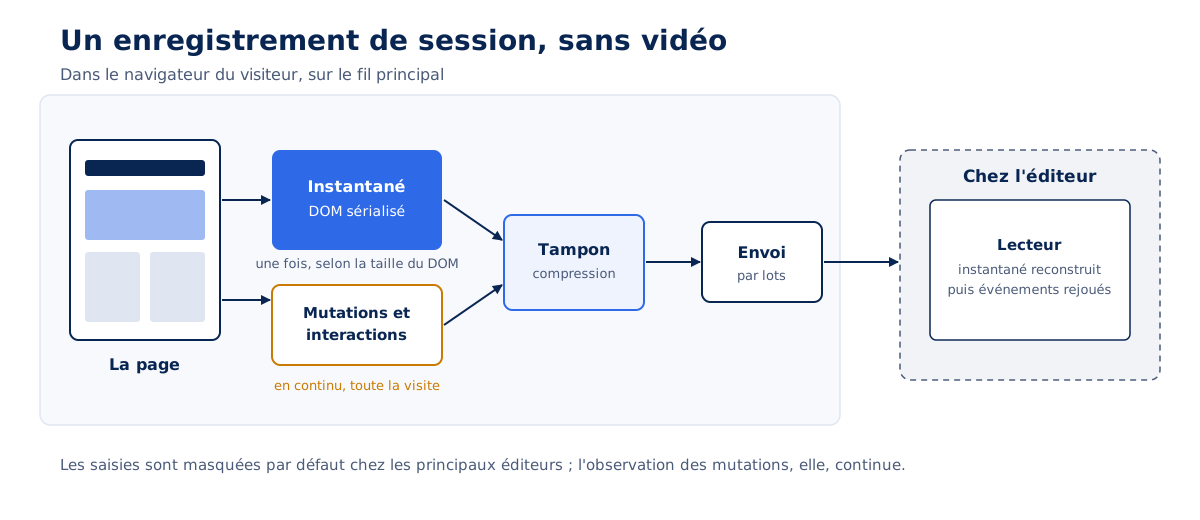
Session replay reconstructs a person's visit from the DOM, the page structure, without any video. The script captures a complete snapshot of the page, then records each modification and each interaction; the tool then replays these events in order. The open-source project rrweb documents this mechanism in detail.
A snapshot, then a stream of mutations
rrweb, a library under the MIT license, serves as a reference here to explain the principle, without prejudging the implementation of each vendor. At startup, the recording module serializes the entire DOM and its state: each node, its attributes, the text, the stylesheets. It then observes the document using a MutationObserver placed on the entire tree, and listeners capture mouse movements, clicks, scrolling, and typing. Each page modification becomes an event, timestamped, buffered, then sent in batches to the vendor's server.
The player takes the opposite path: it reconstructs the snapshot in an iframe, then applies the events one by one. A recording therefore contains a description of the page and its changes, without any pixels or screen images. Input fields are hidden by default by major publishers, which prevents recording what the visitor types, without changing the cost of observation.
Heatmaps and scroll maps
Heatmaps are based on the same collection: click coordinates, mouse positions, scroll depth, sent to the server and aggregated over thousands of page views. The cost on the visitor side is that of the listeners and the sending; aggregation takes place on the publisher's side. A heatmap without session recording therefore costs less, but the installed tool often does both.
Why does a session replay tool cost more than its weight?
Because two of its three cost components are continuous: the initial snapshot is paid for once, observation and sending last the entire visit. The larger and more dynamic the page, the longer and more interactive the visit, the more the tool works on the same thread as your responses to clicks.
The initial snapshot, proportional to the DOM size
Serializing a page with 3,000 nodes costs more than serializing a page with 800 nodes, and this work takes place at startup, often during loading. Lighthouse 13 flags a page that is too heavy with the dom-size-insight insight, which replaced the old dom-size audit in the version released on October 10, 2025. A lighter DOM benefits everything, and in particular the initial cost of a session recorder.
Continuous observation
Every DOM mutation is serialized. A static page produces few; a dynamic page produces them continuously: a rotating carousel, a scrolling counter, content injected on scroll, ads that reload, a single-page application that replaces its content on each navigation. On these pages, the tool works even when the visitor does nothing, and its work adds to that of the page.
Network sending
Events are sent in batches, often compressed in the browser before sending, and in the background. The transferred weight remains modest, but batch compression and preparation consume processor on the main thread or in a worker, depending on the implementation. On an entry-level mobile, this cost is reflected in the battery as much as in the metrics.
The effect on INP
INP measures the delay between an interaction (click, touch, keypress) and the subsequent display. The recorder reacts precisely to interactions: it captures the click, then serializes the mutations that the click causes. Its work happens in the same loop as your page's response, and extends it. Our article on INP and how to improve it details this window.
Measured by the agency on October 15, 2026, on a media site article, using mobile emulation: Clarity leaves the lab INP at 72 ms, Contentsquare increases it from 72 to 88 ms on average, with a peak of 184 ms. On this lightweight page, the difference remains below the 200 ms threshold; on yours, the measurement described later gives the figure.
Why do Lighthouse and PageSpeed Insights underestimate it?
Because their bot doesn't click, scroll, or give consent. It sees an idle tool, sometimes not even loaded if the site waits for visitor consent, and measures a baseline, never the cost of a real visit.
What third-party-web publishes
The third-party-web project aggregates Lighthouse audits that HTTP Archive launches every month in mobile emulation, and publishes the average execution time of each third-party service per page. The most recent dataset published on October 15, 2026, is from March 1, 2026. For session recorders, it shows: Microsoft Clarity, 405 ms per page across 1,226,624 pages; Hotjar, 732 ms across 504,590 pages; FullStory, 911 ms across 21,307 pages; Mouseflow, 52 ms across 14,518 pages. Contentsquare does not appear there under its own domain in this dataset.
These averages should be considered with three caveats. They describe a typical implementation, which careful configuration can alleviate. They come from a bot without interaction or consent: this is a baseline, and the Web Almanac 2025 itself acknowledges in its chapter on third parties that its readings are a low estimate. Finally, sample size matters: an average over 14,518 pages does not have the robustness of an average over 1.2 million. The ranking by total impact, often cited, is a global sum and never a per-page cost.
Our benchmark recorded 68.5 ms of script for Clarity, far from third-party-web's 405 ms. The two figures describe two different things: third-party-web uses the execution time measured by Lighthouse over the entire loading of real pages, which are often heavily loaded; the benchmark measures long frames during a session on a lightweight page. Each provides an order of magnitude, within its own context.
Lighthouse 13 no longer alerts
Until version 12, the Third-Party Summary audit failed when third-party code blocked the main thread for more than 250 ms. Lighthouse 13 replaced it with the “3rd parties” insight, which lists third parties and their cost, without a threshold or failure. A session recorder can therefore be expensive without the report signaling it. Only two metrics show the real cost: the scripted journey and field data. Our pillar article on the impact of third-party JavaScript details these methods for all third parties.
How to measure the real cost of session replay on your site ?
Using three complementary metrics, from fastest to most conclusive: blocking the domain in the lab, the scripted journey with attribution by domain, and the comparison, in field data, between recorded and unrecorded sessions.
Blocking the domain in the lab
Block the tool's domain, reload, compare: this is the figure that ends a debate between teams. In Chrome, the Network panel allows blocking a domain; from the command line, Lighthouse accepts the --blocked-url-patterns option. One tool at a time, on a product page or an article rather than the homepage, and several runs per variant. The command below was verified with Lighthouse 13.5.0 on October 15, 2026.
# Lighthouse avec puis sans le domaine de l'outil, extraction des métriques par jq
URL="https://www.exemple.fr/produit/chaise-bois/"
DOMAINE="*hotjar*"   # motif du domaine à bloquer (ex. *clarity.ms*, *contentsquare*)

for variante in avec sans; do
  bloque=""
  [ "$variante" = sans ] && bloque="--blocked-url-patterns=$DOMAINE"
  npx lighthouse "$URL" --quiet --only-categories=performance \
    --output=json --output-path="lh-$variante.json" $bloque
  # variante, TBT (ms), LCP (ms), temps d'exécution JavaScript total (ms)
  jq -r --arg v "$variante" '[$v,
    (.audits["total-blocking-time"].numericValue | round),
    (.audits["largest-contentful-paint"].numericValue | round),
    (.audits["bootup-time"].numericValue | round)] | @tsv' "lh-$variante.json"
done
This measurement retains the robot's limitations: without simulated consent and without interaction, it underestimates the cost. It remains useful for loading, and for verifying that a tool supposed to wait for consent does not load before.
The scripted journey, with attribution by domain
The Long Animation Frames API, available since Chrome 123, records each frame longer than 50 ms and attributes its time to the scripts that occupied it, with their origin URL (sourceURL), their duration, and the forced style and layout time (forcedStyleAndLayoutDuration); the Chrome documentation specifies that only scripts longer than 5 ms are attributed. Grouped by domain after a realistic journey (consent given, scrolling, clicks, adding to cart, in mobile emulation), this is the tool's cost during a real visit.
// Temps de thread principal par domaine tiers, d'après les Long Animation Frames (Chrome 123+).
// À lancer dans la console après un parcours (consentement, clics, défilement).
(() => {
  const tiers = (u) => { try { return new URL(u).hostname !== location.hostname; } catch { return false; } };
  const parDomaine = {};
  for (const f of performance.getEntriesByType('long-animation-frame')) {
    for (const s of f.scripts) {
      if (!tiers(s.sourceURL)) continue;
      const d = (parDomaine[new URL(s.sourceURL).hostname] ??= { frames: 0, execution_ms: 0, style_layout_force_ms: 0 });
      d.frames += 1;
      d.execution_ms += Math.round(s.duration);                               // durée du script dans la frame
      d.style_layout_force_ms += Math.round(s.forcedStyleAndLayoutDuration);  // style et mise en page forcés
    }
  }
  console.table(parDomaine);
})();
Verified on October 15, 2026 in Chromium 141 on a local benchmark, with a cross-origin script that adds 120 ms of work per click: 627 ms attributed to its domain over 6 frames, after five clicks. Two limitations: the browser's buffer stores a limited number of frames, and frames shorter than 50 ms are not recorded. The figure is therefore a minimum; it is compared from one variant to another, with and without the tool, on the same journey.
Agency results from October 15, 2026, on a media site article where Clarity and Contentsquare were injected by the benchmark: 20 sessions with the tool and 20 without, alternating, Chrome 155 emulating Moto G Power, CPU throttled four times, slow 4G. The table shows medians, with minimum and maximum in brackets; no styles or layouts forced by either tool.
| Measurement | Clarity | Contentsquare |
|---|---|---|
| Tool script in long frames | 68.5 ms [65, 76] | 55.5 ms [49, 106] |
| Bytes received from the tool | 28.7 KB | 164.9 KB |
| Data sent in 30s of visit | 5 | 2 [2, 5] |
| Lab INP, with the tool | 72 ms [72, 88] | 88 ms [72, 184] |
| Lab INP, tool blocked | 72 ms [72, 88] | 72 ms [72, 88] |
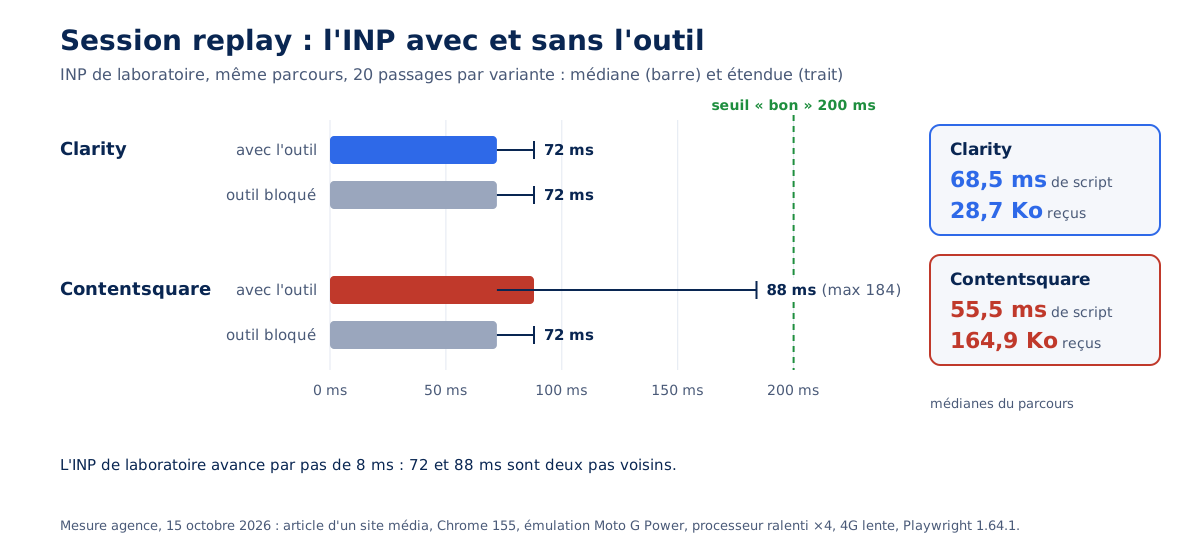
Clarity costs little, but with each session; Contentsquare downloads nearly six times more and sometimes encounters an interaction. Lab INP advances in 8ms steps, the rounding of Event Timing: 72 and 88ms are two neighboring steps. These figures are minimums: on an animated benchmark page, Clarity consumed about 145ms of CPU in 30s without producing a single long frame, work that only the profiler sees.
The field: recorded sessions vs. unrecorded sessions
The most convincing measurement requires no A/B testing to set up. When the tool records only a portion of sessions, randomly selected, the site has a natural experience: two comparable groups of visitors, one recorded, the other not. It is sufficient for the field measurement (RUM, for Real User Monitoring) to carry a flag indicating whether the session is recorded, then to compare the INP of the two groups at the 75th percentile, the threshold used by Core Web Vitals. The difference between the two groups is the real cost of the tool, on your visitors and your devices.
Three conditions make the comparison valid. Random selection must precede tool loading, and must not depend on the page or the device; the conditional loader presented below does this. The two groups are compared page by page, or template by template, over the same period. And each group must have enough measurements for the 75th percentile to be stable: agency convention, at least 1,000 INP measurements per group and per template before concluding.
This volume assumes several thousand page views per day on the template studied, and consent collected by a CMP: only sessions with consent can be recorded, so only they can be compared. The measurement below transmits both flags. Below this traffic, lab measurements provide the order of magnitude.
// Mesure de terrain : chaque INP part avec un drapeau « session enregistrée ».
// web-vitals 6 (npm), window.awpReplay et window.awpConsentement posés par le chargeur et la CMP.
import { onINP } from 'web-vitals';

onINP((mesure) => {
  navigator.sendBeacon('/rum', JSON.stringify({
    inp: Math.round(mesure.value),
    replay: window.awpReplay === true,   // groupe enregistré ou non
    consentement: window.awpConsentement?.mesure === true,   // seules ces sessions se comparent
    page: location.pathname,             // comparaison gabarit par gabarit
  }));
});
Is your site as fast as your visitors expect?

Hotjar, Clarity, Contentsquare: what are the differences for performance?
For equal functionality, the differences are due to the loading method, sampling, and consent management. The execution time published by third-party-web positions the tools relative to each other; the configuration done on your site weighs more than the editor's choice.
The three tools compared
Hotjar belongs to the Contentsquare group: as of July 1, 2025, the Hotjar company has merged into the group, and its tools (heatmaps, recordings, surveys) are offered on the Contentsquare platform, with Free, Growth, Pro, and Enterprise plans. The table below shows the editors' documentation, consulted on October 15, 2026; the last column dates and weights each average.
| Tool | Model | Documented sampling | Consent | Masking and exclusion | third-party-web (March 1, 2026 dataset) | Agency benchmark (October 15, 2026) |
|---|---|---|---|---|---|---|
| Microsoft Clarity | Free | Tracking of all sessions, recording capped at 100,000 sessions per project per day | Signal required in the EEA, UK, and Switzerland since October 31, 2025 | "Balanced" mode by default, data-clarity-mask, data-clarity-unmask | 405 ms per page, 1,226,624 pages | 68.5 ms, 28.7 KB |
| Hotjar (Contentsquare group) | Free and paid | Not documented in the pages consulted | To be integrated with the CMP | Entries masked by default, data-hj-allow to allow them | 732 ms per page, 504,590 pages | Not measured |
| Contentsquare | Paid (free offer announced) | Collection rate adjustable, depending on the offer; decided in the browser, after download (agency measurement) | To be integrated with the CMP | Entries masked in the browser, data-cs-mask, data-cs-capture | Absent from the dataset under its own domain | 55.5 ms, 164.9 KB |
The Clarity case and consent
Microsoft Clarity has required a consent signal for visits from the European Economic Area, the United Kingdom, and Switzerland since October 31, 2025. Without consent, the tool does not set any cookies, loads, and only collects data without cookies ; Microsoft warns that features dependent on it, including session recordings, may be limited. The script therefore loads anyway : on these visits, its loading cost remains, for reduced service.
Its FAQ claims that the asynchronous script has no effect on site speed. This argument confuses loading and execution : an asynchronous script does not block HTML parsing, but it executes afterward on the main thread, like all others. The figure from third-party-web, measured without interaction, alone shows that execution has a cost.
On our benchmark, Clarity classified automated sessions as bots and excluded them from the interface, even though each had downloaded 29 KB, executed 65 to 76 ms of script, and made 5 requests. Server-side filtering leaves the browser-side cost intact, for bots as well as visitors.
How to reduce the impact of session replay without giving up the tool?
By limiting the tool in time, targeting it on useful templates, sampling before any download, and loading it after consent and the first interaction. Together, these four settings bring the cost down to a fraction of sessions, on a fraction of pages, during a defined period.
A campaign rather than a permanent subscription
A recorder is used to answer a question : why do visitors abandon at the checkout stage, what do they do on the new landing page, where do they get stuck in the form ? Activated for two to four weeks around this question, then removed, it yields its insights without impacting the rest of the year. It's the same logic we apply to A/B testing tools: an end date, set from installation.
Target useful templates
The checkout funnel, a campaign landing page, the registration form : these are the pages where a question arises. Blog posts, legal notices, and the homepage rarely need to be recorded. Tools offer URL targeting rules in their interface ; they decide what is recorded, often after the script has downloaded. Targeting in the code, before any download, is the only way that also eliminates the cost.
Sample before download
A sampling rate set in the tool's interface can be decided after downloading and running the full script. Measured on October 15, 2026 with Contentsquare, on 10 new sessions per variant: one unselected session downloads 187 KB and executes 113 ms of script, compared to 116.5 ms for a selected session; only the submissions disappear.
The random draw must be done in your code, before inserting the tool's tag. It serves at the same time for the field measurement described above, since the "selected session" flag is the result of this draw.
Load after consent and first interaction
Consent is a legal prerequisite; the first interaction is a performance choice. Waiting for a click, a key press, or a first scroll, with a maximum delay so as not to lose the beginning of the sessions, takes the tool out of the loading phase. Triggering by scrolling occurs on the first event only: a continuous scroll observer would shift the workload to the INP window. The loader below combines the four conditions; it was tested on October 15, 2026 in Chromium 141, with a fake publisher tag.
// Charge l'outil d'enregistrement de session seulement si quatre conditions sont réunies :
// gabarit ciblé, session tirée au sort, consentement donné, première interaction (ou délai plafonné).
(function () {
  const GABARITS = ['/panier/', '/commande/', '/inscription/']; // pages sur lesquelles une question est posée
  const TAUX = 0.2;                                             // part des sessions enregistrées
  const PLAFOND_MS = 8000;                                      // chargement au plus tard 8 s après le consentement
  const SCRIPT = 'https://outil-replay.example/tag.js';         // URL du tag de l'éditeur

  if (!GABARITS.some((g) => location.pathname.startsWith(g))) return;

  // Tirage au sort AVANT tout téléchargement, mémorisé pour la session (onglet).
  let tirage = null;
  try { tirage = sessionStorage.getItem('awp-replay'); } catch (e) {}
  if (tirage === null) {
    tirage = Math.random() < TAUX ? '1' : '0';
    try { sessionStorage.setItem('awp-replay', tirage); } catch (e) {}
  }
  window.awpReplay = tirage === '1';                            // relu par la mesure de terrain
  if (!window.awpReplay) return;

  let charge = false;
  function charger() {
    if (charge) return;
    charge = true;
    ['pointerdown', 'keydown', 'scroll'].forEach((t) => removeEventListener(t, charger, true));
    const s = document.createElement('script');
    s.src = SCRIPT;
    s.async = true;
    document.head.append(s);
  }

  function apresConsentement() {
    // Première interaction : clic, touche ou défilement, une seule fois.
    ['pointerdown', 'keydown', 'scroll'].forEach((t) => addEventListener(t, charger, { capture: true, once: true, passive: true }));
    setTimeout(charger, PLAFOND_MS);
  }

  // À adapter à la CMP : ici, un événement « awp:consentement » émis avec { mesure: true }.
  if (window.awpConsentement && window.awpConsentement.mesure) apresConsentement();
  else addEventListener('awp:consentement', (e) => { if (e.detail && e.detail.mesure) apresConsentement(); }, { once: true });
})();
Test results: no loading on an untargeted template, none for an unselected session, none without consent; loading on the first click after consent, or after 8 seconds without interaction. On a site whose tag manager loads the tool, the same reasoning applies to the tag's trigger, with the precautions described in our article on Google Tag Manager: the CMP itself never differentiates.
Exclude highly dynamic areas
A carousel, a refreshing news feed, or a chat widget produce continuous mutations.
Publishers offer masking attributes (data-cs-mask in Contentsquare, data-clarity-mask in Clarity), designed for privacy: they remove the content from the recording, and nothing in their documentation guarantees that they remove the observation of the area. rrweb, on the other hand, offers a blocking class (rr-block) that replaces the element with an empty space of the same dimensions.
Measured on October 15, 2026 on a carousel that changes every 500 ms: Clarity's masking attribute leaves the tool's work intact, about 145 ms of processor for 30 s of page with or without mask, whereas rrweb's rr-block class reduces it by a third and divides the recorded volume by 14. Masking protects privacy; only excluding lightens the load.
The benchmark did not allow us to conclude for data-cs-mask. For another tool, verification is done via the Performance panel profiler, masked then unmasked area : this work, broken down into short tasks, escapes Long Animation Frames.
Only one tool at a time
Two recorders on the same page observe the same mutations, serialize the same DOM, and send two streams. This situation occurs more often than one might think, especially when a tool has been replaced without the old one being removed, or when a heatmap and a recorder come from different editors. The same discipline applies to other widgets, as shown in our article on customer relationship widgets: an inventory of third parties, one owner per tool.
Is session replay compatible with GDPR ?
It assumes visitor consent. In February 2026, the CNIL published a draft recommendation on session replay tools, which confirms this principle, requires masking of entries by default, and recommends sampling. The following is a reading guide : only a legal expert can rule on a specific case.
The draft recommendation, submitted for public consultation until April 22, 2026, indicates that the purposes pursued by these tools are subject to the prior consent of users.
It recommends masking applied by default to all data categories, no collection of passwords and bank details, a limited retention period depending on the purpose, random sampling of sessions, and the use of less intrusive tools when they are sufficient. Its minimization recommendations align with performance ones : fewer sessions, less data, lower cost. Our CMP guide covers consent from a performance perspective, and our article on Google Analytics covers audience measurement tools.
Should a session replay tool be kept?
Yes, when someone watches the recordings and makes decisions based on them; otherwise, it should be removed. A recorder that no one consults costs every visitor, on every page, for zero benefit, and this is the most frequent situation we encounter in audits.
Governance consists of three rules, to be established on the day of installation. A designated owner, who consults the recordings and reports on what is learned from them. A written question, which justifies the tool and defines the recorded templates. A removal date, at the end of the campaign, unless explicitly decided to extend. The number of third-party domains on a page is a good monitoring indicator : one additional domain without an owner signals drift, which is detected by performance monitoring.
Encrypting the real cost of the tool on your site, through the scripted journey and field comparison, then deciding whether it stays, on which pages and for how long, is the purpose of a performance audit. The initial question becomes the decision criterion: how many recordings were viewed, and what did they change?