The debate around artificial intelligence bots is playing out publicly in the realm of copyright: who has the right to read your pages to train a model, and for what compensation. Meanwhile, another question remains unanswered in most teams: who, every night, recalculates your least visited pages, and what this work costs your human visitors.
A bot does not behave like a visitor. It requests precisely the pages your cache does not contain, follows links no human would, and sometimes executes your pages' JavaScript until it fills and empties a shopping cart. Its cost lands on the origin server, in the response time (TTFB) for everyone, while the lab continues to display a fast site.
This guide approaches AI bots from the perspective of load: measuring their share, understanding why a bot request costs more than a human request, and controlling this load without shutting the door on what brings you readers. Before reading on, a simple question: what share of the requests reaching your server comes from a human?
What share of web traffic today comes from bots?
About two out of every three HTML page requests. On the Cloudflare network, from October 8 to 15, 2026, bots accounted for 39.5% of all HTTP requests and 65.1% of HTML page requests, those that mobilize PHP. AI bots form a minority part of this, the fastest-growing one.
What Cloudflare Radar measures, and what it doesn't
The figures in this section were recorded on October 15, 2026, via the Cloudflare Radar API, for the window of October 8 to 15, 2026. Radar classifies a request as automated when its bot score is less than 30 out of 99: this is a probabilistic classification, and it applies to traffic that passes through the Cloudflare network, which is a significant part of the web but not the entire web.
Percentages vary depending on the chosen window, and articles that cite "a Cloudflare figure" often mix different periods and scopes, leading to tenfold discrepancies between two articles. Each figure cited here therefore carries its window: a figure without a dated window is worthless in this domain.
AI bots among bots
On HTML page requests from the same week, Radar thus breaks down users: 55.4% bots unrelated to AI (search engines, SEO tools, link previews), 34.8% humans, 6.0% declared AI bots, and 3.9% mixed-use bots, led by Googlebot, whose index serves both traditional search and generated responses. In other words, one-tenth of HTML pages served are to an AI bot, whether declared or mixed.
Among AI bot requests, Radar distinguishes the purpose declared by the operator: 43.7% for model training, 39.5% for mixed use, 11.6% for search, and 3.8% for an action requested by a user. Over the year, the share for training has gone from about 35% in October 2025 to a peak of 54% in June 2026, before dropping back to around 42% in mid-October; search, meanwhile, has multiplied by seven, from 1.7% to 12.2% of requests.
The most active agents of the week, as a share of AI bot requests: Googlebot (23.9%), ClaudeBot (13.0%), Meta-ExternalAgent (9.4%), Bingbot (7.9%), Applebot (7.8%), GPTBot (5.9%), ShapBot (5.3%, a search bot from Parallel, which indexes the web for agent APIs), Amazonbot (4.7%), and OAI-SearchBot (4.6%).
These bots primarily request pages: 74.3% of their requests are for HTML, and 28.9% receive a client error response (4xx), indicating a significant volume of blocks and not-found pages.
Explored pages vs. returned visits
Since July 1, 2025, Radar has published a ratio between the pages an operator explores and the visits it sends back to sites. For the week of October 8-15, 2026: Perplexity explores 3,419 pages per returned visit, OpenAI 2,084, Anthropic 469, Microsoft 40, and Google 4.8. This ratio should be read with its limitation: a training bot has no traffic return mechanism; its ratio is infinite by construction. Its load will never be offset by visits, which is why the two families are regulated separately.
Why does a bot cost more than a visitor?
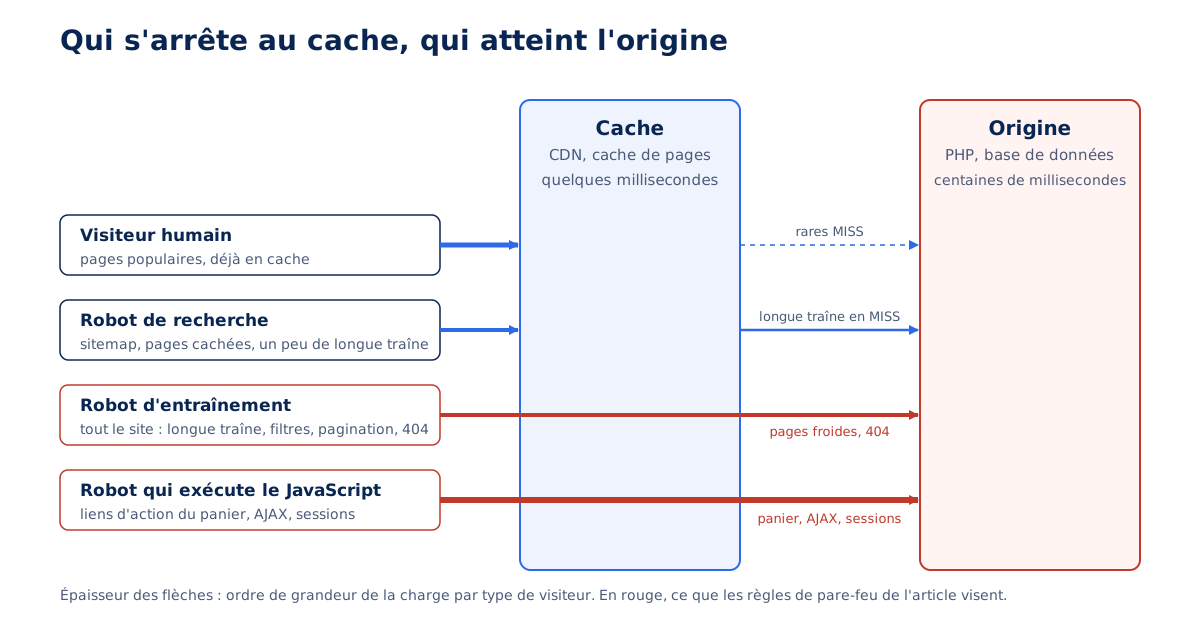
Because it precisely visits pages that are not in the cache. A human reads popular pages, already cached on the CDN or server; a bot browses the entire site, including the long tail, filters, and paginations. On a WooCommerce store audited in September 2026, a single bot accounted for half of the requests that reached the origin.
The cold long tail
A page cache, whether at the CDN or on the server, only contains what has been recently requested. Pages that are rarely viewed (old articles, end-of-catalog items, tag pages) are removed as soon as their lifespan expires, and every robot pass recalculates them in PHP with their SQL queries. The robot therefore reads almost exclusively MISSes, and its unit cost is that of an entire recalculated page, whereas the average visitor costs a memory read. Cache layers and their lifespans are detailed in our web caching guide.
Infinite URL spaces
A dynamic site generates more URLs than it has content: combinable faceted filters, sorting, deep pagination, internal search, calendars, tracking parameters. Each combination is a distinct URL for the robot, thus a recalculated page for the server, and almost never a useful page. Campaign parameters play the same role on popular pages, creating variants that the cache does not recognize, as explained in our article on tracking parameters that destroy cache. A robot discovering these URLs explores an endless space at the origin's expense.
Robots that execute JavaScript
Some robots render pages in an off-screen browser, as Googlebot has done for years. A robot that executes JavaScript also follows links that the JavaScript constructs and triggers the page's network calls. On a shop, this includes cart action links: ?add-to-cart=, remove_item=, ?wc-ajax= and admin-ajax.php calls. Each creates a session, bypasses the page cache by design, and renders a cart in PHP. This is the most expensive scenario a robot can trigger, and the case detailed below.
Errors served without cache
On a CMS, an unfound URL is often the most expensive request on the site: it bypasses the cache, starts the application, executes the main query, notes the failure, and then renders the error template, all to serve nothing. A robot following old links or testing paths absent from your stack (/wp-login.php on a Drupal site, /.env) produces a series of application-level 404s. Our guide to HTTP status codes details why a 404 rendered by the CMS costs hundreds of milliseconds, versus tenths when the web server serves it itself.
What humans endure
PHP processes are finite. When bots occupy half of them recalculating cold pages, human requests wait their turn, and the origin response time increases for everyone. The effect is seen in the TTFB measured in the field by the Chrome User Experience Report, especially on mobile, while lab tests, launched during a quiet moment on a popular cached page, remain good.
Our article on TTFB and its optimization explains this gap between field and lab. In the WooCommerce case mentioned above, the degradation of mobile field TTFB was the first symptom, before any log analysis.
How to measure the load of bots on your site?
By breaking down three things by agent and by bot category: the number of requests, the time spent on the origin, and the cache status. Two sources are sufficient: server access logs and, behind Cloudflare, GraphQL analytics; the question to answer is what proportion of the day's PHP time serves bots, and which ones.
Access logs
The web server access log contains everything needed: the agent, the method, the path, the status, and, depending on the configuration, the response time. Three counts provide the essentials: requests per hour and per agent, the proportion of POSTs (a bot should almost never make them), and requests on non-cacheable paths, cart, account, internal search, admin-ajax.php. The command below, in the combined format of Apache and nginx, isolates the agents hitting these paths.
# Requêtes par agent sur les chemins non cachables, journal au format combiné (Apache, nginx).
# Découpage sur les guillemets : $2 = « MÉTHODE chemin protocole », $6 = agent.
awk -F'"' '
  $2 ~ /(cart|panier|checkout|commander|my-account|mon-compte|admin-ajax|wc-ajax|[?]s=)/ {
    split($2, req, " ")               # req[1] = méthode, req[2] = chemin
    agent = $6
    # Nom du robot quand l agent en déclare un (GPTBot, meta-externalagent…), sinon premier mot
    if (match(agent, /[A-Za-z0-9._-]*([Bb]ot|[Cc]rawler|[Ss]pider|externalagent|externalhit|[Ff]etcher)[A-Za-z0-9._-]*/))
      agent = substr(agent, RSTART, RLENGTH)
    else
      sub(/ .*/, "", agent)
    compte[agent " " req[1]]++
  }
  END { for (k in compte) printf "%8d %s\n", compte[k], k }
' access.log | sort -rn | head -20

# Le même robot, heure par heure (champ 4 = [jj/Mmm/aaaa:hh)
grep -i 'meta-externalagent' access.log | awk '{print substr($4, 2, 14)}' | uniq -c
Command verified on October 15, 2026, on seven days of nginx logs in combined format, with gawk, mawk, BSD awk, and busybox. The first word of the agent is not enough to sort: GPTBot, ClaudeBot, meta-externalagent, bingbot, and Amazonbot all start with Mozilla/5.0, and on this log, a naive version classified 1,093 requests under this single word. Behind Cloudflare, the first field contains the proxy's address, not the visitor's.
A bot that appears in this ranking with POSTs, or with hundreds of requests per hour on the cart, is the prime suspect. The response time, when the log provides it (`%D` in Apache, `$request_time` in nginx), allows us to go from the number of requests to the actual origin time consumed by each agent, the measure that matters.
Cloudflare's GraphQL analytics
Behind Cloudflare, the httpRequestsAdaptiveGroups dataset breaks down requests by agent, cache status, and verified bot category, with the average time spent at the origin. It is sampled, so counts are estimates, but proportions are reliable, and it is the only per-request source on a Pro plan. The query below isolates, over seven days, agents reaching the origin on dynamic or miss for HTML.
# Requête GraphQL (POST https://api.cloudflare.com/client/v4/graphql, jeton « Analytics : Read »)
# Agents qui atteignent l'origine sur du HTML : requêtes, statut de cache, temps d'origine moyen.
{
  viewer {
    zones(filter: { zoneTag: "<identifiant de zone>" }) {
      agents: httpRequestsAdaptiveGroups(
        limit: 50
        filter: {
          datetime_geq: "2026-10-08T00:00:00Z"
          datetime_lt:  "2026-10-15T00:00:00Z"
          edgeResponseContentTypeName: "html"
          cacheStatus_in: ["dynamic", "miss", "expired", "bypass"]
        }
        orderBy: [count_DESC]
      ) {
        count
        avg { originResponseDurationMs }      # temps passé à l'origine, en ms
        dimensions {
          userAgent                           # agent déclaré
          clientRequestHTTPMethodName         # GET ou POST
          cacheStatus
        }
      }
    }
  }
}
Query verified on October 15, 2026, on a free plan zone, with a seven-day window accepted. The first line of the response had an empty agent: requests without a User-Agent form a separate group, to be treated as bots, since no browser sends them.
The product of the number of requests by the average origin time gives, agent by agent, the seconds of PHP consumed. On the September 2026 WooCommerce store, this calculation gave Meta's bot more than two-thirds of the HTML computed by the origin, even though it represented only half of the requests: its pages were the most expensive, because none were cached.
Distinguishing a real bot from a fake agent
Any script can claim to be Googlebot. Every serious operator publishes a verification method: Google requires a reverse DNS lookup to *.googlebot.com followed by a direct lookup that returns the same address, Apple does the same for *.applebot.apple.com, Meta refers to the routes of its autonomous system AS32934, OpenAI, Anthropic, Perplexity, and Amazon publish lists of addresses in JSON format. Behind Cloudflare, the verified bot category performs this check for you, by IP address or by signature. An agent claiming to be Googlebot from an ordinary hosting provider address is a fake, to be blocked without hesitation.
A third method is being implemented: Web Bot Auth, cryptographic signatures placed in HTTP headers, which the site verifies with the public key that the bot publishes under /.well-known/http-message-signatures-directory. Cloudflare already uses it, based on two IETF drafts (draft-meunier-web-bot-auth-architecture and draft-meunier-http-message-signatures-directory) which, as of October 8, 2026, remain drafts; verification by DNS or by address list remains necessary for operators who do not sign.
Is your site as fast as your visitors expect?

Training, research, agent: which bots should be allowed through?
The decision belongs to the publisher and depends on the site's model. Agency convention: a showcase or corporate site allows everything, because it benefits from being cited; a media outlet, whose content is the product, blocks training bots and never prohibits inference bots, search, and user queries, which bring it readers.
Three families, and tokens per operator
Operators now document their bots by purpose, and Cloudflare adopted the same three-category system on July 1, 2026: search (indexing to respond later and send traffic back), agent (acting in real-time for a person), and training (collecting to train or refine a model). The table below shows the tokens published by each operator, verified on October 15, 2026; these lists change, and the operator's page is the definitive source on the day you write your file.
| Operator | Training | Search | User action | Verification |
|---|---|---|---|---|
| OpenAI | GPTBot | OAI-SearchBot | ChatGPT-User (robots.txt may not apply) | JSON address lists |
| Anthropic | ClaudeBot | Claude-SearchBot | Claude-User | JSON address list |
| Meta | meta-externalagent | meta-webindexer | meta-externalfetcher (may ignore robots.txt) | AS32934 Routes |
| Perplexity | None declared | PerplexityBot | Perplexity-User (ignores robots.txt) | JSON address lists |
| Amazon | Amazonbot (may be used for training) | Amzn-SearchBot | Amzn-User (may not follow all rules) | Address lists |
| Apple | Applebot-Extended (usage token, does not crawl) | Applebot | None declared | Reverse DNS *.applebot.apple.com |
Google-Extended (usage token, no own agent) | Googlebot | None declared | Reverse DNS *.googlebot.com | |
| Common Crawl | CCBot | None | None | None |
Two tokens are closely related. Applebot-Extended does not crawl any pages: it only tells Apple not to use what Applebot has collected for training, with no effect on Siri or ranking. Google-Extended is of the same type, without its own agent: it refuses the use of content for training Gemini models and for anchoring their responses in the index, and Google specifies that it changes nothing regarding presence in search.
User-triggered bots (ChatGPT-User, Perplexity-User, meta-externalfetcher, Amzn-User) warn that they may override robots.txt, as a person requested the page: their load is only regulated at the firewall.
The Google case
Googlebot powers both classic search and generated responses (AI Overviews, AI Mode), with a single bot and a single token. As of October 15, 2026, Google does not offer a setting that removes a site from generated summaries while keeping it in classic results; the only documented levers are those for snippets (nosnippet, data-nosnippet, max-snippet), which also limit ordinary display. Blocking Googlebot to escape summaries therefore means exiting Google Search, a trade-off that belongs to the publisher.
The landscape is shifting. In the UK, the Competition and Markets Authority (CMA) imposed on Google, on June 3, 2026, a conduct obligation towards publishers: effective controls on the use of their content in generative AI functions of search, without penalty in classic results. The CMA's opinion sets the effective date as December 3, 2026, for responses shown in the UK; the effect on settings offered elsewhere remains to be seen.
Declare a preference: Content-Signal
The Content-Signal directive, placed in a User-agent group in robots.txt, declares for which uses content can be collected: search (index and results made of links and snippets, without generated summaries), ai-input (real-time injection into a model at the time of response), and ai-train (training or fine-tuning). It complements Disallow by robot without replacing it: tokens change with operators, the declared preference remains stable.
Its status calls for caution. The vocabulary comes from an IETF draft written by two Cloudflare authors, last revised on October 1, 2025, and which has now expired; work on a preference vocabulary continues in the AIPREF working group. It is a declared preference, without standard value or technical constraint.
The legal scope is a Cloudflare position: its managed robots.txt documentation presents a no as an express reservation of rights under Article 4 of the European Directive 2019/790 on text and data mining. A publisher relying on it relies on an interpretation that no court decision has yet confirmed.
Cloudflare is indeed evolving its mechanism. Since September 15, 2026, managed robots.txt has been deprecated in favor of Bot Preference Sync, available on all plans, which rewrites the site's robots.txt from the dashboard settings, at the top of the existing file and preserving the Disallow entries already present. A file originally controlled does not need this service, and a combination of the two would produce two `*` groups with two preferences.
A sample robots.txt for a media outlet
The file below applies the media convention: declared preference, blocked training robots, explicitly allowed inference robots. A group specific to a robot replaces the `*` group for it, hence the repetition of the preference and exclusions in the group of allowed robots. On WordPress, the file is virtual and written via the robots_txt filter; on another server, a physical file at the root does the same job, as for the rules described in our guide to the .htaccess file.
# robots.txt d'un site de type média (convention agence, jetons vérifiés le 15 octobre 2026)
User-agent: *
Content-Signal: search=yes, ai-input=yes, ai-train=no
Disallow: /wp-admin/
Disallow: /?s=
Disallow: /recherche/
Allow: /wp-admin/admin-ajax.php

# Robots d'entraînement : bloqués
User-agent: GPTBot
User-agent: ClaudeBot
User-agent: CCBot
User-agent: Applebot-Extended
User-agent: meta-externalagent
User-agent: Amazonbot
Disallow: /

# Robots de recherche et d'action d'un utilisateur : autorisés, avec les mêmes exclusions que le groupe *
User-agent: OAI-SearchBot
User-agent: ChatGPT-User
User-agent: Claude-SearchBot
User-agent: Claude-User
User-agent: PerplexityBot
User-agent: Perplexity-User
User-agent: meta-webindexer
User-agent: meta-externalfetcher
User-agent: Amzn-SearchBot
User-agent: Amzn-User
Content-Signal: search=yes, ai-input=yes, ai-train=no
Disallow: /wp-admin/
Disallow: /?s=
Disallow: /recherche/
Allow: /

Sitemap: https://exemple.com/sitemap.xml
Control is exercised on the file actually served, robot by robot, using the standard Python library parser, which applies the most specific group rule as RFC 9309 does. A modified file takes up to 24 hours to be re-read: RFC 9309 recommends that robots do not keep a cached copy beyond that, and Google documents the same duration, extended if the file returns an error. On WordPress, the virtual file is cached like a page: clear the page cache before purging the CDN, otherwise the edge server will retrieve the old version.
# Contrôle du robots.txt servi, robot par robot (Python 3, bibliothèque standard)
import urllib.request, urllib.robotparser

site = "https://exemple.com"
contenu = urllib.request.urlopen(site + "/robots.txt").read().decode("utf-8")
p = urllib.robotparser.RobotFileParser()
p.parse(contenu.splitlines())

for agent in ["GPTBot", "ClaudeBot", "meta-externalagent",
              "OAI-SearchBot", "Claude-User", "PerplexityBot", "Googlebot"]:
    # True = la page peut être explorée par cet agent
    print(f"{agent:20s} {p.can_fetch(agent, site + '/un-article/')}")
How to control robot load beyond robots.txt?
At the firewall, by blocking non-cacheable actions and leaving pages open. robots.txt is a request: RFC 9309 has specified since September 2022 that its rules are not a form of access authorization. A bot that executes JavaScript follows action links regardless of what the file says; only a firewall rule stops it.
Block actions, keep pages
On the WooCommerce store audited in September 2026, the bot meta-externalagent/1.1, verified by Cloudflare in the "AI Crawler" category, was generating hundreds of thousands of requests per week on cart/?remove_item=…, POST /?wc-ajax=…, and POST /wp-admin/admin-ajax.php, with as many POSTs as GETs on the site. robots.txt could do nothing about it: these requests originated from the JavaScript of the pages that the file allowed. The Cloudflare firewall rule below only blocks non-cacheable methods and paths for this agent, and leaves content pages accessible.
# Règle personnalisée Cloudflare, action « Block » (jamais « Challenge » : un défi casse les appels AJAX réels)
# Adapter les chemins aux slugs traduits du site (panier, commande, compte).
(lower(http.user_agent) contains "meta-externalagent")
and (
  not http.request.method in {"GET" "HEAD"}
  or http.request.uri.path contains "/wp-admin/"
  or http.request.uri.path contains "/panier" or http.request.uri.path contains "/cart"
  or http.request.uri.path contains "/commander" or http.request.uri.path contains "/checkout"
  or http.request.uri.path contains "/mon-compte" or http.request.uri.path contains "/my-account"
  or http.request.uri.query contains "wc-ajax" or http.request.uri.query contains "add-to-cart"
  or http.request.uri.query contains "remove_item" or http.request.uri.query contains "add_to_wishlist"
)
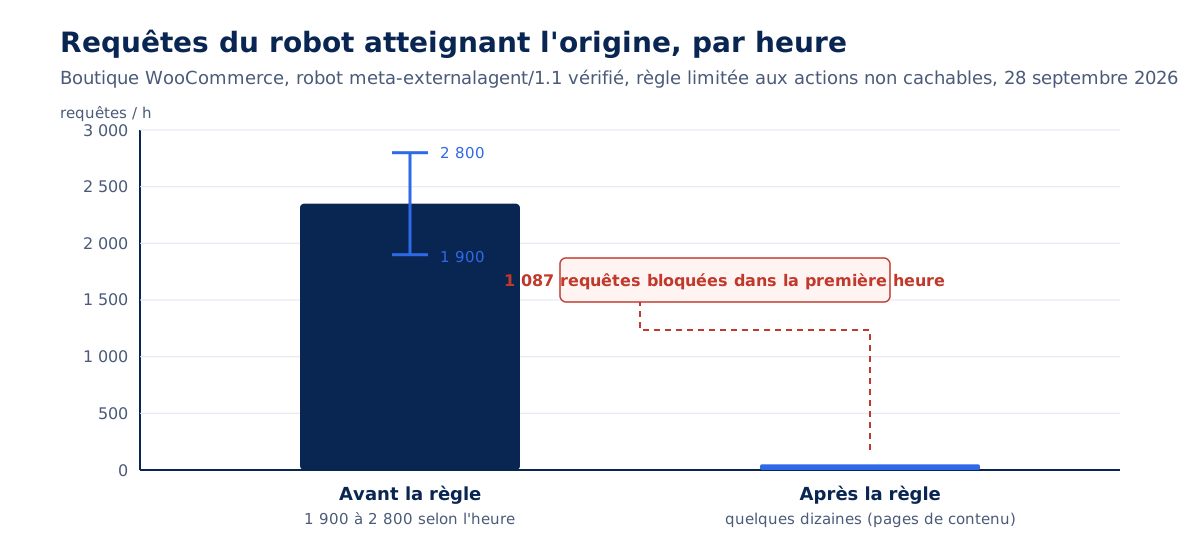
Measurement from September 28, 2026, recorded in the store's Cloudflare analytics: 1,087 requests blocked in the hour following deployment, and a bot that went from approximately 1,900 to 2,800 requests per hour initially to a few dozen, those for content pages. The initial TTFB decreased with it. The rule applies to any bot that executes JavaScript; the token changes, the logic remains.
Why block rather than challenge? A Cloudflare JavaScript challenge interrupts the request with an HTML page that the browser must display and resolve; an AJAX call expects JSON, receives this page, fails, and does not retry. On a content site measured in September 2026, an OWASP ruleset set to challenge on admin-ajax.php presented about 438,000 challenges per day to real visitors, with 14 resolved. A challenge on a request that is not a page is equivalent to a block, and it affects humans before bots.
Cloudflare settings since July 2026
Since July 1, 2026, all Cloudflare plans, including the free plan, separately configure the three categories of AI bots (search, agent, training), with three options each: block everywhere, block on pages that display advertising, do not block. Cloudflare automatically detects pages with advertising, without documenting the method.
Starting September 15, 2026, for new domains joining Cloudflare, training and bots are blocked by default on pages with ads, with search still allowed. The release notes explicitly limit this new default to domains that register, with existing customers able to opt out before the date. Press articles have announced a broader scope; the official text does not confirm it.
The most consequential point concerns mixed bots. Starting September 15, 2026, a bot that serves both search and training, Googlebot, Bingbot, or Applebot, is treated according to all its behaviors: a block on training also blocks it, thus removing the site from the index. To avoid this effect, Cloudflare introduced on the same day a "Disallow AI Training" setting that publishes the preference in robots.txt via Bot Preference Sync, and its September 15th post provides two useful orders of magnitude.
Less than 1% of Cloudflare sites choose to block search bots.
Bryan Becker, Cloudflare, in the post Have it both ways: stay discoverable in search while disallowing AI training, published September 15, 2026
In the same post, 17% of sites enable a training blocking mechanism. The distinction between the two families is therefore already the majority practice among those who configure something, and total blocking remains marginal.
Verified bots bypass default protections
Cloudflare documentation explains why the targeted rule is necessary: verified bots have historically been excluded from default configurations, across all plans, and Super Bot Fight Mode lets them pass. A verified AI bot executing the cart is therefore stopped neither by bot protection nor by score filtering. It must be named in a rule: a legitimate bot is also one that your protections let in.
Without Cloudflare: nginx, Apache, fail2ban
Without a CDN in front of the site, the web server enforces the rule. With nginx, a map on the agent assigns a rate limit key to only the targeted bots, and limit_req caps their rate on costly paths, responding with 429 beyond that; the rest of the traffic has no key, thus no limit. With Apache, a RewriteCond directive on %{HTTP_USER_AGENT} and the path returns 403 on the same actions. With or without a CDN (our article on the pros and cons of a CDN helps decide), the rule targets actions, never pages.
# nginx : limiter le débit des robots d'IA sur les actions non cachables (contexte http puis server)
map $http_user_agent $robot_ia {
    default                           "";          # pas de clé : aucune limite
    ~*(GPTBot|ClaudeBot|meta-externalagent|Amazonbot|CCBot)  $binary_remote_addr;
}
limit_req_zone $robot_ia zone=robots_ia:10m rate=10r/m;   # 10 requêtes par minute et par adresse

server {
    # Les actions du panier et les appels AJAX : limitées pour les robots, intactes pour les visiteurs
    location ~ ^/(panier|cart|commander|checkout|mon-compte|my-account)/ {
        limit_req zone=robots_ia burst=5 nodelay;
        limit_req_status 429;
        try_files $uri $uri/ /index.php?$args;
    }
    location = /wp-admin/admin-ajax.php {
        limit_req zone=robots_ia burst=5 nodelay;
        limit_req_status 429;
        include fastcgi_params;   # puis la configuration PHP habituelle du site
    }
}
Checked on October 15, 2026 with nginx 1.30.6: out of 30 GPTBot requests in 10 seconds to the cart, 6 pass immediately (1 at nominal rate and 5 burst), a seventh after 6 seconds, when nginx frees up a slot, and the other 23 receive a 429. The 30 requests from a browser all pass, and the limit also applies to POST on admin-ajax.php.
A precaution on servers equipped with fail2ban, Plesk in particular: a jail that bans based on the volume of requests or 404s ends up banning search engine bots, which produce both. Google publishes its IP ranges by category (common-crawlers.json, special-crawlers.json), to be trusted and resynchronized weekly; its general list goog.json also contains ranges leased to Google Cloud clients, and trusting it exempts any machine leased from Google.
How to make crawling less expensive?
By reducing the number of URLs the server has to calculate, and by making the others cacheable. A bot that only finds cached pages and no action links costs a few milliseconds per request, regardless of its volume. Five areas are sufficient, and the first, POST actions, alone solves the WooCommerce issue.
POST actions, never GET links
A link that modifies the cart, votes, or unsubscribes is followed by any bot, and by email antivirus when it's in an email. RFC 9110 defines GET and HEAD as safe methods, precisely so that automated systems can use them without risk, and draws an obligation from this: an action selected by a URL parameter must be disabled when accessed by a safe method.
An action is therefore triggered by a button in a POST form, with a token; a link only displays a question. On WooCommerce, this involves removing ?add-to-cart= links from archives and using form buttons instead of action links.
Close infinite spaces
Internal search, filter combinations, and sorting are closed to bots via Disallow in robots.txt, and via filter links that bots do not follow: a button that builds the URL in JavaScript, or a rel="nofollow" link for search engines that respect it. What a bot cannot discover costs nothing.
On PrestaShop, the core ignores cart actions from bots it recognizes by their agent, but its list, even extended in version 9.2, does not contain meta-externalagent: the firewall is still necessary. Our comparison of CMS for a high-performance site reviews these design differences between platforms.
Normalize cache key and hide errors
At the CDN, the cache key ignores parameters that do not change the page (campaign parameters, click identifiers like fbclid or gclid), so a bot following decorated links hits the cached version. 404 and 410 responses are cached for a few minutes: a phantom URL is then calculated only once, then served from the edge on subsequent visits.
Missing static files are handled by the web server (try_files $uri =404;) without waking up the application. On a site measured in September 2026, a deleted background image still referenced by the CSS caused a full 49 KB 404 page to be downloaded instead across 32 records.
An up-to-date sitemap and directives that bots read
A sitemap that only lists canonical URLs in 200 status avoids bots discovering the site through its tag pages and paginations. The Crawl-delay directive, often recommended to slow down a bot, is ignored by Google, which only reads user-agent, allow, disallow, and sitemap; Apple and Amazon also ignore it, Anthropic states it respects it. It remains relevant for SEO tools that read it, and of almost no use for the load of AI bots. The link between crawl, speed, and SEO is discussed in our article on the SEO impact of web performance.
Cache preloading: one more bot
Cache extensions offer to preload pages after each purge, so that the first visitor finds a ready version. This preloading is a full site crawl, launched by the server itself (the WP Rocket/Preload agent starts from the server address): a purge for each publication on a site of 20,000 pages triggers 20,000 recalculations. Limiting the frequency of purges and preloading only popular pages avoids inflicting on ourselves the load we blame bots for; the strategy is detailed in our cache guide.
Where to start?
With a measurement, then a decision, then a rule. Measure the proportion of bots in origin time over seven days; decide with the publisher on the training policy according to the site model; block uncacheable actions from bots executing JavaScript at the firewall; then monitor the breakdown by bot category at each maintenance pass.
This approach avoids the two most common mistakes: writing a robots.txt and thinking the problem is solved, when the file only governs robots that read it and never actions triggered by JavaScript; or broadly blocking at the firewall, including challenges, and breaking real visitors' AJAX calls while removing the site from the index. In between, a narrow rule on specific actions, measured before and after, does the bulk of the work.
Robot load is one of the items we track in the managed hosting of the sites we manage, because it degrades on its own, at the rate new operators appear. Performance monitoring that tracks real-world TTFB signals a drift in a few days, and a performance audit quantifies it when it's already there. The initial question remains the same: what portion of your server is working for humans?