
Choosing a CMS often feels like choosing for comfort: an administration interface that is pleasant to use, an attractive theme catalog, a reasonable subscription price. However, behind this comfort lies a much more significant decision, because the choice of CMS sets a performance ceiling that no subsequent optimization will allow you to break. According to W3Techs, as of August 24, 2026, 69.1% of websites rely on an identified content management system: the question therefore concerns the vast majority of web projects.
Comparisons that dominate search results rank platforms by their features, price, or ease of use. None ask the question that conditions all others, that of what each platform technically allows or prohibits: what rendering mode, what control over the generated HTML, what access to the infrastructure. Yet, these are the three levers that determine the Core Web Vitals your site can achieve, or never.
A site can be slow on an excellent platform; in fact, this is the most common case. The reverse does not happen: a site never exceeds the structural ceiling of its architecture. So, between WordPress, Shopify, Webflow, PrestaShop, Drupal, or a headless CMS, how do you identify the platform whose ceiling truly matches your project?
What is a CMS?
A CMS, for Content Management System, is software that allows you to create, modify, and publish website content without writing the code for each page. WordPress, used by 40.7% of all websites according to W3Techs in August 2026, is the most widespread example in the world, ahead of Shopify and Wix.
In French, we speak of a "système de gestion de contenu." The technical definition involves a separation: on one side, the content, stored in a database or as files; on the other, the presentation, assembled by templates. To the question "what is a CMS?", the short answer is therefore: a page assembler from structured content, equipped with an editing interface. This assembly mechanism is precisely the first place where performance is determined.
Still according to the W3Techs report of August 24, 2026, the market share hierarchy places WordPress at 58.9% of sites with an identified CMS, ahead of Shopify (7.7%), Wix (6.1%), Squarespace (3.5%), Joomla (1.7%), Webflow and Drupal (1.2% each), Adobe Commerce (0.9%), PrestaShop (0.7%), and TYPO3 (0.5%). These dated figures are worth keeping in mind, because popularity says nothing about performance ceiling: it measures adoption, not architecture.
What are the main types of CMS?
Five families cover most of the market, and this typology structures the entire performance analysis that follows, because each family imposes a different rendering mode:
- the traditional monolithic CMS, which manages content and presentation in a single application: WordPress, Joomla, Drupal, TYPO3, PrestaShop, or Magento;
- the decoupled CMS, which retains its native rendering layer but also exposes its content via API: WordPress via its REST API, Drupal in "progressively decoupled" mode;
- the headless CMS, which abandons any presentation layer and only serves structured content: Strapi, Contentful, Sanity, Storyblok, or Directus;
- the static site generator, which pre-builds all pages at deployment time: Astro, Eleventy, Hugo, or Next.js in static export;
- the hosted site builder, which imposes its infrastructure and visual editor: Shopify, Webflow, Squarespace, or Wix.
The most structuring boundary is not between these five families, but between two worlds: open-source CMS that you host yourself, and SaaS platforms that host you. This distinction deserves a whole section, because it determines who controls the infrastructure, and therefore part of the ceiling.
What is the difference between a CMS and a CRM?
A CMS manages the content of a website, a CRM (Customer Relationship Management) manages customer relationships: contacts, sales history, sales opportunities. The two tools often connect, a form from the first feeding the second, but they never substitute for each other. HubSpot causes confusion by offering both, CMS and CRM, in the same software suite.
Does the choice of CMS affect a website's speed?
Yes, but not as one might think: the CMS doesn't make a site slow or fast, it sets a ceiling. A well-maintained WordPress passes the three Core Web Vitals, a neglected WordPress fails them all, and the gap between the two commonly reaches several seconds on the LCP measured on mobile. The platform defines the scope of possibilities, the implementation decides where one stands within that scope.
Specifically, the choice of platform determines six levers that the Core Web Vitals then measure in real conditions, and each of these levers is limited differently depending on the chosen CMS:
- the rendering mode: on-the-fly generation, page cache, static pre-generation, or server-side rendering, the primary factor of TTFB;
- control over the generated HTML: a CMS that imposes its markup and containers structurally limits the optimization of LCP and CLS;
- control over loaded resources: removing unnecessary CSS, loading scripts conditionally, controlling priority order;
- the ecosystem of extensions: each module adds requests, CSS, and JavaScript, and the real question is the ability to measure this unit cost;
- access to infrastructure: server cache, PHP version, database, CDN, and HTTP headers;
- the room for maneuver on the theme and page builders, the most frequent aggravating factor across all CMSs.
The first of these levers weighs more than all the others combined, as it determines the server's initial response time. Google's documentation sets the threshold for a good TTFB under 800 ms, and reminds us that a degraded TTFB mechanically delays all subsequent metrics: LCP can never be better than the TTFB that precedes it.
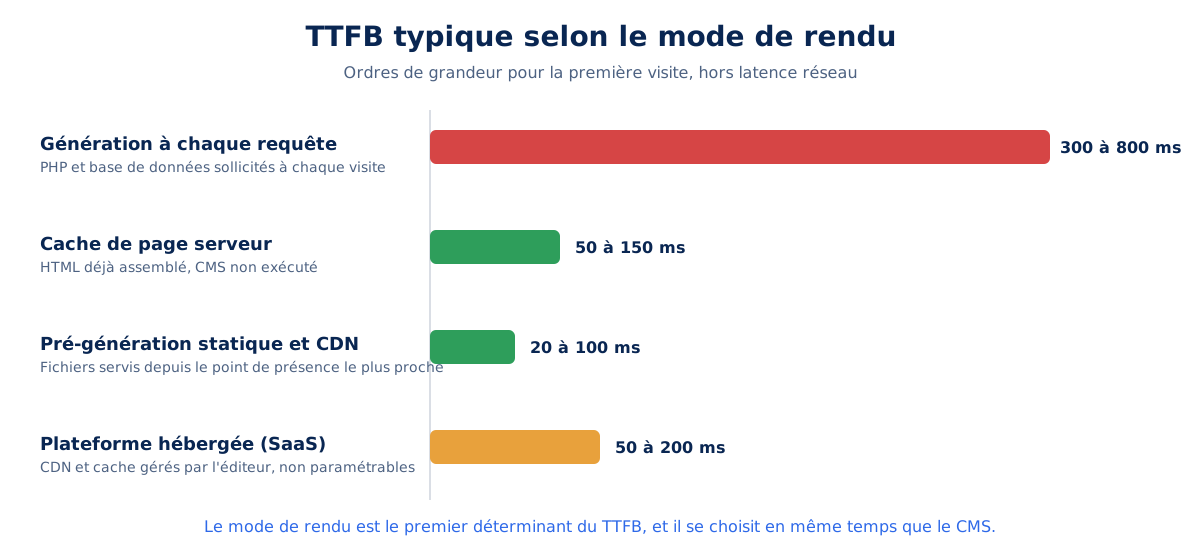
A monolithic CMS that executes PHP and queries its database on each request produces TTFBs of 300 to 800 ms, while the same page served from a cache drops below 150 ms: this is the entire purpose of TTFB optimization and web caching at every level. Harry Roberts, a recognized consultant in the field, summarizes the challenge with a formula that has become a benchmark among web performance specialists.
A good TTFB doesn't necessarily mean your site will be fast, but a bad TTFB almost certainly guarantees a slow site.
Harry Roberts, an independent web performance consultant, in his article "Time to First Byte: What It Is and How to Improve It" published on CSS Wizardry in August 2019
What slows down a CMS-based site?
In the vast majority of audits, the culprit is not the CMS itself but four implementation factors: an overloaded theme, a page builder, redundant extensions, and undersized hosting. On WordPress, the weight of the theme and page builder alone explains most of the gap between a fast installation and a sluggish one, a phenomenon detailed in choosing a WordPress theme.
Page builders like Elementor or Divi inject hundreds of kilobytes of CSS and JavaScript into every page, even for simple layouts, and multiply nested containers in the DOM. Lighthouse's DOM size audit, documented by the Chrome team, flags pages that exceed a few hundred nodes, a threshold page builders cross on the homepage. HTTP Archive's Web Almanac 2025 observes that recent optimizations in these tools, such as conditional loading and minification, reduce the gap but never completely eliminate it : the extra markup and scripts remain structural.
The answer to the question "do page builders degrade performance?" is therefore yes, to an extent that varies depending on the tool and its use case. A builder used for three simple templates costs little; the same builder left in the hands of contributors who stack columns, animations, and widgets produces pages with a DOM three to five times heavier than a native block theme, with the corresponding CLS and INP.
How many extensions can a CMS support?
There is no set limit: ten well-written extensions weigh less than a single poorly designed one. The official WordPress directory lists nearly 60,000 free extensions, and the only relevant question is about the unit cost of each on the critical path: added requests, CSS, and JavaScript loaded on pages that don't need them.
The evaluation method involves two steps: measure the page with and without the extension, and check if its resources load everywhere or only where they are needed. A form extension that injects its scripts on all 2,000 pages of the site for a single contact form illustrates the typical problem of open ecosystems: the functionality is flawless, but its default implementation is not. These implementation factors can be corrected; the next lever, infrastructure, depends entirely on the chosen CMS family.
Open-source CMS or hosted platform: what difference does infrastructure make?
A self-hosted open-source CMS like WordPress, Drupal, Joomla, TYPO3, PrestaShop, or Magento allows you to choose the server, PHP version, cache, and CDN. A hosted platform like Shopify, Webflow, Squarespace, or Wix imposes its shared infrastructure: you control neither the server, nor the cache, nor the HTTP headers. Each model raises the ceiling in opposite directions.
The self-hosted model offers the highest ceiling and the lowest floor. With your hand on the infrastructure, you can stack opcode cache, object cache, page cache, and CDN, enable HTTP/3 or Brotli compression, and aim for TTFBs under 100 ms. The downside is that none of this exists by default : a WordPress site on entry-level shared hosting, without configured caching, will start from a very low point.
This open-source family also bears the responsibility for updates : PHP versions, security patches, and extension compatibility are your responsibility or that of your host. A self-hosted site that remains on an obsolete PHP version for three years loses both security and execution speed, even though each major PHP version brings measurable gains in page generation time for a CMS.
The SaaS model reverses the equation : the publisher manages the CDN, caching, and scaling for all its clients simultaneously, which guarantees a correct foundation without technical expertise. The data from the Web Almanac 2025 confirms this : closed platforms are progressing faster on Core Web Vitals than open-source CMSs, precisely because an improvement deployed by the publisher instantly benefits the entire fleet. The price for this foundation is a ceiling set once and for all : when your store or site reaches the platform's limit, no provider will be able to push it further.
A word about first-generation builders, led by Wix : their situation illustrates how much the debate deserves to be dated. For years, Wix displayed mediocre performance, before a massive investment that, according to the Web Almanac 2025, puts it at 74% of sites passing Core Web Vitals on mobile, ahead of all open-source CMSs. However, the ceiling has not moved : unmanageable generated HTML, no native content migration to another platform, no access to low-level layers. A simple showcase site will live there correctly; a project intended to grow, to be taken over by an agency, or to leave the platform will find itself trapped in a contractual glass ceiling as much as a technical one. It is this combination of lock-in and opacity, much more than the current figures, that justifies discarding these platforms for any high-stakes project.
What is the fastest CMS?
No CMS is "fastest" in absolute terms, but real-world data ranks platforms. According to the Web Almanac 2025, 74% of Wix sites pass Core Web Vitals on mobile, compared to 45% for WordPress; TYPO3 reaches 79%, Duda 85%. The gap reflects the degree of control exerted by the platform, not an intrinsic code quality.
These averages hide enormous dispersion, and that's what matters for your project. Closed platforms concentrate their sites around their foundation: few very slow sites, no exceptional sites. Open CMS span the entire spectrum: WordPress hosts both sites that load in under a second and sites that display nothing for five, so that the average of an open CMS predicts nothing about the site you will build. Monthly monitoring of the Core Web Vitals Technology Report allows you to check these trajectories platform by platform, continuously.
The median Lighthouse scores recorded by the same Web Almanac 2025 complete the picture on mobile: Wix at 64, Webflow at 58, Duda at 57, Shopify at 52, WordPress at 41, Joomla at 40, PrestaShop and Squarespace between 30 and 32. The Squarespace case is instructive: excellent on INP in real conditions (96% of sites in the green), mediocre in the lab, proof that these figures describe typical implementations, never a destiny. It remains to understand, platform by platform, where these discrepancies come from.
What each platform allows, and what it forbids
Examining platforms one by one from the same angle, what each allows and what it locks down, is more illuminating than a ranking. The criteria remain constant: rendering mode, HTML produced, resources loaded, infrastructure, the four determinants established earlier.
WordPress, the most variable ceiling
On WordPress, everything is open: HTML can be fully controlled with a custom theme or a lean block theme, each script is loaded conditionally via the documented hooks of the WordPress developer, and the infrastructure is yours. Well-built, a WordPress with page caching and CDN reaches TTFBs below 100 ms and green Core Web Vitals without difficulty, as detailed in our guide to optimizing Core Web Vitals on WordPress.
The coin has a flip side: this freedom also explains why only 45% of WordPress sites pass mobile Core Web Vitals according to the Web Almanac 2025, the lowest score among the ten platforms tracked. All-in-one themes, page builders, and stacks of plugins without measuring unit cost drag the average down, so that WordPress combines the highest ceiling and the lowest average: it all depends on who builds it.
Drupal, Joomla, and TYPO3: the rigor of the veterans
Drupal natively offers what WordPress delegates to extensions: granular render caching, CSS and JavaScript aggregation, BigPipe to send cacheable parts of a page before dynamic parts. This architectural rigor explains why Drupal sites, often complex and institutional, show continuous improvement in their Core Web Vitals, gaining 4 points between 2024 and 2025 according to the Web Almanac.
TYPO3 is more surprising: 79% of sites passing mobile Core Web Vitals and 89% with good LCP in 2025, the best scores among all open-source CMS. Its ecosystem of seasoned professionals and its more limited extension market work in its favor. Joomla, conversely, is slowly aging with 1.7% market share, but remains stable in visual stability with about 84% good CLS: these three veterans demonstrate that the age of a platform does not doom its performance, as long as the architecture keeps up.
Webflow, clean code under lock and key
Webflow occupies a unique position: a professional visual editor that generates HTML and CSS notably cleaner than those of WordPress page builders, published on an AWS infrastructure served by the Fastly CDN. Pages are pre-rendered and cached at the edge, which explains a median mobile Lighthouse score of 58, second in the market according to the 2025 Web Almanac, and a perfect SEO score of 100.
The lock remains closed: no access to the server or headers, no configurable cache, and the editor's animated interactions add proprietary JavaScript that can neither be deferred nor removed. For a showcase site or a brand site where the design team wants to iterate quickly, the compromise is often favorable, as for any corporate site focused on speed; for a high-volume, business logic, or complex multilingual site, the ceiling is reached sooner than one might think.
Squarespace and Wix, the storefront without the keys
Squarespace takes the all-in-one approach to its conclusion: locked themes, mandatory hosting, block-based customization. The real-world result is honorable, with 96% good INP and 89% good CLS in 2025 according to the Web Almanac, but the median mobile Lighthouse score tops out around 30, a sign of heavy platform JavaScript that nothing allows to lighten from the outside. In France, its presence remains marginal compared to Wix.
Wix deserves the same nuanced verdict as above: metrics that are now solid, 74% of sites passing Core Web Vitals and 95% good CLS in 2025, but a model without site export, without access to generated HTML, and without reversibility. These two platforms are suitable for projects where it is accepted that they will not grow beyond the intended scope, and it is precisely this scope that ambitious projects always end up exceeding. For them, another path is being talked about a lot: headless.
Is your site as fast as your visitors expect?

What is a headless CMS and when should you choose it?
A headless CMS is a content management system without a presentation layer: it stores and structures content, then exposes it via API to a separately developed front-end, most often with a JavaScript framework like Next.js, Nuxt, or Astro. Strapi, Contentful, Sanity, and Storyblok dominate this market, alongside WordPress used in decoupled mode via its REST or GraphQL API.
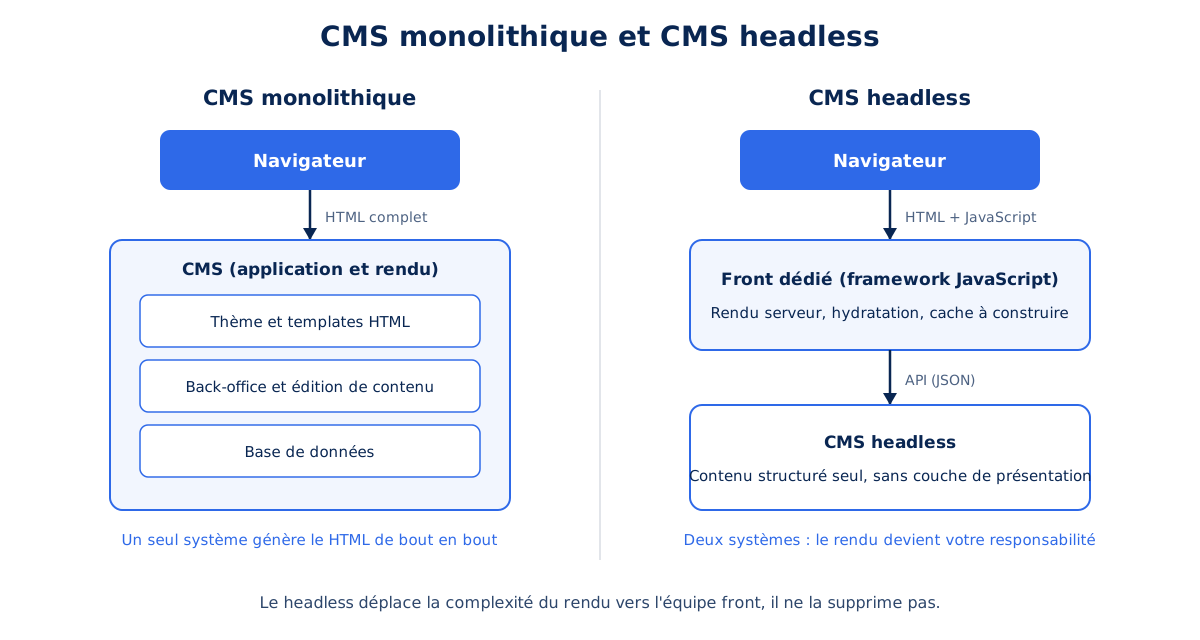
Decoupling separates two responsibilities that a monolithic CMS merges: content management on one hand, and its presentation on the other. This separation opens up real possibilities: distributing the same content to a website, a mobile app, and in-store displays, total freedom on the front-end, and independent scaling of the two layers. It also has a cost that solution providers rarely mention, because the complexity of rendering does not disappear, it changes hands.
Is a headless CMS necessarily faster?
No, and this is the most costly misunderstanding on the market: a poorly built front-end on a headless back-end is slower than a well-cached monolithic CMS. Headless shifts the rendering responsibility to your front-end team, and a JavaScript bundle of several hundred kilobytes negates any benefit of decoupling on mobile.
The mechanism is documented by Google in its reference guide on web rendering: content served by API must be rendered somewhere, server-side, at build time, or in the browser. Pure client-side rendering pushes display after JavaScript download, parsing, and execution, then hydration blocks the main thread, degrading both LCP and the responsiveness measured by INP. A monolithic CMS whose pages come from a server cache in full HTML avoids this entire chain of costs on the browser side: the HTML arrives ready to display.
Well executed, with static pre-rendering or careful server-side rendering, a headless site achieves CDN TTFB, under 100 ms, and remarkable LCPs. The difference between the two scenarios lies not in the tool or the framework, but in the maturity of the front-end team building it : this is the honest decision criterion.
When is decoupling truly justified?
Headless is justified based on specific criteria : multiple distribution channels for the same content, a dedicated and sustainable front-end team, highly structured content, and a volume that benefits from pre-rendering. Without these conditions, it adds a layer of complexity with no measurable benefit : front-end hosting, cache management, rebuilding previews, operating SSR.
For a showcase website of a few dozen pages, a small team, or an organization without internal JavaScript expertise, a well-cached monolithic CMS provides equivalent service for a fraction of the ownership cost. The question to ask is not 'is headless more modern?' but 'who will operate the front-end in three years?' : if the answer is uncertain, the cacheable monolith remains the rational choice. The same logic of responsibility sheds light on another recurring question, that of a site developed entirely custom.
What is the performance difference between a CMS and a custom-built site?
A custom-built site is not faster than a CMS-based site; it is as fast as the team that develops it. According to W3Techs as of August 24, 2026, 30.9% of websites run without an identified CMS, and this pool covers the entire spectrum of observable performance, from the instantaneous static site to the single-page application that takes eight seconds to load.
Custom development removes the platform's ceiling and, with it, all its safeguards : no more provided cache, no more responsive image generation, no more shared optimization libraries. Each mechanism that WordPress, Shopify, or Webflow provide by default becomes a budget line item, and audit experience shows that these lines are the first to be sacrificed when the schedule tightens. A mature CMS incorporates fifteen years of performance fixes that few internal developments can replicate.
The calculation becomes rational in two situations : a web product whose interface is the core business, where front-end investment is sustainably justified, or a need so specific that no platform covers it without contortions. For a classic editorial or e-commerce site, custom development amounts to paying dearly for a theoretical ceiling that no one will reach. E-commerce, in particular, poses these trade-off questions with even tougher constraints.
Which CMS to choose for a high-performance e-commerce site?
E-commerce intensifies the problem because part of the user journey cannot be hidden: the cart, checkout tunnel, and stock levels are calculated with every request, for every visitor. Shopify, WooCommerce, PrestaShop, and Magento differentiate themselves precisely on the performance of this non-cacheable part, the part that standard comparisons ignore and where conversion is decided.
A store superimposes two performance regimes. Catalog pages, product pages, and category pages are easily cacheable as long as the displayed stock tolerates a slight delay. The checkout tunnel, however, escapes all caching: each addition to the cart, each shipping cost calculation, each promotional code application executes server code. A TTFB of 800 ms that is acceptable on a product page becomes unacceptable when repeated at each step of the checkout tunnel, where the buyer already has their credit card out. Our approach to optimizing e-commerce sites systematically begins with this mapping of cacheable and non-cacheable areas.
Shopify: what can be optimized, and what cannot
Shopify built its success on complete infrastructure management: a global CDN backed by Cloudflare, automatic Brotli compression, resource minification, load scaling handled by the platform, all documented in its platform documentation. The shared checkout tunnel handles the load spikes of the biggest commercial operations, giving Shopify a remarkably high performance floor: even a poorly built store is served quickly.
On the levers side, the theme concentrates the bulk of your maneuverability. Liquid themes from the "Online Store 2.0" generation are finely tunable: conditionally loaded sections, responsive images generated by the CDN, reduced JavaScript, and the official best practices cover Liquid, images, and blocking resources. The entry barrier is also clearly stated: the theme marketplace requires a minimum average Lighthouse score of 60 on home, product, and collection pages. Third-party apps are the other lever, in the negative: each injects its scripts, and the accumulation of apps is the primary cause of degradation observed on Shopify stores.
The rest is locked, and you need to know this before signing: no server or cache access, imposed HTTP headers, a command tunnel that cannot be modified outside of planned extension points, and untouchable checkout HTML. A median mobile Lighthouse score of 52 according to the Web Almanac 2025, higher than WordPress, indicates the typical result. To break free from the framework, Shopify offers Hydrogen, its headless framework based on React: the store becomes custom development again, with all the headless costs described above.
WooCommerce, PrestaShop, and Magento vs. Shopify
WooCommerce turns WordPress into a store and inherits its two faces: total freedom over HTML, server, and cache, but performance entirely dependent on the build. Its unique technical point lies in "cart fragments," a mechanism that refreshes the cart via Ajax on all pages and bypasses the cache if left unchecked: when managed well, disabled outside of merchant pages, a WooCommerce on a well-maintained Gutenberg stack holds its own against Shopify across the entire catalog, provided the hosting is sized for the checkout process.
PrestaShop, a French open-source solution, natively integrates the e-commerce business that WooCommerce adds as an extension: variations, carriers, multi-store. Its performance relies on the Smarty cache of its templates and a module system of highly variable quality, which explains a median mobile Lighthouse score around 30 in the Web Almanac 2025, the lowest in the panel: typical PrestaShop stores accumulate modules like WordPress accumulates extensions, and the project's official documentation, available at devdocs.prestashop-project.org, dedicates an increasing portion of its pages to these issues.
Magento, now Adobe Commerce, targets six-figure catalogs and B2B logic: full-page cache on Varnish natively integrated, asynchronous indexing, architecture designed for load. This power comes at the cost of infrastructure and expertise; a Magento requires proper sizing and operation, and an understaffed project will be slower than a well-maintained modest WooCommerce. Among these four options, the choice criterion aligns with that of headless: the available team weighs more than the platform. SEO follows a similar logic.
What is the best CMS for SEO?
No CMS is inherently better ranked than another, and the data proves it: the Web Almanac 2025 measures a median Lighthouse SEO score of 92 for almost all platforms, with Wix and Webflow reaching 100. What differentiates CMSs is mastery of technical SEO fundamentals, not a hidden bonus.
These fundamentals are listed precisely: URL structure, editable title and meta tags, canonical management, bulk 301 redirects during redesigns, XML sitemap, editable robots.txt, structured data. Open-source CMS cover them all, natively or via extensions; hosted platforms cover almost all of them, with nuances on bulk redirects and robots.txt. The real difference then comes down to performance itself, as Core Web Vitals contribute to Google's page experience signals: with equal content, a fast site has a measurable advantage, regardless of the CMS powering it.
SEO extensions do not reverse this hierarchy, they confirm it: Yoast or Rank Math on WordPress, equivalent modules on PrestaShop, only properly expose the fundamentals listed above. No extension has ever compensated for a 5-second LCP or a server that responds in 2 seconds, and crawlers experience TTFB just like visitors: a slow site consumes its crawl budget faster than a fast site, which penalizes the indexing of large catalogs long before rankings. The same reasoning debunks another misconception, the one that pits free CMS against paid solutions.
Is a free or French CMS a better choice?
A free CMS is neither better nor worse than a paid solution: WordPress, Drupal, Joomla, TYPO3, and PrestaShop are all open-source and free, and together power over 43% of the web according to W3Techs in August 2026. What the free license shifts is the cost towards hosting and development, never the achievable performance.
The real divide overlaps with that of infrastructure: a free open-source CMS is paid for with skills and hosting, a paid SaaS is paid for with a subscription and limitations. The total budget for a serious website lies elsewhere than in the license, in the theme, integration, and maintenance, so much so that the argument of 'free' carries little weight in the final decision. A sovereignty criterion, however, can be important: PrestaShop, a French solution created in 2007, maintains a dense French-speaking community and top-notch documentation, a real asset for stores that want a local provider ecosystem.
The question of open source finally joins that of reversibility: a CMS whose code and data belong to you can be migrated, audited, and corrected without publisher authorization. This freedom does not inherently speed up your site, but it guarantees that every encountered limitation remains a correctable limitation, whereas a closed platform turns the same limitation into a dead end. One question remains for existing sites: if yours is slow, should you change it?
Should you change your CMS to improve performance?
No, in most cases. The problem identified in an audit is almost always the implementation: heavy theme, page builder, redundant extensions, unsuitable hosting, lack of cache, not the platform itself. A migration costs tens of thousands of euros for a substantial site and carries a real SEO risk related to redirects. It is rarely justified by performance alone.
Before considering a redesign, the rational approach is to measure the gap between the site's current state and its platform's ceiling. A WordPress site with a 6-second LCP doesn't have a WordPress problem; its ceiling is well below one second. An audit demonstrates this by identifying, item by item, the cost of the theme, extensions, and hosting. This method is detailed in our analysis of the real cost of a fast website. In these situations, optimization delivers the majority of the gains for a fraction of the budget required for a migration.
Three situations truly justify a change: reaching a structural ceiling, for example, a closed builder whose platform JavaScript limits the INP; a platform abandoned by its publisher, posing a security and performance risk; or a profound functional mismatch, like a catalog of 100,000 items on a solution designed for 500. Outside of these three cases, changing the CMS shifts the problem without solving it. The new platform will be implemented as poorly as the old one if practices don't change. To help decide, a summary table is better than a long speech.
CMSs Compared from a Performance Perspective
The table below summarizes the analysis platform by platform: architecture and default rendering mode, mastery of HTML and resources, infrastructure access, and achievable ceiling and type of project where this ceiling meets the actual need.
| Platform | Architecture and default rendering | Mastery of HTML and resources | Infrastructure access | Ceiling and suitable project |
|---|---|---|---|---|
| WordPress | PHP Monolith, dynamic generation, cache via extension | Total with a simple theme, low with a page builder | Total (server, PHP, cache, CDN) | Very high; any editorial project, if built correctly |
| WooCommerce | WordPress + E-commerce, non-cacheable tunnel | Total, fragments to manage | Total, hosting to scale | High; custom e-commerce with medium catalog |
| PrestaShop | PHP E-commerce Monolith, Smarty cache | Good, depends on modules | Total | High; structured e-commerce, technical team required |
| Magento (Adobe Commerce) | PHP Monolith, Varnish full-page cache native | Total, steep learning curve | Total, demanding infrastructure | Very high; large catalogs and B2B with tools |
| Drupal | PHP Monolith, granular rendering cache, BigPipe | Total and rigorous | Total | Very high; complex and institutional sites |
| Shopify | SaaS, Liquid rendering, Cloudflare CDN required | Good on the theme, bad on checkout | None | High floor, fixed ceiling; store without an infra team |
| Webflow | SaaS, pre-rendered pages, Fastly CDN | Good via the editor, platform JavaScript required | None | Good; design-driven showcase or brand site |
| Squarespace / Wix | SaaS, opaque proprietary rendering | Low, blocks required | None | Limited and irreversible; small site with no growth ambition |
| Headless + JS front end | API + rendering to build (SSR or static) | Total, at the front-end team's expense | Total, two layers to operate | Highest, or lowest; multichannel with a permanent front-end team |
Two interpretations emerge from this table. Vertically, the infrastructure column separates two worlds with no overlap: total or none, there is no middle ground, and this binary choice is the first commitment a project makes when choosing its platform. Horizontally, the highest ceilings all belong to solutions requiring significant expertise.
The missing row in this table would be for "custom site without CMS": maximum ceiling, maximum cost, and loss of the editorial autonomy that is the reason for a CMS's existence. Between these extremes, the right choice is never the "fastest" platform of the moment, but the one whose ceiling exceeds your actual needs with a comfortable margin, operated by a team that knows how to leverage it.
A ceiling is chosen, it is not corrected
The Web Almanac figures tell, year after year, the same story: closed platforms are moving upmarket by decision of their publisher, open platforms are progressing at the pace of their implementers. Between 2024 and 2025, Wix gained 14 points in Core Web Vitals while WordPress gained 4: the gap does not reflect the quality of the tools, it reflects who is in control.
This observation shifts the real question to the moment of choice. A CMS is evaluated less on its current performance than on the position of the steering wheel: if your team or your provider knows how to drive, an open platform will transform that skill into a lasting advantage; otherwise, a closed platform will protect you from your own missteps, until the day the ceiling meets your ambitions. On that day, the migration bill will remind you that the architecture was the only choice that could not be corrected along the way.