
What are Core Web Vitals?
Core Web Vitals are the three metrics by which Google evaluates a page's loading experience: LCP for main content rendering, CLS for visual stability, and INP for responsiveness. They have been part of the ranking signals since 2021, within the Page Experience component.
With its "Page Experience" algorithmic update in June 2021, Google placed Core Web Vitals (essential web signals in French) at the heart of its user experience evaluation, as explained in its official recommendations. The goal: to offer users results that are not only relevant but also fast, responsive, and pleasant to view, on mobile and desktop alike. Five years later, the principle hasn't changed, but the metrics, tools, and optimization levers have evolved significantly. This article provides an update, in 2026, on everything you need to know for a WordPress or WooCommerce site to meet these technical requirements.
A useful reminder before diving into the details: Core Web Vitals are not just a cosmetic score. They are built from your users' actual visits and influence search result rankings, in addition to content relevance. We've also dedicated a full article to the SEO impact of web performance. Beyond SEO, these metrics primarily measure what your visitors actually experience: a site that loads quickly, responds instantly, and doesn't jump around converts better, quite simply.
What are the three Core Web Vitals metrics?
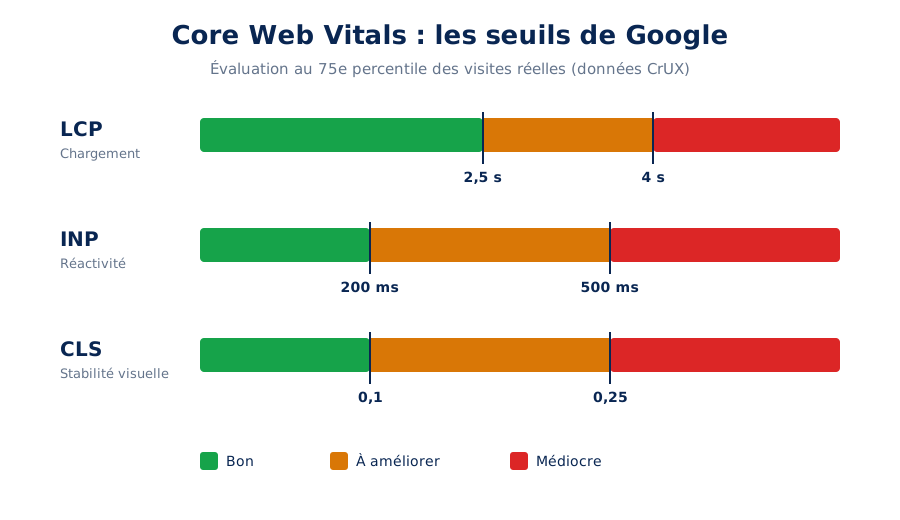
Each metric covers a distinct aspect of the experience. LCP should be under 2.5 seconds, CLS under 0.1, and INP under 200 milliseconds. All three thresholds must be met simultaneously at the 75th percentile of visits for a page to be considered good by Google.
| Metric | What it measures | Threshold to meet | Main lever on WordPress |
|---|---|---|---|
| LCP | Loading of the main content | ≤ 2.5 s | Page cache, prioritized cover image |
| CLS | Visual stability | ≤ 0.1 | Image dimensions, placeholder |
| INP | Responsiveness to interactions | ≤ 200 ms | Deferred third-party scripts, lightweight plugins |
The last column deserves attention: the three metrics do not have the same dominant lever on WordPress. LCP is handled on the server-side and with caching, CLS with media markup, and INP with third-party JavaScript. Therefore, treating all three with the same optimization plugin never works completely.
Core Web Vitals are currently based on three complementary indicators, defined and documented by the Chrome team on web.dev: LCP for loading speed, INP for interactivity, and CLS for visual stability. Each has precise thresholds that categorize the experience into three levels: good, needs improvement, or poor.
LCP: loading speed
The Largest Contentful Paint measures the time it takes to display the largest visible element on the page, most often a banner image, product photo, or main heading. It's the indicator that most closely approximates the visitor's perception of a "loaded page." To be considered good, LCP should occur within 2.5 seconds of starting the page load. Anything over 4 seconds is considered poor. On a typical WordPress site, the LCP element is almost always the featured image of an article or the main visual on the homepage. We detail specific techniques for this metric in our dedicated article: What is LCP and how to optimize it?
INP: interactivity
The Interaction to Next Paint officially replaced FID in March 2024 within the Core Web Vitals. While FID only measured the delay of the very first interaction, INP observes all clicks, taps, and keyboard inputs made throughout the page's lifespan, and records one of the worst observed values. It captures the time elapsed between a user's interaction and the next visual update of the screen. To be good, INP must remain under 200 milliseconds. It is the most demanding metric for JavaScript-heavy sites and the one that caused the most sites to fall into the "poor" category upon its introduction. Our article What is INP and how to improve it? is entirely dedicated to it.
CLS: layout stability
The Cumulative Layout Shift quantifies unexpected layout shifts: that button that moves just as you're about to click it, that paragraph that suddenly drops because an ad just loaded above it. The score aggregates the magnitude and frequency of these shifts: it must remain below 0.1 to be considered good. Unlike LCP and INP, CLS is not measured in seconds; it's a unitless score calculated from the displaced area and the distance of the displacement.
The 75th percentile, the rule of the game
A key point, often misunderstood: Google doesn’t evaluate your site on an average visit, but on the 75th percentile of all visits. In concrete terms, 75% of your page views must reach the “good” threshold for the metric to be validated. This rule protects the experience of the least fortunate visitors: those browsing on an entry-level mobile, on a shaky 4G connection, far from your server. Optimizing for the 75th percentile means optimizing for your audience’s reality, not for the office fiber.
Lab data or field data: what does Google look at?
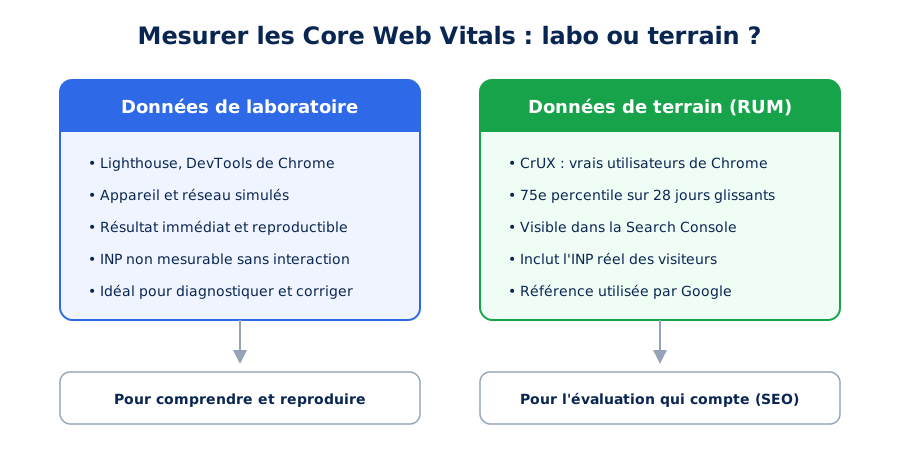
Google only uses field data, collected from real Chrome users and aggregated in CrUX. The PageSpeed Insights score does not factor into rankings: it is used for diagnostics. A site can score 100 in the lab and fail Core Web Vitals in the field.
Before discussing optimization, you need to understand where the numbers come from. Two families of tools coexist, and they often tell different stories, as explained in the web.dev documentation.
CrUX, the source of truth
Field data comes from the Chrome UX Report (CrUX): Chrome collects, from users who have given their consent, the metrics actually measured during their visits. This data is aggregated over a rolling 28-day period and feeds the “Core Web Vitals” report in Google Search Console, the functioning of which is detailed in the official documentation. It is through this channel that the famous email alerts like “a page deserves your attention” are sent. Remember this: it is this field data, and this alone, that counts for your site’s Page Experience evaluation.
Lighthouse and PageSpeed Insights, the diagnostic tools
Lab data is produced on demand by tools like Lighthouse or the Performance tab in Chrome DevTools, under simulated and reproducible conditions. They are valuable for diagnosing and verifying a fix, but they are not definitive: a Lighthouse score of 100 does not guarantee green Core Web Vitals in the field, particularly because INP cannot be measured without real interaction. PageSpeed Insights has the advantage of presenting both families of data on the same screen: CrUX data at the top, Lighthouse audit at the bottom. We have broken down the differences between these tools in our comparison PageSpeed Insights vs. Lighthouse.
What does WordPress do natively for Core Web Vitals?
WordPress natively applies three optimizations: lazy loading of images outside the initial viewport, srcset and sizes attributes to serve the correct size, and a heuristic that removes lazy loading from the first few images. Everything else depends on your theme and plugins.
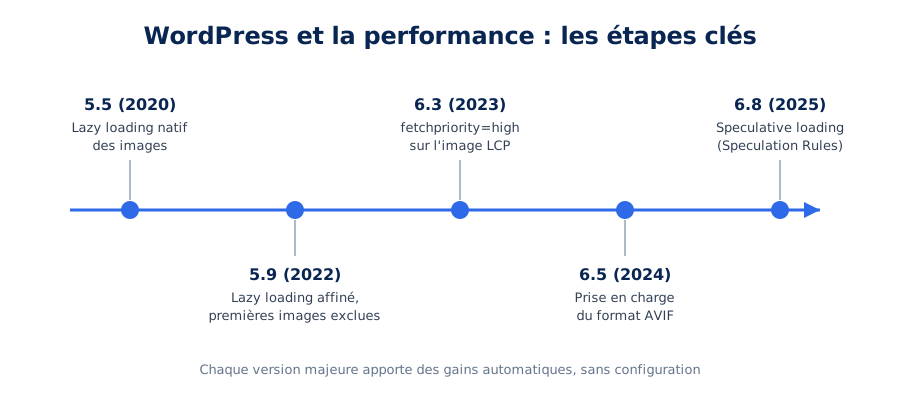
Good news: WordPress hasn't stood still. Since 2020, a dedicated performance team (the Core Performance Team) has been improving the CMS version after version, and the results are measurable on a web scale. The 2024 Web Almanac from HTTP Archive shows that the share of WordPress sites passing all three Core Web Vitals on mobile has increased from 28% in 2023 to 40% in 2024, driven in particular by spectacular improvements in INP. Keeping your WordPress site up to date is therefore, in itself, a web performance action.
Native image lazy loading
Since WordPress 5.5, the loading="lazy" attribute has been automatically added to images, which are then only downloaded as they approach the visible area. Version 5.9 refined the mechanism to exclude the first few images on the page: lazy-loaders were paradoxically delaying LCP. This is a pitfall we still encounter very often in audits: an LCP image deferred by an overzealous plugin can cost several hundred milliseconds.
Automatic LCP image prioritization
Since WordPress 6.3, the CMS automatically adds fetchpriority="high" to the image it deems to be the LCP element, indicating to the browser to download it with priority, even before layout calculation. According to the Core team, this attribute alone typically improves LCP by 5 to 10%. Version 6.4 then further refined these heuristics. However, the mechanism remains an estimation: on complex templates, an audit helps verify that the correct image is actually prioritized.
Modern image formats: WebP and AVIF
WordPress has supported the WebP format since version 5.8 and, since version 6.5, the AVIF format, which produces files up to 50% lighter than JPEG at equivalent visual quality. AVIF images benefit from all native tooling: responsive variations via srcset, lazy loading, and fetchpriority. The only condition is that your hosting's image library (Imagick or GD) supports the format, a point we systematically check on the WordPress hosting we operate.
Speculative loading: near-instant navigation
This is the most exciting new feature in years: since WordPress 6.8, the CMS natively uses the Speculation Rules API to prefetch pages that the visitor is about to open. By default, WordPress applies cautious prefetching: when the user starts interacting with a link, the HTML of the target page is downloaded in the background. Result: on click, navigation seems almost instantaneous. The behavior can be enhanced via a simple filter, to switch to prerender (the page is fully built in advance, including stylesheets and scripts):
// Passer du prefetch conservateur au prerender modéré (WordPress 6.8+)
add_filter( 'wp_speculation_rules_configuration', function ( $config ) {
    if ( is_array( $config ) ) {
        $config['mode']      = 'prerender';
        $config['eagerness'] = 'moderate';
    }
    return $config;
} );
Caution is still advised on e-commerce sites: overly aggressive prerender can skew certain statistics or prefetch stateful pages (cart, customer account). WordPress excludes sensitive URLs by default, but custom configuration is still recommended. Note that this API is supported by Chrome and Edge; incompatible browsers simply ignore the rules, with no side effects: it's a progressive enhancement by nature.
How to improve LCP on WordPress?
Three actions cover the essentials: identify the LCP element, usually the hero image, remove any loading="lazy" from it, and add fetchpriority="high", then enable page caching to reduce server response time. TTFB often weighs more than the image itself.
The reference guide Optimize LCP breaks down the metric into four phases: server response time (TTFB), resource discovery delay, its download time, and its rendering. On WordPress, three areas concentrate the majority of the gains.
Optimize the main image
The LCP image must be served in a modern format, at the correct size, and discovered as early as possible by the browser. When it's loaded in CSS background or injected with JavaScript (two common anti-patterns with page builders), the browser only discovers it after processing the stylesheets: explicit prefetching corrects this. Here's what a well-integrated solution produces:
<!-- Dans le head : découverte immédiate de l'image LCP -->
<link rel="preload" as="image"
      href="/wp-content/uploads/hero-1200.avif"
      imagesrcset="/wp-content/uploads/hero-800.avif 800w,
                   /wp-content/uploads/hero-1200.avif 1200w"
      imagesizes="100vw" fetchpriority="high">

<!-- Dans le contenu : dimensions explicites, pas de lazy loading -->
<img src="/wp-content/uploads/hero-1200.avif"
     srcset="/wp-content/uploads/hero-800.avif 800w,
             /wp-content/uploads/hero-1200.avif 1200w"
     sizes="100vw" width="1200" height="600"
     fetchpriority="high" alt="Description du visuel">
The width and height attributes are essential: they allow the browser to reserve space for the image before it's downloaded, which also benefits CLS. WordPress automatically populates them for images in the media library, but visuals manually embedded in themes often miss out.
Reduce TTFB: hosting, PHP, and server cache
LCP cannot be good if the server takes a second to respond. The Time to First Byte documentation recommends a TTFB of 800 milliseconds or less at the 75th percentile, and we aim for much less on the sites we operate. On WordPress, this requires adequate hosting, a recent version of PHP with OPcache, a healthy database, and above all, page caching: serving already generated HTML rather than rebuilding the page for each visit makes a radical difference. This is precisely the foundation of our high-performance WordPress hosting offer.
Is your site as fast as your visitors expect?

Bring content closer to visitors
For an international audience, a CDN physically brings static resources (and possibly HTML) closer to visitors, reducing incompressible network latency. However, the subject deserves a case-by-case analysis: for an essentially French audience served by a good local host, the gain may be marginal. We weighed the pros and cons in our article CDN and web performance: what are the advantages and disadvantages?
How to improve INP on WordPress?
INP is corrected by reducing the JavaScript executed during interactions. On WordPress, the usual culprits are third-party scripts, page builders, and plugins that load their libraries everywhere. Deferring and removing weigh more than minifying, which does not reduce execution time.
INP degrades when the browser's main thread is busy executing JavaScript when the user interacts. The Optimize INP guide is clear: the main culprits are long JavaScript tasks, which block rendering and delay the visual response. On WordPress, the diagnosis almost always comes back to the same causes.
Track third-party scripts
Tag managers, advertising pixels, chats, A/B testing, embedded videos: third-party scripts are the primary cause of INP degradation we observe in audits. Each seems harmless, but their accumulation saturates the main thread. Our article on reducing the impact of third-party JavaScript details the method: inventory, remove the unnecessary, defer the non-critical, and confine what can be confined. Consent banners deserve special mention, as they execute at the worst possible moment, upon arrival on the site: we compared 11 CMPs from a performance perspective, and the differences are considerable. Even your audience measurement tool has a cost, which we quantified in our article on the impact of Google Analytics.
Load JavaScript at the right time
Since WordPress 6.3, developers can natively declare the loading strategy for their scripts, as documented by the Core team. A deferred script is only executed once the document has been parsed, without ever blocking rendering:
// Déclarer un script en defer, à la mode WordPress 6.3+
add_action( 'wp_enqueue_scripts', function () {
    wp_enqueue_script(
        'mon-app',
        get_theme_file_uri( 'assets/app.js' ),
        array(),
        '1.2.0',
        array(
            'strategy'  => 'defer',
            'in_footer' => true,
        )
    );
} );
Break down long tasks
For application code that truly needs to run, the golden rule is to regularly yield control back to the browser so it can handle pending interactions. The Optimize long tasks guide recommends breaking down any processing exceeding 50 milliseconds, particularly using the scheduler.yield() API:
// Rendre la main au navigateur entre chaque lot de travail
async function traiterElements(elements) {
  for (const element of elements) {
    afficher(element);
    if ('scheduler' in window && 'yield' in scheduler) {
      await scheduler.yield();
    }
  }
}
How to improve CLS on WordPress?
Specify the dimensions of all your images, reserve space for banners and consent pop-ups, and check the behavior of your fonts during loading. Images without width and height attributes remain the primary cause of layout shifts on the WordPress sites we audit.
CLS is probably the most satisfying metric to fix: the causes are identifiable one by one, and the fixes are long-lasting. The Optimize CLS guide groups them into three categories: media without dimensions, late-injected content, and fonts.
Reserve space for media and injections
All images, iframes, or videos must have explicit dimensions (width and height attributes, or aspect-ratio CSS property) so that their space is reserved before loading. The same principle applies to dynamic content: a consent banner should overlay the page or have a reserved placeholder, never push content down. Carousels are a classic example: with layout shifts, JavaScript weight, and non-prioritized images, they accumulate flaws, as we explain in our article Say goodbye to sliders.
Tame fonts
When a web font arrives after the initial render, the text is re-displayed with new metrics, and the entire page can shift. Best practices documented by web.dev include hosting fonts locally, a recommendation also long advocated by Harry Roberts (secondary source), preloading the critical WOFF2 file, and displaying text without waiting using font-display. The expert step involves adjusting the fallback font with size-adjust so that the swap is visually neutral:
@font-face {
  font-family: "Manrope";
  src: url("/fonts/manrope.woff2") format("woff2");
  font-display: swap;
}

/* Police de repli calibrée : la permutation ne décale plus rien */
@font-face {
  font-family: "Manrope Fallback";
  src: local("Arial");
  size-adjust: 106%;
  ascent-override: 103%;
  descent-override: 29%;
}

body {
  font-family: "Manrope", "Manrope Fallback", sans-serif;
}
The subject is broader than it appears (variable fonts, character subsets, icon fonts): we have dedicated a complete article to it on the impact of fonts on performance.
What are the foundations of a fast WordPress?
Three foundations determine the result before any fine optimization: a sober theme that does not load unused code, a controlled number of plugins, and above all their background behavior, and a correctly configured page cache. No adjustments can make up for a heavy theme, nor for overloaded shared hosting.
Fine optimizations only make sense on a healthy foundation. Three structural choices determine the performance potential of a WordPress site.
A light and well-built theme
The theme conditions everything else: CSS weight, JavaScript quantity, quality of generated HTML. Themes like GeneratePress, Astra, or Blocksy are designed for simplicity, while others pack megabytes of resources for unused features. We detailed the objective selection criteria in our guide how to (properly) choose your WordPress theme? On an existing site, changing themes is not always feasible: we then optimize the existing theme, via a child theme, to correct its flaws without altering the design.
As few plugins as possible, and the right ones
Each active plugin on the front-end can add its stylesheets, scripts, and database queries. The historical page builders (Elementor, Divi, Beaver Builder) are the most resource-intensive: the native Gutenberg editor produces much more sober HTML, and today allows building complete sites, including e-commerce, as we demonstrate in our article on creating a performant WooCommerce site with Gutenberg. An expert reflex: after deactivating each plugin, check what has actually disappeared from the source code. It is also possible to surgically remove resources that a plugin loads where they are not needed:
// Ne charger les ressources WooCommerce que sur les pages marchandes
add_action( 'wp_enqueue_scripts', function () {
    if ( class_exists( 'WooCommerce' ) &&
         ! is_woocommerce() && ! is_cart() && ! is_checkout() ) {
        wp_dequeue_style( 'woocommerce-general' );
        wp_dequeue_style( 'wc-blocks-style' );
        wp_dequeue_script( 'wc-cart-fragments' );
    }
}, 20 );
A complete caching strategy
A page caching plugin (WP Rocket, for example) transforms each page into static HTML served in milliseconds, while managing script deferral and resource optimization. On high-traffic or business-logic-intensive sites, a persistent object cache (Redis or Memcached) further relieves the database. Finally, the browser caching policy (Cache-Control headers) prevents re-downloading unchanged resources on subsequent visits. We should also mention the official plugin Performance Lab, a showcase for the Core Performance Team, which allows activating future WordPress optimizations before they are included in the CMS core.
How to measure and track your Core Web Vitals?
Use PageSpeed Insights to position your site based on field data, Search Console to track page-by-page progress, and a RUM tool to detect regressions over time. Tracking is more important than occasional measurement, as performance degrades through accumulation.
The method we apply on assignments consists of three steps. First, an assessment of field data: Search Console and CrUX show where the site truly stands, page by page, metric by metric. Then, laboratory diagnosis: Lighthouse, the Performance tab in DevTools, and the Chrome Web Vitals extension allow us to reproduce problems and identify their exact cause. Finally, long-term verification: since CrUX data is aggregated over a rolling 28-day period, a fix takes several weeks to be reflected in Search Console, hence the value of continuous web performance monitoring which alerts to the slightest regression, long before Google notices it.
One watchword to conclude this section: measure before optimizing. Miraculous recipes applied blindly (aggressive minification, excessive preloads, stacked optimization extensions) sometimes do more harm than good. Each site has its own performance profile, and it is the audit that prioritizes actions based on cost-benefit. To go further, our bible of 117 pro tips lists all known levers.
Need technical support in your approach?
Optimizing a WordPress site remains a technical intervention that requires in-depth knowledge of web languages (HTML, CSS, JavaScript, PHP) and the internal workings of the CMS. With over 20 years of experience with WordPress and WooCommerce, our developers work on any existing site to maximize its performance level: comprehensive audit to establish the diagnosis and prioritize, then WordPress optimization to implement the fixes. The site you are currently on has been optimized by us: green Core Web Vitals and a mobile PageSpeed Insights score of 100 are entirely achievable with WordPress. Trust us to help your site reach its full performance potential!