
Google Analytics is the most widespread audience measurement tool on the web, and the third-party script found on almost every page we audit. It's implemented once, early in the site's life, often by someone who no longer works there, and is rarely questioned: it's a free tool, provided by Google, whose official snippet is only eight lines long. Yet, these eight lines hide several hundred kilobytes of JavaScript executed with every visit.
An audience measurement tool is a script that collects navigation events, page views, clicks, and conversions in the visitor's browser, then sends them to a collection server. Google Analytics 4 does this via the Google tag, gtag.js, served from the googletagmanager.com domain, the same as the Google Tag Manager container, with which it is often confused. The difference matters, because the two do not load, execute, or optimize in the same way.
This article traces the origin of the tool, measures its real cost to a page, details five levers to reduce this cost without losing data, compares lightweight alternatives with supporting figures, and places Google Analytics within the broader family of third-party scripts. How does Google's integration recommendation, unchanged for twenty years, hold up against the Core Web Vitals that Google itself uses to rank your pages?
Where does Google Analytics come from?
Google Analytics originated from Google's acquisition of Urchin Software in March 2005. The tool has gone through four generations, from Urchin to the classic tag, then Universal Analytics in 2012, and finally Google Analytics 4, which became mandatory when Universal Analytics was shut down on July 1, 2023. Each generation has increased the size of the embedded script as measurement has become more closely tied to advertising.
From Urchin to Universal Analytics
Before being called Google Analytics, the tool was called Urchin, and it analyzed server log files. Google acquired Urchin Software Corporation in March 2005 and launched Google Analytics a few months later, with such strong demand that sign-ups had to be temporarily suspended. Adoption was massive: by 2010, the tool was used by about half of the ten thousand most popular sites. In 2012, Universal Analytics brought cross-platform tracking and customization capabilities that strengthened an already dominant position.
Google Analytics 4 and the Google tag
Over the years, Google added mobile tracking, integration with Google Ads and Search Console, goal and conversion reports, which accelerated e-commerce growth and brought the tool closer to ad platform measurement.
Google Analytics 4 completed this shift: an event-based model, native integration with Google Ads, and a common script, the Google tag, which also serves Ads and Floodlight. Despite a widely criticized migration, the tool still dominates the market, and the Web Almanac 2025 ranks google-analytics.com and googletagmanager.com among the ten most present third-party domains on the web.

This story demonstrates Google's ability to identify a need, integrate it into its ecosystem, and develop it for its advertisers as well as for webmasters. It also explains why the script grew: a tool that only measured page views became the entry point for all Google advertising, and it carries the weight of that responsibility.
Does Google Analytics slow down a site?
Yes, measurably. The Google Analytics 4 gtag.js tag weighs approximately 419 KB uncompressed, measured in August 2026, and 135 KB compressed according to Plausible's measurements, compared to 2.5 KB for the latter. The real cost is mainly at execution: this JavaScript must be parsed, compiled, and executed on the main thread, the very thread that displays the page.
A JavaScript tag, by choice
Since its early versions, Google has provided a JavaScript tag to enable tracking, and this seems logical: JavaScript works everywhere and allows for complex interactions. In terms of performance, this decision is not without consequences. Until Universal Analytics, the tag was a dynamic injection script, which created the library's <script> tag itself, which prevented any prioritization by the browser: the preloading scanner cannot see what the JavaScript creates.
/* Ancien script d'injection asynchrone Google Analytics (Universal Analytics) */
(function(i,s,o,g,r,a,m){i['GoogleAnalyticsObject']=r;i[r]=i[r]||function(){
(i[r].q=i[r].q||[]).push(arguments)},i[r].l=1*new Date();a=s.createElement(o),
m=s.getElementsByTagName(o)[0];a.async=1;a.src=g;m.parentNode.insertBefore(a,m)
})(window,document,'script','//www.google-analytics.com/analytics.js','ga');

ga('create', 'UA-XXXXXXXXXX', 'auto');
ga('send', 'pageview');
Things have changed with Google Analytics 4, whose official documentation now provides a native HTML <script> tag. The browser can finally discover it as soon as the document is parsed. But it retains its async attribute, and the placement instruction hasn't moved: immediately after the opening of the <head>, on every page.
Async is not free
The official tag uses asynchronous loading, which means it is downloaded in parallel with the HTML parsing, without blocking it, but it executes as soon as it is ready, at an unpredictable time. This is where the problem lies: although the script is loaded asynchronously, its execution interrupts the page rendering for several hundred milliseconds on an entry-level mobile. In its default implementation, the Google Analytics tag delays page display in multiple scenarios, especially when it arrives before the main image.
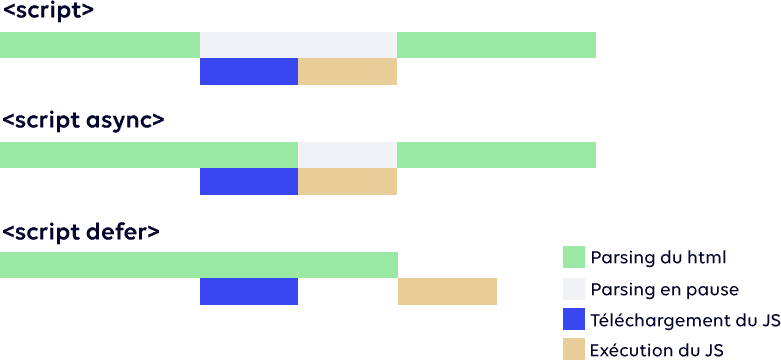
Google itself documents this cost in its best practices for tags and tag managers, regarding the Core Web Vitals responsiveness metric, INP.
Interaction to Next Paint is sensitive to CPU contention on the main thread, and we have observed a correlation between the size of tag managers and poorer INP scores.
Katie Hempenius and Barry Pollard, engineers on the Chrome team, in the Best practices for tags and tag managers guide on web.dev, updated August 24, 2022
Google Tag Manager, an additional and separate layer
A confusion needs to be cleared up, because it's in almost every article on the subject. The GA4 Google tag is served from googletagmanager.com, but it is not a Google Tag Manager container, and GA4 is installed without GTM, via the manual snippet from the documentation.
When the site also uses a container, two separate scripts are executed, gtm.js then gtag.js, each with its own initialization. The container generates its own blocking time, re-evaluates its triggers with each event, and delays the execution of the measurement code. Measurements from the third-party-web project, on Lighthouse audits of the HTTP Archive, quantify this cumulative effect: the container costs about ten times the measurement tool it deploys.
Google's problematic recommendation
Google advises placing its tag immediately after the opening <head>, which, from a performance perspective, is the worst possible location. The beginning of the <head> is valuable territory, where resources essential for the initial render should be placed: the critical stylesheet, the main font, the LCP image preload. Placing a 419 KB third-party script there, without technical justification, is asking the browser to measure before displaying.
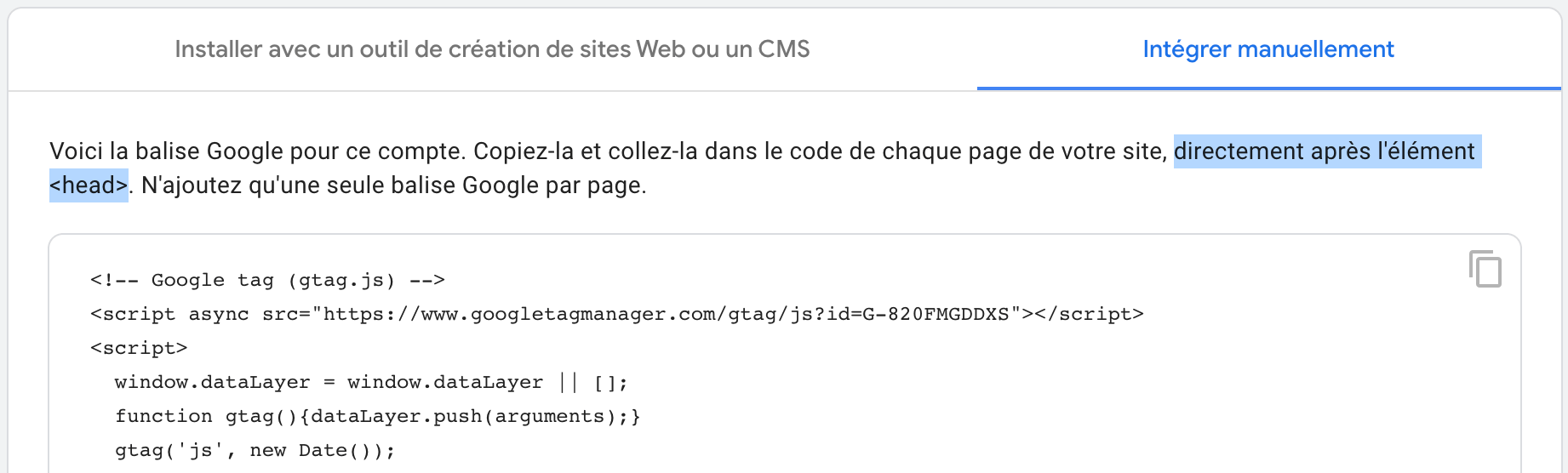
Although Google Analytics offers valuable data on visitor traffic and behavior, its standard implementation therefore poses serious performance problems. For those who want fast pages while retaining this data, it is advisable to correct Google's proposal, and that is what we do in our interventions.
How to optimize Google Analytics integration?
Five levers reduce the impact without giving up measurement: replace the official snippet with a native script tag in defer with low priority, place it at the bottom of the page, prepare the connection without over-soliciting it, serve the script from your own domain, and defer its execution until the first interaction. None of these degrade the quality of the collected data, with collection delays measured in hundreds of milliseconds.
Implementing a measurement tool should not come at the expense of performance, and with a few technical steps, it is possible to minimize its impact while retaining the tool's benefits. The five levers are cumulative, and the first two are already sufficient on most sites:
- a native
<script>tag withdeferandfetchpriority="low", instead of the official asynchronous snippet; - placement at the very end of the page, just before
</body>, with all other third-party scripts except the CMP; - a
dns-prefetchto the collection domains, never a preconnect to everything that passes by; - serving the script from your own domain, via the Google Tag Manager or a proxy;
- deferring execution until the visitor's first interaction, with a maximum delay for those who do not interact.
Each of these levers has a measurable effect and a known trade-off, detailed below in the order we apply them. The only rule that precedes them all is to measure before and after, by blocking the domain, as explained in our guide on the real cost of third-party scripts: unmeasured gain is no gain.
A native script tag with defer and fetchpriority
Rather than relying on the default implementation, use a native <script> tag with the defer attribute. Unlike async, defer executes the script after the HTML document has been fully parsed, in the order of the tags, and never in the middle of rendering. To deprioritize it further, the fetchpriority="low" attribute tells the browser that this file is not critical and can stay in the download queue until the first screen's images and fonts are served :
<!-- Google tag (gtag.js), version corrigee -->
<script>
  window.dataLayer = window.dataLayer || [];
  function gtag(){ dataLayer.push(arguments); }
  gtag('js', new Date());
  gtag('config', 'G-XXXXXXXXXX');
</script>
<script src="https://www.googletagmanager.com/gtag/js?id=G-XXXXXXXXXX" defer fetchpriority="low"></script>
The order of the two tags is reversed compared to the official snippet, and this is not a minor detail : the dataLayer queue and the gtag() function must exist before the library executes, and since it is deferred, any config commands pushed beforehand are simply processed upon its arrival. No events are lost; they wait in the queue.
Load the script at the bottom of the page, before the closing body tag
For defer, much more than for async, the order in which scripts are called matters. Even when deferred, a script called in the <head> executes before all subsequent scripts in the document, including your own interface scripts. To be certain of deprioritizing Google Analytics, the code must therefore be placed at the very end of the page, just before </body>, along with all other third-party scripts. The only exception is the CMP, which conditions the others and the visitor's experience : it stays at the top, and only it, as detailed in our guide to choosing the right CMP.
Use resource hints sparingly
To anticipate the connection to Google domains, the dns-prefetch and preconnect resource hints allow the browser to resolve a domain, or even establish the connection, before the script is requested. The rule has changed since our first recommendations: a preconnect opened too early competes with the first screen connections, and Chrome considers it expired if it is not used within 60 seconds, and Lighthouse 13 has removed its preload audit due to the risk of over-recommendation. For a script deferred at the end of the page, a simple dns-prefetch is sufficient, and preconnect is reserved for the CMP:
<!-- Resolution DNS anticipee, sans ouvrir de connexion : cout nul -->
<link rel="dns-prefetch" href="https://www.googletagmanager.com">
<link rel="dns-prefetch" href="https://www.google-analytics.com">

<!-- Preconnexion : reservee a ce qui est charge tot et conditionne le reste -->
<link rel="preconnect" href="https://cmp.exemple.com" crossorigin>
Serve the script from your own domain
Another approach is to serve the script directly from your domain, which saves all or part of the three steps of connecting to an external domain: DNS resolution, TCP connection, and TLS negotiation, often resulting in several hundred milliseconds saved on a mobile connection.
Google now offers an official path, the Google Tag Manager for advertisers, which allows deploying the tag from your own first-party infrastructure, via your CDN, your load balancer, or your web server. In the WordPress ecosystem, several plugins offer local script caching, with the risk of serving an outdated version if refreshing is not managed.
Postpone execution until the first interaction
If your needs allow, the most effective solution is to delay script execution until the visitor interacts with the site, by clicking, typing, or moving the pointer, with a timeout for those who never do. Browser resources are then fully dedicated to page rendering, and collection occurs in a second window. This behavior can be activated in a few clicks on WordPress with WP Rocket, Perfmatters, or FlyingPress, and requires specific code elsewhere :
// Report de Google Analytics a la premiere interaction, avec plafond de 5 s
(function () {
  var done = false;
  function load() {
    if (done) { return; }
    done = true;
    var s = document.createElement('script');
    s.src = 'https://www.googletagmanager.com/gtag/js?id=G-XXXXXXXXXX';
    s.defer = true; s.fetchPriority = 'low';
    document.body.appendChild(s);
  }
  ['pointerdown', 'keydown', 'touchstart'].forEach(function (ev) {
    addEventListener(ev, load, { once: true, passive: true });
  });
  setTimeout(load, 5000);   // les visiteurs qui n'interagissent pas sont quand meme mesures
})();
Scrolling is intentionally absent from the triggers. Loading a script of several hundred kilobytes on the first scroll shifts its execution exactly into the window where INP is measured, trading lab gains for ground loss. Clicking, on the other hand, is an interaction where the visitor explicitly expects something. If all this seems too complex, the competition may have a simpler answer.
Is your site as fast as your visitors expect?

Which alternative to Google Analytics to choose?
Three serious alternatives share the market: Plausible, the lightest with 2.8 KB of uncompressed script; Fathom Analytics, at 6.9 KB; and Matomo, the most complete, at 84 KB but self-hostable. All three work without cookies, which also eliminates the consent banner for audience measurement, and data loss related to refusals.
| Solution | Script weight | Cookies | Hosting |
|---|---|---|---|
| Google Analytics 4 | 419 KB | Yes | |
| Matomo | 84 KB | Optional | Cloud or self-hosted |
| Fathom Analytics | 6.9 KB | No | Cloud |
| Umami | 4.7 KB | No | Cloud or self-hosted |
| Plausible | 2.8 KB | No | Cloud or self-hosted |
These weights are for uncompressed scripts, recorded from each publisher in August 2026. Plausible publishes a comparison of compressed weights: 135 KB for the Google Analytics script versus 2.5 KB for theirs, or 54 times less, and over 285 KB in total when Google Tag Manager and a consent banner are added. The most telling gap is between the two extremes: Google's tag weighs 150 times that of Plausible, for a need that, on a showcase or editorial site, is most often limited to page views and traffic sources.
Weight is only the visible part. A lightweight script is also a script that executes little code, does not set cookies, and therefore does not require a consent banner for measurement or data loss related to rejections. On a site where half of visitors refuse cookie placement, a cookie-less solution paradoxically measures better than Google Analytics, which only sees the other half, or anonymized signals in advanced consent mode.
Why are these alternatives paid?
The costs of collecting, processing, and storing tracking data are real. Handling millions of requests per day requires robust and scalable infrastructure. Unlike Google, which monetizes its services by exploiting data for advertising purposes, these players opt for a directly paid model to fund their infrastructure without reselling the audience, which is also the condition for their GDPR compliance without consent.
Matomo and Plausible, two philosophies
Formerly Piwik, Matomo is an open-source platform that offers a serious and complete alternative, including funnels and heatmaps, with a focus on data control, whether self-hosted or in the cloud. Its script remains substantial, and its behavioral features have a cost comparable to the tools they replace. Plausible takes the opposite approach: a few kilobytes tag, a single dashboard, no cookies, and an impact on TBT and INP so low that it becomes difficult to measure.
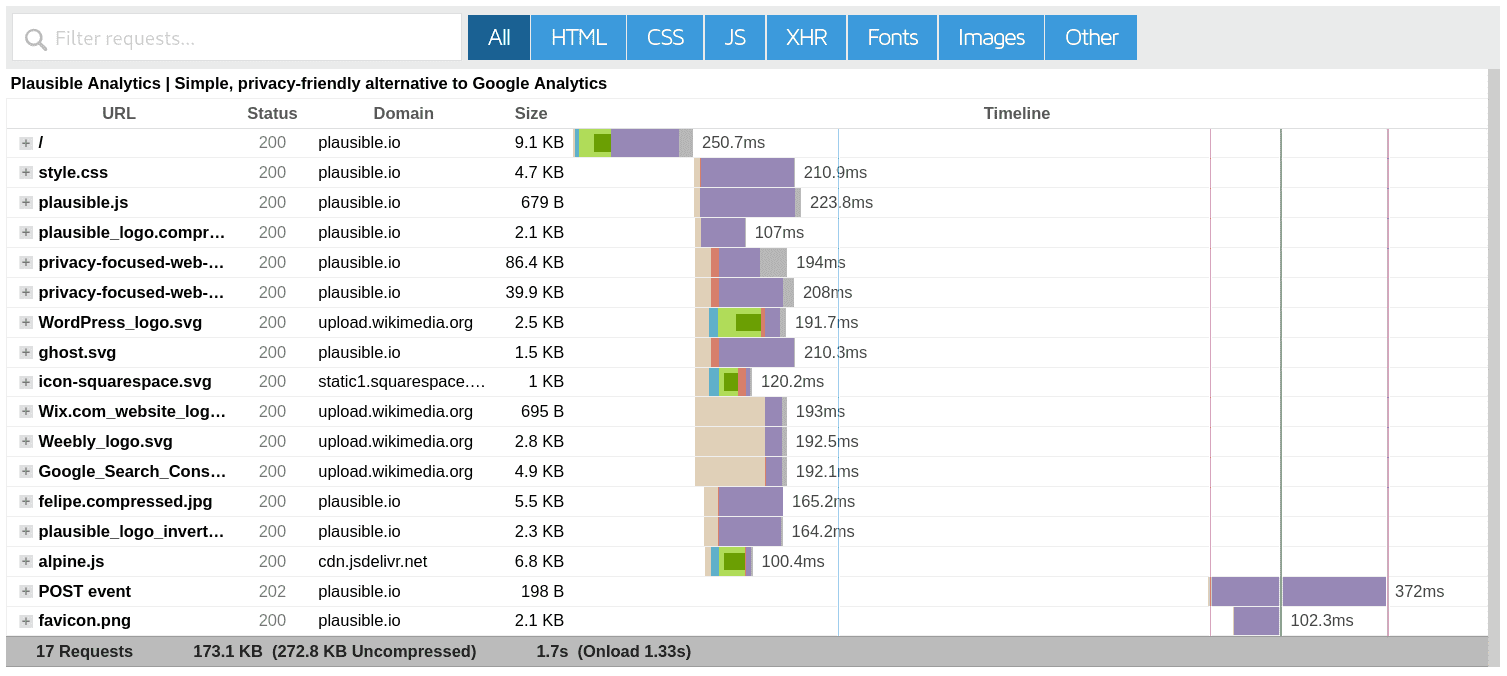
You probably didn't notice, but the page you are reading loads Plausible and gets a mobile PageSpeed Insights score of 100. It's not the script that makes the score, it's the sum of the choices it's part of; but it's a script that has never needed to be deferred, and that's the best compliment you can give to a third party.
Privacy and regulation
The other major advantage of these solutions is regulatory. Without cookies or personal data collection, audience measurement can, under certain conditions, do without consent, which removes a banner, or at least a purpose of the banner, and the data loss that comes with it. CMPs are not only heavy, they generate blocking time on the critical path, as our comparison shows. Eliminating the need for a CMP for measurement is therefore a performance gain in itself, and Google Analytics is just one example among others of what measurement costs.
What is the impact of third-party scripts on performance?
Each third-party script claims the same thing: to be loaded with priority. Since they can't all be, the question isn't whether one of them slows down the site, but which ones deserve to load before the content. The answer is short: no third-party script deserves to load before the page itself, except for the one that authorizes the others.
A universal request for priority
Google Analytics is just the tip of the iceberg. Advertising, behavioral analysis, consent, A/B testing, chat, customer reviews: these scripts pile up, and most of their providers recommend placing their tag as early as possible in the page, for tracking efficiency reasons that are legitimate from their point of view. The visitor's point of view is different: the core of any site is the page itself, and first-party scripts that make the interface, menus, forms, and cart work should be the only ones to load before the content.
Delay to prioritize
The trick is therefore to re-prioritize first-party scripts by delaying the execution of third-party ones, which directly improves FCP and LCP, and frees up the main thread during the window when INP is measured. The display gain largely compensates for the delay these scripts experience, which is generally a maximum of 500 milliseconds. No data is lost, it's just shifted: the page view is sent a few tenths of a second later, which changes neither the count nor the attribution.
This point of doctrine applies to the whole family, and each tool will have its guide on this blog, from the cost of anti-flicker in A/B testing to the cost of chat and review widgets. Only one family is an exception, A/B testing, which must remain a priority, otherwise its tests will be skewed, and that's precisely why it's so expensive.
How to reconcile audience measurement and performance?
By treating each measurement tool as a budgeted expense, not as a free add-on. Quantify its weight and execution cost before installation, by domain blocking, then verify its actual impact on real-world Core Web Vitals in Search Console. An unmeasured tool always ends up costing more than it brings in, because no one knows what it brings in.
The ease of integration and the variety of available tools make it tempting to layer functionality upon functionality: one tag for behavioral tracking, another for targeted advertising, a third for a campaign. Each addition, however appealing, must be considered in terms of its impact: on loading time, network latency, and visitor processor consumption. The question to ask is not just whether a tool provides value, but whether it justifies its performance cost, figure against figure.
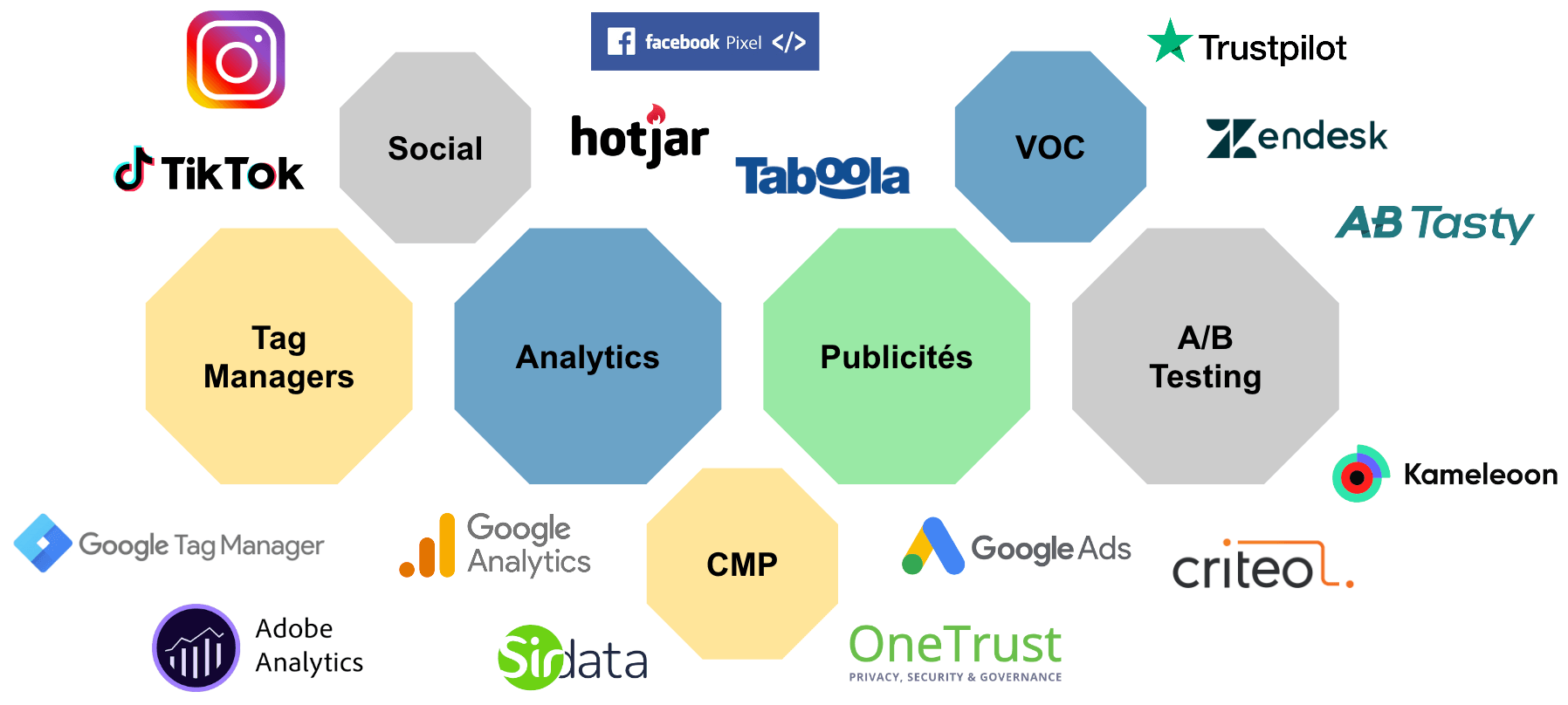
In the whirlwind of daily operations, tools that were once essential become obsolete or duplicated. Technical teams are not always informed of marketing or SEO priority changes, and unused scripts persist for years. Rigorous monitoring, with detailed performance metrics, highlights these imbalances and yields immediate gains by removing redundant tools. This is an issue we systematically address in our performance monitoring services, where the number of third-party domains is tracked as a metric in its own right.
It is not enough to think about adding new features; their maintenance and removal must be planned, which requires collaboration between development, marketing, and SEO, and an end date recorded when each tag is implemented. This proactive thinking prevents problems before they arise and ensures the site remains fast and aligned with its objectives.
Quantifying the cost of each measurement tool and relating it to what it brings is the starting point for a web performance audit; then, replacing the tag, deferring it, or replacing it is a matter of performance optimization. In this delicate game, performance and measurement are not enemies, but partners that require arbitration, and arbitration begins with a number.