
You've optimized your homepage, compressed your images, and focused on your LCP. Yet, every click your visitors make to a new page starts from scratch: request, server wait, download, render. The Speculation Rules API radically changes the game: it allows the browser to prefetch, and even fully generate in the background, the page the user is about to visit. Result: navigation perceived as instantaneous, with LCP dropping to a few milliseconds on internal navigations.
At Agence Web Performance, we deploy this API systematically, with a configuration adapted to each site, and it's on e-commerce sites that we observe the most significant impact. Here's how it works, what it delivers, and most importantly, how to deploy it without shooting yourself in the foot.
Why is navigation between pages slow?
Each click on a link restarts the entire cycle: request to the server, waiting for the HTML, downloading resources, rendering. Even on an optimized site, this cycle costs several hundred milliseconds. The browser only starts working after the click, even though the destination was often predictable long before.
When we talk about web performance, we almost always think about the first visit: the one measured by our audits and tools like PageSpeed Insights. But a visitor browsing your site makes dozens of navigations, and each of these navigations repays the full cost of a page load.
What happens on each click
With each click on an internal link, the browser must issue an HTTP request, wait for the server to generate and send back the HTML (this is the TTFB, Time To First Byte), then download this HTML, discover the resources it references, download them in turn, build the render tree, and finally paint the page. Even on a perfectly optimized site, this chain rarely takes less than 500 ms, and commonly exceeds 2 to 3 seconds on mobile. The browser cache mitigates the cost of static resources, but the HTML itself, generally not cached on a dynamic site, must be regenerated each time.
This is precisely this observation that led Single Page Applications to move navigation to the client side: the JavaScript router avoids reloading an entire page. But SPAs pay a high price for this convenience on the initial load and for indexing, a topic we cover in detail in our SPA audit service. The Speculation Rules API offers classic, multi-page sites the fluidity of an SPA without inheriting its drawbacks.
Old approaches and their limitations
The idea of anticipating navigation is not new. The <link rel="prefetch"> tag, from the W3C Resource Hints, already allowed downloading a resource for the next navigation. Libraries like instant.page or quicklink then automated triggering on hover. But all these approaches share the same fundamental limitation: they only download the HTML. Parsing, downloading sub-resources, executing JavaScript, and rendering still need to be done at the time of the click. The old <link rel="prerender"> tag, which was supposed to go further, never produced a complete render and is now deprecated, as explained in the Chrome documentation on prerendering.
On the WordPress side, several optimization plugins have long offered an equivalent JavaScript functionality: a script that listens for link hovers and preloads the corresponding page. The intention was good, but the cost is significantly higher than with the native API: additional JavaScript to download and execute, event listeners on each link, and a simple HTML preload where native prerender prepares the entire page. One point is crucial: these features must be disabled when Speculation Rules are activated, as this is complete redundancy. Letting them coexist amounts to preloading the same pages twice, a complete waste.
What is the Speculation Rules API?
Speculation Rules is a browser API that allows declaring, in JSON within the page, which URLs to preload or prerender before the user clicks. The browser anticipates the next navigation and prepares it in the background. The target page is already ready at the time of the click, making the display instantaneous.
The Speculation Rules API is the modern answer to this problem. It is declared in a simple JSON block embedded in the page, and it allows the browser to prepare future navigations, up to the complete rendering of the target page in an invisible tab. When the user clicks, the browser loads nothing: it displays an already constructed page. Barry Pollard, Web Performance Developer Advocate at Google, describes it as a quasi-magical tool for masking navigation cost in his video presentation of the API.
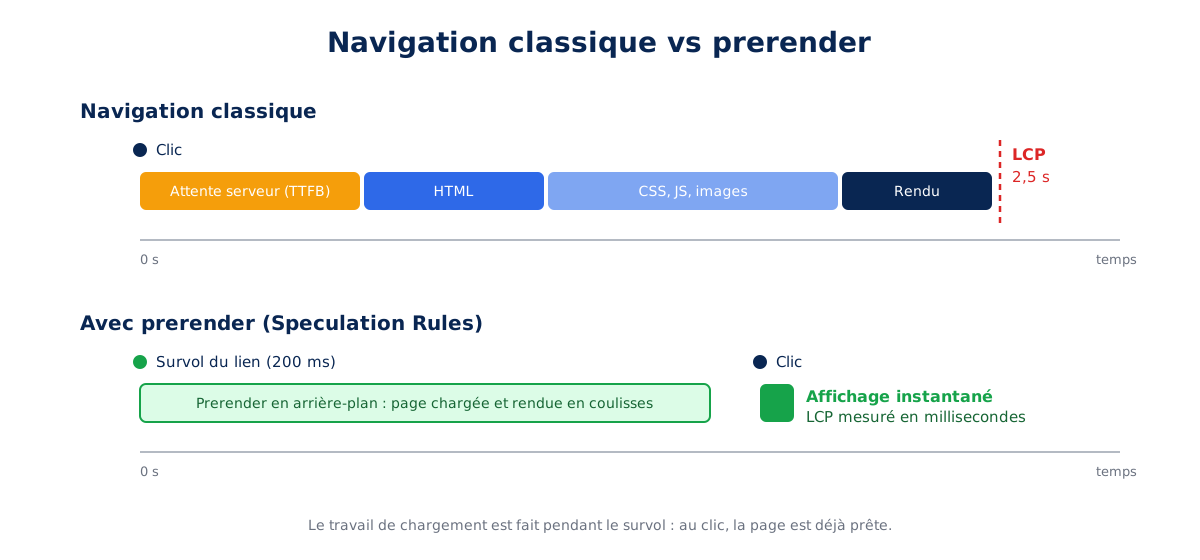
prerender, all the loading work is moved to the hover: on click, the page is already rendered.Prefetch or prerender: two levels of anticipation
The API offers two modes. prefetch downloads the target page's HTML in advance: on click, we save the network round trip and server generation time, which is the bulk of the TTFB. prerender goes much further: it loads the entire page in the background, including sub-resources, executes its JavaScript, and constructs its rendering, as in a hidden tab that replaces the current tab at the time of activation, as described in the official documentation. It is this second mode that produces the instant navigation effect: the LCP of the activated page is then measured in tens of milliseconds.
Declarative rules in JSON
In practice, it all fits within a <script type="speculationrules"> tag containing JSON. Since Chrome 122 and the major evolution of the API, so-called document rules can target all links on the page with URL patterns (href_matches) or CSS selectors (selector_matches), allowing an entire site to be covered with a few lines, while surgically excluding what should never be speculated. Here is the minimal form:
<script type="speculationrules">
{
  "prerender": [{
    "source": "document",
    "where": {
      "and": [
        { "href_matches": "/*" },
        { "not": { "href_matches": "/wp-admin/*" } },
        { "not": { "href_matches": "/wp-login.php*" } }
      ]
    },
    "eagerness": "moderate"
  }]
}
</script>
A detail that matters: if the JSON is malformed, the browser silently ignores the rule, without the slightest error in the console. We have audited more than one site where the team believed prerendering was active when an extra comma had disabled it for months. Validation is part of our deployment checklist.
The inline block is not the only way: rules can also reside in an external JSON file, declared via the Speculation-Rules HTTP header, as described in the Chrome documentation. This is the choice made by Shopify, which is currently testing the API across its platform with a view to a widespread rollout, whereas WordPress opted for inline declaration in HTML. Both approaches are functionally equivalent; the HTTP header simply facilitates centralized deployment across a fleet of sites.
eagerness: adjust speculation aggressiveness
The eagerness parameter determines when the browser triggers speculation, and it is the main trade-off between user benefit and resource waste. The Chrome documentation defines four levels: immediate speculates as soon as the rule is read, eager is close to it, moderate waits for a 200 ms hover (or the start of a touch on mobile), and conservative only triggers on pointerdown, i.e., when the finger or mouse button is pressed, a few tens of milliseconds before the actual click.
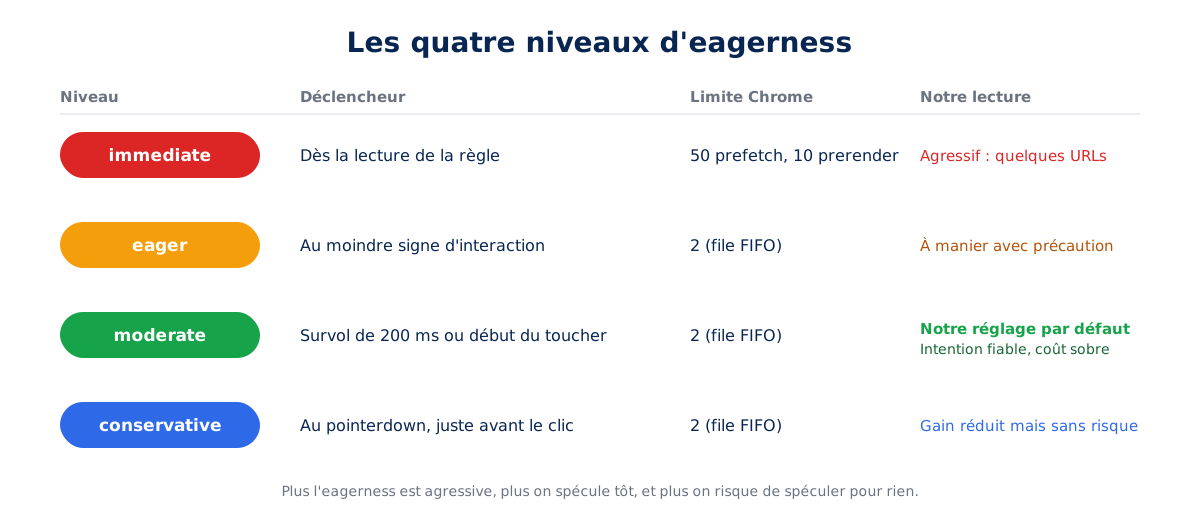
eagerness: the earlier you speculate, the more you risk speculating for nothing.Chrome also limits the memory consumed: in immediate mode, the limit is 50 simultaneous prefetch and 10 prerender; in moderate or conservative mode, it drops to 2, managed in a FIFO queue: the oldest speculation is canceled when a new one arrives. This mechanism, detailed in the same documentation, makes the moderate setting remarkably efficient: only what the user shows intent to visit is prepared.
What about browser support?
The Speculation Rules API has been available in Chromium-based browsers (Chrome, Edge, Opera, Brave, etc.) since Chrome 121 for document rules, as indicated by the MDN compatibility page. Safari and Firefox ignore it completely, with no side effects. This is a textbook case of progressive enhancement: compatible browsers, which are the majority for most French audiences, benefit from instant navigation, while others retain their usual behavior. No risk of regression, only gain.
Is your site as fast as your visitors expect?

What is the real impact of prerendering ?
The gain is measured in hundreds of milliseconds, or even seconds on slow sites, as the perceived loading time drops to zero on prerendered pages. The effect is maximal where navigation is repetitive: product lists, pagination, checkout funnels, and search journeys.
Let's get to the numbers, because this is where this API really stands out from the long list of micro-optimizations. On navigations initiated from a prerender, LCP typically drops below 100 ms: the page was already rendered, it just needs to be displayed. On the scale of a complete user journey, the effect on Core Web Vitals measured in real conditions (RUM, the data that feeds Google's CrUX report) is massive, as internal navigations often represent the majority of page views.
The Ray-Ban case: doubled conversions
The most telling case study is Ray-Ban's, documented by the Chrome team on web.dev. By deploying prerender on navigations between listing pages and product pages, the brand managed to reduce its mobile LCP from 4.69s to 2.66s, a 43% improvement.
But the figure that matters to an e-commerce director is elsewhere: the conversion rate on product pages increased by 101% on mobile and 156% on desktop, with a bounce rate decrease of 13%. These results illustrate a reality we observe on all our projects: perceived speed throughout the journey has a greater impact on conversion than the speed of the initial load.
Why e-commerce benefits more than any other sector
An e-commerce site concentrates everything that makes prerendering profitable. Journeys are deep and predictable: home to category, category to product page, product page to cart. Each step taken brings the user closer to purchase, and each second of waiting between two steps offers an opportunity for abandonment.
Hovering over a product thumbnail is a highly reliable signal of intent: when a visitor rests their mouse on a product for 200 ms, the probability of them clicking is high, and prerender has just enough time to prepare the product page during that delay. This is why we integrate Speculation Rules by default in our web performance optimization services, whether the site runs on WooCommerce, PrestaShop, or Shopify.
Our experience
We now systematically deploy Speculation Rules on the sites we optimize or host, with configurations adjusted on a site-by-site basis. On online stores, we consistently observe internal navigations initiated from a prerender with near-zero LCP, listing-to-product page journeys that feel instantaneous, and a ripple effect on the domain's CrUX metrics as soon as the proportion of prerendered navigations becomes significant.
The most general scenario is navigating between category pages and product pages. Speculation Rules cover forward navigation (from category to product page, from product page to the next), while the back/forward cache handles going back, instantly restoring the category page from memory. The combination of the two results, based on our findings, in gains of up to 35% reduction in consolidated Core Web Vitals in CrUX: almost the entire journey becomes instantaneous, in both directions.
This feedback is consistent with third-party measurements: the CDN Planet tutorial on Cloudflare, for example, documents the collapse of effective TTFB for speculated navigations, with before/after measurements to support it. Let's clarify methodological honesty: these observations stem from our agency practice, as each site has its own conversion factors; this is precisely why we systematically measure before and after using our web performance monitoring.
How to deploy Speculation Rules?
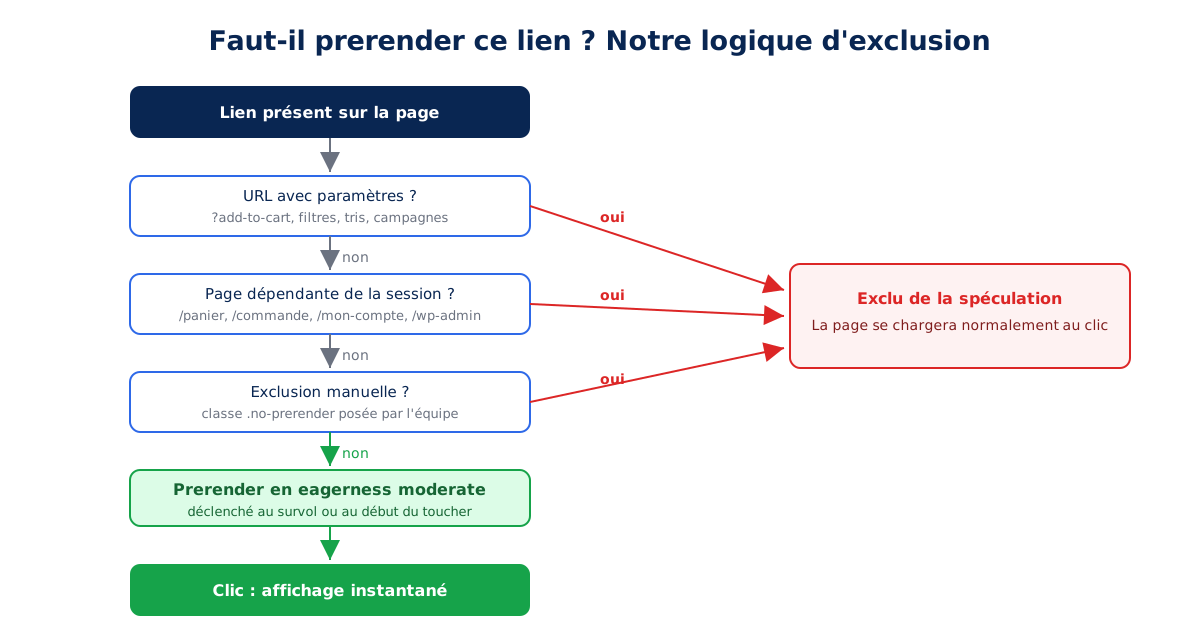
Three elements make up a healthy deployment: a broad prefetch rule for internal links, a restricted prerender rule for hovered links, and explicit exclusions for anything that triggers an action. Exclusions are as important as the rules, otherwise speculation causes side effects.
Deploying Speculation Rules isn't about pasting a snippet found online. The value lies in the configuration: choosing the right mode, the right eagerness, and especially defining the site-specific exclusions. Here is the configuration we use as a starting point, which we then adapt.
The reference configuration, commented
<script type="speculationrules">
{
  "prerender": [{
    "source": "document",
    "where": {
      "and": [
        { "href_matches": "/*" },
        { "not": { "href_matches": "/wp-admin/*" } },
        { "not": { "href_matches": "/wp-login.php*" } },
        { "not": { "href_matches": "/*\\?*" } },
        { "not": { "href_matches": "/panier/*" } },
        { "not": { "href_matches": "/commande/*" } },
        { "not": { "href_matches": "/mon-compte/*" } },
        { "not": { "selector_matches": ".no-prerender" } }
      ]
    },
    "eagerness": "moderate"
  }],
  "prefetch": [{
    "source": "document",
    "where": {
      "and": [
        { "href_matches": "/*" },
        { "not": { "href_matches": "/*\\?*" } }
      ]
    },
    "eagerness": "conservative"
  }]
}
</script>
Let's break down the choices. prerender in moderate triggers on prolonged hover, the most reliable intention signal, while staying within the modest limit of 2 FIFO speculations. prefetch in conservative acts as a safety net for clicks without prior hover. The /*\?* exclusion discards all URLs with parameters: it neutralizes action URLs like ?add-to-cart=123, sort and filter links with infinite variations, and campaign parameters in one line.
The paths /cart/, /checkout/, and /my-account/ are excluded because their content depends on session state and a prerender would be at best useless, at worst misleading. Finally, the .no-prerender class gives teams a way to exclude any link from the HTML, without modifying the rule.
On WordPress: the Speculative Loading plugin and the WordPress 6.8 core
Good news for the WordPress ecosystem, on which our creation and WordPress optimization services are based: since WordPress 6.8, speculative loading is integrated into the CMS core, as announced by the performance team in the official Make WordPress Core note. However, the default setting is very cautious: a simple prefetch in conservative mode.
To achieve the real gain, that of prerender, the official Speculative Loading plugin from the WordPress performance team enables prerender in moderate mode and exposes the choice of mode and eagerness in the reading settings. The premium extension Perfmatters offers the same control over mode and aggressiveness level from its interface. Both of these options are convenient when there are no specific exclusion needs; as soon as the site includes action URLs or specific session pages, manual configuration is required again.
For specific exclusions, WordPress 6.8 exposes a dedicated filter. Here's how we properly add the sensitive paths of a WooCommerce site:
add_filter( 'wp_speculation_rules_href_exclude_paths', function ( $exclude_paths ) {
    $exclude_paths[] = '/panier/*';
    $exclude_paths[] = '/commande/*';
    $exclude_paths[] = '/mon-compte/*';
    return $exclude_paths;
} );
It should be noted that the core already excludes URLs with parameters and administration areas by default. Our job then consists of verifying, site by site, that no plugin generates an action link in GET that is not covered by these exclusions, a point we detail in the next section.
And on Shopify or an SPA?
On Shopify, the <script type="speculationrules"> tag is added directly into the Liquid theme, with adapted exclusions (/cart, /checkout, /account); this is one of the levers we use in our Shopify optimization missions. On an SPA, however, the API is largely irrelevant: internal navigation does not reload a page, it is handled by the JavaScript router. The challenges there shift to code splitting and data preloading, which we cover in our SPA audit.
What are the pitfalls of Speculation Rules?
Four pitfalls systematically arise: statistics distorted by prerendered pages that are never viewed, actions triggered without clicks on logout or add-to-cart URLs, increased server load due to unnecessary speculations, and session-dependent pages rendered with the wrong state. Each is resolved by a targeted exclusion.
If we insist so much on configuration, it is because poorly configured Speculation Rules can produce very real side effects. Here are the main ones, all encountered in the field.
Statistics skewed by never-before-seen pages
A prerender loads and executes a full page: without precautions, each prerendered but never visited page would count as a page view. Google Analytics 4 natively handles this case by deferring measurement until the actual activation of the page, as do Google Publisher Tag and AdSense, as specified in the Chrome documentation. However, not all measurement, A/B testing, or consent management tools do. The expert reflex: condition the execution of sensitive scripts with document.prerendering and the prerenderingchange event:
function initAnalytics() {
  // initialisation du tracking, du consentement, etc.
}

if (document.prerendering) {
  document.addEventListener('prerenderingchange', initAnalytics, { once: true });
} else {
  initAnalytics();
}
Actions triggered without a click
This is the most dangerous trap. If a link triggers a server-side action using GET (add to cart, logout, delete an item), prerender will execute this action on simple hover. An e-commerce site whose add-to-cart buttons point to ?add-to-cart=123 would fill its visitors' carts without their knowledge. Our exclusions on URLs with parameters and action paths cover this risk, but the truly good practice is deeper: an action that modifies a state should never be a GET, this is an HTTP architecture principle that prerendering merely brings back into focus.
Server load and visitors without clicks
Each speculation is a real request served by your infrastructure. In moderate mode, the overhead is marginal: speculation only occurs on clear intent, limited to 2 pages. In immediate mode on all links on a page, however, server traffic can be multiplied by ten with no benefit for the majority of prepared pages. This is a waste of bandwidth, mobile battery, and server resources.
On the infrastructures we manage in performant WordPress hosting, a well-configured page cache makes these speculative requests almost free; on hosting without a cache, aggressive eagerness can, on the contrary, degrade the TTFB for all visitors. The setting therefore depends directly on the quality of the infrastructure: yet another reason not to copy-paste a generic config.
Pages dependent on session state
A prerender freezes a snapshot of the page at the time of speculation. If the page displays content that changes between hover and click (cart counter, real-time stock, personalized messages), the user might see stale content. Chrome also automatically cancels outdated prerenders, but a robust workaround is to exclude these pages from prerender, or to refresh sensitive data upon activation via prerenderingchange. This is typically the kind of trade-off we document during a web performance audit: which pages to speculate, which to exclude, and why.
How to verify that prerendering is working?
Three checks are sufficient. Chrome DevTools' Application tab lists speculations and their status; a console line indicates if the current page was prerendered; and long-term tracking measures the proportion of speculations actually used. An unused speculation is wasted server load.
The final link, too often overlooked: verification. Between silently failing JSON, memory limits, and exclusions, believing it works isn't enough, you need to prove it.
In Chrome DevTools
Chrome DevTools dedicates a specific section to Speculation Rules, documented in the official debugging guide: the Application panel lists loaded rules, the status of each speculation (ready, in progress, failed), and the precise reason for failures. This is the first reflex to diagnose a rule that produces nothing: URL pattern mismatch, limit reached, or target page refusing prerender.
In a single console line
On a page reached by internal navigation, the activationStart property of the PerformanceNavigationTiming API tells the whole story. A value greater than zero confirms that the page was activated from a prerender:
const nav = performance.getEntriesByType('navigation')[0];
if (nav.activationStart > 0) {
  console.log('Page activée depuis un prerender après ' + nav.activationStart + ' ms');
} else {
  console.log('Navigation classique, pas de prerender');
}
Over time: measure the rate of useful speculations
Beyond the spot test, the real question is about return on investment: what proportion of navigations actually benefit from a prerender, and what do we gain on actual Core Web Vitals? By reporting activationStart as a dimension in your measurement tool, you can segment the LCP of prerendered and classic navigations, and guide the adjustment of eagerness using real-world data. This is exactly the type of monitoring we implement in our web performance monitoring, with alert thresholds if the rate of useful speculations drops after a production release.
What to remember about Speculation Rules
The Speculation Rules API is one of the best effort/impact performance levers in recent years: a few well-thought-out lines of JSON offer instant internal navigation to Chromium browsers, with no risk to others. Public figures, led by Ray-Ban with its doubled conversions, confirm what we observe with our clients: it is in e-commerce, where each step of the journey is an opportunity for abandonment, that the gain is most significant.
But the API does not forgive approximation: exclusions of action URLs, analytics compatibility, server load, and pages with session state require site-specific adjustments. It is this adjustment, validated by measurement, that transforms a promising API into a lasting result. Want to know what instant navigation would change for your site? Let's talk, a web performance audit is the best starting point.