
Forms are being spammed. Someone then adds a captcha that the forms extension injects on all site pages. The contact form is protected; the homepage, articles, and product pages now load a third-party script, an iframe, and their connections to another domain for a form they do not contain.
This cost is evident in several areas: loading time and interactivity, Lighthouse's "Best Practices" score, form accessibility, and, since 2025, the reCAPTCHA bill, which has moved to Google Cloud with a capped free quota. This guide compares reCAPTCHA, Cloudflare Turnstile, hCaptcha, and self-hosted solutions from a performance perspective, then shows how to load a captcha only where it's needed, and only when it's needed.
It also raises a question often overlooked: is a captcha absolutely necessary? Before reading further, do the math: on how many of your pages does the captcha script load, and for how many forms?
Why does a captcha slow down a site?
Because a modern captcha is a full third-party script: JavaScript library, iframe served from another domain, additional connections, sometimes third-party cookies. Loaded on all pages, it adds this workload where no form justifies it, and impacts loading as well as INP, the metric that measures responsiveness to interactions.
What a captcha loads
A captcha widget consists of a library, loaded from the publisher's domain (www.google.com or www.gstatic.com for reCAPTCHA, challenges.cloudflare.com for Turnstile, js.hcaptcha.com for hCaptcha), then an iframe that holds the checkbox or the invisible challenge. Each domain incurs a DNS resolution, a connection, and a TLS negotiation; the iframe loads its own scripts and executes its checks on the visitor's processor, competing with your page.
reCAPTCHA v3 adds a visible element: a badge fixed to the bottom of the screen, displayed on all pages that load the script. On mobile, this badge sometimes covers a call button or a footer link. Our article on the impact of third-party JavaScript details how to measure the cost of a third-party script; the captcha follows this logic, with a peculiarity: it only serves a specific action, sending a form.
The reCAPTCHA v3 case
reCAPTCHA v3 asks no questions: it calculates a score from 0.0 to 1.0 based on observed behavior, and the site then decides. Its documentation recommends calling the verification on the actions to be protected, but also "in the background of pages" for analysis purposes, explaining that the tool works better when it has maximum context on interactions with the site. Google therefore invites itself to load the script on a maximum of pages.
The trade-off is real. A score calculated on a complete journey is more reliable than a score calculated on the contact page alone. But this gain in precision comes at a cost on every page view, for all visitors, whereas only a small fraction of them will send a form. On a showcase or media site, the trade-off almost always leans towards loading limited to pages with forms; on a payment tunnel attacked by bots, the additional context may be justified, provided it has been measured.
Measurable side effects
Lighthouse's "Best Practices" score flags third-party cookies and the use of obsolete APIs. A captcha often causes this; a bot detection script from Cloudflare also has the same effect on this score, regardless of the site's code. Measurement by the agency on October 2, 2026, on a client site's contact page: hCaptcha reported on the first interaction, Best Practices score from 58 to 100, third-party cookies and obsolescence warnings removed from initial load.
The second side effect is visual. The captcha iframe appears after the rest of the form, and if its container has not reserved exactly its place, everything that follows descends: this is a layout shift, counted in the CLS. On the same site, the iframe was displayed in inline and its line measured 85px, in a container reserved for 78px; changed to display: block, it fits in the reserved space and nothing moves when it appears. CLS and its causes are detailed in our CLS guide.
What has changed for reCAPTCHA in 2025?
reCAPTCHA Classic has moved to Google Cloud: starting in Q4 2025, Google will automatically migrate old keys to Google Cloud projects, with a free tier of 10,000 assessments per month. Beyond that, billing must be enabled, and the free quota is per organization, which changes everything for an agency.
The official calendar
According to Google's migration documentation, the creation of new Classic keys ceased in Q3 2024. An initial notification to migrate was sent in Q1 2025, a follow-up in Q3 2025, and the automatic migration of keys began in Q4 2025. It concludes in Q1 2026 with blocking API access for keys without a Google Cloud project.
Automatic migration creates a Google Cloud project for the keys and sends an invitation to accept ownership. Existing keys, both v2 and v3, continue to work without code changes, but they can only be managed once the project is accepted. As we write this, Google's documentation also refers to reCAPTCHA under a new product name, Google Cloud Fraud Defense, which doesn't make searching any easier.
What happens beyond the quota
The same documentation describes two behaviors depending on the API used, if billing is not enabled. With the old siteverify API, requests beyond the quota "fail open": they return a success with a score of 0.9 and an overrun message, in other words, the protection lets everyone through without telling the form. With the CreateAssessment API, they fail with a 429 error and no assessment is created.
The pricing is published on the offer comparison page, consulted on October 15, 2026: Essentials offer free up to 10,000 assessments per calendar month; Premium offer free up to 10,000, then a flat rate of $8 for 10,001 to 100,000 assessments, then $1 per 1,000 beyond that. A site that receives 30,000 form submissions per month, or that follows the recommendation to call reCAPTCHA in the background on its pages, crosses the free tier without realizing it.
A quota per organization: the agency trap
The same page settles the question agencies are asking: the 10,000 free assessments are per Google Cloud organization, and the limit aggregates usage from all accounts and all sites. An agency that created reCAPTCHA keys for twenty clients under its own account ends up with a single free quota for twenty sites, and the resulting bill, or the silent failure described above.
The practical consequence involves two steps. Inventory the reCAPTCHA keys for each site and the Google Cloud organization that hosts them, then link each project to the client's Google account, the owner of their site and their bill. It's also an opportunity to consider whether the site needs reCAPTCHA, or protection that doesn't depend on any quota.
What are the alternatives to reCAPTCHA ?
Three families coexist: invisible challenges from other providers (Cloudflare Turnstile, hCaptcha), self-hosted proof-of-work (ALTCHA, Cap) or European (Friendly Captcha), and interface-less defenses, honeypots, and minimal delay. Their performance cost depends mainly on the domain serving the script and when it loads.
Solutions Compared
The table below summarizes the information published by each provider, consulted on October 15, 2026. A proof-of-work requires the browser to solve a small cryptographic calculation, invisible to the visitor, costly for a bot sending thousands of forms. The last column comes from an agency measurement on October 15, 2026: bytes received from another domain on the form page, including iframes, and execution time measured by Lighthouse 13.5.0 in mobile emulation.
| Solution | Detection | Visible Interaction | Script Origin | Published Price and Quota | Explicit Rendering | Measured Cost (Form Page) |
|---|---|---|---|---|---|---|
| reCAPTCHA v3 (Google Cloud) | Behavioral Score | None, fixed badge | Google Domains | 10,000 free evaluations per month per organization, then paid | Yes | 449 KB, 262 ms execution |
| Cloudflare Turnstile | JavaScript checks, including proof-of-work | Checkbox only if risk requires it | challenges.cloudflare.com | Free, unlimited challenges, 20 widgets and 10 hostnames per widget | Yes, render=explicit | 135 KB, less than 5 ms excluding iframe |
| hCaptcha | Challenge and risk signals | Checkbox, possible visual challenge | js.hcaptcha.com | Free offering, paid plans | Yes, render=explicit | 303 KB, 75 to 109 ms, 2 third-party cookies |
| Friendly Captcha | Proof of work | None | Publisher domain, European | Free for a non-commercial project (1,000 requests per month), otherwise paid | Yes | Not measured |
| ALTCHA | Proof of work | Checkbox | Your domain (self-hosted) | Free (MIT), paid hosted offerings | Web component | 0 KB third-party (36 KB served by the site), 6 to 7 ms |
| Cap | Proof of work | Checkbox | Your domain (self-hosted) | Free (Apache 2.0) | Web component | Not measured |
| Honeypot and minimum delay | Trap field, fill time | None | No third-party scripts | Free | None | 0 KB, no scripts |
Two lines of the table are read closely. Turnstile is free and has no challenge limit, with 20 widgets per account on the free plan as updated on August 14, 2026: an agency managing a fleet of sites under a single account quickly reaches this limit. Self-hosted solutions, on the other hand, eliminate third-party domains: the script comes from your domain, over an already open connection, and no data is sent to a publisher.
What the agency's measurement shows
Bench from October 15, 2026: WordPress 7.1.3, the same contact page, five solutions, three loading modes, five Lighthouse audits per variant, then a scripted journey on slow 4G with server-side verified submission, 65 out of 65. The contact page weighs 27.9 KB with a honeypot, 63.7 KB with ALTCHA, 163.2 KB with Turnstile, 331.2 KB with hCaptcha, and 476.8 KB with reCAPTCHA v3.
The iframe accounts for a lot: 193 KB for hCaptcha, 112 KB for Turnstile. However, Lighthouse's third-party insight and the attribution of long frames ignore the work of a document loaded in the iframe of another domain: the table's execution time is that of the page, the widget's time is added to it. Turnstile and hCaptcha were measured with test keys, whose iframe may differ from that of a real key.
The Performance score remained at 100 and TBT at 0 in almost all cases: on a light page, a captcha does not change the score. The differences are seen in bytes, execution, and Best Practices, 58 for hCaptcha, with two third-party cookies placed from its domain and a warning about the Protected Audience API being obsolete. All publishers advertise a "light" solution: the measurement separates these promises.
Is your site as fast as your visitors expect?

How to load a captcha without penalizing other pages?
Only on pages that have a form, and only when the visitor is near it. Turnstile and hCaptcha document an explicit rendering mode (render=explicit) that allows loading the library on demand, then rendering the widget in a chosen container: the homepage then loads nothing more.
On WordPress, one load per page
Form and anti-spam extensions often enqueue their script on all pages, without settings to limit it. The generic method consists of removing the default script, then re-enqueuing it when the form is rendered: the script then follows the form, including when it is inserted into a reusable block or a widget. Our article on Core Web Vitals on WordPress places this method among other settings. A point of vigilance: a login page may depend on the script of an anti-spam, and refuse any login without it.
Loading as the form approaches
On a page that has a form at the bottom, loading can still wait until the visitor approaches it. The loader below combines two triggers: an IntersectionObserver that loads the library when the form comes within 300px of the screen, and a focusin listener that loads it as soon as the visitor enters a field, via keyboard or anchor link. The library is loaded in explicit mode, with a callback that renders the widget in each container.
<form id="contact" method="post" action="/envoi">
  <label for="email">Courriel</label>
  <input id="email" name="email" type="email" autocomplete="email" required>
  <!-- Conteneur du widget : fournisseur et clé de site en attributs, place réservée -->
  <div class="captcha" data-captcha="turnstile" data-sitekey="VOTRE-CLE-DE-SITE"></div>
  <button>Envoyer</button>
</form>
<script src="/js/captcha-a-la-demande.js" defer></script>

// /js/captcha-a-la-demande.js
// Charge le captcha quand le visiteur s'approche du formulaire ou y entre, puis rend le widget.
(function () {
  const FOURNISSEURS = {
    turnstile: {
      script: 'https://challenges.cloudflare.com/turnstile/v0/api.js?render=explicit&onload=awpCaptchaPret',
      rendre: (el) => window.turnstile.render(el, { sitekey: el.dataset.sitekey }),
    },
    hcaptcha: {
      script: 'https://js.hcaptcha.com/1/api.js?render=explicit&onload=awpCaptchaPret&recaptchacompat=off',
      rendre: (el) => window.hcaptcha.render(el, { sitekey: el.dataset.sitekey }),
    },
  };

  const conteneurs = [...document.querySelectorAll('[data-captcha]')];
  if (!conteneurs.length) return;                       // page sans formulaire protégé : rien à charger
  const fournisseur = FOURNISSEURS[conteneurs[0].dataset.captcha];
  let demande = false;

  // Rappel appelé par la bibliothèque une fois prête (paramètre onload=) : rendu de chaque conteneur.
  window.awpCaptchaPret = () => conteneurs.forEach((el) => fournisseur.rendre(el));

  function charger() {
    if (demande) return;                                // un seul chargement, quel que soit le déclencheur
    demande = true;
    observateur.disconnect();
    const s = document.createElement('script');
    s.src = fournisseur.script;
    s.async = true;
    document.head.append(s);
  }

  // Déclencheur 1 : le formulaire arrive à 300 px de l'écran.
  const observateur = new IntersectionObserver((entrees) => {
    if (entrees.some((e) => e.isIntersecting)) charger();
  }, { rootMargin: '300px 0px' });
  conteneurs.forEach((el) => observateur.observe(el.closest('form') || el));

  // Déclencheur 2 : le visiteur entre dans un champ (clavier, lien d'ancre, remplissage automatique).
  conteneurs.forEach((el) => (el.closest('form') || el).addEventListener('focusin', charger, { once: true }));
})();
Tested on October 15, 2026 in Chromium 141 with test keys published by Cloudflare and hCaptcha, on a page whose form is 2,500px from the top: no request to the publisher on load, then library loaded and widget rendered on scroll as on field entry. Turnstile's documentation advises, on the contrary, to execute its script as early as possible: loading on approach is an assumed compromise, and the challenge resolution time must remain less than the form filling time, which is verified on the site.
Measured on October 15, 2026 with real keys and this loader, on 4 to 5 attempts per publisher: Turnstile renders its token 1 to 2.3 seconds after entering the form on 4G, without interaction, and sometimes before. hCaptcha, in its free offering, imposed visual challenges that extended this delay to 18 and 42 seconds, beyond the time to fill out a contact form: this delay is due to the challenge itself, regardless of the loading time.
For the recipe, a precaution: Turnstile refuses a browser that impersonates another device (developer tools emulation, error 600010) and displays its checkbox to an automated browser. A test done with these tools does not reflect the visitor's experience; verification is also done on a real phone.
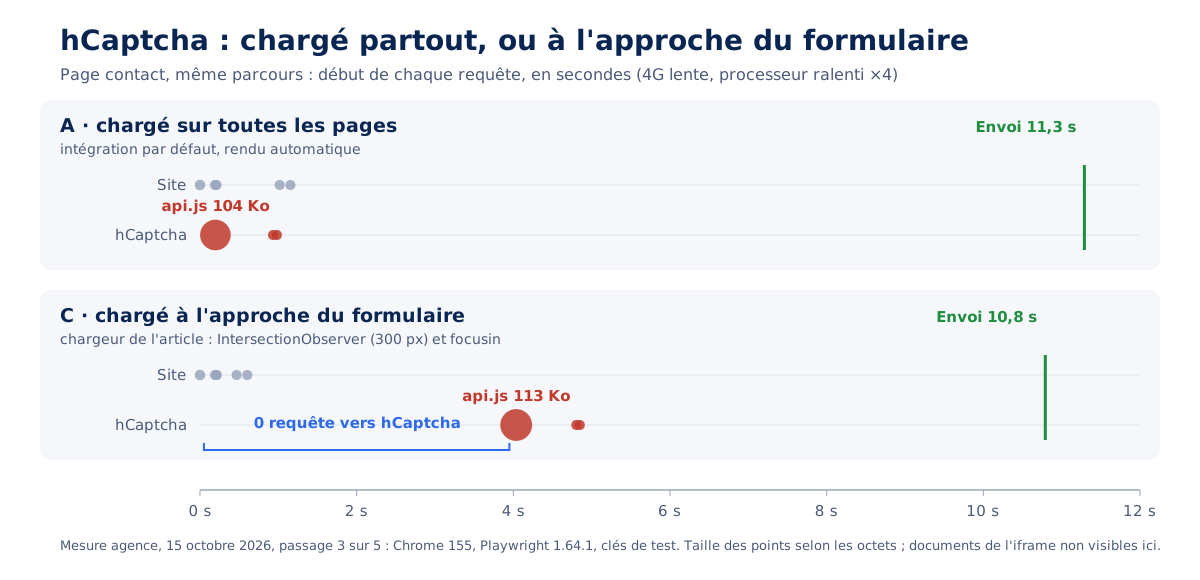
On the staging server, limiting the script to form pages removes any request to the editor on the homepage for all five solutions and brings the Best Practices score for that page up to 100 with hCaptcha. Loading on approach then removes the captcha from the contact page load. Lighthouse does not scroll the page: in this mode, the audit no longer sees the captcha, and only a walkthrough measures its cost.
This mode has a limitation: a heavy script loaded at the last moment impacts input. With reCAPTCHA v3, the INP for input went from 56 to 144 ms on slow 4G because 350 KB arrive and execute while the visitor is typing; 72 ms with hCaptcha, 56 ms unchanged with Turnstile and ALTCHA. With a heavy script, trigger loading earlier by widening the margin of the IntersectionObserver, or choose a lightweight solution.
The trap of the deferred inline call
Performance extensions offer to defer third-party scripts until the first interaction. When applied to a captcha, the setting can make the component disappear without any visible errors. The integration code for a captcha often consists of two parts: the library, and an inline call that uses it (grecaptcha.render(…), grecaptcha.execute(…)). If only the library is deferred, the call executes on load with a missing library, fails, and the library that arrives later never replays it.
The risk depends on the extension's deferral mode. Real case, in September 2026, on a site where all requests went through HubSpot forms: the forms library was deferred by a list of patterns, the creation call remained on load, and forms were missing for six days before the client noticed. Checks made after the setting focused on metrics, which had improved, precisely because the component was no longer loading.
| Deferral mode | Inline calls | Risk for captcha |
|---|---|---|
| Defer all JavaScript (WP Rocket, "Delay JavaScript execution") | Also deferred, replayed in document order | Low: library then call |
| Deferral of a list of patterns (FlyingPress, Perfmatters) | Deferred only if they contain a pattern from the list | High: library leaves, call remains |
| Custom loader | According to their markup | High if the call does not wait for the library |
Library that renders itself (render=onload) | No inline calls | Low: widget appears on interaction |
The resulting rule: a setting that changes the execution time of scripts is validated by the function, never by measurement. After each adjustment, check that the widget exists a few seconds after loading and after an interaction, on desktop and mobile.
The control below, to be pasted into the form page console, signals a container that remained empty. Searching only for an iframe gives a false negative with reCAPTCHA v3, which has no widget, and with ALTCHA, which renders a web component; this control covers both, verified on October 15, 2026 in Chromium 141 with Turnstile, ALTCHA 3.4.0, and reCAPTCHA.
// Contrôle fonctionnel après report : chaque captcha est-il prêt ?
// À lancer quelques secondes après le chargement, puis après un clic ou un défilement.
// Turnstile rend son iframe dans une racine fantôme fermée : le champ du jeton fait foi.
// ALTCHA est un composant web : sa définition fait foi. reCAPTCHA v3 n'a pas de widget.
const pret = (el) =>
  el.localName === 'altcha-widget'
    ? !!customElements.get('altcha-widget')
    : !!el.querySelector('iframe, input[name="cf-turnstile-response"], textarea[name="h-captcha-response"], textarea[name="g-recaptcha-response"]');
console.table([...document.querySelectorAll('[data-captcha], .cf-turnstile, .h-captcha, .g-recaptcha, altcha-widget')].map((el) => ({
  conteneur: el.dataset.captcha || el.className || el.localName,
  widget: pret(el),
})));
console.log('reCAPTCHA v3 prêt :', typeof window.grecaptcha?.execute === 'function');
Reserve the widget's space
The widget appears after the rest of the form: its space is reserved in the CSS, by a minimum height on the container, equal to that of the rendered widget. Measured on October 15, 2026 in Chrome 155, at 375 and 1,280px: 68.5px for Turnstile, 76px for hCaptcha, 78px for reCAPTCHA v2 in normal size, 138 to 144px in compact size.
The container and iframe switch to display: block: displayed inline, the iframe inherits the line height of the text and overflows the reserved space by a few pixels, enough to cause a shift. With hCaptcha, the container thus goes from 79.5 to 76px. Turnstile places its iframe in a closed shadow root, out of reach of the page's CSS: its reservation follows the measurement, 68.5px, higher than the announced 65px.
Can a captcha be accessible?
A visual challenge alone excludes some visitors: blind or visually impaired people, people with cognitive impairments. The W3C has been documenting this for years, and invisible solutions reduce the problem without eliminating it: what happens to the visitor when detection fails?
The W3C note on CAPTCHA inaccessibility, in its December 16, 2021 version, concludes that the very nature of an interactive challenge excludes many disabled people. It recommends limiting captchas to what is strictly necessary, offering several modalities when a challenge is essential, and prefers a honeypot as long as no attack imposes it. Criterion 1.1.1 of the WCAG 2.2 requires, for a captcha, a description of its purpose and alternative forms in other sensory modalities.
Turnstile declares compliance with WCAG 2.2 AA, as does ALTCHA; these declarations remain those of the publishers. The weak point of invisible solutions is their failure case: a visitor classified as suspicious by an ambiguous score is presented with a challenge, or is denied submission, without recourse. The W3C note specifically asks to document this case and offer a secondary path, such as a contact address.
Since June 28, 2025, the European Accessibility Act extends accessibility obligations to parts of the private sector; our article on the RGAA and digital accessibility specifies who is concerned and what is required.
Captcha and GDPR: what precautions?
A third-party captcha transmits browsing data to its publisher. The CNIL exempts it from consent when its sole purpose is site security, but explicitly mentions reCAPTCHA among the solutions whose publisher reuses the data for its own purposes. The following is a reading guide: only a legal expert can rule on a specific case.
In its FAQ on trackers (question 17), the CNIL indicates that an anti-bot device whose sole purpose is to secure the site or an authentication mechanism does not require consent. When the provider pursues other purposes, consent becomes necessary again, and the CNIL itself notes the contradiction: a simple refusal would then be enough to bypass the protection. In this case, it recommends alternative or complementary solutions. A self-hosted solution or a defense without a third-party service avoids the issue; our CMP guide covers consent from a performance perspective.
Do you really need a captcha on your form?
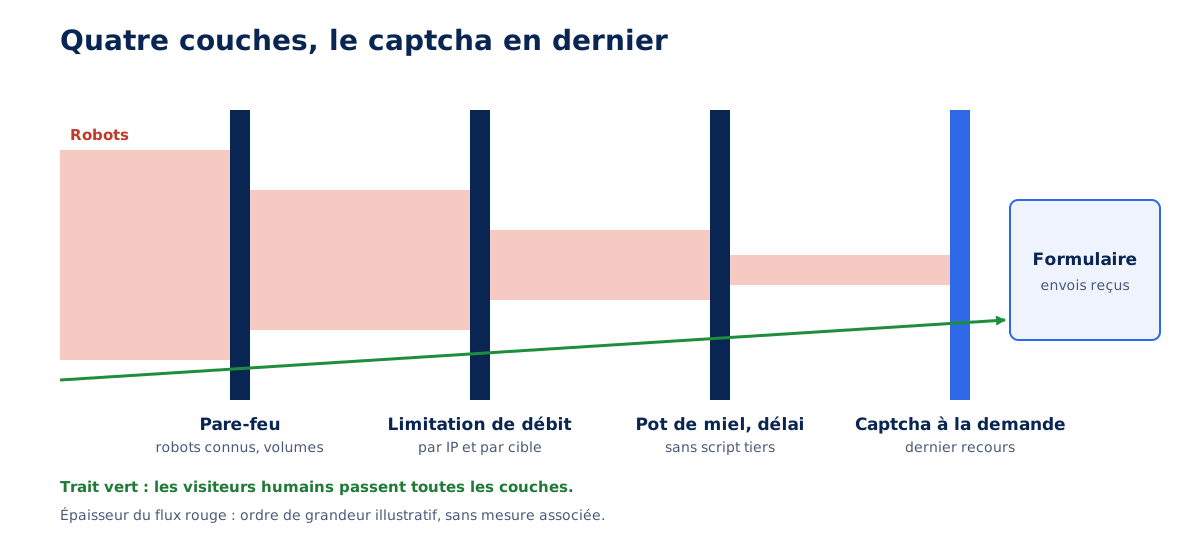
Often, no. Invisible layered defense, honeypot, minimum delay, rate limiting, and firewall stop most bots targeting a contact form; the captcha then becomes the last resort, reserved for forms actually under attack, and loaded on demand.
Honeypot and minimum delay
A honeypot is a field invisible to humans, which bots fill out because they fill out everything. A minimum delay completes the system: a form submitted less than three seconds after its display was not filled out by a person. The code below signs the display time so that a robot cannot falsify it, and removes the trap field from tab order and screen readers. Tested on October 15, 2026 under PHP 8.3: immediate submission refused, filled trap field refused, forged timestamp refused, submission after three seconds accepted.
<?php
// Pot de miel + délai minimal de soumission, sans service tiers.
const SECRET_FORMULAIRE = 'remplacer-par-une-valeur-aleatoire-longue';
const DELAI_MINIMAL     = 3;     // secondes
const DELAI_MAXIMAL     = 7200;  // un formulaire ouvert depuis plus de 2 h se recharge

function jeton_affichage(): string {
	$t = (string) time();
	return $t . '.' . hash_hmac( 'sha256', $t, SECRET_FORMULAIRE );   // heure d'affichage signée
}

function envoi_humain( array $post ): bool {
	if ( '' !== trim( $post['site_web'] ?? '' ) ) {
		return false;                                                   // pot de miel rempli
	}
	[ $t, $signature ] = array_pad( explode( '.', $post['affiche_le'] ?? '', 2 ), 2, '' );
	if ( ! hash_equals( hash_hmac( 'sha256', $t, SECRET_FORMULAIRE ), $signature ) ) {
		return false;                                                   // horodatage absent ou falsifié
	}
	$age = time() - (int) $t;
	return $age >= DELAI_MINIMAL && $age <= DELAI_MAXIMAL;
}

if ( 'POST' === $_SERVER['REQUEST_METHOD'] && ! envoi_humain( $_POST ) ) {
	http_response_code( 400 );
	exit( 'Envoi refusé. Patientez quelques secondes avant de valider le formulaire.' );
}
?>
<form method="post">
	<label for="email">Courriel</label>
	<input id="email" name="email" type="email" autocomplete="email" required>
	<!-- Pot de miel : hors écran, hors tabulation, ignoré des lecteurs d'écran -->
	<div aria-hidden="true" style="position:absolute;left:-10000px">
		<label for="site_web">Ne pas remplir</label>
		<input id="site_web" name="site_web" type="text" tabindex="-1" autocomplete="off">
	</div>
	<input type="hidden" name="affiche_le" value="<?= htmlspecialchars( jeton_affichage() ) ?>">
	<button>Envoyer</button>
</form>
Rate limiting in the application
A form that sends an email or SMS is a sending service open to everyone. Rate limiting at the web server counts requests per IP address; a bot that changes its address with each submission gets through.
The application limit also counts per target, the email address or number entered, per hour and per 24 hours, and responds with a 429 code accompanied by a Retry-After header and a readable message. Agency convention for a contact form: 5 submissions per hour and 20 per day per IP address, 3 and 10 per target.
Web Application Firewall: block rather than challenge
A web application firewall, like Cloudflare's for example, stops known bots and abnormal volumes upstream. A point of concern, observed in September 2026 on a content site: a set of rules configured for JavaScript challenges on admin-ajax.php presented about 438,000 challenges per day to real visitors, with 14 resolved. A challenge is not resolved in an AJAX call, which expects JSON and receives an HTML page: on a request that is not a page, a challenge is equivalent to blocking legitimate visitors.
If the captcha remains necessary
When a form remains under attack despite these layers, the captcha is brought back, loaded on demand as above, and verified on the server side. Token verification is mandatory: a displayed widget protects nothing if the server does not check the token with the provider. Turnstile and hCaptcha expect a form-encoded POST, and a Turnstile token expires after 300 seconds and is only validated once. The function below was tested on October 15, 2026 with test keys from both providers: valid token accepted, refusal key and empty token rejected.
<?php
// Vérification côté serveur du jeton (Turnstile ou hCaptcha), avant tout traitement du formulaire.
function verifier_captcha( string $fournisseur, string $secret, string $jeton, string $ip = '' ): bool {
	$points = array(
		'turnstile' => 'https://challenges.cloudflare.com/turnstile/v0/siteverify',
		'hcaptcha'  => 'https://api.hcaptcha.com/siteverify',
	);
	if ( '' === $jeton || ! isset( $points[ $fournisseur ] ) ) {
		return false;                                          // aucun jeton : widget absent ou non résolu
	}
	$champs = array( 'secret' => $secret, 'response' => $jeton );
	if ( '' !== $ip ) {
		$champs['remoteip'] = $ip;                             // facultatif, améliore la détection
	}
	$ch = curl_init( $points[ $fournisseur ] );
	curl_setopt_array( $ch, array(
		CURLOPT_POST           => true,
		CURLOPT_POSTFIELDS     => http_build_query( $champs ), // application/x-www-form-urlencoded
		CURLOPT_RETURNTRANSFER => true,
		CURLOPT_TIMEOUT        => 5,
	) );
	$corps = curl_exec( $ch );
	curl_close( $ch );
	if ( false === $corps ) {
		return false;                                          // service injoignable : refuser, ou basculer sur une autre défense
	}
	$reponse = json_decode( $corps, true );
	return ! empty( $reponse['success'] );
}

// Champ du jeton : cf-turnstile-response (Turnstile) ou h-captcha-response (hCaptcha).
$jeton = $_POST['cf-turnstile-response'] ?? $_POST['h-captcha-response'] ?? '';
if ( ! verifier_captcha( 'turnstile', getenv( 'TURNSTILE_SECRET' ), $jeton, $_SERVER['REMOTE_ADDR'] ?? '' ) ) {
	http_response_code( 400 );
	exit( 'Vérification anti-robot échouée. Rechargez la page et réessayez.' );
}
Inventorying a site's third-party scripts, including captchas, and deciding which ones are worth their place is the purpose of a performance audit. Widgets of the same kind, chat, customer reviews, appointment booking, follow the same rules, as shown in our article on customer relationship widgets; their implementation without regression is handled in technical support. The initial question remains: does your captcha load for your forms, or for the entire site?