
You've experienced it before: you start reading an article, your finger moves towards a button, and just as you're about to click, everything shifts. The text jumps, the button has moved, and you've just tapped on an ad. This phenomenon has a name: layout shift. And Google measures it with a dedicated metric, the Cumulative Layout Shift (CLS), the third pillar of Core Web Vitals alongside LCP and INP.
Unlike its two cousins, CLS doesn't measure a duration but visual instability. It's the most counter-intuitive metric of the trio, the one whose calculation method is least understood, and paradoxically, the one whose fixes are often the quickest to implement. In this article, we break down CLS like our experts in web performance audits do: the exact score calculation, the five main categories of causes, and concrete fixes, with code examples, to sustainably stay below the 0.1 threshold.
CLS, what exactly is it?
Cumulative Layout Shift measures the visual instability of a page by combining two pieces of information: what proportion of the visible content has moved, and over what distance. A good CLS is less than or equal to 0.1, bad above 0.25, at the 75th percentile of visits. The official definition is given by web.dev: CLS is the largest sum of shift scores observed over a given time window, during the entire lifespan of the page.
Two important clarifications stem from this definition. First, CLS is a unitless number. Where LCP is expressed in seconds and INP in milliseconds, CLS is an abstract score: 0 means a perfectly stable page, and the higher the score, the more the page moves under the user's eyes.
Second, only unexpected shifts count. A content shift that occurs within 500 milliseconds of a user interaction (a click, a keyboard input) is considered intentional and excluded from the score. Opening an accordion menu that pushes content down therefore does not penalize your CLS. However, a shift that occurs beyond this grace period, for example after a slightly slow network call, is counted again, even if it indirectly results from a user action.
How a layout shift score is calculated
Each individual layout shift gets a score that is the product of two fractions, detailed in the metric's documentation :
- the impact fraction: the proportion of the viewport that is taken up by the union of the areas an unstable element covered before and after it moved;
- the distance fraction: the distance the element moved, relative to the largest dimension of the viewport.
Let's take a concrete example. A text block takes up half the screen. An image is inserted above it and pushes it down by 25% of the viewport height. The area affected by the movement (initial position plus final position of the text) covers 75% of the viewport: the impact fraction is 0.75. The distance traveled is 0.25. The score for this shift is therefore 0.75 × 0.25 = 0.1875. A single event of this type is enough to push the page into the "needs improvement" zone.
The distance fraction hasn't always existed: it was introduced to avoid over-penalizing large elements that only move a few pixels. This detail illustrates an essential property of CLS: a small shift of a large element and a large shift of a small element are not equivalent; the metric seeks to reflect the perceived user experience, not just mechanical movement.
Session windows rather than infinite accumulation
The "C" in CLS was misleading for a long time. Originally, all shifts were added up over the entire lifetime of the page: a page viewed for ten minutes mechanically accumulated more shifts than a page closed in thirty seconds, which unfairly penalized long-lived pages like news feeds or single-page applications. Google corrected this bias in 2021, as explained in the article Evolving the CLS metric.
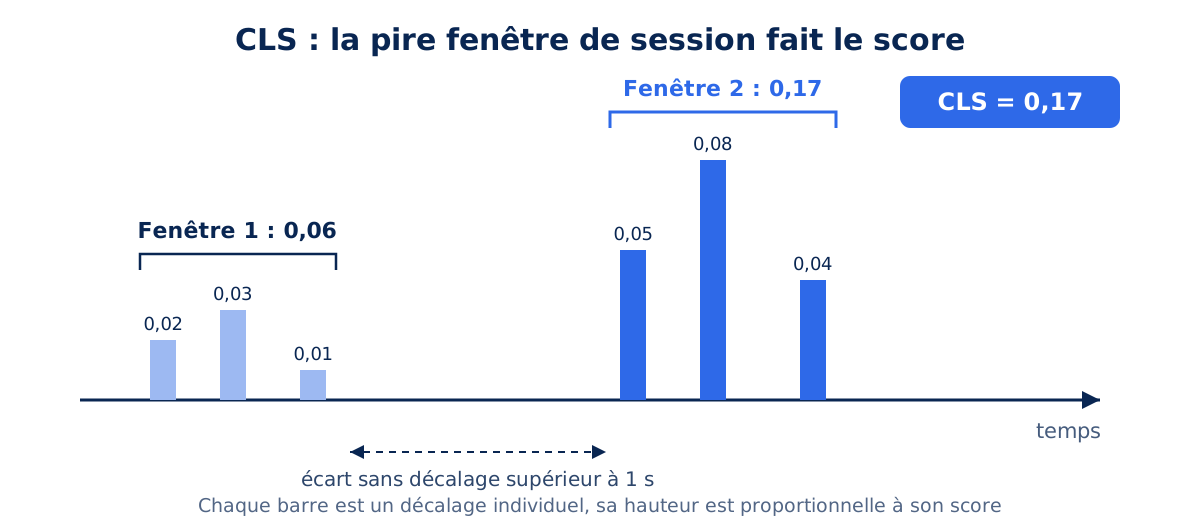
Since then, shifts have been grouped into session windows: a window starts with the first shift, continues as long as shifts occur within a second of each other, and closes after a maximum of five seconds. Each window adds up the scores of the shifts it contains, and the CLS recorded is that of the worst window. A practical consequence: a page may experience shifts at different times during its life (on load, then during scrolling), and it's the worst episode, not the sum of all, that counts.
Thresholds to keep in mind
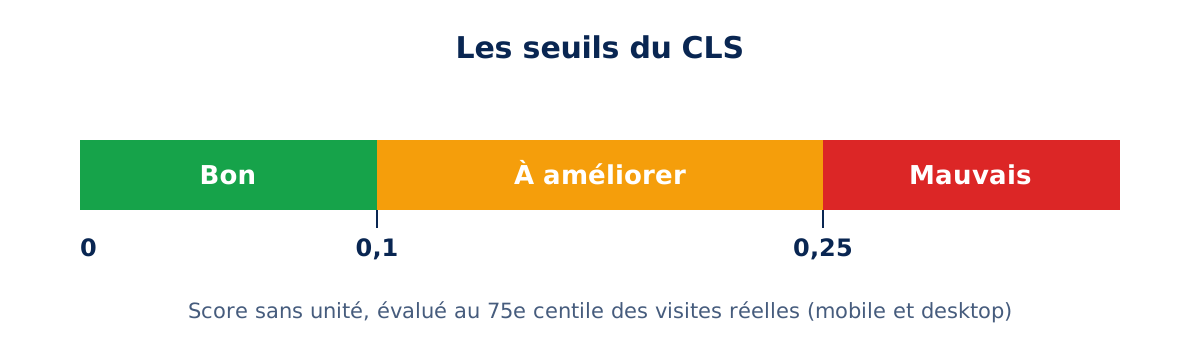
To offer a good experience, Google sets the target at a CLS of 0.1 or less. Between 0.1 and 0.25, the page is classified as "needs improvement"; above 0.25, it is considered poor. As with the other Core Web Vitals, the evaluation is done at the 75th percentile of real visits: it is not enough for the page to be stable on your development machine, it must be stable for at least three out of four visitors, including mobile users.
Why is CLS important?
CLS is the only metric that measures directly felt annoyance: a button that moves when you click it, a paragraph that jumps while you're reading. It impacts conversion and trust. It is also the easiest of the three to fix, as its causes are few and identifiable.
CLS is probably the metric most directly linked to user frustration. A poor LCP results in waiting; a poor CLS results in errors: clicking the wrong link, unintentional addition to the cart, losing your place while reading. On an e-commerce site, a "Complete Order" button that disappears under your finger in favor of a promotional banner is a major irritant, with measurable consequences on conversion.
There's also the SEO aspect: CLS is part of the page experience signals taken into account by Google, just like the other two Core Web Vitals. We detailed this mechanism in our article on the SEO impact of web performance: performance isn't everything, but with comparable content, it makes the difference.
Finally, CLS has a valuable property for prioritizing performance work: its causes are few, well-identified, and most fixes are low-risk HTML and CSS adjustments, whereas LCP or INP work often touches the site's architecture itself.
What are the causes of poor CLS?
Five causes cover almost all cases: images and media without declared dimensions, ads or iframes whose space is not reserved, content injected above existing content, fonts that cause a rendering shift, and CSS animations affecting layout properties. All of these can be fixed by reserving space in advance.
| Cause | What happens | Fix |
|---|---|---|
| Images without dimensions | Space is created when the file arrives | Width and height attributes, or aspect-ratio |
| Ads and iframes | The block is inserted and pushes the content | Reserve a fixed-size container |
| Injected content | Banner or message added above | Reserve space or insert overlay |
| Fonts | Fallback font switches to final font | font-display swap and adjusted fallback metrics |
| CSS Animations | Animating Layout Properties | Animate only transform and opacity |
This table is read from top to bottom by frequency: images without dimensions remain by far the leading cause of CLS on the sites we audit. The fix involves two HTML attributes, making it the best effort-to-gain ratio of the entire metric. The other four causes require a bit more work, without ever becoming complex.
The official CLS optimization documentation identifies four main categories of causes: images without dimensions, ads and iframes without dimensions, dynamically injected content, and web fonts. We add a fifth, regularly encountered during audits: poorly chosen CSS animations. Let's review them, along with the associated fixes.
Images and media without dimensions
This is historically the leading cause of CLS on the web. Without width and height attributes, the browser ignores an image's proportions before downloading it: it reserves zero height, displays the text, then pushes everything down when the image arrives. The fix has existed since late 2019: when both attributes are present, the browser deduces the display ratio and reserves the exact space even before the first byte of the image, as explained in detail by Jake Archibald (secondary source, Chrome engineer at the time of publication).
<!-- Le ratio 16/9 est réservé avant téléchargement -->
<img src="/img/hero.avif" width="1600" height="900"
     alt="Description pertinente">
These values do not impose a fixed display size: standard responsive CSS remains in control of the final dimensions, with the ratio being preserved by the browser.
img {
  max-width: 100%;
  height: auto; /* le ratio issu de width/height est conservé */
}
For responsive images in srcset, it's enough for all variants to share the same ratio. For art direction in <picture>, modern browsers now accept width and height on each <source>, allowing different ratios between mobile and desktop without shifting. And for CSS background images, which have no equivalent, the aspect-ratio property serves the same space reservation role. We dedicate a full article to image optimization, of which explicit dimensions are only one aspect.
Advertisements, iframes, and embedded content
Ads are one of the main contributors to CLS across the web. Ad networks serve formats of variable size in placements whose height is not known in advance: when the creative arrives, all the content below it shifts down a notch. The same mechanism applies to YouTube videos, Google Maps cards, or embedded social media posts: the widget doesn't know its own size until it has loaded, and the platform doesn't reserve space for you, as reminded by the best practices for embeds.
The workaround is always the same: reserve space in the initial layout before third-party content arrives. A min-height rule set to the most likely format, or an aspect-ratio for proportional content, is sufficient in most cases.
/* Emplacement publicitaire : hauteur du format le plus probable */
.ad-slot {
  min-height: 250px;
}

/* Iframe video : l'espace est réservé au bon ratio */
.video-embed iframe {
  width: 100%;
  aspect-ratio: 16 / 9;
}
Two subtleties are worth highlighting. Firstly, if no ad is ultimately served, the placement should not be collapsed: removing a placeholder causes the exact same shift as inserting one. It's better to display substitute content there. Secondly, position matters: a block injected at the top of the viewport shifts everything that follows it, whereas the same block at the bottom of the page shifts almost nothing. Placing late content as low as possible is a free optimization.
Dynamically injected content: banners, CMPs, and infinite scroll
Consent banners, promotional bars, newsletter signup forms: anything inserted into the page flow after the initial render pushes existing content down. The case of the cookie banner is emblematic, to the point that web.dev dedicates a best practices guide to it: the solution is either to reserve space for the banner from the initial render, or to overlay it on the content using position: fixed, out of the flow, so that it doesn't shift anything. Our comparison of 11 CMPs shows how unequal market solutions are on this point.
Infinite scroll is another classic pitfall: if new elements load without reserved space while the user scrolls, each injected batch causes its own shift, even long after the initial load. Addy Osmani (Chrome engineer) details the correct pattern in Infinite scroll without layout shifts (secondary source): pre-sized placeholder skeletons and off-screen insertion. More generally, for any on-demand loaded content, three strategies avoid shifts: replacing the old content in a fixed-size container, triggering the load by the user (shifts under 500 milliseconds are then excluded from the score), or loading off-screen and notifying.
Fonts
Fourth major cause, more insidious: webfonts. While a custom font is downloading, the browser displays either invisible text (FOIT) or a fallback font (FOUT). In both cases, when the final font arrives, the text is redrawn: if the fallback font doesn't occupy the exact same space (width, line height), the text blocks change height and the entire bottom of the page shifts. Our article on the impact of fonts on performance covers the subject in depth; let's focus here on the CLS aspect.
The most effective lever is to adjust the fallback font so that it mimics the final font, using the descriptors size-adjust, ascent-override, descent-override, and line-gap-override, introduced by Chrome and documented in Improved font fallbacks:
/* Fallback dimensionnee pour mimer Poppins */
@font-face {
  font-family: "Poppins-fallback";
  src: local("Arial");
  size-adjust: 112%;
  ascent-override: 93%;
  descent-override: 31%;
}

body {
  font-family: Poppins, "Poppins-fallback", Arial, sans-serif;
}
With a well-calibrated fallback font, the switch becomes almost invisible and text-related CLS drops to zero. Supplement this with font-display: swap so the text is immediately readable, preloading critical files via <link rel="preload">, and, for cases where stability is more important than exact rendering, font-display: optional which forgoes the switch if the font isn't ready for the first render, as recommended by the font best practices guide.
Calculating these descriptors by hand is tedious: that's precisely why we developed No More Font Shift, our tool for generating optimized fallback fonts. You upload your webfont, the tool helps you calculate the size-adjust and override values, then produces ready-to-use CSS, with Arial and Roboto as fallback fonts for sans-serifs, by far the most common (Times New Roman and Roboto Serif or Impact and Roboto Condensed stacks cover serif and condensed fonts). An integrated loading simulator even allows you to visually compare, with and without adjusted fallback, the shift actually experienced by your visitors depending on their connection speed.
Poorly chosen CSS animations
Animating the top, left, width, or margin properties triggers layout recalculations on every frame, and these movements count as shifts. The rule, detailed in the guide High-performance animations, is simple: all movement must go through transform, which operates at the composition stage, does not affect the position of other elements, and is not included in the CLS calculation.
/* A eviter : declenche layout + layout shift */
.banner { animation: slide-bad 300ms ease-out; }
@keyframes slide-bad {
  from { top: -80px; }
  to   { top: 0; }
}

/* A privilegier : composition seule, aucun CLS */
.banner { animation: slide-good 300ms ease-out; }
@keyframes slide-good {
  from { transform: translateY(-80px); }
  to   { transform: translateY(0); }
}
Along the same lines, beware of elements positioned with position: absolute that are loaded late by JavaScript, and older generation carousels that recalculate their dimensions on load : we documented the latter case in our article on sliders.
Is your site as fast as your visitors expect?

How to measure and diagnose CLS ?
Before fixing, you must first measure in the right place. CLS is the metric where the gap between lab tools and field data is most frequent, and most confusing for teams.
Lab data vs. field data
Lighthouse measures CLS during a simple page load, without interaction or scrolling. The Chrome UX Report (CrUX), on the other hand, measures CLS over the entire page lifecycle with real users : scroll, interactions, content loaded on demand. A Lighthouse score of 0 with a CrUX of 0.25 is therefore not an anomaly : it means your shifts occur after loading, typically during scrolling on lazy-loaded content or during view transitions in a single-page application.
This is a case we systematically encounter in SPA audits, where route changes beyond the 500-millisecond grace period contribute to field CLS, invisible in the lab. PageSpeed Insights displays both datasets side-by-side, and their divergence is in itself a diagnostic signal, as we explained in PageSpeed Insights vs Lighthouse.
Tracking shifts in DevTools
The Performance panel in Chrome DevTools has a "Layout shifts" track that groups shifts into clusters : each diamond is an individual shift, its size is proportional to its score, and clicking it replays the shift animation by highlighting the moved elements. The "Live metrics" view in the same panel allows you to interact with the page while monitoring the score in real time, ideal for reproducing a post-load shift.
The Debug layout shifts guide details the complete method. Beware of a subtlety : the tools list the moved elements, which are not always the offending elements. A block inserted at the top of the page causes all elements below it to appear in the reports ; the cause is above, in the inserted element.
Measure continuously on your real users
To go beyond one-off diagnostics, Google's web-vitals library exposes an "attribution" version that identifies, for each real session, the worst shifted element and the time of the shift :
import { onCLS } from "web-vitals/attribution";

onCLS((metric) => {
  console.log("CLS :", metric.value);
  // L'element le plus decale de la pire fenetre de session
  console.log("Cible :", metric.attribution.largestShiftTarget);
  navigator.sendBeacon("/analytics", JSON.stringify(metric));
});
Connected to a RUM tool, this instrumentation transforms CLS from an abstract score into a list of culprit elements, sorted by frequency. This is precisely the approach we are industrializing in our web performance monitoring service : without continuous measurement, a CLS regression introduced by a theme update or a new advertising network can go unnoticed for weeks. A point of attention highlighted by the CrUX documentation : shifts occurring within iframes are counted by CrUX but invisible to JavaScript APIs, so your RUM may slightly underestimate the official score.
Does the bfcache improve CLS?
Yes. A page restored from the back/forward cache reappears as it was, without a new load or layout recalculation : therefore, no shifts can occur. Navigations using the back and forward buttons thus entirely escape the risk of visual instability.
A lever often ignored corrects no shifts but improves the overall score : the back/forward cache (bfcache). When a user returns to a page via the Back button, the browser can restore it instantly from memory, in the exact state it was left in : no reload, therefore no loading shifts.
These navigations being very frequent (return to search results, to a category page), their CLS close to zero pulls the field distribution down : when this consideration was deployed, Chrome observed notable CLS improvements in CrUX. However, your pages must be eligible : an unload event handler or certain headers are enough to deprive the entire site of this bonus. Bfcache eligibility is part of the points we check in every optimization mission.
What to remember about CLS
CLS is a unitless score that measures the worst window of unexpected shifts over the entire page life, with a target of 0.1 at the 75th percentile. Its causes fall into five categories : images without dimensions, third-party content without reserved space, dynamic injections, poorly substituted fonts, and layout-triggering animations. The guiding principle for all corrections is the same : tell the browser, from the initial HTML and CSS, the size of what has not yet arrived.
It is also the metric with the best effort/result ratio: with width and height attributes, some min-height, and a calibrated font fallback, a page can go from 0.3 to less than 0.05 in a few days of work. However, one must diagnose the right culprits in the right place in the page's lifecycle. If your field CLS resists your fixes, our experts can analyze it as part of a complete web performance audit, or directly fix your site through our web performance optimization service.