
Most guides on redesign and SEO boil down to one piece of advice: create a redirection plan. It’s necessary, and very insufficient. In the redesigns we carry out, as well as those we audit afterward, losses rarely come from a forgotten line in a spreadsheet. They come from what no one replayed on the actual site.
A redirection rule that was never tested, a URL captured by a new rewrite rule, a staging environment leaking into the index, a script remaining at its old version after an update, without the slightest alert: none of this is visible in a plan. All of this is measured, before, during, and after.
This guide follows the order of a construction site, with figures recorded during our interventions. The common thread is the redesign of Matthieu Tran-Van's website, carried out in the fall of 2026: 661 public URLs, over 1,300 inherited redirects, the same shared hosting. Before reading further, a simple question: do you know how many public URLs your site has today?
Why does a redesign cause a loss of search engine ranking?
Because it changes what Google has learned about the site, and design is not part of that. Google knows URLs, the content they serve, the links that connect them, and how the server responds. A redesign that preserves these four elements can change everything on screen without losing anything; a redesign that breaks even one can lose positions with an impeccable design.
The four things Google knows about your site
- The URLs. Each URL that changes requires an old-to-new mapping and a permanent redirect, to be maintained over time.
- The content. Title, text, structured data: a page rewritten during the redesign is no longer the page Google had ranked.
- Internal links. Menu, footer, related content blocks: a preserved URL can lose all its links without any errors being displayed.
- Server responses. Status codes and response times regulate the pace at which Google crawls the site.
Don't change everything on the same day
Google's documentation on site moves states it plainly: plan changes one by one, not all at once. Yet a redesign often combines a new brand identity, a new theme, a new site structure, and, while you're at it, a new host. When traffic then drops, no one knows which change to blame.
Our rule: everything that can stay in place stays in place, starting with URLs, and hosting when it's not the issue. On the project serving as the thread for this guide, the brand identity, the technical foundation, and the new sections have changed. No existing URLs have moved, and the host has remained the same. This is what allows, further down, to attribute a response time gain to the site itself and not to a new server.
Google's timeline is not the project's timeline
A redesign goes live in seconds; Google digests it in weeks. The orders of magnitude below were presented by Gary Illyes at Search Central Live in Barcelona in early October 2026, and reported by the ROAST agency's summary (secondary source: Google has not published the slides, nor specified the sample size or what "typical" covers).
| What Google updates | Typical delay | Slowest delay |
|---|---|---|
| Discovery of a new URL | about 20 hours | weeks, or never |
| Revisiting a known URL | about 30 days | weeks, or never |
| Sitemap processing | about 24 hours | up to 14 days |
| Canonical URL change | 1 to 3 weeks | months |
| Link consideration | a few minutes to 3 weeks | months |
| Site migration | 1 to 3 months | 6 months to over a year |
Two lines count as a redesign. A known page awaits its next crawl, about thirty days under normal conditions: two weeks after going live, Google has not yet recrawled the entire site. And a migration is judged over one to three months, not by the next day's curve. We will revisit this during the monitoring phase.
What should be inventoried before touching the site?
Three things: URLs, redirects, and a dated reference state in Search Console. Without this inventory, "nothing has changed" remains an impression, and an impression cannot be replayed on the day of going live.
All public URLs, not just the sitemap
An SEO plugin's sitemap lists what the plugin wants to show, not what the site serves. The inventory is drawn from the database: published content of all public types, archives, terms from all public taxonomies, authors who have published. On our project, it yielded 661 URLs, including 554 articles and 61 pages, the rest being categories, tags, and author pages.
The same inventory is drawn on the working copy, and the two lists are compared line by line. Each line present on only one side is content renamed, unpublished, or deleted during the project, to be decided before going live. This check only costs one command, and it can be rerun as many times as needed.
The redirection history, rule by rule
A website that has been around for a while has a redirection history that no one has reviewed. Here: 1,338 rules, including 611 automatically created by the extension with each address change of an article. A redesign is the right time to review them, sorted by usage count and last visit date, with a simple decision order for each source.
- content from the site on the same topic;
- failing that, a specific page from another site, never its homepage;
- failing that, a 410 response (content deleted).
On another site whose redirection history we reviewed in September 2026, the 142 rules were distributed as follows: 99 to site content, 8 to a specific fallback site page, 11 to 410, and 24 disabled. Two pitfalls recur with each review. A regular expression from the old site captures a page created since: a rule on ^/a-propos(.*)$ that redirected to the homepage was masking a new "About Us" page. And on nginx, an old address with a .php extension is processed by the server before WordPress: the rule set in the extension never executes, even though its counter, inherited from the previous hosting, seems to prove otherwise.
A dated reference state
After going live, there is no more 'before'. Therefore, before we start, we record: the average response time per file type in the crawl statistics, the number of indexed pages and exclusion reasons, and for the pages that generate revenue, their queries and their position over three and sixteen months. Titles and descriptions are saved separately: on a site where revisions are disabled, only a backup saves the title from before.
Should we keep the same URLs during a redesign?
Yes, whenever possible. A preserved URL keeps its incoming links and history without depending on anything. A redirected URL depends on a rule that Google asks to keep "as long as possible, generally at least a year," and that the next provider may delete without knowing why it was there.
What a redirection costs
A redirect is a full round trip before the first useful byte. We measured it in September 2026 on the redirect from the bare domain to the www of a site: left to WordPress, it was never cached and cost 430ms from Paris, nearly a second from the Antilles. Handled by a rule at the CDN level, the same redirect responded in 36 to 60ms. A redirect produced by a plugin makes the entire CMS start up to send a few dozen bytes.
Google follows up to ten hops, which doesn't mean you should give it that many. Each hop counts as a full crawl request, and internal links should never go through a redirect. Our guide to HTTP status codes details the cost of each depending on where it is generated.
When the address must change: a table, not a pattern
Changing CMS sometimes requires changing addresses, and the temptation is to fix everything with a generic rule. During the audit of a community site migrated from a phpBB forum, the old topic addresses all responded with 404. We tested 142 of them: 135 topics still existed on the new site, but under a different number. No pattern could link them. It required a mapping table, address by address, built during the migration, when the old and new numbers were still side-by-side in the same database.
When content disappears: 410, not the homepage
Mass redirecting to the homepage is the most common bad idea. Google recommends not redirecting many old addresses to an unrelated destination, which it may treat as a 'soft 404', and specifies in its Crawl Budget guide that these pages continue to be crawled in vain.
On one of our editorial sites, refocused on practical guides, 367 outdated news items were deleted. They respond with 410. Twenty-five old addresses had a real successor: they received their redirect on the day the corresponding guide was published, not before. And the plugin that redirected any unfound address to the homepage was disabled. Google treats 404 and 410 the same way; the 410 simply states more clearly that the deletion is intentional.
Collisions that nobody seeks
An address can remain in place and serve something else. Case seen on November 16, 2026, on a pre-production site: a new page created at the same address as an existing category. With the category base removed by the SEO extension, the category rule takes precedence over pages: the address returns a 200, without error, and serves the category archive. The page is unreachable even though the editor shows it. Hence a control rule: a 200 code does not prove it's the right page. On a sample by content type, we also compare the title and the canonical address.
How to check a redirection plan?
By replaying it on the server, address by address, and comparing the response code and destination to those from before. Rereading the spreadsheet proves nothing: it's the server responses that Google will read, not the plan.
Replay each address, in series
The script is only a few lines long: it requests each address from the inventory from the target and only prints what is not a 200, along with the destination of redirects.
#!/bin/bash
# Usage : controle-adresses.sh inventaire.tsv https://cible.example
# inventaire.tsv : une adresse relative par ligne, en cinquième colonne.
REF=$1; CIBLE=$2
cut -f5 "$REF" | sort -u | while read -r u; do
  curl -s -o /dev/null --max-time 40 -A "Mozilla/5.0 controle-adresses" \
       -w "%{http_code} %{redirect_url} $u\n" "$CIBLE$u"
  sleep 0.4                      # une requête à la fois : voir plus bas
done | awk '{ n[$1]++; if ($1 != "200") print }
            END { for (c in n) print "TOTAL " c " : " n[c] > "/dev/stderr" }'
The sleep is not a courtesy. On the shared hosting of the project, 661 addresses requested by six parallel requests resulted in 375 empty responses; with two parallel requests, still 296. In series, with a 0.4s pause, all addresses responded. An empty response is not a discrepancy; it's the host cutting off the burst, and a check that doesn't account for it creates false alerts.
The reverse is also true: a run without any discrepancies proves nothing if it has no witness. We slip an address into the inventory whose discrepancy is known, which the script must flag. Without it, 'zero discrepancies' might simply mean the script queried the same site twice.
Result on the project, before going live and then just after: 640 pages served and 21 redirects, identical on both sides. The only discrepancy was intentional: a two-hop redirect reduced to a single hop.
A single redirect manager
The site had two tools capable of redirecting: a dedicated extension, and the SEO extension's module. The latter contained only one rule, which didn't stop it from working: it logged every unfindable address with the visitor's complete IP address, totaling 4,745 lines in a week, doubling the first log. A complete IP address is personal data; this log had no reason to exist.
The 1,338 rules were incorporated into a single tool, then each active rule was replayed and compared to the old one: same code, same destination, with three exceptions, all explained. The import also revealed 33 source addresses present twice. And one last detail, which only a check the next day could reveal: with the log cut, the extension had still written 2,862 lines the next morning. It was logging its own redirects without consulting its setting. A unchecked setting is not a verified behavior.
Redirects that WordPress doesn't do for you
WordPress redirects the old address of a renamed post by itself. It doesn't do this for a page. Any page renamed during a redesign therefore requires an explicit rule, or an extension that monitors address changes, an option disabled by default on a new installation. This is exactly the kind of safety net that disappears without a trace when replacing one tool with another: on this project, monitoring was reactivated in the new tool, then tested with a real address change, which was immediately undone.
How to work on a copy without showing it to Google?
By isolating it at the server level, not just WordPress, and verifying that the cache does not bypass the isolation. A pre-production environment fed by a copy of the production contains everything real about the site: content, accounts, scheduled tasks. Indexed, it becomes the exact duplicate of the site it is preparing.
Cache comes before access control
On October 7, 2026, our pre-production environment was closed by an access control written in PHP, tested with an empty cache: any unauthorized visitor received a denial. Except that the page cache of an extension is served before WordPress starts, therefore before this control. After a first authorized visit, the cached page was served to everyone at 200, including five bots on the same day.
The workaround is a single line of configuration: make the access cookie mandatory to receive the cache. An HTTP authentication set by the web server does not have this flaw, as it occurs before PHP. In both cases, an X-Robots-Tag: noindex header sent by the server closes the door to search engines, and this is also the first setting to remove on launch day.
A copy is never identical to the original
An example from the same site: the copy contained 18,421 derived WebP images, 245 MB that nothing seemed to use. On pre-production, served by nginx, no pages requested them. On production, served by Apache, a rule in the .htaccess file sent them to any compatible browser instead of JPEGs. Deleting them would have increased the size of every image on the site. Proof that a file is not being used must be sought on the server that will serve it.
The same caution applies to extensions. On an isolated copy, those that have been disabled for isolation (email sending, image optimization, audience measurement) appear inactive, whereas they are running in production. The status of an extension is determined on the actual site, never on its copy.
The site lives during the work
Between the copy and the launch, production continues to change. On October 26th, we had verified that no content had changed since the copy. On the same day, after our visit, the client published a limited-time offer on a sales page. In the same interval, an automatic update had caused production to move ahead of pre-production by a minor version of WordPress.
This delta is therefore measured twice: at each checkpoint, and one last time just before switching, with a publication freeze on the day itself. Content created or modified, comments, accounts, added files, versions. Everything written in production after the copy disappears upon launch if no one has reported it.
Replace the addresses in the copy, everywhere
Switching from the working address to the public address required 41,086 replacements in the database. The check is not on this number, but on what remains: zero occurrences of the working address, including in its escaped form (https:\/\/), the one that a full address replacement doesn't find in JSON data. And some data is derived from the address without containing it: 263 redirect fingerprints, calculated from addresses that the replacement had just modified, had to be recalculated.
Is your site as fast as your visitors expect?

What to clean up during a redesign, and what to leave in place?
Everything that impacts response time and maintenance, provided it's done in controlled batches. A redesign is the only time when everything is already open on the workbench. It's also when it's most tempting to change everything at once: one batch, one check, then the next.
Extensions and legacy blocks
The cleanup reduced 27 active extensions to 13. Among the removed extensions, three block libraries installed over the years. The most used was present in 361 items: 1,427 question-accordions, 7,377 list items, 1,029 buttons. Removing the extension without converting these blocks would have left broken pages in the editor, and content stripped of its formatting.
The conversion was done by script, with three safeguards. The converter only touches the blocks of the extension to be removed, and the rest of each content must come out identical to the byte. Each converted content is then reread by the block editor: five were different on the first pass, none on the second. Finally, the structured data survives: a question accordion that produced FAQ markup must still produce it, only once per page. This is the kind of detail that a visually perfect conversion makes disappear.
The database
- Encoding. 25 tables inherited in latin1 were converted to utf8mb4. The symptom was subtle: arrows entered in a table were saved as question marks.
- Residue. 429 settings and 41,864 metadata belonged to about fifty extensions that had long since disappeared.
- Revisions. They occupied 522 MB of a 894 MB database.
- Queries. Of the 257 SQL queries for an article, 107 each read a setting absent from the database. A grouped read reduced the total to 172.
This last point illustrates what a redesign adds without saying so: a freshly installed extension whose settings have never been saved queries the database on every page for every missing setting. A new site can thus make more queries than the old one, while having fewer extensions.
How to switch without risk?
By changing a pointer rather than overwriting the site. The new site is placed in a separate folder and database, then the domain is pointed to this folder. The old site remains intact next to it, and reverting is a single action, without a maintenance page.
A new folder, a new database, the old site intact
In cPanel, the pointer is the domain's root. The principle applies everywhere: on a high-traffic media outlet whose theme we replaced, the switch took 1.4 s, with a rollback tested in 3 s and never used. What makes the method safe is not its speed, but that the rollback was performed before the D-day.
It has its pitfalls, all encountered:
- a configuration file copied from the old site may contain absolute paths, and the new site would then load the old site's extensions;
- files written outside the content directory do not follow a copy of this directory: an
llms.txtfile written by the SEO extension next to this directory had to be regenerated; - on shared hosting, the PHP version applies to the entire account: if you revert, the old site reverts to the new version, which must therefore have been tested.
See the new site before it has an address
A site placed in a directory that serves no purpose yet cannot be visited. It can be executed: we generated 22 typical addresses for the new site, via the command line, with a simulated request, before changing the pointer. No PHP errors, no noindex tags, no trace of the working address. On the media mentioned above, a similar procedure, carried out on the live site via a reserved address, had revealed a video player that positioned itself using a marker from the old theme, defined in the ad server's configuration and nowhere in the site's code.
Temporary errors from the first pass
On the first check of addresses after the switch, 20 out of 661 addresses responded with 503; on the second, all responded with 200. Cache cleared, shared hosting, six hundred pages requested in a row: the server protected its neighbors. This is not a problem for Google, which temporarily slows down its crawl when encountering server errors and recommends not to return more than two or three days. A few minutes cost nothing.
This indicates the order of operations: preloading the page cache starts immediately after the pointer change, never before. A preloading service fetches pages at their public address: if activated too early, it preloads the old site and calculates its CSS based on the old theme.
Re-open for indexing, really
Unchecking the box "discourage search engines from indexing this site" is not enough. Three locks overlap: the WordPress setting, which generates a tag; the X-Robots-Tag header, set by the server or CDN for pre-production, which is removed in their configuration; and page-by-page noindex tags, inherited from imported templates (legal notices, contact). We check the tag and header for each template, the sitemap, and the robots.txt file before declaring the site open.
What to check immediately after going live?
Addresses, then functions, then what the robots read. All three, because an address check does not detect a broken component.
Addresses, a second time
The script from before the switch is replayed as is, with production as the target and the previous inventory as a reference. This is the least expensive check of the entire project, and the one that allows us to state, with supporting figures, that no address has been lost.
Functions, not just response codes
A page can return 200, have the correct link, show no console errors, and still not work. The most insidious case involves scripts minified by a cache extension. This extension creates a lightweight copy of each script and names it after the source file, not its content: when an extension is updated, the old copy continues to be served, alongside the new stylesheet.
Observed on a site where an extension was updated four minutes after copies were made, on the day of a switchover: 24 out of 47 copies were older than their source, including the script for a video player and those for the contact form. The player would open on click and remain invisible, hidden by a stylesheet that no longer recognized its old format.
Verification involves a loop, to be run after any update on a site with minified scripts:
# Copies minifiées plus anciennes que leur source (ici WP Rocket, WordPress dans ./wordpress).
# Liste dans un fichier : certains mutualisés n'ont pas /dev/fd, et une boucle "< <(find …)" y lit zéro ligne.
L=$(mktemp)
find wordpress/wp-content/cache/min/1 -type f \( -name '*.js' -o -name '*.css' \) > "$L"
total=$(wc -l < "$L"); vues=0; perimees=0
while IFS= read -r copie; do
  vues=$((vues+1)); source=${copie#wordpress/wp-content/cache/min/1/}
  [ -f "$source" ] && [ "$source" -nt "$copie" ] && { perimees=$((perimees+1)); echo "PÉRIMÉE $source"; }
done < "$L"; rm -f "$L"
echo "copies : $total, examinées : $vues, périmées : $perimees"   # examinées doit égaler copies
Our post-switchover process also includes a real click on each component that makes the site function: video player, form, search, appointment booking, payment. None of these components appear in a response code report, nor in a Lighthouse score.
What robots read
- Structured data: they only tag what is displayed. A breadcrumb declared in the markup when it no longer appears in the new design is an error the redesign has just created.
- The menu and footer: during this project, two entries in the new menu temporarily pointed to non-existent pages, and 29 published pages hid the header and menu, a remnant of old sales pages. They were online, and outside the site's internal linking.
- The sitemap: it must list the new sections, and no technical taxonomy created by the page builder.
Lost files
A forgotten image in the copy costs more than just a broken icon. On a CMS, an untraceable address bypasses the cache, starts the application, and results in a full error page. We saw a site where a deleted image, still called by the stylesheet of 32 product pages, caused a 49 KB 404 page to be downloaded with each view. After any migration, cross-referencing a crawl with server logs finds these files in minutes.
Can a redesign speed up Google's crawling?
It can reduce the time Google spends fetching each page by two-thirds, without changing hosting. On our project, the average response time of HTML pages to Googlebot dropped from 2,583 ms in the 28 days prior to 837 ms in the 15 days after, a 68% decrease. The drop occurred from one day to the next: 1,915 ms the day before the switchover, 833 ms on the day itself.
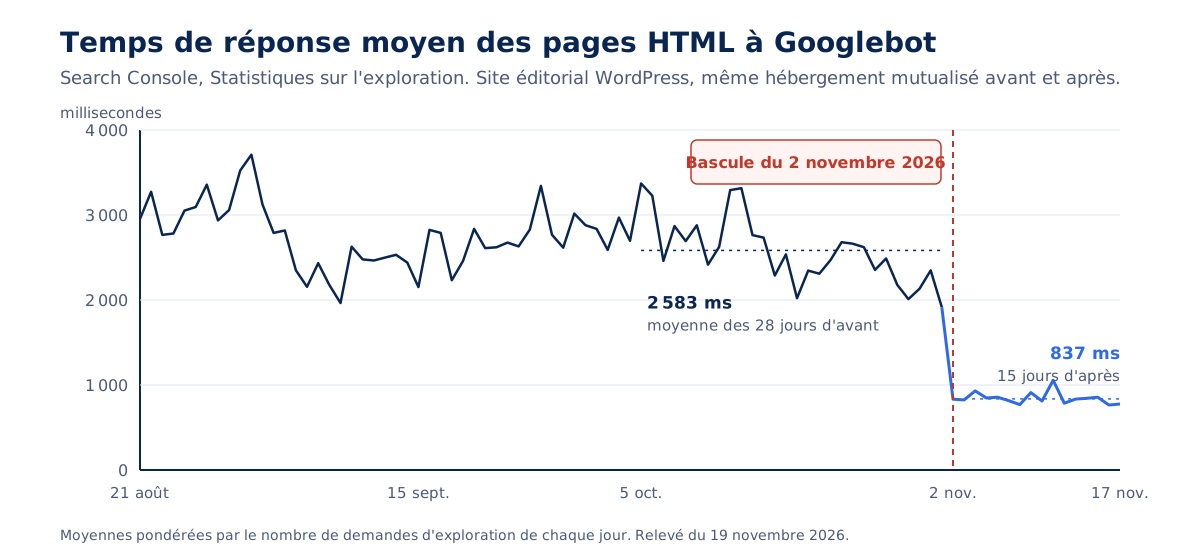
What this figure measures
Search Console's Crawl Stats report the average retrieval time for each resource, without rendering. The overall average mixes pages, images, and scripts : you need to break it down by file type and read the HTML line before concluding anything about the server. We then weight each day by its number of requests, so a day with 46 requests doesn't weigh as much as a day with 300.
One detail makes the result clearer : the pages have grown. Their average size downloaded by Googlebot has gone from about sixty kilobytes to nearly a hundred, because the new version embeds the CSS it needs within each page instead of calling it from external stylesheets. Heavier pages, served three times faster : the gain comes from processing time, not transfer.
Where the gain comes from
Three changes arrived on the same day : a lighter foundation (half as many extensions, a cleaned-up database), a newer PHP version, and a site-wide preloaded page cache. We haven't isolated the contribution of each, and we won't pretend otherwise. Our experience points to the third. On an editorial site, on-demand generated pages are ten to fifty times slower than pages served from cache, and a bot specifically requests those that visitors don't request : the 500 old articles, not the ten current ones.
This is the mechanism we describe in our guide on what bots cost the server : the cold long tail. A cache that only covers popular pages leaves all the rest to bots, at a high price. The server response time that your visitors measure and the one Googlebot experiences are two different figures.
What this figure doesn't prove
Google doesn't crawl the site more as a result. HTML page requests went from 168 to 99 per day over the same periods, and this isn't bad news : a site with 661 addresses doesn't have a crawl budget problem. Google explicitly reserves this topic for sites with over a million pages, or over ten thousand when their content changes daily, and deems its crawl report useless for sites under a thousand pages.
What response speed buys here is gained elsewhere. Google writes that the speed at which it discovers and processes a site’s moved addresses depends on their number and server speed: a server that responds in under a second helps the redesign be digested faster. It also leaves headroom for when a bot insists, whereas a server at 2.6s per page is already at its limit. And it serves visitors who land on an uncached page faster, which ties into the link between performance and SEO.
What to monitor in Search Console, and for how long?
One month before concluding, three for a review, and always page by page. The site total is the last place a loss shows up: a stable average can hide six pages that are declining.
Two weeks: enough for an alert, not for a review
Here’s what we knew fourteen days after the switch, compared to the fourteen days before: an average position unchanged (36.4 then 36.3), impressions up from 95,600 to 121,000, clicks stable at a level too low to interpret (161 then 153). And 51 pages from the new sections already showing in results, consistent with discovery in about twenty hours.
This allows us to write “no visible loss,” not “improvement.” Some pages have not yet been re-crawled by Google, and a rise in impressions over two weeks can be due to the season as much as the site. The first honest assessment is made over 28 days versus 28 days, the second at three months, at the upper end of the typical migration timeframe.
The average hides declining pages
On a recent redesign, the site’s average position was stable and several offer pages were improving. When opening the page-by-page details, six local pages, all of the same template, had all declined: from position 22.5 to 30.2 on average, one of them from 17.7 to 31.5. Their addresses had not changed. But the new branding no longer linked to them from the footer.
We don’t have proof this is the cause, and two weeks is too short to confirm it. It’s the prime suspect, and the first fix to test. The lesson is valid regardless of the verdict: the pre-redesign inventory must also list the links present on all pages, menu and footer, because a retained address can lose its internal links without producing any errors.
Reading an average position
Search Console's average position is an impression-weighted average. A page that starts appearing for new, distant queries will see its average position drop without losing a single rank on its original queries. Before concluding there's a drop, we plot the page's curve over sixteen months, month by month, with the date of each change alongside. Comparing two periods tells how much a page has lost; only the curve tells when, and therefore why.
Reports to open each week
- Page indexing: the number of indexed pages (here 577 before, 562 two weeks later), and especially the reasons. Google's known not-found URLs went from 80 to 67; a line for "Page with redirect" or "Discovered, currently not indexed" that swells requires an explanation.
- Crawl statistics: the breakdown of responses by code, where a rise in server errors or rejections is seen before any drop in traffic.
- Performance, by page: the pages that drive revenue, one by one, against their baseline status.
Who does what between the technical team and the SEO consultant?
The SEO consultant decides what the site should say and to whom; the technical team ensures nothing gets lost along the way, and proves it. The two roles overlap just enough for each to believe the other has checked.
On the construction site of this guide, the division of labor was written from the start. For the consultant: the sitemap for new sections, the content, the priorities. For us: content types and their URLs, templates, structured data, redirects, response times, and the numerical controls described here. Two rules prevented most friction. A single source of truth for content, the consultant's document, whose sheets were generated without retyping. And since several people work on the site during construction, all changes start from the live version, never from a working copy that's three days old.
Where to start?
To count. How many public URLs, how many redirects, what response time for Googlebot, which pages drive traffic. Then decide what won't change, and write it down. Only then open the mockup.
This order avoids the two most frequent errors: treating SEO as a final project step, with a redirect plan written the day before going live; or treating it solely as a content issue, forgetting that Google first reads URLs, response codes, and response times. In between, a method consists of three actions: inventory, replay, measure, before, on the day, and during the three months that follow.
This is the method we apply in our website redesign services. If your redesign is already online and the curves worry you, a performance audit finds what has changed on the server side, and monitoring signals it before the Search Console. And if you were to remember only one question before signing off on a mockup: who, in your project, is responsible for proving that nothing has been lost?