
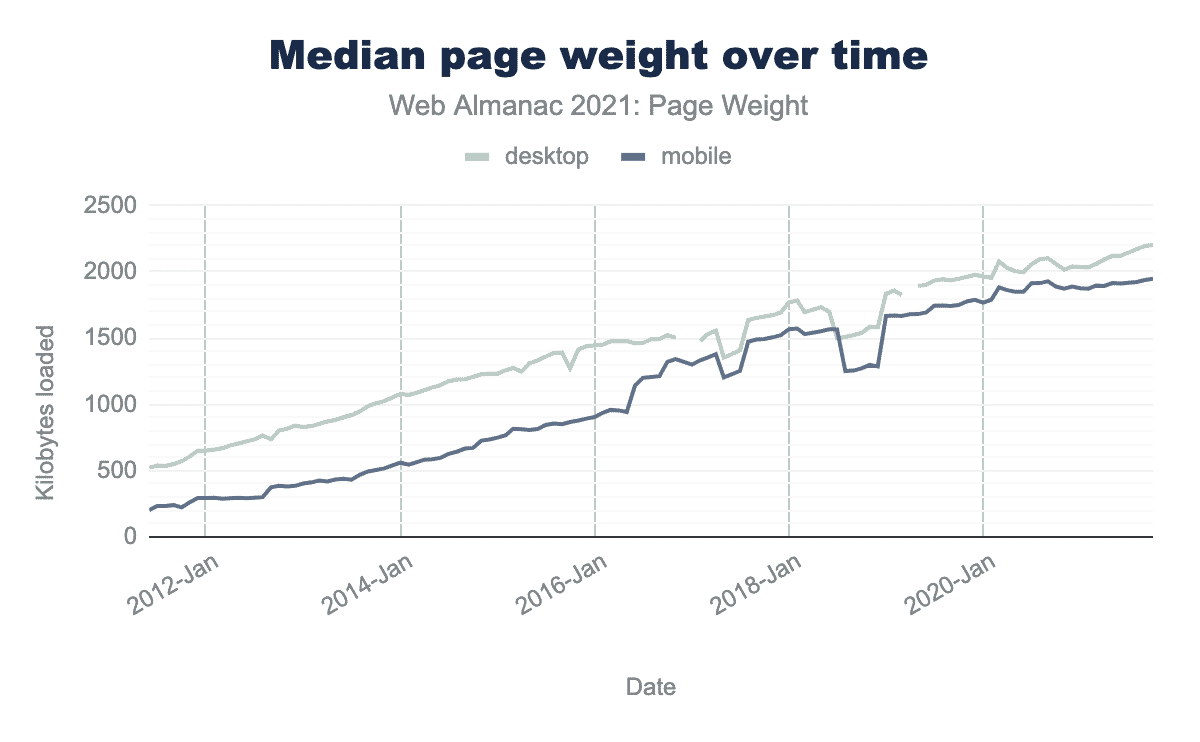
Websites are getting heavier, and it's not just an impression. The Page Weight chapter of the Web Almanac 2025 measures a median homepage at 2.56 MB on mobile and 2.86 MB on desktop, an 8% increase in one year, and recalls that in July 2015 the same mobile page weighed 845 KB. In ten years, **the weight of a mobile page has tripled**, and images are no longer the sole driver of this trend.
A third-party script is a JavaScript file served from a domain that is not yours, and which executes in your pages with the same rights as your own code: measurement tool, tag manager, ad network, chat, customer reviews, A/B test, consent banner. The Web Almanac 2025 notes that more than nine out of ten pages embed at least one, with a median of 79 third-party requests per mobile page. These scripts are added as needed by each team and **are almost never removed**.
This guide sets the common framework for this entire family: why its weight has changed in nature, what a third-party script really costs beyond its kilobytes, how to measure it on your site, and how to govern it over time. Each family of tools then has its own guide on this blog, from tag managers to chat widgets. How many third-party scripts are running on your homepage, and **how many of them are still useful to anyone**?
Why is third-party JavaScript getting heavier?
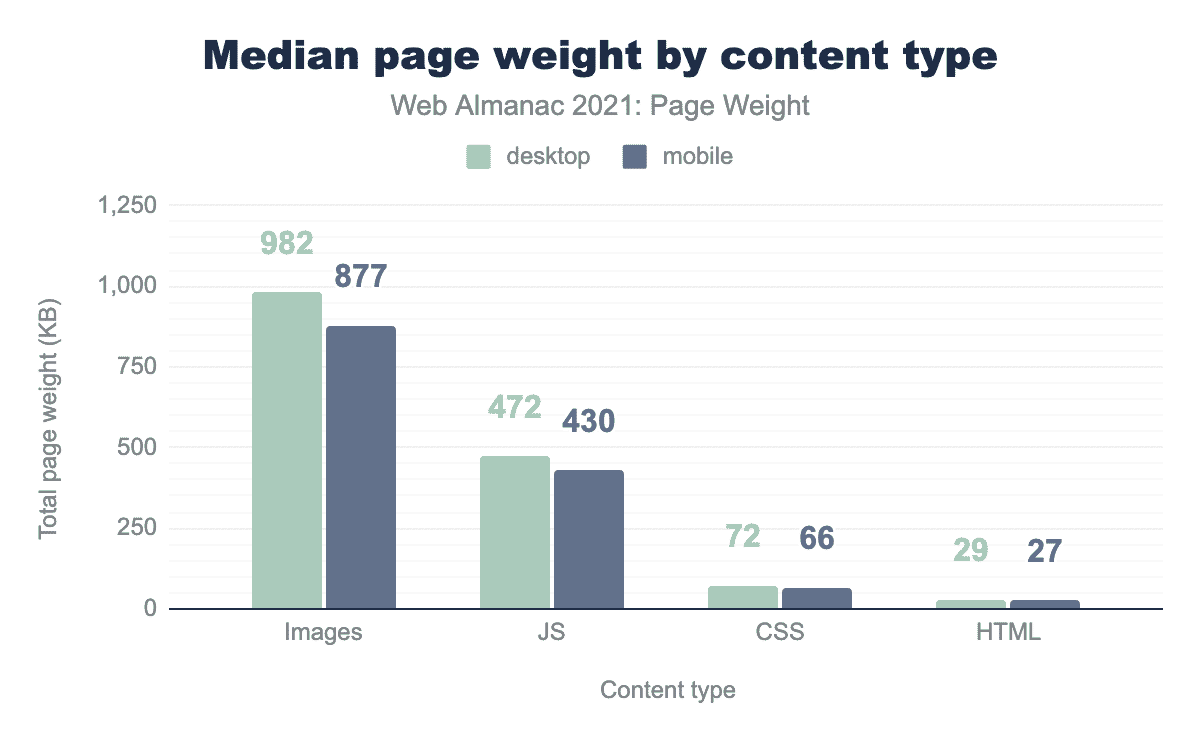
Because the nature of page weight has changed. For ten years, the increase came from images; it now comes from JavaScript, of which the Web Almanac 2025 measures 632 KB per mobile homepage, a quarter of the total weight, and largely from third-party JavaScript. **These scripts pile up without an owner or removal date**, driven by marketing needs.
From jQuery to frameworks, then to tools
For a long time, a page's JavaScript was limited to jQuery, a few extensions, and a Google Analytics. Starting in 2015, frameworks became widespread, single-page applications like React or Angular became the standard for redesigns, and JavaScript became essential for any publisher. This first wave was first-party code, written or chosen by the technical team, and **controllable by them**.
The second wave came from tools, most often deployed by a tag manager: traffic monitoring, advertising and social retargeting, voice of the customer, A/B testing, behavioral analysis, accessibility overlays, anti-bots. Then GDPR made consent management platforms essential, also built in JavaScript to interact with cookies, as detailed in our guide to choosing the right CMP. This second wave is third-party code, which the technical team does not read or control, and it is what dominates today.
A container that loads containers
The tag manager made deploying a script painless, and its removal unlikely, since it no longer goes through a deployment process. The third-party-web project, which aggregates Lighthouse audits from the HTTP Archive, places Google Tag Manager at the top of all web third parties by cumulative execution time, with an average impact of 1,066 ms per page. We will revisit this figure in a guide dedicated to the container; what needs to be understood here is that the container is not neutral, it is the first third-party script on the page.
What is the impact of third-party scripts on performance?
Their cost far exceeds their weight. A third-party script must be downloaded, decompressed, parsed, compiled, and then executed on the main thread, the very thread that displays the page and responds to clicks. It is the execution time that degrades the INP, much more than the kilobytes transferred, and it is paid for on every page, cached or not.
The main thread, a single thread
The browser has only one thread to parse HTML, calculate styles, lay out, paint, and execute JavaScript. Every third-party script that runs takes its place, and during this time nothing else progresses: neither the rendering of the main image nor the response to the visitor's click. This blocking time is reflected in Lighthouse's Total Blocking Time during loading, and in the Core Web Vitals' Interaction to Next Paint throughout the visit.
Weight says nothing about this time. Forty kilobytes that traverse the DOM and set up observers can block for longer than a file three times heavier that just waits.
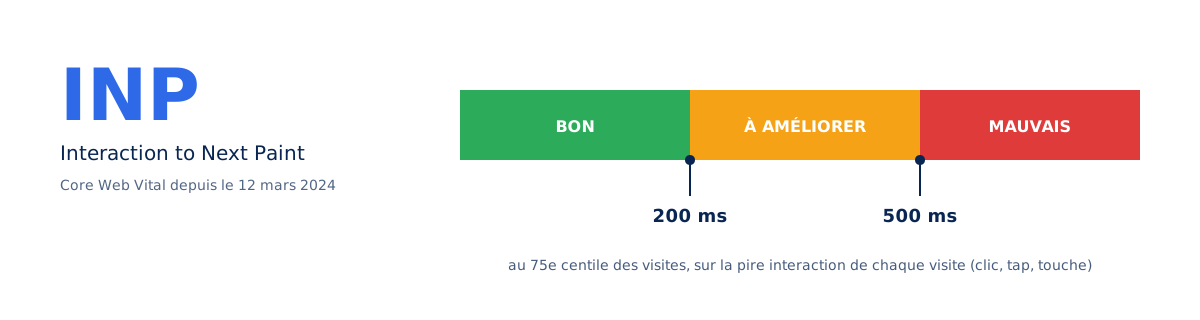
INP replaced First Input Delay as a Core Web Vital on March 12, 2024, and this change made the measurement stricter: where FID only looked at the delay of the first interaction, INP captures the worst interaction of the entire visit, up to the next paint. A third-party script that wakes up on every click, like a tag manager that re-evaluates its triggers on every event, has become visible in the metric where it wasn't before. Our guide on INP and how to optimize it details this mechanism.
The pitfalls we find in almost every audit
This proliferation goes hand in hand with a poor understanding of the stakes, and the same errors recur from one site to another. Our clients commonly load two or three Google Tag Manager containers, one for themselves and one per service provider, when a single Google tag can send data to multiple destinations. Other pitfalls are just as common:
- a misconfigured CMP, with third-party scripts loading before any consent, making it useless and exposing the publisher;
- an A/B testing script active when no test is running, with its page masking penalizing LCP for no reason;
- Facebook, TikTok, or LinkedIn retargeting pixels running when no advertising campaign is active;
- chat, review, or appointment booking widgets loading on all pages, including those where they have no role;
- poor prioritization, with third-party scripts running before scripts necessary for the site's functionality, sometimes before the main image.
Each of these cases deserves its own detailed guide: the one on the impact of Google Analytics is online, those on the true cost of A/B testing anti-flicker and on the cost of chat, review, and survey widgets will follow. The common thread is always the same: the cost is paid by all visitors for the use of a few, and no one has measured it.
Is your site as fast as your visitors expect?

How to measure the real cost of a third-party script?
Three figures are enough to qualify a script: its transferred weight, its execution time on the main thread, and the number of additional connections it opens. The second is the most determining and the least observed, even though it can be read directly in the Performance tab of the developer tools, sorted by origin.
The method takes a few minutes. Open Chrome's Performance panel, record a load, then group activity by domain: each third party appears with its cumulative analysis and execution time, and Lighthouse 13's Third parties insight has given the same reading since October 2025. The decisive test remains the comparison with and without. Block the script's domain, reload, note the difference in LCP and blocking time. The resulting figure is the one to present to the team that requested the tool:
# Reference : page telle quelle
lighthouse https://www.exemple.fr/ --preset=desktop --output=json --output-path=./avec.json

# Meme page, un domaine tiers bloque (repeter pour chaque script, un a la fois)
lighthouse https://www.exemple.fr/ --preset=desktop --output=json --output-path=./sans.json \
  --blocked-url-patterns="*static.hotjar.com*"

# Ecart LCP et TBT entre les deux rapports
jq '.audits["largest-contentful-paint"].numericValue, .audits["total-blocking-time"].numericValue' avec.json sans.json
Measure one script at a time, never all together: costs don't add up linearly when multiple scripts compete for the main thread, and a global block masks which one weighs the most. Also measure on a page representative of the user journey, product page or article, not just the homepage. The lab won't see the INP, which only the field reveals, but it's enough to designate the script to address first.
How to reduce the impact of third-party scripts?
Three actions in order: remove what's no longer needed, defer what's not necessary for the initial screen, and load on interaction what's only useful after an action. The first action is by far the most profitable, and it's the one we almost always skip, because it requires a decision rather than a line of code.
Async and defer, what they do and don't do
The async and defer attributes profoundly change a script's loading behavior, but neither reduces its execution cost. With async, downloading no longer blocks HTML parsing, but the script executes as soon as it arrives, at an unpredictable time, often in the middle of rendering. With defer, execution waits for the end of document parsing and respects tag order. Both move execution, they don't lighten it: an 800ms script remains an 800ms script.
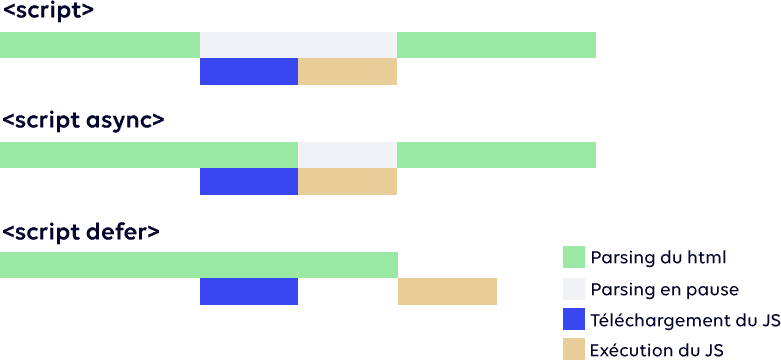
async and defer attributes profoundly changes the loading behavior of scripts, not their execution cost.Position matters as much as the attribute. A script with defer placed at the top of the <head> executes before all those that follow it, even deferred ones; placed just before </body> with fetchpriority="low", it truly comes after the content. This is the form we give to any non-critical third-party script, with one exception: the CMP, which conditions the others and must arrive first:
<!-- Dans le <head> : seulement ce qui conditionne le reste -->
<script src="https://cmp.exemple.com/consent.js" async></script>

<!-- Juste avant </body> : tous les autres tiers, en defer et priorite basse -->
<script src="https://www.googletagmanager.com/gtm.js?id=GTM-XXXXXXX" defer fetchpriority="low"></script>
<script src="https://static.exemple-avis.com/widget.js" defer fetchpriority="low"></script>
</body>
Load on interaction, not on scroll
For scripts whose loading is transparent to the visitor, for measurement or retargeting, it is relevant to delay their execution until the first interaction, click, key press, or pointer movement, with a ceiling delay for visitors who never interact. Postponing until scroll, as offered by several extensions, is a false friend: it moves the execution peak exactly where INP is measured.
For a chat or a reassurance widget, the facade, a static button that loads the actual widget on the first click, remains the most effective technique, even though Lighthouse 13 has removed the audit that recommended it. Our guide on widgets provides a complete and copyable version.
Should all third-party scripts be removed?
No, and asking the question that way leads to a dead end. An audience analysis tool, a payment system, or an internal search engine provide a service that the site cannot produce on its own. The useful question is about the value-to-cost ratio, script by script, not about a mass deletion that no one will approve.
Three cases are clearly distinguished. Scripts essential for functionality are kept and optimized; those whose value is real but deferrable are loaded after the first screen or upon interaction; those whose data is no longer requested are removed. British consultant Andy Davies reports the case of a European airline whose audit revealed that about a third of the tags had expired subscriptions, some continuing to serve their full script. This third is found on almost all sites over three years old, and it summarizes the tension.
There is also a tension between the value that tags bring and the costs they impose in terms of privacy, security, and speed.
Andy Davies, web performance consultant, in his article Reducing the Site-Speed Impact of Third-Party Tags, published October 2, 2020
Inventory is the prerequisite that is almost always missing. Listing the third-party domains called by a representative page takes ten minutes and consistently produces surprises: tools from a completed campaign, measurement duplicates, script from a provider whose contract has ended. Each continues to run for all your visitors, and each was validated one day by someone who no longer thinks about it.
How to govern third-party scripts over time?
By treating each addition as an expense subject to arbitration: who requests it, for what purpose, for how long, and who verifies that it is still serving its purpose. Without a named owner, a script is never removed, as no one takes the risk of disabling something they did not install, and a removal date set at installation is the only rule that holds.
Within the agency, we face these issues daily. As part of our audits and optimizations, reprioritizing the loading of third parties is always a decisive step, when they cannot simply be removed, and it regularly produces the most visible gains on LCP and INP.
But an optimized site degrades on its own, and the container is the channel through which it degrades, because it allows adding without deploying, therefore without measuring. This is why our performance monitoring services monitor the number of third-party domains as a metric in its own right: it is the one that moves first, well before the Core Web Vitals.
If you are experiencing these types of symptoms, unreactive interfaces, INP in orange in Search Console, high bounce rate on mobile, a web performance audit begins precisely with this inventory, script by script, with the figure for each. Carrying out this work on an existing site commonly makes it possible to multiply the PageSpeed Insights score by two or more, and the difference is all the more appreciable as the site was slow to begin with. The fastest third-party script is still the one you removed, and it deserves to be questioned with every addition.