
Google Tag Manager was adopted for a simple reason: to regain control of third-party scripts. A single code snippet on the page, and marketing can deploy, remove, and condition its tags without a full deployment. Fifteen years later, this container has become the leading JavaScript expense on the web, ahead of YouTube, ahead of ad networks, ahead of libraries hosted by Google itself.
A tag manager is a script that loads other scripts. The gtm.js file embeds the container's configuration, its tags, its triggers, and its variables, then continuously evaluates what needs to be triggered, on the single thread that displays the page and responds to clicks. It is asynchronous, and this is precisely what perpetuates the market's most widespread belief: asynchronous, therefore free. This is false, and this article demonstrates it with figures.
Three things are established here: what a container truly costs, why this cost remains invisible to usual measurement methods, and how to reduce it without losing a single piece of data. The reader doesn't need to be a developer; they need access to their container, or to know who to ask. How many milliseconds does your container cost each visitor, and how many of its tags still serve a purpose?
Does Google Tag Manager really slow down a site?
Yes, and more so than most of the tools it helps install. In the third-party-web dataset consulted on September 17, 2026, Google Tag Manager shows an average impact of 1,066 milliseconds on over 15 million pages, compared to 108 milliseconds for Google Analytics. The container therefore costs about ten times the measurement tool it deploys.
What the global ranking of third-party scripts says
Patrick Hulce's third-party-web project aggregates Lighthouse audits from the HTTP Archive each month for about four million mobile sites, and attributes to each third party the execution time of its scripts on the main thread. Ranked by total impact, Google Tag Manager is first with over 16 million cumulative seconds, ahead of Google's CDN and YouTube. On a per-page basis, 1,066 ms of execution on average, out of 15,022,156 pages observed. The table below positions the main tag managers on the market on the same scale.
| Tag manager | Average impact | Pages observed |
|---|---|---|
| TagCommander (Commanders Act) | 220 ms | 2,600 |
| Tealium | 283 ms | 134,480 |
| Ensighten | 558 ms | 6,750 |
| Adobe Tag Manager | 687 ms | 105,342 |
| Google Tag Manager | 1,066 ms | 15,022,156 |
Two nuances should be noted before drawing a conclusion. The indicator measures what the processor executes, not what the visitor expects: it says nothing about a script that blocks image discovery or delays a decision. And the Google Tag Manager line aggregates everything served from googletagmanager.com, i.e., gtm.js and gtag.js, the container and the Google tag used without a container. The value reflects the ecosystem, not the tool alone.
A domain present on one out of two sites
The Web Almanac 2025 places googletagmanager.com among the ten most present third-party domains on the web, in a top 10 dominated by Google services, and notes that over 90% of pages embed at least one third party. The audience concerned by the following is therefore almost all sites that do marketing. The same clarification as above applies here: the presence of the domain does not indicate GTM's market share, since the Google tag alone also uses it.
The context, 79 third-party requests per page
The same edition of the Web Almanac gives a median of 79 third-party requests per mobile page, 83 on desktop, and 129 for the top thousand sites, an increase from year to year. A container is therefore never alone: it arrives amidst several dozen third-party requests, most of which it has triggered itself.
It also carries a methodological remark that is worth its weight in gold: HTTP Archive's robots do not scroll or interact with pages, so anything triggered by scrolling, clicking, or exit intent is underrepresented. Public statistics on third parties are a floor, never a ceiling, and a container well-stocked with interaction triggers costs more than these figures show.
Why the cost of a container is invisible
Why does an asynchronous script still slow down the page? Because async protects the download, not the execution. The file no longer prevents document parsing, but its code does indeed run on the single thread that displays the page and responds to clicks, at an unpredictable time. Google Tag Manager is asynchronous everywhere, and remains number one globally for execution time.
Async is a false friend
The official snippet, as pasted on millions of sites, is five lines long that almost no one reads. Here it is commented, to show that the async attribute applies to the download of gtm.js and nothing else, and that the downloaded file will itself create other script tags that the browser could not know about:
<!-- Google Tag Manager : le snippet officiel, tel quel -->
<script>(function(w,d,s,l,i){
  w[l]=w[l]||[];                                  // 1. cree window.dataLayer s'il n'existe pas
  w[l].push({'gtm.start': new Date().getTime(), event:'gtm.js'});  // 2. premier evenement
  var f=d.getElementsByTagName(s)[0],             // 3. premier <script> de la page
      j=d.createElement(s),                       // 4. une nouvelle balise <script>
      dl=l!='dataLayer'?'&l='+l:'';
  j.async=true;                                   // 5. async : le TELECHARGEMENT ne bloque pas le parseur
  j.src='https://www.googletagmanager.com/gtm.js?id='+i+dl;
  f.parentNode.insertBefore(j,f);                 // 6. injection avant le premier script
})(window,document,'script','dataLayer','GTM-XXXXXXX');</script>

// Ce que gtm.js fait ensuite, et que le snippet ne montre pas :
// - il evalue tous les declencheurs du conteneur, sur le thread principal ;
// - il cree a son tour des balises <script> (gtag/js, pixels, outils) ;
// - chacune est decouverte par le navigateur seulement a ce moment-la.
The attribute therefore protects bandwidth and the HTML parser, which is good for LCP. It does not protect the main thread, which executes gtm.js as soon as it arrives, then each tag it injects, between two rendering tasks. It is the execution that costs, not the transfer, and a loading attribute has no control over it. Our guide on the real cost of third-party scripts details this mechanism, which applies here to the container and to each of its tags.
A cascade the browser cannot anticipate
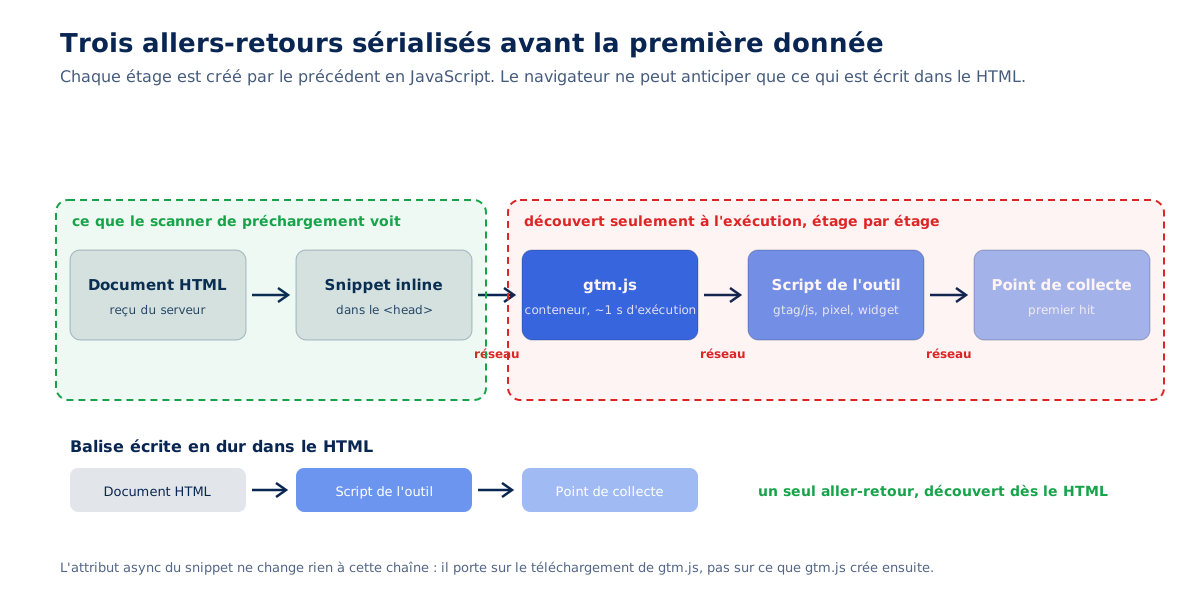
The actual path of a first measurement hit goes through five stages: the HTML, then the inline snippet, then gtm.js, then the measurement tool's script, then the collection point. Each stage is created by the previous one in JavaScript, and none are discoverable by the browser's preloading scanner, which only reads the HTML. Three network round trips are thus serialized before the first data, where a hardcoded tag would have cost one. The following diagram illustrates what the browser can anticipate, and where it stops.
The cache doesn't save you
An attentive reader will object that gtm.js is cached from the second page onwards. This is true, and it only saves one download, never an execution. The file is decompressed, parsed, compiled, and executed on every page, on every visit, cache or not.
The right unit for judgment is not the transferred weight but the decompressed weight, the one the processor must read: on the containers we audit, the ratio between the two is commonly one to three, a typical production container representing several hundred kilobytes of JavaScript to parse. The diagram below illustrates this order of magnitude.
Google itself provided benchmarks in its best practices for tag managers, updated in August 2022: the library alone weighs about 33 KB compressed, the median container about 50 KB, and the size is capped at 300 KB with a warning at 70% of the limit. A container that approaches the ceiling is not a rich container, it is a container that has never been cleaned.

What happens on each dataLayer.push()
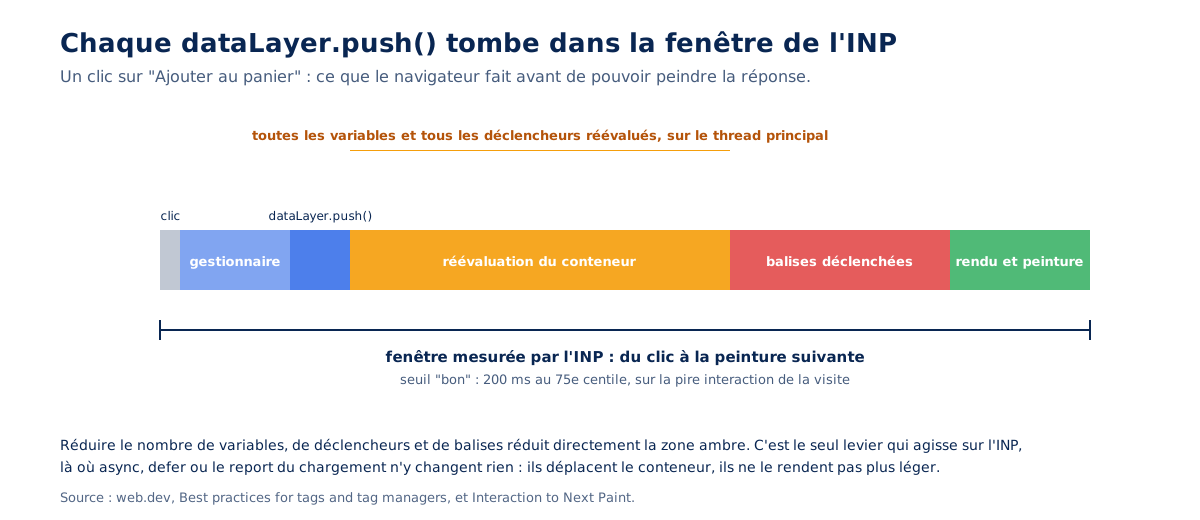
The same web.dev page carries a sentence that few readers notice: updating the data layer causes Google Tag Manager to re-evaluate all container variables and potentially trigger tags, which involves JavaScript execution. Each dataLayer.push() is therefore a complete re-evaluation, on the main thread. On a page with filters, a carousel, or a cart, this happens with every visitor interaction, exactly during the INP measurement window:
// Un push ordinaire, au clic sur "Ajouter au panier"
document.querySelector('#add-to-cart').addEventListener('click', function () {
  window.dataLayer.push({
    event: 'add_to_cart',
    ecommerce: { items: [{ item_id: 'SKU-1234', price: 49.9, quantity: 1 }] }
  });
  // Ce que ce push declenche, avant que le visiteur voie son panier changer :
  // - reevaluation de TOUTES les variables du conteneur ;
  // - test de TOUS les declencheurs (clic, timer, visibilite, custom event) ;
  // - execution de chaque balise dont la condition est vraie ;
  // - le tout sur le thread principal, dans la fenetre mesuree par l'INP.
});
Google specifies in the same document that triggers are JavaScript code that increases the size and execution cost of the container, that multiple click or timer triggers can significantly increase the load, and that variables are evaluated continuously. A container does not have one cost, it has a cost per interaction, and that's what makes it so hard to see in a tool that only loads the page.
What is the effect on Core Web Vitals?
INP first, LCP by contention, and none of this in a Lighthouse report. The Chrome team writes on web.dev that they observed a correlation between the size of tag managers and lower INP scores, and the Web Almanac 2025 notes 69% good INP on mobile secondary pages versus 80% on home pages, a gap attributed to widgets and third-party scripts that activate further down the journey.
INP, the metric that the container degrades first
The sentence from web.dev deserves to be read in context: Interaction to Next Paint is sensitive to CPU contention on the main thread, and the Chrome team has seen a correlation between the size of tag managers and lower INP scores. A detail that signals the age of the diagnosis, this page dates from 2022, which is two years before INP became a Core Web Vital in March 2024.
The link between the container and responsiveness was therefore documented even before the metric counted for SEO, and it has only been confirmed since. Our guide on INP and how to optimize it explains why a single slow interaction is enough to degrade a page's score.
Why the problem gets worse on deep pages
The Web Almanac 2025 Performance chapter describes a shift: mobile homepages reach 80% good INP, up seven points, while secondary pages fall to 69%, even though both were tied the previous year.
The authors see this as the effect of optimization work focused on landing pages, and an accumulation of third-party JavaScript and analytics on deeper pages, which also handle complex interactions, filters, carousels, and form validation. The operational consequence is direct: auditing your homepage tells you nothing about your funnel, and it's in the funnel that the container triggers the most.
And LCP?
The container doesn't degrade LCP by its weight, it degrades it by contention. While it executes gtm.js and then its tags, the main thread is not available to decode and paint the main image, and a snippet placed at the very top of the <head>, as Google recommends, runs before everything else. Our guide on LCP and how to optimize it details the relevant sub-part of the metric, render delay, the one on which neither compression nor CDN have any effect.
What Lighthouse won't see
A lab audit doesn't produce INP, due to lack of interactions. The cost of a container on responsiveness is therefore structurally invisible to the tool everyone uses to judge, which only captures a shadow of it through the Total Blocking Time of the load. Our comparison PageSpeed Insights vs. Lighthouse also reminds us that below a five-point difference between two audits, we observe measurement noise: removing a tag and seeing the score move by two points proves nothing. Only the field judges a container, and the field, on this subject, says what our audits confirm.
What we really find in the containers we audit
The findings that follow come from our audits and interventions, on sites from various sectors, anonymized by typology. They have one thing in common: none are due to a defect in the tool, all are due to a lack of container governance, and each is reproducible on your site in a few minutes in the Network tab of DevTools.
Two or three containers on the same site
A container for the company, one for the web agency, one for the SEO provider. Each loads its own instance of gtm.js, with its own cascade and its own re-evaluation on each push. On an e-commerce site for furniture and decoration, Google Tag Manager was loaded three to four times on the same page, and showed up in the audit as a major contributor to Blocking Time, translated into long tasks.
The recommendation was to keep only one container, responsible for calling all third-party scripts, and to give providers access to this container rather than a container of their own.
The most common case of duplication is more subtle: a GTM container and, alongside it, a hard-coded Google tag for Google Ads or for a second Analytics property. However, the Google tag can send the same data to multiple destinations from a single configuration, and the documentation for gtag.js routing shows how to group Ads, Analytics, and Floodlight in the same block. One tag, multiple IDs, and a single execution:
<!-- AVANT : deux balises Google chargees separement, deux executions -->
<script async src="https://www.googletagmanager.com/gtag/js?id=G-XXXXXXX"></script>
<script async src="https://www.googletagmanager.com/gtag/js?id=AW-YYYYYYY"></script>

<!-- APRES : une seule balise, plusieurs destinations -->
<script async src="https://www.googletagmanager.com/gtag/js?id=G-XXXXXXX"></script>
<script>
  window.dataLayer = window.dataLayer || [];
  function gtag(){ dataLayer.push(arguments); }
  gtag('js', new Date());
  gtag('config', 'G-XXXXXXX');   // Google Analytics 4
  gtag('config', 'AW-YYYYYYY');  // Google Ads, meme bibliotheque, aucun script de plus
  // Dans l'interface, la meme chose se fait par "Google tag > Destinations > + Destination".
</script>
The container that executes before the main image
The most striking observation comes from a kitchen e-commerce site. All third-party scripts were injected from the main JavaScript bundle, via an eval, which forced them to be asynchronous: the download ran in the background, but the execution remained blocking and occurred even before the LCP element. The audit report noted that this approach is particularly problematic for a tag manager, as it is in turn responsible for loading all tracking pixels, which should only execute once the page has rendered. This is the exact illustration of the false friend from the previous section, observed in production.
The third of tags that no longer serves anyone
On a site older than three years, a significant portion of third-party scripts are no longer of interest to any service. British consultant Andy Davies documents, in his article on reducing the impact of third-party tags, the case of a European airline whose audit revealed that subscriptions for about a third of the tags had expired, without anyone knowing who was using some of the others. He specifies a detail that complicates cleanup: upon expiration, some providers return an error, others an empty script, but many continue to serve their full script.
The same article makes the strongest business case on this topic. At a British fashion retailer, a single third-party tag was slowing down Android visitors by about four seconds; disabling it for this segment produced 26% more revenue from those visitors, and the site went on to bring its median Android load time down from over fourteen seconds to under six. Andy Davies draws from this a governance rule that also applies to the preconnects we stack in the <head>.
Not all domains need a preconnect, and if you feel the need to preconnect many domains, you’re probably using too many tags.
Andy Davies, web performance consultant, in his article Reducing the Site-Speed Impact of Third-Party Tags, published October 2, 2020
Completed campaigns that are still running
An A/B testing script active with no test in progress, an ad pixel installed for a campaign that closed months ago, a heatmap tool put in place for a redesign delivered last year. These costs outlive the projects that justified them, for lack of a removal date entered somewhere. The container makes them easy to deploy and unlikely to remove, because removing a tag is never anyone’s problem. The notion of an expiration date per tag, revisited in the method below, is the only workaround we’ve seen work sustainably.
The cookie banner loaded by the container
Should you load your consent banner via Google Tag Manager? No, and Google explicitly advises against it. The web.dev best practices for cookie banners recommend placing the script directly in the main document’s HTML, because loading it via a tag manager hides it from the browser’s pre-parser and prevents it from loading before JavaScript execution. The banner therefore arrives later, and everything it conditions arrives even later.
The best practices page for tag managers adds that some users block tag managers, and that a banner loaded through this channel may never display for them.
The double fault observed in audits goes further: the banner is loaded by the container, and the scripts it’s supposed to hold back still load before the visitor makes any choice, because their triggers aren’t conditioned on consent. The site then pays the cost of the banner and that of the scripts, without fulfilling the function for which the system was installed. Our guide to choosing the right CMP details this interaction; what follows is the point of doctrine that completes it.
The CMP, the only tag that should never be deprioritized
Everyone writes that third parties must be deferred. Almost no one explains which ones should never be. The CMP conditions both the validity of the measurement and the visitor experience: as long as it is not present, nothing can legally trigger, and the banner that appears late shifts the page. It must therefore arrive as early as possible, unlike the rest of the container.
On a media site, two preconnections were deliberately reserved for the CMP and ad networks for this reason; on an industrial B2B site, the CMP was explicitly excluded from the list of deferred scripts upon first interaction.
The opposite case also exists, and it is more frequent than one might think. In an audited container, the CMP was loaded last by Google Tag Manager, after measurement tools and pixels, which required reprioritizing it in the container before any other optimization. The order of tags in a container is not neutral, and the first one to load should be the one that authorizes the others.
The container that counts never-before-seen pages
With Speculation Rules, a page prepared in the background by the browser is actually loaded and its JavaScript is actually executed, container included. Google Analytics 4 waits for the actual display before counting the visit, but many tags placed in a container, advertising pixels foremost, do not test document.prerendering and count a view for a page the visitor never looked at. Our article on Speculation Rules and prerendering details the side effects of this technique: an ungoverned container makes it a generator of phantom conversions. Now we need to move from diagnosis to remediation.
Is your site as fast as your visitors expect?

How to reduce the cost of your container?
By removing it, for the duration of a measurement. Block googletagmanager.com in your browser, reload the page, and note the difference in Largest Contentful Paint and Total Blocking Time: this figure transforms an opinion debate between teams into a documented arbitration, and it can be obtained in five minutes. Only then come inventory, removal, deprioritization, and deferral, in that order.
Start by measuring, not by optimizing
The manipulation involves three steps in Chrome DevTools: Network tab, right-click on the gtm.js request, block the domain, then reload with the Performance tab open. For a reproducible measurement, the command line does the same thing and allows comparison of two reports, provided that a representative page of the funnel is measured, not just the homepage:
# Reference : conteneur actif
lighthouse https://www.exemple.fr/produit/exemple/ --preset=desktop \
  --output=json --output-path=./avec-gtm.json

# Meme page, domaine du conteneur bloque
lighthouse https://www.exemple.fr/produit/exemple/ --preset=desktop \
  --output=json --output-path=./sans-gtm.json \
  --blocked-url-patterns="*googletagmanager.com*"

# Ecart LCP et TBT
jq '.audits["largest-contentful-paint"].numericValue, .audits["total-blocking-time"].numericValue' \
  avec-gtm.json sans-gtm.json
The resulting gap is the gross cost of the container and everything it loads. It doesn’t yet say which of its tags weighs the most, but it sets the stakes, and it ends the conversation where marketing claims its tags are light and engineering claims they are heavy. Both now have the same number, and it remains to be seen what’s in it.
Inventory, then delete
Listing the domains called by a representative page takes ten minutes in the Network tab, and exporting the container tags takes five more. For each tag, the inventory involves four questions, and a single missing answer is enough to remove it :
- who reads the data this tag collects, specifically, and in which tool ;
- when this data was last read, with a date ;
- on which pages the tag is actually necessary, rather than on all of them ;
- by what date it should be removed, noted in the tag’s name or description.
A tag without an identified recipient is deleted; it is not optimized. A tag whose data has not been read for six months is paused, and if no one claims it, it is deleted the following month. This sorting alone, without a line of code, produces the most significant gain of the entire process on an old container, because it removes weight, triggers, and executions all at once.
Deprioritize what remains
Google recommends placing its snippet as high as possible in the <head>. However, its own best practices page nuances this instruction for scripts loaded via a tag manager, reminding that the browser has generally finished parsing the <head> by the time the container executes. Moving the snippet just before the closing body tag and setting it to defer with a low fetch priority truly deprioritizes it. This is the snippet we implement during interventions, to be compared line by line with the official one :
<!-- OFFICIEL : tout en haut du <head>, async, injecte par script -->
<script>(function(w,d,s,l,i){ /* ... */ j.async=true; /* ... */ })(window,document,'script','dataLayer','GTM-XXXXXXX');</script>

<!-- CORRIGE : juste avant </body>, defer, priorite basse, balise ecrite en dur -->
<script>
  window.dataLayer = window.dataLayer || [];
  window.dataLayer.push({ 'gtm.start': new Date().getTime(), event: 'gtm.js' });
</script>
<script src="https://www.googletagmanager.com/gtm.js?id=GTM-XXXXXXX"
        defer fetchpriority="low"></script>
</body>

<!-- Ce que chaque difference change :
     - balise ecrite en dur : le scanner de prechargement la voit, plus d'injection par script ;
     - defer : execution apres l'analyse complete du document, dans l'ordre, jamais au milieu du rendu ;
     - fetchpriority="low" : le telechargement cede la place aux images et polices du premier ecran ;
     - position en fin de body : execute apres les scripts qui le precedent, meme en defer. -->
Marketing’s objection is expected, and it has a numerical answer. The collection delay is measured in hundreds of milliseconds, five hundred at most on the sites we monitor, for a significantly larger gain in display speed. No data is lost; it’s just shifted: the page view is sent a few tenths of a second later, which changes neither the count nor the attribution. Our article on what Google Analytics really costs makes the same trade-off for the measurement tool itself. The only exception, already mentioned, is the CMP: it stays at the top, and only it.
When deprioritization is not enough, defer
Switching to defer resolves the execution order, not whether execution happens during loading. On sites where the container remains heavy after cleanup, the intervention strategy combines four mechanisms: preloading the file without executing it, delaying by a few hundred milliseconds after the visitor's first interaction, setting a low priority, then triggering with requestIdleCallback(), with a ceiling delay for visitors who never interact. The function below is the generic version of what we deploy:
// Report reel d'un script tiers : prechargement, premiere interaction, idle, plafond
function awpInjectScript(src, delayAfterInteraction, maxWait) {
  // 1. Prechargement sans execution, en priorite basse
  var l = document.createElement('link');
  l.rel = 'preload'; l.as = 'script'; l.href = src; l.fetchPriority = 'low';
  document.head.appendChild(l);

  var done = false;
  function inject() {
    if (done) { return; }
    done = true;
    var s = document.createElement('script');
    s.src = src; s.fetchPriority = 'low';        // 4. execution reelle
    document.body.appendChild(s);
  }
  function whenIdle() {                          // 3. quand le thread principal est libre
    if ('requestIdleCallback' in window) { requestIdleCallback(inject, { timeout: 2000 }); }
    else { setTimeout(inject, 0); }
  }
  // 2. Premiere interaction, puis temporisation, puis idle
  ['pointerdown', 'keydown', 'touchstart'].forEach(function (ev) {
    addEventListener(ev, function () { setTimeout(whenIdle, delayAfterInteraction); }, { once: true, passive: true });
  });
  // Plafond : les visiteurs qui n'interagissent pas sont quand meme mesures
  setTimeout(whenIdle, maxWait);
}

// Exemple d'echelonnement en production, 100 ms entre chaque tiers
awpInjectScript('https://www.googletagmanager.com/gtm.js?id=GTM-XXXXXXX', 2500, 5000);
awpInjectScript('https://widget.exemple-antirobot.com/api.js', 2600, 5000);
awpInjectScript('https://widget.exemple-chat.com/loader.js', 2700, 7000);
The delays in the example are not principled; they are production values. On an e-commerce site for electronic cigarettes, the following deferrals were implemented: the tag manager, which itself loads the analytics tool and the CMP, deferred to 2.5 seconds; the internal search engine to 100 ms; the anti-bot to 5 seconds; the chat to 7 seconds, with a 100 ms stagger between each, triggering on first interaction, and a 5-second ceiling delay. These are the figures a reader searches for and finds nowhere, and they are adjusted site by site, on RUM.
Resource hints inherited from the container
A recurring and easily verifiable observation: an industrial B2B site had seven dns-prefetch accumulated over the years, for fonts, a visitor tracking tool, a CMP, a content delivery network, and an icon kit, several of which were no longer called. All were removed in favor of a single one, towards the tag manager domain. Preconnecting everything does not save time; it creates contention on the connections the first screen needs, and every inherited hint is a forgotten tag, exactly in Andy Davies' sense.
The case of Consent Mode
Google's Consent Mode introduces a voluntary delay in the collection path. The official documentation explains that if the banner loads asynchronously, it may not execute before Google tags, and suggests the wait_for_update parameter to indicate how many milliseconds to wait before sending data, with 500 ms in its example. These milliseconds are not lost for display; they delay sending. However, a banner that takes one second to respond, because it is itself loaded by the container, consumes this delay without ever updating it:
<script>
  window.dataLayer = window.dataLayer || [];
  function gtag(){ dataLayer.push(arguments); }

  // Etat par defaut, AVANT le chargement des balises Google
  gtag('consent', 'default', {
    'ad_storage': 'denied',
    'analytics_storage': 'denied',
    'wait_for_update': 500   // la CMP a 500 ms pour appeler gtag('consent', 'update', ...)
  });
  // Si la CMP est chargee par le conteneur, elle arrive apres gtm.js :
  // le delai expire, les balises partent en mode "denied", la mise a jour vient trop tard.
</script>
A detail that few people mention: the advanced consent mode does not reduce performance costs. The presentation of Consent Mode indicates that in its advanced version, Google tags load upon site opening and, as long as consent is refused, send measurements without cookies, along with the consent status, on each page. The script therefore runs no matter what; only the basic mode truly blocks tags if consent is refused, and this is a measurement choice, not a performance one.
What doesn't work
Three approaches come up in every discussion and waste time. Partytown, which offloads third parties into a web worker, remains in version 0.x, and its most reliable mode requires Cross-Origin-Embedder-Policy and Cross-Origin-Opener-Policy headers set to same-origin, which isolate the entire site from cross-origin: the remedy is more restrictive than the problem for most sites.
Self-hosting gtm.js breaks container updates and only saves one connection. And loading the container on the first scroll moves the execution peak exactly to where INP is measured, which is worse than leaving it in place. This leaves the approach everyone is selling, and that needs a close look.
Does server-side tagging solve the problem?
No, it only partially shifts it. Server-side tagging removes browser calls to dozens of third-party domains, but gtm.js continues to load and execute on the visitor's end: you gain network connections, not JavaScript. Google indicates about $45 per month per instance on Cloud Run, with a minimum of two instances recommended in production.
What server-side actually shifts
The principle is described on web.dev: with server-side tagging, the client makes a single request to the server container, which redistributes the data to the various accounts. We replace N requests to N domains with N requests to one domain, eliminating as many DNS resolutions, TLS handshakes, and cache partitions. The gain is real, and it's measured in connections, not execution.
The same page warns that server-side only works with certain tags, depending on the providers. Anything that observes the DOM or listens to interactions, A/B testing, heatmaps, chat, personalization, must execute on the visitor's end, and these tools are precisely the heaviest.
What it costs
The Cloud Run installation guide, updated in May 2026, prices each server at approximately $45 per month for a single vCPU and 0.5 GB of memory instance, and recommends running at least two to limit the risk of data loss in case of failure, anticipating that autoscaling from two to ten instances will handle 35 to 350 requests per second.
The floor is therefore around $90 per month excluding traffic, plus a preview server, plus the reconfiguration time for each tag. This should be compared to the gain measured by domain blocking, not the gain advertised in the brochure.
A side effect to be aware of
Server-side tagging and CNAME domain masking make third parties invisible to web measurement robots. The Web Almanac 2025 itself acknowledges this by explaining that its third-party prevalence figures are a lower bound, precisely because these techniques make third-party requests appear as first-party traffic. The statistics cited at the beginning of the article are therefore mechanically underestimated, and the actual weight of containers is higher than the ranking shows.
Should you keep a tag manager?
Yes, in most cases, provided it is governed. The tag manager is not the problem; the lack of container governance is. A container with six useful tags and a removal date for each costs a few tens of milliseconds. A container that has never been cleaned for four years costs one second of execution for each visitor, which is the global average recorded by third-party-web.
Three rules are sufficient to maintain this governance. A container review at least annually, with the four-question inventory. A mandatory removal date upon creation of each tag, in its name or note, without which the tag is not published. A before-and-after measurement for each addition, by domain blocking, archived with the tag. None of these three rules require a developer.
For those who want to move away from Google Tag Manager, alternatives exist, such as Commanders Act or Tealium with average impacts three to five times lower in the ranking, or simply hard-coded tags when there are only three, which remains the fastest solution of all.
The conclusion that closes this article is the one we reach with every tracking audit: an optimized site degrades on its own, and the container is the channel through which it degrades, because it allows adding without deploying, and therefore without measuring. A few months of stacked marketing scripts are enough to bring a fast site back to its starting point, as our article on the cost of a fast website reminds us. The container did not create this problem; it made it painless at each step and painful at the end.
Encrypting the cost of the container, tag by tag, and relating it to what each tag generates is what a web performance audit produces; redeploying the snippet, reporting what needs to be reported, and reprioritizing the CMP is then part of a performance optimization carried out with the marketing team rather than against it. The cheapest container is the one where each tag has an owner, and an end date.