
Digital accessibility consists of making a website usable by all people, including those who navigate with a keyboard, a screen reader, a magnifier, voice control, or an adapted pointing device. In France, the official method for verifying it is called the RGAA, the General Referential for Accessibility Improvement, published by the Interministerial Directorate for Digital Affairs. Its current version is RGAA 4.1.2.
This requirement is nothing new: the legal obligation dates back to Article 47 of the law of February 11, 2005. What has changed is that it is now being monitored and penalized. The DINUM reminds us that 12 to 15 million people have disabilities in France, and on June 24, 2026, the Arcom issued its first formal notice targeting a state service. At the same time, a new version of the referential is announced for the end of 2026, which leads many organizations to wonder whether to act now or wait.
We approach this subject from our perspective, that of front-end quality. Accessibility is not a separate discipline added at the end of a project: it is a component of web quality, just like loading time or security, and it is within this framework that the Opquast certification, which structures our work method, is inscribed. It remains to be seen what the RGAA exactly requires, who must comply with it, and what real compliance demands beyond a good tool score?
What is digital accessibility?
Digital accessibility refers to the ability of an online service to be perceived, understood, and used by everyone, regardless of the person's sensory, motor, or cognitive abilities. It concerns permanent disabilities, but also temporary or contextual situations: a broken arm, overwhelming outdoor brightness, a noisy environment that makes a video inaudible without subtitles.
The legal scope is broad. Article 47 of the 2005 law aims at access to all types of information in digital form, regardless of the means of access and the method of consultation: websites, intranets, extranets, mobile applications, software packages, and even digital street furniture for its interactive part.
What are the 4 principles of digital accessibility?
The four founding principles come from the WCAG of the W3C and structure everything else, including the RGAA. They are remembered by the acronym POUR, and each answers a different question about what content must allow.
- Perceivable: information must be receivable by at least one available sense. An image has a text alternative, a video has subtitles, text has sufficient contrast to be read;
- Operable: the interface must be manipulable other than with a mouse. Everything must be reachable by keyboard, without focus traps, with enough time to act;
- Understandable: the content and operation must be predictable. The language is declared, form errors are explained, navigation remains consistent from one page to another;
- Robust: the code must be sufficiently valid and semantic for present and future assistive technologies to interpret it correctly.
These four principles are then broken down into success criteria, then into national control criteria. It is this layering that must be understood to know what the RGAA actually adds.
What is the RGAA standard and what does it contain?
The RGAA is the French technical framework that makes the accessibility obligation verifiable. Published by DINUM and made enforceable by the decree of September 20, 2019, it includes 13 themes and 106 control criteria, with an average of 2.5 tests per criterion according to the technical method published on accessibilite.numerique.gouv.fr.
The 13 themes cover images, frames, colors, multimedia, tables, links, scripts, mandatory elements, information structuring, presentation, forms, navigation, and consultations. Each criterion is formulated to reduce the margin of interpretation, and numerous tests refer to precise implementation techniques in HTML, CSS, or JavaScript.
A confusion needs to be cleared up right away, because it distorts the entire reasoning afterward. The RGAA is not a list of good intentions: it is a testing procedure that produces a quantified result. One does not declare oneself RGAA compliant; one measures a compliance rate by testing each applicable criterion on a sample of pages.
What is the difference between RGAA and WCAG?
The WCAG and the RGAA are not two competing standards, but two levels of the same structure. The W3C's WCAG 2.1 define what accessible content must be, in the form of success criteria classified into levels A, AA, and AAA. The RGAA defines how to verify it in France, criterion by criterion and test by test.
A European layer fits between the two. The harmonized standard EN 301 549 selects 50 success criteria from levels A and AA of WCAG 2.1 to set the legal requirement level, and it is this standard that the French decree refers to. The RGAA breaks down these 50 success criteria into 106 operational control criteria.
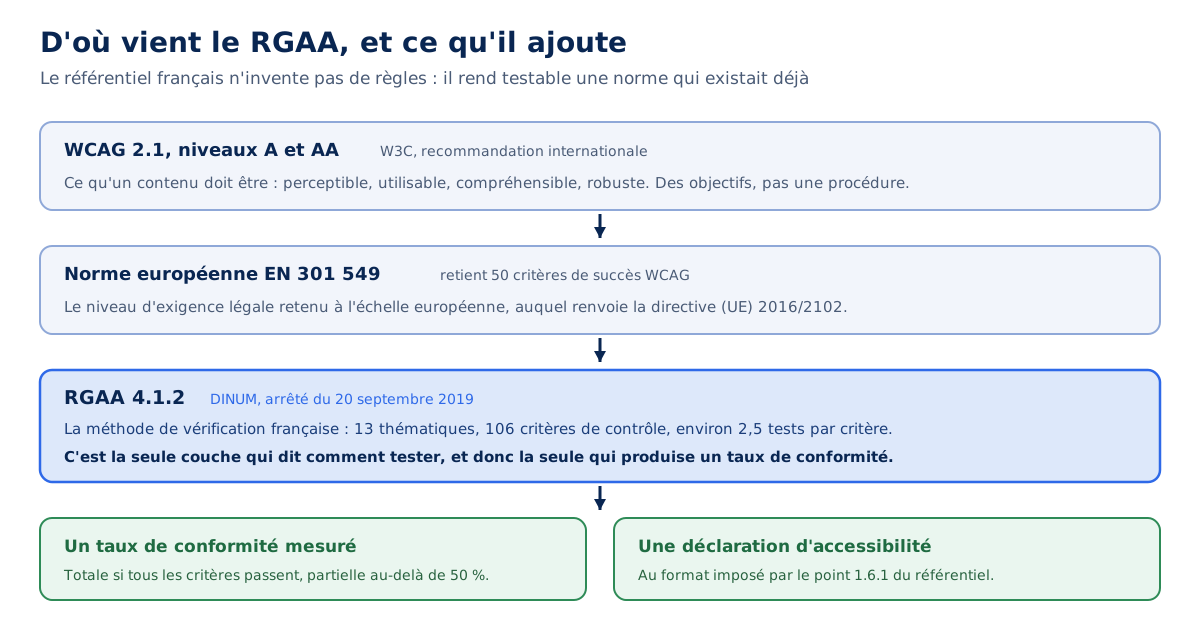
This architecture has a practical consequence that the Arcom explicitly highlights: it is the European standard that is legally binding, not the framework. If the RGAA remains silent on a point present in EN 301 549, such as the principle of non-interference, the obligation remains. The framework is a control method, not the scope of the requirement.
Who is concerned by the RGAA?
Three categories of organizations fall under Article 47 of the 2005 law, and the scope has considerably expanded since then. The Arcom lists them on its dedicated page, and the threshold applicable to private companies deserves close reading.
- Public law legal entities: State, local authorities, public institutions, hospital public service;
- Private law legal entities delegated a public service mission;
- Companies whose turnover exceeds a threshold set by decree, currently 250 million euros, calculated on the average of the last three closed fiscal years and on the turnover generated in France only.
A detail matters for groups, and it is regularly misinterpreted. The reference turnover is not the group's consolidated turnover, but that of the company designated as responsible for the service in the website's legal notices. A French subsidiary of an international group is therefore assessed on its own business volume.
What the European Accessibility Act has changed since June 28, 2025
Directive (EU) 2019/882, known as the European Accessibility Act, has introduced a second set of obligations, this time targeting business sectors rather than organization sizes. Transposed into French law by Law No. 2023-171 of March 9, 2023, Decree No. 2023-931, and the Order of October 9, 2023, it applies to products placed on the market and services provided since June 28, 2025.
The scope covers e-commerce, consumer banking services, passenger transport, audiovisual media, telephony and digital books, as well as associated hardware. The practical guide from the DGCCRF details the categories concerned.
However, an exemption limits the scope of the regulation for smaller entities. Companies with fewer than 10 employees whose annual turnover remains below €2 million are exempt from the service obligations, as are cases where making the service accessible would fundamentally alter the nature of the product or represent a disproportionate burden.
The scale of change is considerable. A medium-sized online retail site, which was not subject to any obligations before June 2025, is now fully covered, and under the supervision of an authority that has already begun its investigations.
What are the accessibility obligations to publish?
Beyond the technical state of the site, the law requires four distinct deliverables, which organizations regularly confuse. They are not interchangeable and each can be cited as a separate violation, regardless of the actual quality of the code.
- The compliance statement on the homepage, clearly visible, indicating whether the service is fully compliant, partially compliant, or non-compliant;
- The accessibility statement, in the format required by point 1.6.1 of the RGAA, supported by a real audit and directly accessible from the service;
- The multi-year accessibility plan, which cannot exceed three years in duration, made public;
- The current year's action plan, which details this plan and must be updated annually.
A fifth element is added, though not a document: the service must easily allow users to report a violation of accessibility rules, and the statement must provide a contact for this purpose. It is through this channel that most association-related reports are received, which then trigger an inspection.
What should an accessibility statement contain?
The statement is not free text. Point 1.6.1 of the RGAA sets its mandatory format, section by section, and requires that the compliance status result from an effective assessment, i.e., an audit conducted according to the official methodology. Only three statuses are allowed, and their thresholds are not chosen freely.
| Status to display | Condition | What it implies |
|---|---|---|
| Full compliance | All applicable criteria are met | A full audit, with no residual non-compliance |
| Partial compliance | At least 50% of the criteria are met | A full audit and the published list of inaccessible content |
| Non-compliance | Less than 50% of the criteria, or no valid audit in progress | This is the default status as long as no audit has been conducted |
The third status is the one most organizations should display, and it's the one seen the least. A statement published without an underlying audit does not constitute partial compliance: it falls under non-compliance, and claiming otherwise is itself a breach.
The statement also has a lifespan. Point 1.6.2 requires it to be updated upon a redesign or substantial modification of the site, three years after its publication, or eighteen months after the release of a new version of the standard for those applying the technical method.
Who controls the RGAA and what penalties are incurred?
Control is distributed among several authorities depending on the nature of the service, and this distribution explains why the same company may fall under two different regimes. Ordinance No. 2023-859 of September 6, 2023, created Article 47-1 of the 2005 law, which entrusts Arcom with the supervision of public digital services.
| Authority | Scope of control | Basis |
|---|---|---|
| Arcom | Digital services of public bodies and their delegates, display obligations for large companies | Article 47-1 of the 2005 law |
| DGCCRF | E-commerce and consumer products | Consumer Code, European Accessibility Act |
| ACPR | Consumer banking services | European Accessibility Act |
| Arcep | Electronic communications services | European Accessibility Act |
The amounts incurred under Article 47-1 are explicit. Arcom may impose a financial penalty of a maximum of €50,000 for non-compliance with accessibility requirements and €25,000 for other obligations, which can be adjusted according to the nature, severity, and duration of the breach. The procedure first involves a formal notice, which is made public.
On the DGCCRF side, the system falls under the consumer code and the mechanism is significantly different. Breaches are considered 5th class misdemeanors, i.e., a fine of €7,500, which can be cumulative depending on the number of offenses, and agents can order compliance under penalty, with publication of the measure.
The authority has also opened a dedicated pathway on the SignalConso platform, allowing consumers to directly report an accessibility defect. Its investigation covers online commerce sites and the integrity of the service providers performing these audits, implicitly targeting express compliance offers.
The nuance that changes everything for private companies
A legal point distinguishes serious content from an approximate restatement, and it is rarely stated. For companies subject to the rules solely based on their turnover, Arcom only has jurisdiction over display obligations. It states this clearly: it cannot intervene with this category of actors on the grounds of non-compliance with accessibility requirements.
The reason is historical. The 2016 European directive only targeted the public sector, and the inclusion of large private companies is a national over-transposition for which the control regime has not kept pace. A private company with a turnover of more than €250 million can therefore be penalized for an absent or false declaration, but not, through this route, for a technically inaccessible website.
This asymmetry should not be interpreted as permission. It simply means that the immediate regulatory risk for many organizations primarily concerns documents, and that these documents are the least costly part to bring into order.
What Arcom's first formal notice teaches us
On June 24, 2026, Arcom issued a formal notice to the Ministry of Action and Public Accounts regarding the impots.gouv.fr website. This is the first public decision of its kind targeting a state service, and the full text of the decision is much more instructive than the accompanying press release. Ten breaches are identified, based on reports drawn up on April 30 and June 2, 2026.
Four relate to technical requirements: a downloadable tax notice in PDF without a title, without a defined language or structuring tags, and without an accessible alternative, in violation of criterion 13.3; a secure messaging system whose writing field is unreachable by tab, contrary to criterion 10.8; a tax year selection menu that only opens with the mouse, contrary to criterion 12.11; and a declaration form table **whose cells are not associated with their headers**, contrary to criterion 5.7.
The other six do not concern the site's code. Five relate to accessibility declarations and one to the action plan, published for 2024 when it should cover the current year. **A declaration dated January 16, 2023 had never been updated**, two others did not comply with the required format, with poorly ordered sections and renamed or missing titles.
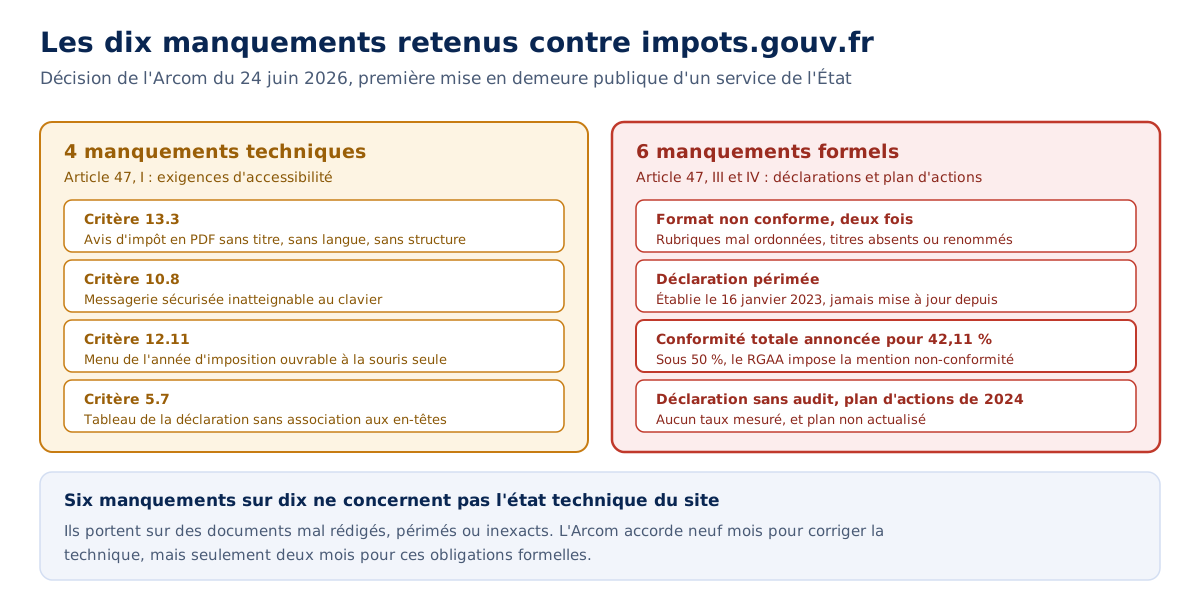
The most telling shortcoming is contained in one line. The declaration for the Real Estate Assets service showed a compliance rate of **42.11% while announcing full compliance** with the RGAA. Below the 50% threshold, the standard requires a non-compliance statement. A fourth declaration mentioned no rate, due to a lack of audit.
The deadlines granted further illustrate the hierarchy of priorities. Arcom allows nine months to correct technical shortcomings, but only two months for declarative obligations and the action plan. The lesson is counter-intuitive and deserves to be stated plainly: **an inaccurate declaration is an autonomous failure**, independent of the actual state of the site, and it is the primary cause of sanctions. It is also, by far, the quickest point to correct.
What does RGAA 5 change and should we wait for its publication?
No, you should not wait, and DINUM itself says so. In its announcement of March 4, 2026, it places this instruction before any description of upcoming developments, which speaks volumes about the frequency of the question: **work based on RGAA 4.1.2 remains fully relevant** and should not be suspended.
Ongoing or upcoming work based on the currently applicable RGAA 4.1.2 remains fully relevant and **must not be suspended or postponed under any circumstances**.
Interministerial Directorate for Digital, announcement of the new RGAA version, March 4, 2026
The technical argument follows the institutional argument. The RGAA 5 criteria will specify or supplement those of 4.1.2, without refuting them: a site that is compliant today will remain in a good position tomorrow. The work undertaken is therefore not threatened by obsolescence; on the contrary, it forms the basis on which new criteria will be added.
The announced developments concern two areas. On the legal obligations side, Arcom is designated as the supervisory authority, and an online service for submitting and publishing declarations will be implemented, making compliance traceable and verifiable from a single point. On the technical method side, the framework will integrate WCAG 2.2, define criteria and tests for mobile applications and office documents, and rephrase certain criteria to simplify them.
The transition to WCAG 2.2 will add requirements that contemporary interfaces largely ignore: minimum touch target size, an alternative to swipe gestures, and above all, authentication that does not rely on a cognitive test such as memorizing a copied password. These three points affect components that almost all sites have.
The calendar question remains, and it has a numerical answer. Declarations published before the release of RGAA 5 remain valid for eighteen months, within the three-year limit from their publication date. Publishing a declaration now is therefore not wasted effort; it's time gained.
Is your site as fast as your visitors expect?

Does a Lighthouse score of 100 mean that the site is RGAA compliant?
No, and the gap between the two is considerable. A score of 100 on Lighthouse's accessibility section means that the tool detected no defects among those it can detect, which is useful but very partial information. WebAIM, the publisher of the WAVE tool, states it unequivocally in the methodology of its annual study: the absence of detected errors does not indicate that a page is accessible or compliant.
The reason lies in the nature of the criteria. A machine is very good at verifying the presence of an attribute, the value of a contrast, or the validity of an ARIA role. It is structurally incapable of judging whether a text alternative correctly describes the image, whether the tab order follows the visual logic, or whether an entire ordering process can be completed without a mouse.
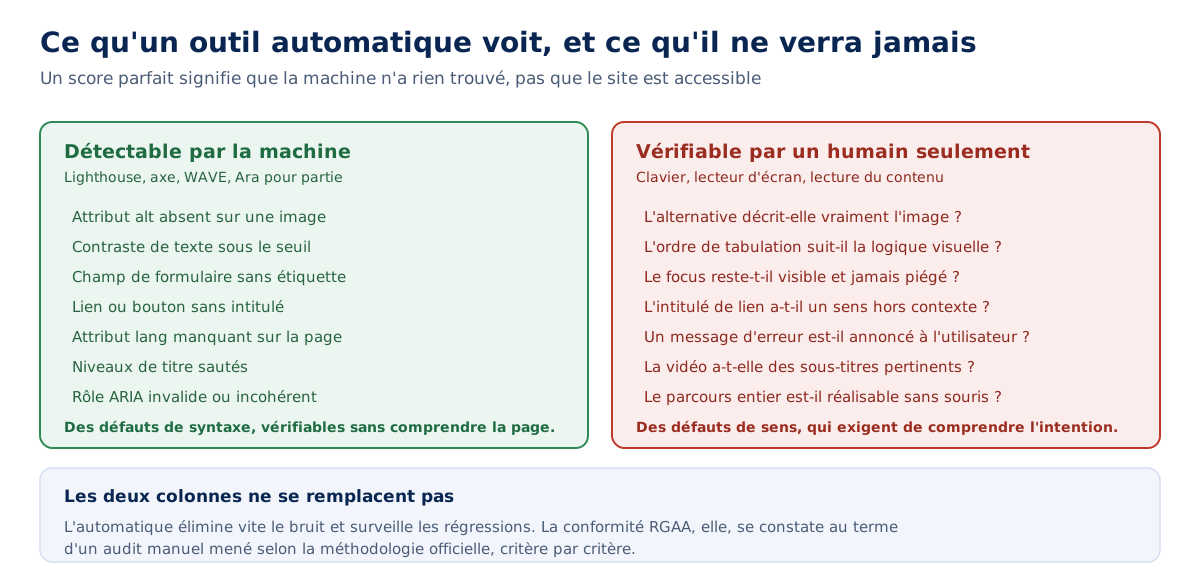
The order of magnitude is documented. WebAIM indicates that WAVE detects about a quarter of possible WCAG 2 errors, and its survey of accessibility practitioners shows that only 17.6% of them believe that at least half of the problems are automatically detectable. In other words, the majority of RGAA criteria are checked manually, by an audit conducted according to the official methodology.
We use Lighthouse daily for site monitoring, and the reports we produce include an accessibility section alongside the performance section, which is continuously tracked. It is precisely this regular use that makes the limitation visible: a site can go from 78 to 100 on this score in an afternoon of mechanical fixes, without its RGAA compliance changing one bit. The two metrics answer different questions, and we detail what each tool actually measures in our comparison of PageSpeed Insights and Lighthouse.
What tools should be used to test the accessibility of a site?
The tools fall into three categories that do not replace one another, and the classic mistake is to stop at the first one. Automatic extensions do the initial cleanup, audit tools structure the official process, and assistive technologies test the result against real-world usage.
- Ara, the official audit tool from DINUM, guides the implementation of RGAA criteria and produces a report along with a usable compliance rate for the declaration;
- Assistant RGAA, a browser extension, highlights the elements to be checked criterion by criterion and considerably speeds up the manual part;
- axe DevTools and WAVE, automated audit extensions, identify the most common syntax errors in seconds;
- Lighthouse, integrated into Chrome's developer tools, monitors regressions over time but covers only a fraction of the criteria;
- NVDA, JAWS, and VoiceOver, screen readers, render the page as it is actually perceived by some users.
The effective approach involves chaining these categories in order. First, use an automatic tool to eliminate noise, then conduct the RGAA audit on a representative sample of pages from the site, and finally, check critical navigation paths using the keyboard and a screen reader. Skipping the last step is equivalent to validating a compliance that no user will notice.
Should you test with a screen reader, and which one?
Yes, at least on the paths that matter : contact form, checkout funnel, personal space. On Windows, NVDA is free and covers the essential testing needs ; on macOS and iOS, VoiceOver is integrated into the system. JAWS remains very common in professional environments but its cost reserves it for in-depth audits.
A precaution is necessary when interpreting these tests. Knowing how to use a screen reader requires learning, and a developer discovering the tool will often produce a pessimistic diagnosis, for lack of knowing the shortcuts that daily users employ. The test is used to identify outright blocks, not to judge the ease of use.
What it reveals in a few minutes remains valuable nonetheless : a button announced as a button without further precision, a modal that does not take focus, a confirmation message invisible to speech synthesis. None of these three defects appear in an automatic report.
Can a site be made accessible with an automatic overlay?
No, and the consensus among practitioners is clear on this point. Accessibility overlays, those JavaScript-injected widgets that display a pictogram and offer to enlarge text or invert contrasts, do not produce compliance and will not produce it. Compliance is defined as adherence to all criteria, and no third-party script can on-the-fly repair a poorly marked-up document structure.
The figures from WebAIM's survey of practitioners are damning : 67 % of respondents find these tools little or not at all effective, and the proportion rises to 72 % among respondents with disabilities, the very people the system claims to serve. Only 2.4 % consider them very effective.
There is also a cost that we are well-positioned to measure. An overlay is a third-party script loaded on all pages, which manipulates the DOM after rendering and adds an interface layer on top of the existing one. In terms of performance, this is exactly the profile of what we seek to eliminate in an audit : third-party JavaScript blocking the critical path, for an unproven benefit.
There is a defensible use of these tools, and it must be said to be fair : some offer display preferences that serve specific users. What is indefensible is to sell them as a compliance solution, and to display them instead of an audit.
Does accessibility have an effect on natural referencing?
The honest answer requires nuance that most content on the subject glosses over. Accessibility is not a Google ranking factor, and Lighthouse's accessibility score has no direct effect on a page's position. Writing the opposite is false, and it's the first thing a technical reader would point out.
What is true, and much more interesting, is that the two disciplines work on the same material. The accessibility tree that a browser builds for assistive technologies and a crawler's understanding of a page both rely on the semantic markup of the document. A document well-structured for a screen reader is also well-structured for a bot, and for a generative bot, which also works on text and structure.
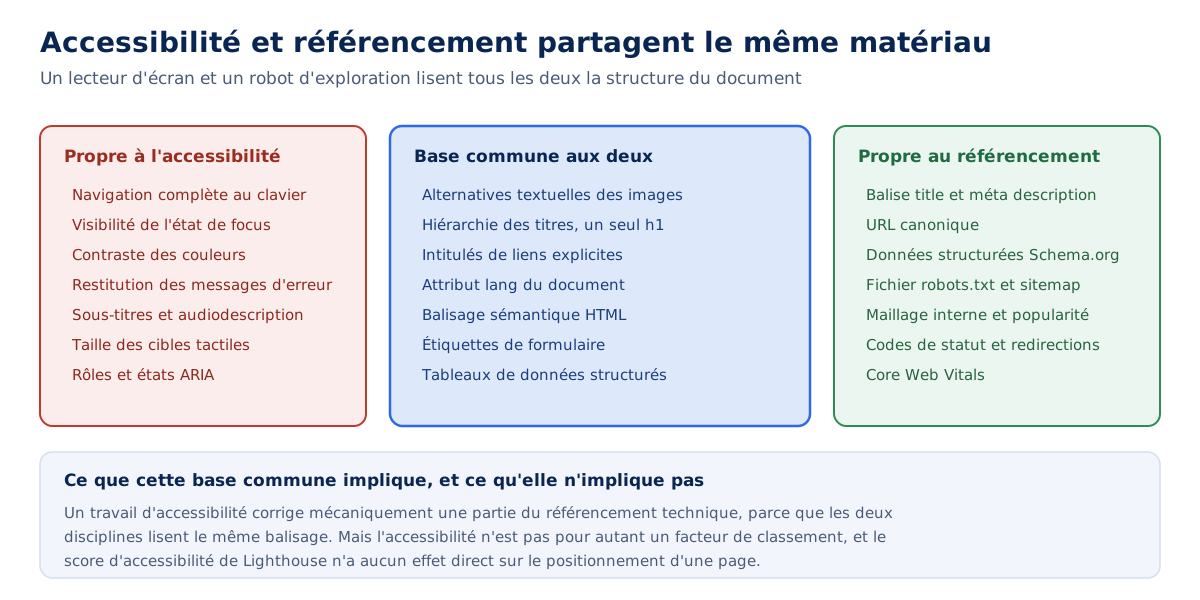
The list of overlaps is long and concrete: text alternatives for images, heading hierarchy, explicit link labels, the document's lang attribute, form labels, correctly structured data tables, using semantic HTML elements rather than generic divs. Each of these points appears in both an RGAA criterion and a technical SEO recommendation.
We see this in our work. Our web performance audits regularly identify issues that directly relate to accessibility, even though that's not their primary focus: images without alternatives identified while working on media weight, an inconsistent heading hierarchy discovered while analyzing the main content rendering, focus states removed by a CSS rule intended to eliminate an outline deemed unsightly. The same file, read for two different reasons.
Some accessibility fixes even have a direct performance effect, and that's the most favorable scenario. Removing an unnecessary JavaScript overlay, replacing an inaccessible carousel with a static layout, simplifying a component overloaded with ARIA: each of these actions lightens the page while making it more usable. The relationship between technical quality and visibility is the subject we explore in our analysis of the SEO impact of web performance.
What are the most common accessibility defects?
WebAIM's annual study, which analyzes the million most visited home pages, provides the most reliable snapshot available. In its March 2026 edition, based on February data, 95.9% of pages had at least one automatically detectable WCAG failure, with an average of 56.1 errors per page. The figure has risen again after six years of gradual improvement.
Six types of defects account for 96% of the errors found, and they have been the same for seven years. Correcting them would therefore resolve the majority of the measurable problem, making their persistence all the more striking.
| Defect | Pages concerned | Associated RGAA criterion | Effect for the user |
|---|---|---|---|
| Insufficient text contrast | 83,9 % | Theme 3, colors | Illegible text in low vision or bright sunlight |
| Missing text alternative | 53,1 % | Theme 1, images | Silent image for screen reader |
| Missing form label | 51,0 % | Theme 11, forms | Field whose expected input is unknown |
| Link without a label | 46,3 % | Theme 6, links | Announced link without destination |
| Button without accessible name | 30,6 % | Theme 7, scripts | Control whose action remains unknown |
| Document language not declared | 13,5 % | Theme 8, mandatory elements | Speech synthesis with the wrong accent |
Two lessons emerge from this table, beyond the figures themselves. None of these six defects are technically difficult to fix: they are missing attributes and color values, not architectures to be redesigned. And all six are automatically detectable, meaning a simple tool scan is enough to identify them.
A third element deserves the attention of anyone working on performance. WebAIM notes that the complexity of home pages has increased by 14.3% in one year, with an average of 1,437 elements, and that the volume of ARIA attributes has grown by 27%. Pages containing ARIA had an average of 59.1 errors, compared to 42 for those that did not.
Carousel libraries are among the technologies most correlated with the errors found, between 20 and 32% above average depending on the case. This is a numerical confirmation of what we were already writing about the real cost of sliders: the component combines accessibility defects, weight, and low utility. Typographic choices and image processing are read in the same way from a double perspective.
How much does compliance cost and how long does it take?
No single figure makes sense here, and being wary of those found online is a good reflex. The cost depends on three variables that vary by a factor of ten from one project to another: the size of the sample of pages to audit, the nature of the components involved, and the quality of the initial code.
The process is broken down into steps whose orders of magnitude differ significantly, and it is more useful to distinguish them than to announce a flat rate.
- The initial audit according to the RGAA methodology, conducted on a representative sample, takes several days and produces the compliance rate as well as the list of non-conformities;
- The mechanical corrections, missing alternatives, contrasts, form labels, language attributes, are handled quickly and often cover the majority of occurrences;
- The structural corrections, interactive components to be redone, keyboard navigation to be restored, focus management, represent the bulk of the budget and require development;
- The formal documents, declaration, multi-year plan, and action plan, are written in a few hours once the audit is available.
This breakdown explains why the first action to take is almost never technical. Publishing an accurate declaration, backed by a real audit and honestly announcing a 40% rate, costs a fraction of what full compliance costs and addresses the part of regulatory risk that triggers the fastest.
The timeline, on the other hand, is constrained by a factor we cannot control: the availability of the teams that must produce the corrections. An audit can be scheduled; redoing components fits into an already busy development cycle, and this is where projects get bogged down.
How to integrate accessibility into a project rather than as an afterthought?
The cost difference between the two approaches is the only argument that matters, and it is massive. Adding an alt attribute during template integration costs nothing; adding it afterward to several thousand published images requires an inventory, an editorial decision on each visual, and a database update. The same work changes in magnitude depending on when it is done.
Three moments in the project concentrate the most impact. In design, the choice of colors and contrasts is validated before the mockup is applied to fifty screens. In integration, choosing semantic HTML elements over styled divs determines half of future compliance. In development, focus management and keyboard navigation are considered at the same time as the component, not six months later.
It is in this spirit that we work on the sites we design and develop, integrating accessibility criteria from the development phase rather than as a catch-up layer. This approach does not dispense with an audit: compliance remains a measured state, and no one can claim it without having verified it criterion by criterion.
A simple practice changes a lot on a daily basis: navigate the page you just developed using only the tab key, before delivering it. The exercise takes two minutes and catches a good portion of the defects that automatic tools do not see.
Where to start concretely
A priority order naturally emerges from all of the above, and it is not the one we spontaneously adopt. The temptation is to start by correcting the code; the effective order begins by knowing where you stand and declaring it honestly.
The first step is to determine if the organization is subject to it, and on what grounds. A public body falls under Article 47 in its entirety, an e-commerce company under the European Accessibility Act since June 2025, and a large private company under the sole display obligations towards the Arcom. The three regimes do not call for the same priorities.
The second step is the audit, because nothing serious can be published without it. The third is documentary organization, which is quick and eliminates the most immediate risk. The fourth is only the technical correction plan, spread over the multi-year schedule, first addressing critical user journeys: those that allow the process for which people come to be completed.
One last recommendation, less obvious: integrate an automatic check into the continuous integration chain. It will only detect a fraction of the criteria, but it will prevent regressions, and this is precisely where the benefit of successful compliance is lost. A site compliant at the time of the audit becomes non-compliant again within a few months of publications if no one monitors it.
A requirement that extends far beyond the regulatory framework
There is something paradoxical about how the subject arrived on the meeting tables. The obligation has existed since 2005, the technical material has been public and documented for years, and it was the prospect of a penalty that triggered the movement. Compliance preceded intent, which is not the best way to build something lasting.
WebAIM's figures, moreover, invite us to look beyond the checkbox. If 95.9 % of the most visited pages on the web fail on automatically detectable criteria, and if the same six defects have dominated for seven years, the problem is not technical difficulty. It is that no one in the production chain has explicit responsibility for these points, and they therefore fall through the cracks.
The question facing teams may not be how to achieve a rate, but when to stop treating accessibility as a one-off project. Contrast is validated during design, an alternative is written at the same time as the content, a component is tested with a keyboard before being delivered. None of these three habits requires a budget ; all three require deciding who will handle them.