
Explaining web performance to novices is not easy. Whether with analogies, vivid descriptions, or more down-to-earth explanations, it's common to take an obvious shortcut: that of weight. The logic is indeed inescapable: the lighter a web page and its resources are, the faster the page will load and therefore display.
Well, no. Or at least, not only. Another essential factor comes into play in the process of loading a web page: the order in which resources are called and executed. Two identical pages relying on the same resources (images, fonts, styles, scripts, etc.) can thus behave very differently, one being perceived as fast and the other as slow.
Why prioritize a page's resources?
Because the browser cannot download everything at once. Bandwidth and the number of simultaneous connections are limited: each resource served in advance delays another. Prioritizing means deciding what waits, and this decision rests with the developer much more than with the browser.
The difference between these 2 pages lies in how their resources will be called within the code. In a finite computer world where an internet connection provides only a certain download speed and with latency, it is advisable to retrieve critical resources as early as possible. We are talking here about the resources necessary for displaying the visible area of the page, or "viewport".
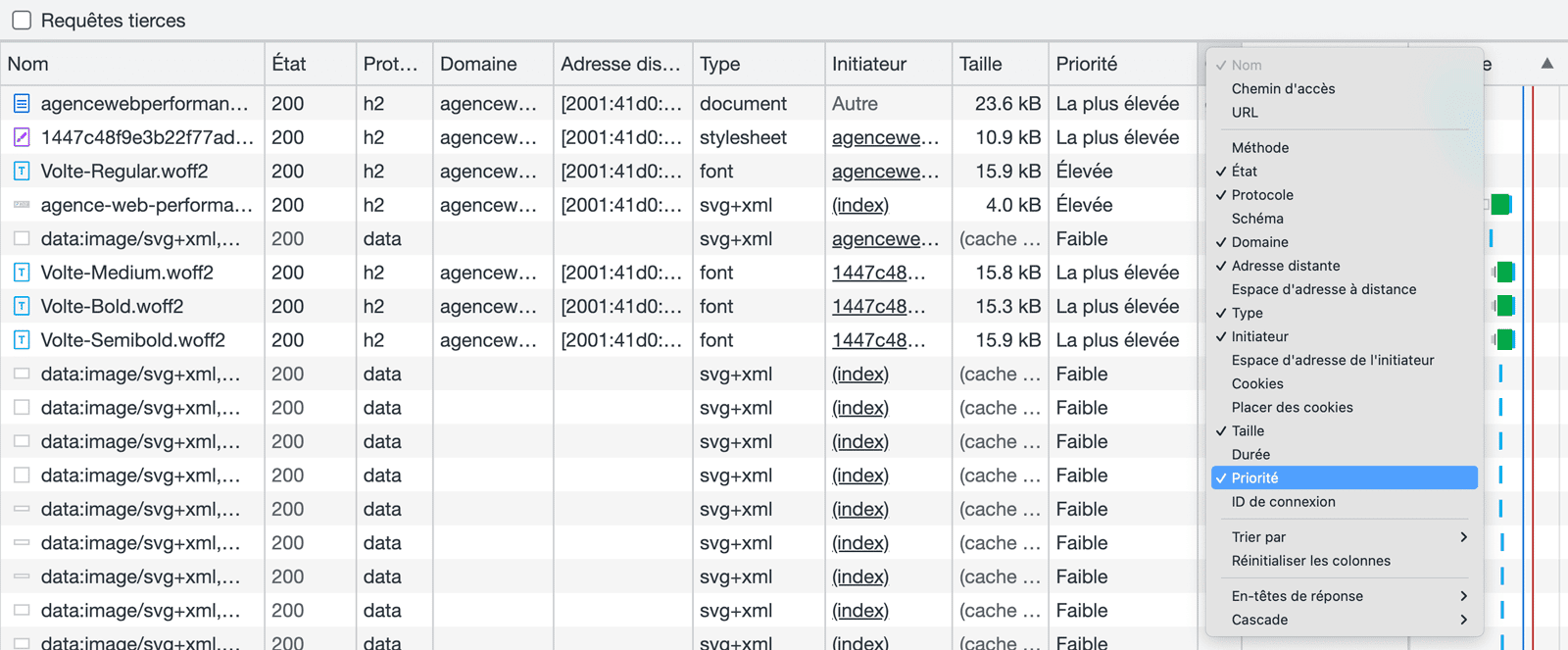
Browsers have increasingly powerful built-in prioritization mechanisms, which allow them to use available bandwidth optimally if relying on HTML standards. They generate a queue that takes into account the importance of each element. However, it is possible to help browsers in this process, with the risk, however, of being counterproductive in case of poor implementation.
In what order does the browser load resources?
The browser follows an order imposed by the page's construction: first the HTML, which it analyzes to discover the rest; then the CSS, which blocks rendering as long as it is not applied; finally JavaScript and images. Anything that precedes the CSS delays the first display.
One of the fundamentals of web performance is to respect a kind of hierarchy between the 3 languages used to display a web page: HTML, then CSS, and finally JavaScript.
HTML and DOM first
For a web page to display quickly, it is essential that all the HTML code necessary for its display is accessible as early as possible. This code is indeed essential for the browser to render the page (by building the DOM tree). Browsers will also analyze the HTML very early to detect all the necessary resources for the page's display: CSS files, web fonts, images, scripts... They will then decide which resources should be downloaded with high, medium, and low priority.
CSS second
Since CSS is essential for displaying a web page, browsers will naturally try to download stylesheets with the “highest priority”. For this process to work best, external CSS files should be called as early as possible within the <head> section of the page, via a standard HTML <link rel="stylesheet"> tag.
JavaScript last
To ensure a fast rendering of a web page, it is essential to allow the browser to complete the rendering phase as early as possible. Since JavaScript can stop this phase, it is essential that scripts are downloaded and executed as late as possible. The best practice is to include them at the bottom of the page, just before the </body> tag. This is true even if their designers recommend including them within the <head> of your pages.
Is your site as fast as your visitors expect?

What tools can be used to manage priorities?
Four families of tools: resource hints, which prepare a connection or download a file in advance; fetchpriority, which changes a resource's rank; lazy loading, which defers off-screen content; and async and defer on scripts. The four combine without ever replacing each other.
Despite constant improvements to their resource detection and download prioritization tools, modern browsers like Google Chrome and Firefox can be imperfect and miss out on major performance levers. Our web performance experts have several tools to guide browsers in this complex prioritization process.
Resource hints, devilishly effective
Used for several years and widely proven, Resource hints allow you to provide "hints" (literal translation from English) to the browser to help it download certain resources more efficiently. There are several types, including the very popular dns-prefetch and preconnect, but the one that particularly interests us is "preload".
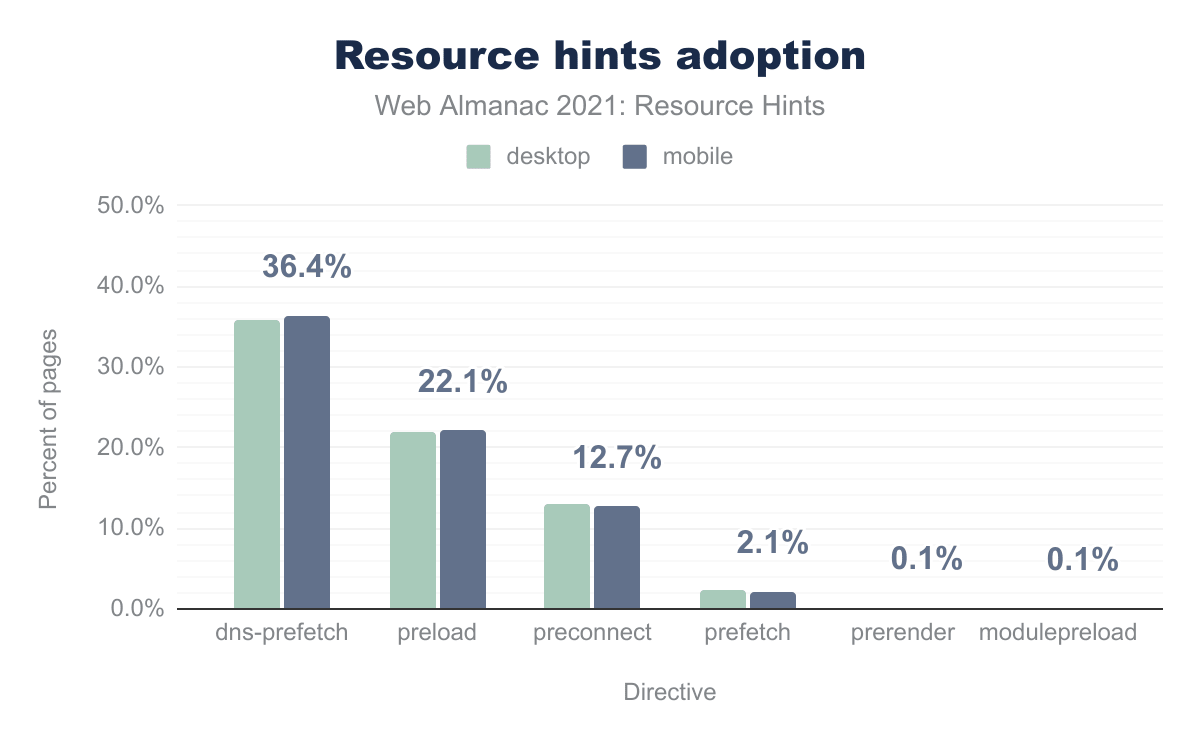
dns-prefetch and 22.1% preload. Source: Web Almanac.Preload is indeed the only Resource hint that allows a resource to be assigned a high priority and start its download extremely early. It is used in particular to pre-load web fonts called via external stylesheets, but also to pre-load images that would constitute the LCP. This is typically the case for news articles with a main image.
However, the mechanism has side effects and can even quite easily prove counterproductive. Since it assigns a high priority to pre-loaded resources, it consumes critical bandwidth and can thus cannibalize other resources essential for displaying the page. It should therefore be used sparingly and its concrete effects tested.
Priority hints, the new essential
Priority hints are much younger than Resource hints, but also much more powerful when it comes to managing resource download priorities, and for good reason: they were designed specifically for this purpose. Their use is also much simpler since you just need to add a fetchpriority="high" or fetchpriority="low" attribute to a resource to re-prioritize it.
This mechanism proves much more effective than <link rel="preload"> for prioritizing the loading of an image that constitutes the LCP (example given previously). It can also allow, conversely, to de-prioritize the loading of certain third-party scripts (Google Analytics, Google Tag Manager...) via a simple attribute in the <script> tag. Finally, it can complement a Resource Hint to de-prioritize it, which was impossible until now: <link rel="preload" fetchpriority="low">.
What is the fetchpriority attribute for?
The fetchpriority attribute tells the browser the relative importance of a resource, with three values: high, low, and auto. It doesn't change the discovery order, it changes the queue rank. Its main use is for the first screen image, which the browser ranks as low priority by default.
This default behavior is often surprising: the browser doesn't know an image is visible until it has calculated the layout, so it treats it like any other. Setting fetchpriority="high" on the hero image corrects a delay that costs hundreds of milliseconds on the LCP.
The reverse is just as useful but less practiced. Declaring fetchpriority="low" on non-critical items, ad banners, footer thumbnails, third-party widgets, frees up bandwidth for the essentials. Only one resource per page deserves high priority: promoting more than one is like promoting none.
What's the difference between preload, prefetch, and preconnect?
The three act at different times. preconnect opens the connection to a domain without downloading anything; preload downloads a resource needed for the current page, with high priority; prefetch downloads a resource useful for the next navigation, with low priority. Confusing preload and prefetch is the most common mistake.
The choice criterion is simple: does the resource serve this page or the next one? A font used in the title requires preload; the CSS for the product page the visitor is likely to click on requires prefetch. A preload on an unused resource is doubly penalizing: it consumes bandwidth and degrades the rest.
| Attribute | Effect | Priority | Use case |
|---|---|---|---|
dns-prefetch | Resolves the domain name | Very low | Third-party domain requested later |
preconnect | Opens DNS, TCP, and TLS | Low | Critical domain known in advance |
preload | Downloads for the current page | High | Title font, LCP image, critical CSS |
prefetch | Downloads for the next navigation | Lowest | Likely page after this one |
fetchpriority | Changes a resource's rank | Adjustable | Promote LCP image, de-prioritize the rest |
This table is read by the priority column. The five attributes form a continuous scale, from simple identification of a domain to immediate download at the top of the queue. Using them without this hierarchy in mind leads to the opposite of the desired effect: multiplying preloads means saturating the bandwidth and delaying what really mattered.
Lazy-loading images, essential
In the absence of specific instructions, a browser will download all images on a page as soon as it loads, consuming more bandwidth. Implementing lazy-loading for non-essential images allows only visible images within the viewport to be downloaded. The bandwidth saved, although not critical, can be used by other resources called with low priority.
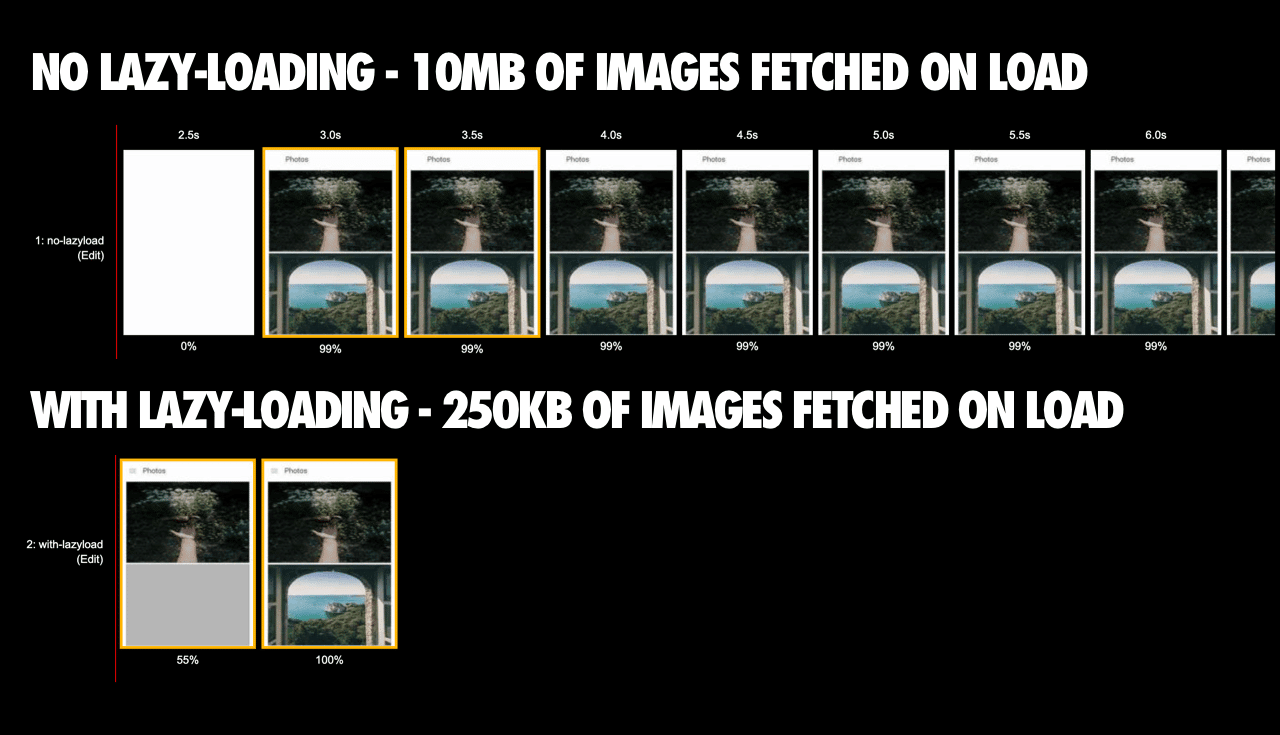
Implementation here is also very simple, as a single attribute is enough to change the default behavior of browsers: <img loading="lazy">. There is no need to use a JavaScript library like Lazysizes or Lozad for this.
The specific case of JavaScript: async and defer
We mentioned JavaScript earlier, explaining that its download and execution should happen as late as possible, certainly after the page has rendered. To do this, we have 2 essential attributes: async and defer. They allow changing the browser's behavior by making scripts non-blocking (async), with the possibility of deferring their execution (defer).
Given the goals of web performance, it is the latter that we will use, adding the appropriate attribute to all script calls, both internal and third-party: <script src="..." defer>. This globally de-prioritizes all JavaScript, ensuring faster rendering of the rest of the page.
As you've understood, web performance is not limited to reducing and removing resources. It is a technical discipline that requires an excellent understanding of how a web browser works and in-depth knowledge of levers such as those mentioned regarding prioritization. It is the combination of all these components that allows us to display such results as part of our web performance optimization services.