
The HTTP protocol is the language spoken by web browsers and web servers. It defines how a request is formulated, how a response is structured, and above all, how data flows between the two. Three versions coexist on the web today: HTTP/1.1, released in 1997, HTTP/2 in 2015, and HTTP/3 in 2022. They all answer the same question, but with radically different transport mechanisms.
This evolution is far from anecdotal for a site's performance. Each generation was designed to remove a bottleneck left open by the previous one, and each makes obsolete certain optimizations that were considered best practices ten years earlier. Concatenating all your JavaScript files or distributing your images across multiple subdomains are two examples of techniques that have become, at best, useless, and at worst, counterproductive.
Adding to this is widespread confusion, even in technical content: QUIC and HTTP/3 are regularly presented as two names for the same thing. They are two distinct protocols, at two different layers of the network stack, and this distinction is not a matter of vocabulary. So, what does each version really change for a site's speed, and should HTTP/3 be enabled today?
What is the HTTP protocol and how does it work?
HTTP stands for HyperText Transfer Protocol. It is an application layer protocol that defines a request-response exchange: the client requests a resource using a method and a URL, and the server responds with a status code, headers, and possibly a body. HTTP is stateless by design, meaning it retains no memory from one request to another.
The protocol itself does not transport bytes over the network. It relies on a transport protocol, historically TCP, to ensure that data arrives complete and in order. It is precisely at this boundary between the application and transport layers that the entire story of the three versions unfolds, as detailed in the protocol timeline published by MDN.
What is the difference between HTTP and HTTPS?
HTTPS is not a version of the HTTP protocol; it is HTTP transported over an encrypted channel by TLS. The semantics remain identical: same methods, same status codes, same headers. Only the confidentiality of the transport changes, and this also explains the switch from port 80 to port 443.
The question has lost its relevance with recent versions, and this is a point that many content pieces omit. No browser implements unencrypted HTTP/2; encryption is effectively imposed. With HTTP/3, it's no longer even a matter of browser policy, as TLS 1.3 is integrated into the transport protocol itself. Unencrypted HTTP/3 does not exist.
What problems did HTTP/1.1 leave unresolved?
HTTP/1.1, standardized in 1997 and now described by RFC 9112, introduced persistent connections: the same TCP connection can serve multiple successive requests, instead of opening a new one for each file. The gain was considerable, but the protocol retained a structural limitation with significant consequences.
On an HTTP/1.1 connection, requests are processed strictly one after another. A slow resource blocks all those that follow it in the queue, regardless of their actual size. A 3 KB stylesheet can wait for the download of a 2 MB image to finish simply because it was requested after it. This is head-of-line blocking at the application level.
Browsers circumvented the problem by opening multiple connections in parallel to the same domain, usually six, as recalled by the MDN documentation on connection management. Six queues instead of one, therefore, but each additional connection costs a full TCP and TLS handshake, and six remains a trivial number compared to the dozens of resources on a modern page.
An entire generation of best practices was born from this constraint, and this is what makes the subject concrete for anyone managing a site today.
What performance improvements does HTTP/2 actually bring?
HTTP/2, published in 2015 and redefined since by RFC 9113 in June 2022, introduces multiplexing: a single TCP connection carries all requests in parallel, broken down into frames and reassembled upon arrival. Application-level queueing disappears, and with it, the need to open six connections per domain.
The protocol also changes in nature in its representation. Where HTTP/1.1 transmitted readable text, HTTP/2 is binary, making it more compact to parse and less prone to interpretation ambiguities. Headers, which are massively repeated from one request to another, are compressed by the HPACK algorithm defined by RFC 7541.
The mechanism is effective, and adoption confirms it. According to the HTTP chapter of the 2024 Web Almanac by HTTP Archive, 71 % of desktop homepages were served in HTTP/2 and only 22 % still in HTTP/1.1, compared to 34 % in 2022. At the request level, 85 % of traffic went over HTTP/2 or better.
What HTTP/2 doesn’t provide
Part of the misunderstanding around HTTP/2 comes from what is attributed to it. Multiplexing solves a queuing problem, not a slowness problem, and this nuance determines what needs to be optimized next. HTTP/2 does not reduce the weight of resources it carries by even one byte.
Three things in particular remain entirely your responsibility after a migration.
- Payload compression, which falls under gzip, Brotli, or Zstandard depending on the case, and has nothing to do with HPACK header compression;
- Browser cache and server cache, which remain the only way to not transfer a resource at all;
- Server response time, which a more efficient protocol never compensates for: if the application takes 800 ms to produce the document, HTTP/2 will wait for it just as patiently as HTTP/1.1.
Multiplexing removes the queue, it doesn’t shorten what’s inside it. A site with poor TTFB will remain slow on HTTP/2, HTTP/3, and all future versions: it’s a first response time problem, not a protocol problem.
Is HTTP/2 server push still usable?
No, server push is dead and should no longer be deployed. Google disabled it by default starting with Chrome 106, in September 2022, followed by other Chromium browsers. The Chrome team justified this removal by mixed results, with no demonstrated net gain and frequent performance regressions, for a feature used by only 1.25 % of sites over HTTP/2.
The principle was nevertheless appealing: send the browser resources it hadn’t requested yet, anticipating its needs. The structural flaw is that the server doesn’t know what the browser already has in its cache, and therefore regularly pushes files that are already present, consuming bandwidth for nothing at the very moment it’s most precious.
Its successor works the opposite way, leaving the decision to the browser. The 103 Early Hints code sends simple preload suggestions before the final response, and the client chooses whether to follow them. Adoption remains marginal, however: the 2024 Web Almanac notes 2.9 % of desktop pages concerned, 90 % of which are attributable to a single e-commerce host.
What is head-of-line blocking and how does HTTP/3 solve it?
Head-of-line blocking refers to the situation where an element blocked at the beginning of a queue immobilizes all those following it, even if they are ready. HTTP/2 eliminated it at the application level thanks to multiplexing, but it left it intact at the transport level, and this is exactly the problem that HTTP/3 corrects.
The reason lies in the very nature of TCP. This protocol presents a single, strictly ordered byte stream to the upper layers: if a packet is lost, TCP holds back all subsequent packets until the missing one is retransmitted. It doesn't matter if these packets belong to other resources that have been fully received and are ready to be processed.
The result is counter-intuitive. In HTTP/2, a single connection carries everything, so a single lost packet freezes all streams simultaneously: the stylesheet, the script, the images, everything waits. In HTTP/1.1, with its six separate connections, a loss would have only penalized one out of six queues. On a very degraded network, HTTP/2 can therefore prove to be worse than its predecessor.
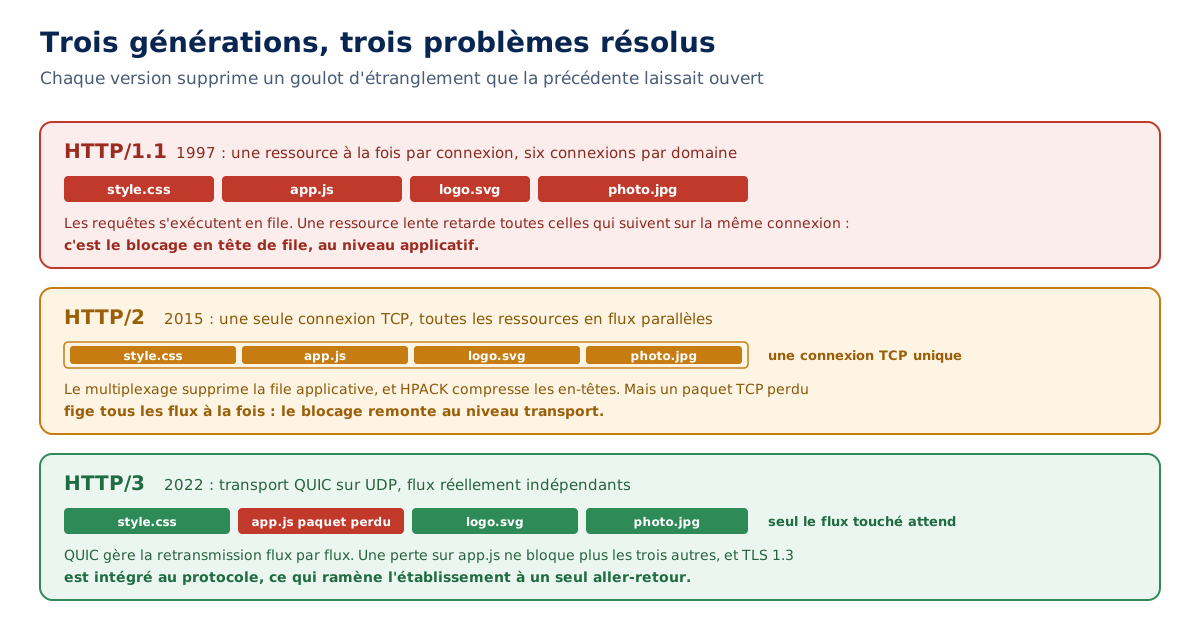
QUIC resolves this by managing stream segmentation and retransmission itself, stream by stream. A loss affecting the script only delays the script, while the stylesheet and images continue to be delivered. The blockage becomes local instead of global.
What is the QUIC protocol?
QUIC is a transport protocol, standardized by RFC 9000 published in May 2021. It replaces TCP, not HTTP. HTTP/3, defined by RFC 9114 in June 2022, is the application protocol that relies on it. QUIC is the truck, HTTP/3 is what's inside it, and confusing the two is like confusing TCP and HTTP/2.
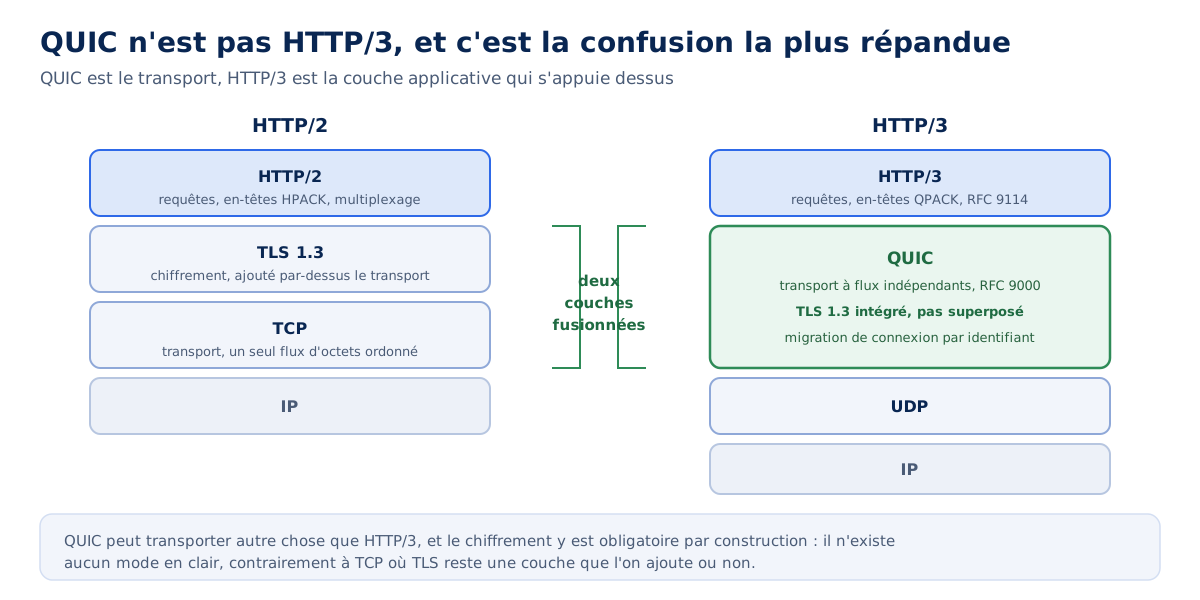
This distinction is not cosmetic. QUIC can carry more than just HTTP/3, and this is already the case in several protocols. Conversely, saying a site is on QUIC without specifying HTTP/3 leaves the question of the application layer entirely open.
Why does QUIC work over UDP?
QUIC relies on UDP because TCP is implemented in the kernel of operating systems and in intermediate network equipment. Modifying its behavior would require updating billions of machines, including boxes, firewalls, and routers, making any profound evolution practically unfeasible.
UDP offers the way out. It is a minimal protocol, content with sending datagrams without guaranteed order or delivery, and already accepted everywhere. QUIC re-implements on top, in user space, everything TCP provided: acknowledgments, retransmission, congestion control. The difference is that it does so with the notion of independent streams built-in from the start.
The choice has a decisive practical consequence: QUIC evolutions are deployed by simply updating the browser and server, without touching the system. What TCP took twenty years not to do, QUIC can do in one version cycle.
How many round trips does QUIC save on opening?
QUIC establishes a connection in a single round trip, versus two for the TCP plus TLS 1.3 combination, and three with earlier versions of TLS. The gain comes from the merger: where TCP first negotiates the transport then lets TLS negotiate encryption on top, QUIC handles both in the same exchange, since TLS 1.3 is part of the protocol.
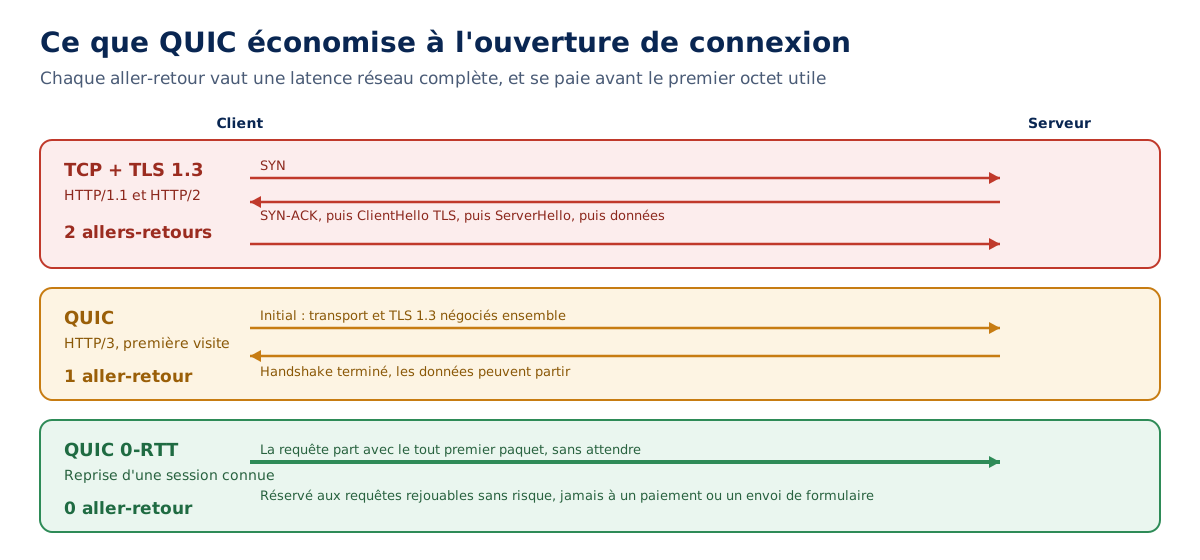
Session resumption goes even further with 0-RTT mode, which allows sending the request with the very first packet when the client has recently spoken to the server. The establishment then costs no round trips at all, which is the maximum theoretically achievable.
This mode, however, calls for a caveat that promotional materials often gloss over: data sent in 0-RTT is vulnerable to replay, as an attacker can capture and resend it. RFC 9000 therefore mandates reserving it for idempotent requests, which excludes payments, form submissions, and any operation that modifies a state.
What is QUIC's connection migration used for?
Connection migration allows changing networks without breaking the current session. A TCP connection is identified by the tuple of source IP address, source port, destination IP address, destination port: as soon as the IP address changes, the connection is dead and everything must be re-established from scratch.
QUIC identifies the connection by its own identifier, independent of the IP address. Switching from Wi-Fi to 5G when leaving home, or changing antennas in a train, therefore breaks nothing: the session resumes on the new address without a new handshake. MDN's glossary makes it one of the protocol's structuring contributions.
The stake is directly mobile, and it is a good indicator of situations where HTTP/3 truly brings something. On a fixed fiber-connected workstation, this feature will never be used.
Is HTTP/3 really faster than HTTP/2?
It depends on the network, and answering otherwise would be dishonest. HTTP/3's gain is maximal on a degraded mobile network, with packet loss, high latency, and access point changes. On a stable fiber connection in laboratory conditions, the difference with HTTP/2 is small, sometimes undetectable.
The reason is mechanical. The two main advantages of QUIC, the elimination of transport blocking and connection migration, only manifest when the network is problematic. Without packet loss, TCP's head-of-line blocking never occurs, so there is nothing to eliminate.
What remains is the round trip saved during establishment, which is incurred on all connections and is visible on the first byte. With 40ms latency, this means 40ms less before the response begins. It's not huge, but it's real, measurable, and it costs nothing once the protocol is enabled.
The practical conclusion can be summed up in one sentence: the more mobile and geographically dispersed a site's audience is, the more HTTP/3 benefits it. A service accessed from smartphones on the go will derive a net benefit, while an internal application accessed from wired workstations will gain almost nothing.
What is the difference between HTTP/1.1, HTTP/2, and HTTP/3?
The three versions differ less in what they carry than in how they carry it. The protocol's semantics, methods, status codes, and headers have remained the same since 1997 and apply to all three: they are described separately in RFC 9110. What changes is the layer underneath.
| Criterion | HTTP/1.1 | HTTP/2 | HTTP/3 |
|---|---|---|---|
| Year and standard | 1997, RFC 9112 | 2015, RFC 9113 | 2022, RFC 9114 |
| Transport | TCP | TCP | QUIC over UDP |
| Format | Text | Binary | Binary |
| Parallel requests | No, one queue per connection | Yes, multiplexed over one connection | Yes, on truly independent streams |
| Connections per domain | 6 in practice | 1 | 1 |
| Head-of-line blocking | Application and transport | Transport only | Neither |
| Header compression | None | HPACK | QPACK |
| Encryption | Optional | De facto imposed by browsers | Integrated into the protocol, TLS 1.3 |
| Round trips on opening | 2 to 3 | 2 to 3 | 1, or 0 on resume |
| Network change | Connection broken | Connection broken | Transparent migration |
Two lines in this table deserve careful reading because they are the source of most misunderstandings. Moving from six connections to a single one is a clear improvement in HTTP/2, but it also concentrates the risk: all resources now depend on a single TCP channel, and the slightest packet loss freezes the entire process.
The encryption line summarizes the change in philosophy. In HTTP/1.1, TLS was a layer added on top of the transport. In HTTP/3, there is no longer a layer to add or an option to enable; security is part of the transport itself. These distinctions also appear, in the form of short entries, in our web performance glossary.
Is your site as fast as your visitors expect?

Which HTTP/1.1 optimizations have become unnecessary?
A good portion of the techniques taught before 2015 aimed to bypass the limit of six connections per domain. These workarounds had a cost that we accepted because the gain was greater. Multiplexing has reversed this ratio, and several of them are now detrimental.
Four practices deserve re-examination on any site with technical debt.
- Excessive concatenation: grouping all scripts into a single file reduced the number of requests, thus the waiting time in the queue. In HTTP/2, requests no longer wait, and the single large file invalidates the entire cache as soon as a single line changes;
- CSS sprites: aggregating dozens of icons into a single image served the same purpose. This method now requires downloading the entire image to display one icon and is advantageously replaced by separate SVG files;
- Domain sharding: distributing resources across multiple subdomains increased the quota of six connections. In HTTP/2, each additional domain forces an extra DNS resolution, connection, and TLS negotiation, and breaks multiplexing by fragmenting what would have fit on a single connection;
- Systematic inlining: embedding CSS and base64 images in HTML eliminated requests but bloats the document, makes it non-cacheable independently, and penalizes every subsequent visit.
None of these techniques are inherently absurd, which makes their re-examination delicate. A reasonable grouping of small files remains relevant, and inlining a very small critical CSS still makes sense. What has changed is that the extreme version of each of these practices has gone from being an optimization to technical debt.
Sharding is the clearest case, because it is the only one whose reversal is complete: it frankly helped in HTTP/1.1, it frankly harms in HTTP/2 and HTTP/3. This is one of the reasons we systematically look for during a performance audit on an old site.
How to know if my site uses HTTP/2 or HTTP/3 ?
The most direct method is through the Network tab in the browser's developer tools, where a Protocol column displays the version used by each resource. It is not visible by default: you need to right-click on the header row of the table and check it. The values are http/1.1, h2, and h3.
On the command line, curl provides the answer unambiguously, provided you have a version compiled with HTTP/3 support, which is not the case for all distributions.
# Version négociée par défaut
$ curl -sI https://exemple.fr/ -o /dev/null -w '%{http_version}\n'
2

# Forcer HTTP/3 pour vérifier qu'il répond
$ curl --http3 -sI https://exemple.fr/ -o /dev/null -w '%{http_version}\n'
3

# L'annonce Alt-Svc dans les en-têtes
$ curl -sI https://exemple.fr/ | grep -i alt-svc
alt-svc: h3=":443"; ma=86400
However, a trap awaits anyone who jumps to conclusions too quickly, and it explains the majority of false negatives. The browser does not attempt HTTP/3 on a first connection to an unknown domain: it must first learn that the server supports it. A lack of h3 in the Network tab therefore proves nothing on its own.
How does the browser discover HTTP/3 support ?
Two mechanisms exist, and the most common requires a detour. The Alt-Svc response header allows the server to announce, during an HTTP/2 or HTTP/1.1 connection, that it is also reachable via HTTP/3. The browser memorizes the information for the duration indicated by the ma parameter and switches on the next visit.
The second, more recent mechanism bypasses this detour by placing the information in the DNS. The HTTPS record, defined by RFC 9460, publishes the list of supported protocols as an alpn attribute. Since DNS resolution takes place before any connection, the browser can open directly in HTTP/3.
$ dig +short HTTPS exemple.fr
1 . alpn="h3,h2" ipv4hint=203.0.113.10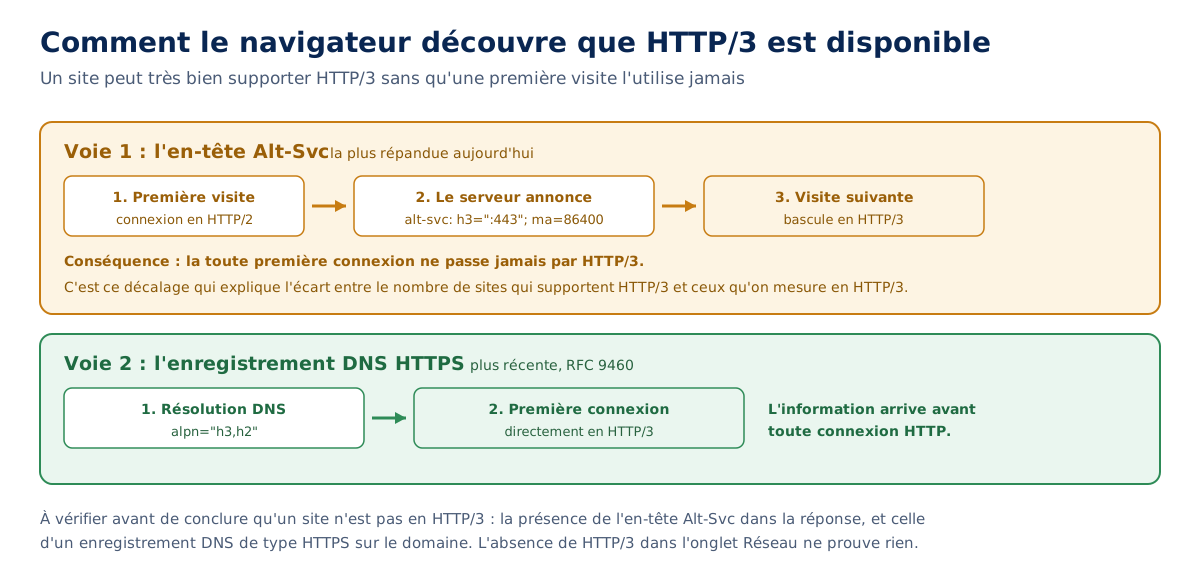
This gap between actual support and observed usage is massive, and it distorts all adoption statistics. The Web Almanac 2024 measures 7% of desktop pages actually loaded over HTTP/3, while 26% of desktop pages and 28% of mobile pages announce support via Alt-Svc. The difference is not a measurement error; it is the discovery mechanism itself.
How to enable HTTP/2 and HTTP/3 on my server ?
The most common case requires no intervention on the origin server. When a CDN or reverse proxy handles TLS termination, HTTP/3 is enabled with a single setting in its interface, and the server behind it doesn’t need to know anything about it. The Web Almanac is explicit on this point: between 85% and 86% of HTTP/3 requests come from a CDN.
This is both good and bad for the ecosystem, in my opinion. Good, because they quickly test new technologies and give them a considerable market share from the outset. Bad, because the web is increasingly centralized around a few large companies, with the risk of leaving behind those who do not use them.
Robin Marx, author of the HTTP chapter of the Web Almanac 2024 from HTTP Archive, on the driving role of CDNs in the adoption of HTTP/3, November 2024
One point deserves to be understood to avoid false expectations. The protocol between the visitor and the CDN, and the one between the CDN and the origin server, are two distinct links. Enabling HTTP/3 on the public side does not mean the link to the origin benefits: it very often remains on HTTP/1.1 or HTTP/2, which is acceptable since this link is generally short, stable, and without packet loss. This is one of the trade-offs we detail in our analysis of CDN advantages and limitations.
On a self-hosted server, configuration remains simple. Nginx supports HTTP/3 since version 1.25.0, provided that the binary was compiled with the corresponding module, which is not the case by default. The listen directive then receives the quic parameter, and the Alt-Svc announcement must be added explicitly.
server {
    # HTTP/2 sur TCP, port 443
    listen 443 ssl;
    http2 on;

    # HTTP/3 sur QUIC, port 443 en UDP
    listen 443 quic reuseport;

    ssl_certificate     /etc/ssl/exemple.fr.crt;
    ssl_certificate_key /etc/ssl/exemple.fr.key;
    ssl_protocols       TLSv1.2 TLSv1.3;

    # Sans cette annonce, aucun navigateur ne basculera en HTTP/3
    add_header Alt-Svc 'h3=":443"; ma=86400' always;
}
Two checks are necessary before considering activation complete, and they are the cause of most activations that produce no effect. Port 443 must be open on UDP as well as TCP on the firewall, otherwise the server is listening in a vacuum. The Alt-Svc header must actually be emitted, which a simple curl -sI confirms in one second.
On the Apache side, the mod_http2 module has covered HTTP/2 since version 2.4.17, and its official documentation details the activation. However, HTTP/3 support remains significantly less advanced than with Nginx, which in practice pushes towards termination by a front-end CDN or proxy.
Does HTTP/3 work behind all firewalls?
No, and this is the main practical limitation of the protocol. HTTP/3 travels over port 443 using UDP, whereas most corporate security policies were written at a time when only TCP traffic on this port had a reason to exist. Blocking outgoing UDP, apart from DNS, remains a common rule.
The risk is fortunately contained by the protocol's design. When the QUIC attempt fails, the browser falls back to HTTP/2 over TCP without the user noticing. A site on HTTP/3 therefore remains accessible everywhere: we lose the benefit, not the service. The Web Almanac also notes that sites announce HTTP/3 slightly better on mobile than on desktop, precisely because corporate environments block it.
There remains a more insidious drawback, on the diagnostic side. Some of the usual network tooling struggles with QUIC: as traffic is end-to-end encrypted, including transport metadata that TCP left in the clear, classic packet analyzers can no longer see much. This is progress for privacy and a real complication for debugging.
Should we migrate to HTTP/3 in 2026?
Yes, if activation only costs a setting with your CDN, which is the most common case: the gain is modest but real, the risk is zero thanks to automatic fallback, and the mobile audience benefits immediately. There is no serious argument for forgoing it in this configuration.
The answer changes as soon as the migration requires recompiling Nginx, modifying firewall rules, and reviewing a monitoring chain. The effort becomes significant for a gain that, on a predominantly desktop audience and well-connected, is difficult to measure. In this case, the honest question is what the same time would yield elsewhere.
And the answer is almost always: much more. A TTFB reduced from 900 to 200 ms, correctly sized images, a correctly configured cache, or managed third-party JavaScript each weigh much more than saving a connection round trip. The protocol is a last-mile optimization, not a primary lever.
The case of HTTP/2, on the other hand, is unequivocally decided. A site still served in HTTP/1.1 in 2026 leaves substantial gains on the table, and migration is trivial today on all common stacks. The 22% of pages identified by the Web Almanac in this situation are, for the most part, forgotten configurations rather than choices.
What the protocol will never replace
There is something revealing in the way each new version of HTTP raises the same expectations, then the same disappointments. The protocol optimizes the pipe, never what is passed through it. It has no control over the weight of resources, over the time it takes an application to respond, nor over the amount of third-party scripts loaded on initial display.
The Web Almanac figures also say something interesting about who really decides. Between 85 and 86% of HTTP/3 requests come from a CDN, and less than 4% of requests served by a CDN still use HTTP/1.1, compared to 29% for those served directly by an origin. The adoption of recent protocols is no longer really a site editor's choice: it's a consequence of its delivery architecture.
This leaves the question open for the future. If transport becomes a setting inherited from one's infrastructure rather than a technical decision, the performance gap between two sites shifts entirely to what the protocol doesn't affect: the amount of work a server must do before responding, and the discipline with which a team arbitrates what it loads. Two areas where no RFC will decide for us.