
With each display of a web page, dozens of text files are transferred between the server and the browser: HTML, stylesheets, JavaScript, JSON, SVGs. They all share a valuable characteristic: their content is massively redundant, therefore massively compressible. HTTP compression is the mechanism that exploits this redundancy to reduce the volume of transferred data, completely transparently for the user and for the application code. It is one of the few performance levers that requires neither a redesign nor editorial arbitration: once configured, it works for every visitor, on every request.
For a long time, the subject boiled down to a single instruction: enable gzip. Then Brotli came along to improve compression ratios, and since 2024, a third player has entered the browser arena: Zstandard, aka zstd. Three algorithms now coexist, each with its strengths, and the choice between them is not trivial: it directly influences the TTFB (Time To First Byte) of your pages, and therefore their LCP, and therefore the Core Web Vitals that Google measures on your real visitors.
In this article, we detail how HTTP compression works, the specifics of gzip, Brotli, and Zstandard, and then the decision rule we apply on our clients' sites: Brotli for static resources, Zstandard for dynamic content. We conclude with the practical implementation, under Cloudflare and on your origin server, and with a preview of the next major development in the field, dictionary compression.
HTTP compression, how does it work?
An invisible negotiation between browser and server
HTTP compression relies on a standardized dialogue, content negotiation, described by RFC 9110 which specifies the HTTP protocol. With each request, the browser announces the algorithms it knows how to decompress via the Accept-Encoding header. The server then chooses one of them, compresses the response, and signals its choice via the Content-Encoding header. The browser decompresses on the fly, and the rendering engine receives exactly the same content as if nothing had happened.
# Requête du navigateur
GET /style.css HTTP/2
Accept-Encoding: gzip, deflate, br, zstd

# Réponse du serveur
HTTP/2 200
Content-Type: text/css
Content-Encoding: br
This mechanism has an essential virtue: backward compatibility is structural. A browser that does not announce zstd will never receive a response compressed in Zstandard. There is therefore no risk in activating a recent algorithm: clients that do not support it automatically fall back to Brotli or gzip. This is what allows new encodings to be adopted as soon as they arrive, without waiting for 100% of the installed base to understand them.
A technical detail is worth knowing when intermediate caches are involved: the response must carry the Vary: Accept-Encoding header. It tells caches that several variants of the same URL exist, one per encoding, and that a Brotli version should never be served to a client that only requested gzip. CDNs and modern servers handle this correctly, but a misconfigured proxy that omits it can produce unreadable pages for a fraction of visitors, a bug that is all the more insidious because it is invisible from the developer's workstation.
What compresses, and what does not
HTTP compression only concerns textual formats: HTML, CSS, JavaScript, JSON, XML, SVG, RSS feeds, WASM. Images (JPEG, WebP, AVIF), videos, PDFs, and fonts in woff2 format already include their own compression, specific to their format: recompressing them at the HTTP level provides no gain, wastes server CPU, and can even slightly increase the transferred size. Cloudflare, for example, only compresses content types from a closed list of textual formats, and only above a minimum size of a few dozen bytes, below which compression would cost more than it yields.
In the real web, there is still considerable room for improvement: the Web Almanac from HTTP Archive shows that gzip remains the dominant encoding, that Brotli adoption is progressing slowly, and that a significant portion of compressible resources are still not compressed at all. In other words, even before discussing fine-grained arbitration between algorithms, many sites are leaving immediate gains untapped.
Let's also clarify that compression does not replace minification, and vice versa: minification removes what is unnecessary (spaces, comments, long names), compression efficiently encodes what remains. The two are cumulative, and it is indeed the combination of minification then compression that produces the lightest files. A JavaScript bundle that is not minified but compressed still leaves bytes on the table; a minified file served without compression leaves far more.
What is the difference between gzip, Brotli, and Zstandard?
The three algorithms differ in their trade-off between file size and compression time. gzip, universal since 1992, compresses quickly but poorly ; Brotli produces the smallest files, at the cost of slow compression ; Zstandard compresses almost as well as Brotli, much faster. None is absolutely better.
| Algorithm | Ratio | Speed | Browser support | Recommended use |
|---|---|---|---|---|
| gzip | Lowest | Fast | Universal | Compatibility fallback |
| Brotli | Best | Slow at high levels | Universal since 2017 | Static compressed at build |
| Zstandard | Close to Brotli | Fastest | Chrome and Firefox since 2024 | Dynamic HTML and JSON |
This table is read diagonally : each algorithm excels in one column and yields in another. gzip maintains universality, Brotli the ratio, Zstandard the speed. This is precisely why a modern configuration does not choose one algorithm, but declares all three in order of preference and lets the browser select the one it knows how to decompress.
gzip, the indestructible universal standard
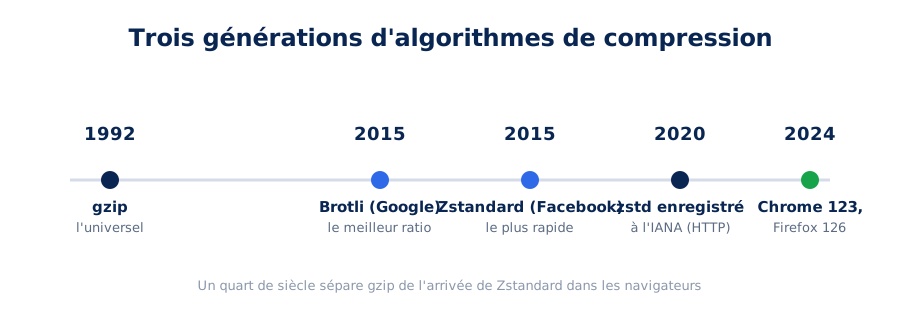
Created in 1992 and specified by RFC 1952, gzip uses the DEFLATE algorithm, which combines two techniques: detecting repeated sequences (LZ77) and Huffman entropy coding, which assigns the shortest codes to the most frequent patterns. Thirty years later, gzip remains supported by absolutely all HTTP clients in circulation, from browsers to indexing bots to the smallest script. This is its unique strength: it is the common floor, the last-resort fallback that guarantees a compressed response will always be readable.
Its limitation is just as clear: its compression ratios are the lowest of the three. Serving gzip to a browser that can do better means transferring unnecessary bytes with every request.
Brotli, the compression ratio champion
Developed by Google, initially to compress fonts in WOFF2 format, Brotli was generalized to the web in 2015 and then specified by RFC 7932. Its secret weapon is a static dictionary of about 120 KB embedded within the algorithm itself, trained on a vast corpus of web content: the most common words, tags, and code fragments on the web are already listed there, allowing them to be encoded in just a few bits. Brotli offers twelve compression levels, from 0 to 11: high levels compress remarkably well, but become slow, which will be important later in this article.
On the support side, the question has been settled for years: all modern browsers announce br in their Accept-Encoding. Brotli is today the reference encoding for the web, and it is what most CDNs serve by default when the client supports it.
Zstandard, the ultra-fast newcomer
Zstandard was created by Facebook in 2015 for its internal storage and replication needs, where petabytes of data are continuously compressed. Specified by RFC 8878 and registered as an HTTP encoding with IANA in 2020, it has long awaited its moment in browsers. It arrived in 2024: Chrome 123 enabled it in March, Firefox 126 in May, as summarized by caniuse. Safari lags behind, with support only starting in late 2025: the fallback to Brotli or gzip therefore remains essential for a portion of the user base.
Zstandard's promise is not to compress better than Brotli: at comparable levels, their ratios are close. Its promise is to compress much faster, at nearly equivalent ratios. And it is precisely this characteristic that changes the game.
Should we prioritize compression ratio or speed?
It depends on who pays for the compression time. For a file compressed once at build time and served millions of times, the ratio takes precedence: the cost is amortized. For a response compressed on each request, every millisecond of compression counts towards TTFB, and speed becomes the decisive criterion.
Every compression algorithm balances two factors: the time spent compressing and the size of the result. Seeking a better ratio means exploring more combinations, thus consuming more CPU and milliseconds. This trade-off has no consequence when compression occurs only once, in advance. It becomes critical when it occurs on each request, because the compression time is then added directly to the Time To First Byte: the browser cannot display anything until the first byte of the HTML has arrived. Every millisecond spent compressing delays the start of rendering by that much, and consequently the LCP, the mechanics of which we detailed in our article on optimizing Largest Contentful Paint.
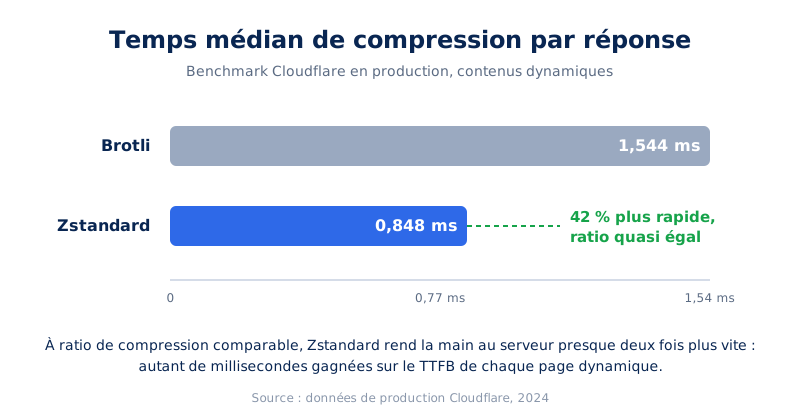
The figures published by Cloudflare, which compresses a significant portion of global web traffic, indicate the gap. On their production data, Zstandard compresses on average 42% faster than Brotli (0.848 ms per response versus 1.544 ms) while maintaining a comparable ratio, and compresses about 11% better than gzip at equivalent speed, according to Cloudflare's engineering blog. Independent analyses, such as that by Paul Calvano, confirm this hierarchy: Brotli wins on final size at high levels, Zstandard clearly wins on compression throughput.
How to measure the impact on your site? TTFB can be read in two complementary places: in field data, in the CrUX report that Google builds from real Chrome sessions, and in the lab, via a simple, reproducible network test. We've dedicated an article to the differences between PageSpeed Insights and Lighthouse which details this essential distinction between synthetic measurement and field measurement. For compression, the field is decisive: it's the distribution of real TTFB, across all pages and all visitors, that reveals the gain from switching to Zstandard for dynamic HTML.
Harry Roberts, a recognized web performance consultant, sums up the issue well in his article The Three Cs: Concatenate, Compress, Cache: compression is not judged in isolation, but in its interaction with the cache and the lifecycle of each resource. It is precisely this framework that underpins the decision rule that follows.
Is your site as fast as your visitors expect?

Should static and dynamic content be compressed differently?
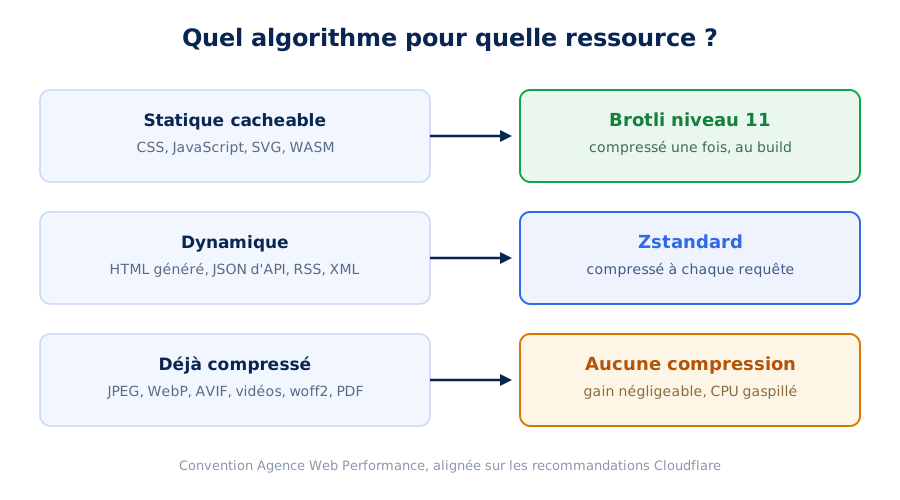
Yes, and this is the rule that structures the entire configuration. Static resources, compressed once at build time, deserve Brotli at its maximum level. Dynamic content, recompressed on each request, calls for Zstandard. Serving Brotli level 11 on dynamic HTML degrades TTFB instead of improving it.
Once the ratio versus speed trade-off is established, the right algorithm is deduced from a single question: is this resource compressed once, or on each request? This is the distinction between cacheable static resources and dynamic content, and it's enough to resolve all common cases.
Static resources: Brotli level 11, compressed at build
A CSS file, a JavaScript bundle, or an SVG only change upon deployment. Their compression can therefore be done once, at build time, then cached and served thousands or millions of times. In this scenario, compression time is infinitely amortized: it doesn't matter if Brotli level 11 takes ten times longer than an intermediate level, since this cost is only paid once, outside the critical path of any request. Only the size served to the visitor matters then, and that's where Brotli 11 is unbeatable.
In concrete terms, pre-compressing a file is done in one command, the brotli tool being available on all systems:
# Précompression Brotli au niveau maximal (11, par défaut en CLI)
brotli --input theme.min.css --output theme.min.css.br
brotli --input app.bundle.js --output app.bundle.js.br

# Le serveur sert ensuite le .br directement,
# sans compresser quoi que ce soit à la volée
On a site behind a CDN, this work is generally handled by the edge layer: the first request is compressed, then the result is cached. The important thing is to verify that static resources are indeed served in Brotli, and not in default gzip or, worse, recompressed on each pass.
Dynamic content: Zstandard to preserve TTFB
The HTML generated by your CMS, the JSON responses from your APIs, RSS feeds, or dynamic sitemaps tell a completely different story: each request produces a potentially unique response, compressed on the fly, within the critical path. Here, compression time is fully included in the TTFB. This is Zstandard's ideal playground: a ratio close to Brotli, for a significantly lower CPU cost. Cloudflare explicitly states it in their announcement of Zstandard support: the algorithm offers an excellent balance that makes it particularly suitable for dynamic content like HTML and non-cacheable data.
The gain is measured in tens, sometimes hundreds of milliseconds on heavy dynamic pages or loaded servers: shopping cart pages on an e-commerce site, user dashboards, filtered listings. Taken in isolation, it's a modest gain; combined with other TTFB levers (HTTP/3, short HTML cache, server generation time), it contributes to building a truly optimized critical path.
An important nuance: this rule only applies to truly non-cacheable content. A static editorial page, cacheable for several hours at the edge, effectively falls into the static category: it will benefit more from high-level Brotli, compressed once then served from the cache.
Already compressed content: do nothing
The third line of the matrix, often overlooked: already compressed formats. A JPEG, a WebP, an AVIF, an MP4 video, a PDF, or a woff2 font have already undergone specialized compression, much more efficient for their data type than a general-purpose algorithm. Applying gzip, Brotli, or Zstandard to them is equivalent to paying CPU for zero gain. If your server compresses these formats, it's not a sign of diligence but a configuration flaw to be corrected.
The base64 trap: sabotaged compression
One last trap deserves its place in this matrix, as it sabotages compression regardless of the chosen algorithm: embedding base64-encoded resources in HTML, CSS, JavaScript, or SVGs. The full power of gzip, Brotli, and Zstandard relies on the redundancy of textual content; however, base64 encoding produces unique, highly non-redundant strings, on which algorithms have almost no leverage. By transforming an image into pseudo-random text, we destroy precisely what makes them strong.
The penalty is threefold. The base64 string is by construction about 33% heavier than the native file it encodes. It then passes through compression almost intact, where the rest of the document shrinks. And its decoding consumes additional CPU resources on the browser side, with each display. Embedded in dynamically generated HTML, a batch of base64 resources inflates the compressed response: the impact on TTFB can be significant, precisely on the metric that the choice of a good algorithm sought to improve.
This is one of the reasons why we categorically refuse the use of base64 in our audits and optimizations: an image belongs in an image file, served in its native format, independently cacheable and compressed by its own codec. The few HTTP requests saved never compensate for this triple overhead, especially since the multiplexing brought by HTTP/2.
How to configure compression on your site?
Configuration is done in two complementary places: on the CDN, which compresses what it serves from its cache, and on the origin server, which compresses what it sends to the CDN. The CDN's setting takes precedence over the origin's for anything cached, which explains many ineffective configurations.
On Cloudflare: two complementary Compression Rules
By default, Cloudflare compresses content types from its list using gzip or Brotli, depending on the visitor’s Accept-Encoding header. Zstandard is supported by the infrastructure but must be explicitly enabled via Compression Rules. To apply the static/dynamic rule described above, we deploy two rules, the order of which is crucial since Cloudflare applies the last rule that matches the request.
The first, global rule keeps the “ default content types ” target and orders the algorithms, prioritizing Brotli, with Zstandard then gzip as a fallback. It notably covers static resources. The second, placed last, targets only dynamic textual MIME types and reverses the priority in favor of Zstandard. Its filter expression relies on the media_type field, which exposes the MIME type in lowercase and without parameters, thus avoiding the need to handle charset variants:
(http.response.content_type.media_type in {
  "text/html"
  "text/plain"
  "text/xml"
  "application/json"
  "application/ld+json"
  "application/xml"
  "application/rss+xml"
  "application/xhtml+xml"
})
With the algorithm order zstd, brotli, gzip on this second rule, Cloudflare automatically serves the best encoding supported by each visitor: Zstandard for Chrome and Firefox, Brotli for Safari, gzip for older clients. No broken responses are possible; content negotiation does its job. We have detailed the other benefits (and pitfalls) of a CDN in our article CDN and webperf.
On the origin server
Behind a CDN, the origin server is only queried on cache MISS, but its configuration still matters: it's the one that compresses dynamic HTML when the page is not in the edge cache. It's worth noting a subtlety documented by Cloudflare: their infrastructure only accepts Brotli or gzip from the origin. An origin sending Brotli is served as-is to visitors who support it; to offer Zstandard to the end client, edge recompression via Compression Rules handles it.
On an Apache server, enabling Brotli for textual types is done via mod_brotli, with mod_deflate as a fallback for clients limited to gzip:
<IfModule mod_brotli.c>
  AddOutputFilterByType BROTLI_COMPRESS text/html text/css
  AddOutputFilterByType BROTLI_COMPRESS application/javascript
  AddOutputFilterByType BROTLI_COMPRESS application/json image/svg+xml
</IfModule>

<IfModule mod_deflate.c>
  AddOutputFilterByType DEFLATE text/html text/css
  AddOutputFilterByType DEFLATE application/javascript
  AddOutputFilterByType DEFLATE application/json image/svg+xml
</IfModule>
The on-the-fly compression level is worth adjusting: Brotli level 4 or 5 offers a much better compromise for dynamic HTML than level 11, which is reserved for precompression. This is typically the kind of fine-tuning we apply to our performance-optimized WordPress hosting offer, where the entire chain, from PHP to the edge, is configured according to this logic.
A specific word about WordPress, which powers a good part of the sites we support: HTTP compression is not the job of a plugin. It is configured at the web server or CDN level, never in PHP, where it would consume application resources for work that the HTTP layer does better. Cache extensions that offer a gzip option are actually just writing the corresponding server directives; it is better to do it properly, with full knowledge, in the server configuration. This is one of the points systematically reviewed in our WordPress performance optimization services.
In the same vein, beware of a common option in WordPress cache plugins: generating .gz files alongside the .html files of the static cache. The real benefit is minimal: on-the-fly compression of HTML already served from a static cache costs only a fraction of a millisecond in gzip, while these pre-compressed copies double the disk space occupied by the cache and, on a site where the cache is regularly cleared, increase each regeneration cycle in terms of writes and CPU.
Wastage is not the only problem: on a misconfigured server, the .gz file may be served without the corresponding Content-Encoding header, and the visitor then receives unreadable compressed content as the page. Our recommendation is simple: disable this option and let the server compress HTML on the fly with gzip, or better yet, according to the rule seen above.
Verify what your visitors actually receive
As always in web performance, configuration is only valid if it is verified. The simplest way is to open the Network tab in DevTools and add the Content-Encoding column: each resource will then display the algorithm actually served. On the command line, curl can be used to test each negotiation scenario:
# Que reçoit un navigateur moderne ?
curl -sI -H "Accept-Encoding: zstd, br, gzip" https://exemple.fr/ | grep -i content-encoding

# Que reçoit un client limité à gzip ?
curl -sI -H "Accept-Encoding: gzip" https://exemple.fr/ | grep -i content-encoding

# Comparer les tailles réellement transférées
curl -so /dev/null -H "Accept-Encoding: gzip" -w "gzip : %{size_download} octets\n" https://exemple.fr/
curl -so /dev/null -H "Accept-Encoding: br" -w "brotli : %{size_download} octets\n" https://exemple.fr/
Beware of a classic pitfall behind a CDN: the response may differ depending on whether the resource is served from the edge cache or from the origin. Therefore, both cases must be tested, and also check the responses of your APIs, which are often forgotten even though they weigh heavily in rich applications. This type of systematic check of the delivery chain is an integral part of our web performance audits.
What is Compression Dictionary Transport?
Compression Dictionary Transport allows a browser to reuse an already downloaded version of a file as a dictionary to decompress the next one. On a JavaScript bundle that changes little between two deployments, the weight saving reaches several tens of percent, since only the difference is actually transmitted.
Classic compression starts from scratch with each resource: it knows nothing about what the browser already has. Dictionary Transport Compression, standardized by RFC 9842, changes this paradigm: it allows using an already downloaded resource as a compression dictionary for subsequent ones. The emblematic use case: serving version 2 of a JavaScript bundle by essentially sending only the delta compared to version 1 still present in the browser's cache.
The mechanism relies on two new encodings, dcb (Brotli with dictionary) and dcz (Zstandard with dictionary), and on the Use-As-Dictionary header, by which the server declares that a resource can serve as a dictionary for a given URL pattern:
# Réponse servant app.v1.js, déclaré comme futur dictionnaire
Use-As-Dictionary: match="/js/app.*.js", match-dest=("script")

# Requête suivante pour app.v2.js : le navigateur annonce le dictionnaire
Available-Dictionary: :pZGm1Av0IEBKARczz7exkNYsZb8LzaMrV7J32a2fFG4=:

# Réponse : delta compressé par rapport à app.v1.js
Content-Encoding: dcb
The gains can be spectacular on applications based on stable code with frequent deployments: the bulk of the bundle doesn't change from one version to another, and the transfer is reduced to the delta. A few constraints temper the enthusiasm: dictionaries are isolated by origin (no cross-site sharing, a consequence of HTTP cache partitioning), CSP must authorize their loading, and implementation requires real versioning discipline. It's a lever we evaluate on a case-by-case basis, typically during a single-page application performance audit, where large, frequently redeployed JavaScript bundles make them the best candidates.
What to remember about HTTP compression
HTTP compression is no longer a simple switch to activate; it's a trade-off between three algorithms resolved with a simple rule. For static, cacheable resources, Brotli at maximum level, compressed once at build or edge: only size matters, the cost is amortized. For dynamic content, generated HTML, and API responses first, Zstandard: with nearly equal ratio, it saves milliseconds of TTFB on each request. For already compressed formats, no HTTP compression. And in all cases, gzip remains the universal fallback that content negotiation serves to older clients.
These settings are quick to deploy, risk-free thanks to content negotiation, and their benefits accumulate with all other critical path levers. If you want to know what your site actually serves to your visitors, and what it could serve them better, our experts integrate this analysis into every web performance optimization service. Compression is often the lever with the best effort/gain ratio on the entire list.